Claude Code searches your files 4.2x faster and 3.2x cheaper with a RAG layer.
As the number of files Claude Code searches grows, two problems compound: searches take significantly longer, and you burn API credits faster with every question. We tested whether adding a RAG layer would solve this - making Claude Code faster and less costly to operate at scale.
This is the full report. Methodology, all scaling data, charts, hallucination findings, and links to raw data and reproducible scripts.
At 5 files, Claude Code answers in 35 seconds. By 100 files, average wait time nearly triples, cost climbs, and only 47% of searches return an answer within 3 minutes.
| Documents | Avg Wait Time | Cost / Question | Done in 3 min |
|---|---|---|---|
| 5 | 35 sec | $0.11 | 100% |
| 10 | 57 sec | $0.20 | 97% |
| 30 | 1 min 11 sec | $0.34 | 97% |
| 50 | 1 min 23 sec | $0.39 | 97% |
| 100 | 1 min 53 sec * | $0.36 | 47% |
| 250 | 2 min 01 sec * | $0.37 | 43% |
| 500 | 2 min 31 sec * | $0.40 | 39% |
* These averages understate true wait time. Searches that exceeded the 3-minute benchmark window were recorded at 3 minutes rather than their actual duration - a statistical property known as right-censoring. The true average at these tiers is higher.
We tested whether adding a RAG layer would solve this problem. Using the CustomGPT.ai MCP plugin, we ran the same benchmark at 500 documents with RAG handling retrieval.
| Without RAG (500 docs) | With RAG (500 docs) | Improvement | |
|---|---|---|---|
| Avg response time | 2 min 31 sec * | 36 sec | 4.2x faster |
| Cost per question | $0.40 | $0.13 | 3.2x cheaper |
| Within 3 min | 39% | 100% | 100% completion |
* These averages understate true wait time - see note above on right-censoring.
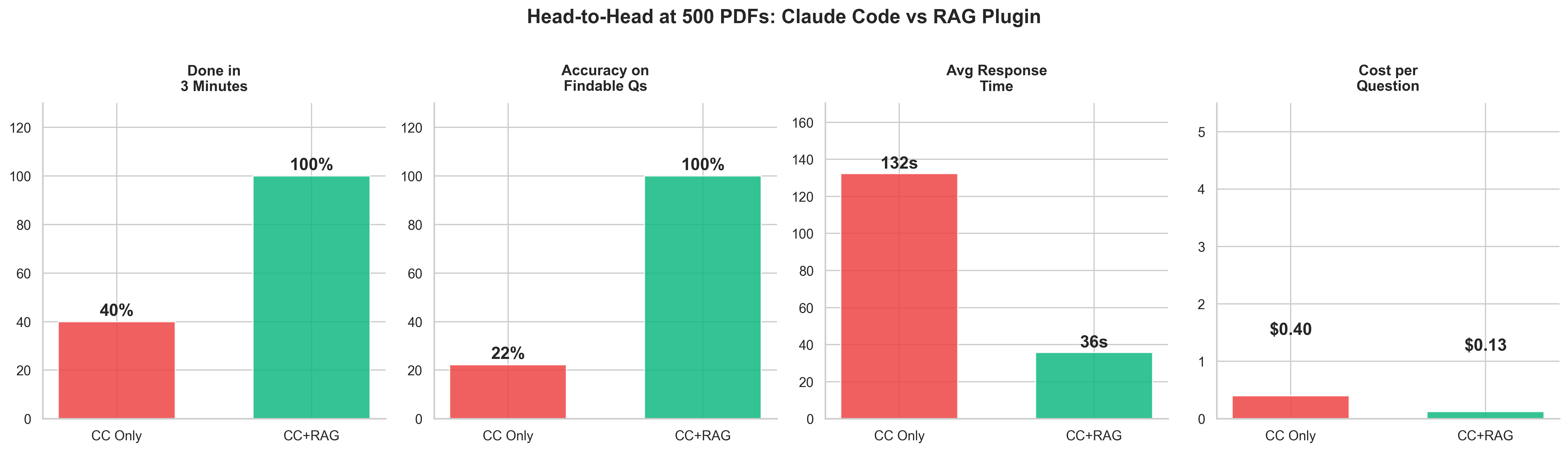
Without RAG, when the requested information is not present in the document set, Claude Code returns a fabricated answer 50-100% of the time - with no indication the answer may be incorrect. With RAG, it returns "not found" instead.
RAG does not just make Claude Code faster. It makes it honest. The retrieval layer gives Claude Code a definitive signal about what exists in the document set before it answers.
Without RAG, Claude Code opens every document one by one, reads it fully, closes it, and moves to the next. At 5 files, that's manageable. At 100, Claude Code is opening and reading 100 PDFs sequentially. Searches slow significantly as the document count grows.
With a RAG layer, your documents are indexed once. Every question searches the index instead of reopening raw files - like having a smart filing system rather than reading every folder from scratch. The document count stops mattering.
This is not a flaw in Claude Code. It is a known architectural tradeoff: direct file reading is flexible and requires no setup; RAG requires indexing but scales. At small document counts, the difference is negligible. At 100+, it is decisive.
"The assumption that bigger context windows solve the scaling problem is wrong. The bottleneck is not how much Claude can hold in memory - it is how long it takes to find the right file in the first place. RAG changes the architecture of the search, not the size of the window."
"Most people assume Claude Code slows down because of the model. It doesn't. It slows down because it's reading every file one by one, and the cost compounds with every document you add. We tested this directly. At 500 files, you're paying 3x more per question and searches are taking 4x longer than they need to. RAG fixes the architecture of the search, not the model. That's the difference."
We generated 500 synthetic corporate emails as PDFs from a fictional company (Acme Corp). Each question ran under two configurations - Claude Code reading files directly, and Claude Code with a RAG plugin handling retrieval. All runs used a fresh session with no conversation history. Timing was captured from Claude's structured JSON output. Cost was calculated from token usage at published API rates.
- Model Claude Sonnet 4.6
- Test corpus 500 synthetic corporate PDF emails (Acme Corp, 7 departments, 34 employees)
- Questions 10 factual questions per run (5 needle-in-haystack, 5 pattern)
- Runs 3 per question per configuration - 30 total per config
- Session Fresh
claude -psession per run - no history, no memory - Without RAG Claude Code reads files natively (grep, cat, read tools)
- With RAG CustomGPT.ai MCP plugin semantic search retrieves relevant chunks before Claude Code answers
- Cutoff 3 minutes (180s) across all tiers
- Reproducibility seed --seed 42 for corpus generation
Needle-in-haystack questions (single fact in one email)
- Patent filing deadline date and responsible person
- Q3 revenue projection and specific figure
- Database migration technology and target date
- Remote work policy effective date
- Vendor contract annual cost
Pattern questions (topic spread across 10-15 emails)
- Project Nexus scope and team involvement
- Berlin office opening status
- Initech API issues and response strategy
- Company retreat planning details
- Series B fundraising progress
All scripts, raw data, and configuration files are publicly available. The benchmark is fully reproducible.
CustomGPT.ai is a no-code RAG platform used by 10,000+ organizations. SOC-2 compliant. We built the MCP plugin that enables Claude Code to use semantic document search. The plugin used in this benchmark is open source: github.com/adorosario/customgpt-skill-plugin.
Alden Do Rosario is CEO of CustomGPT.ai. Previously co-founded Chitika (2003-2020) - bootstrapped from $5 to the #2 contextual ad network after Google AdSense, 9-figure revenues, zero outside funding. 30 years in tech.
Set up the plugin in 4 steps
No build step. No Node.js. No Python. Requires only curl and a CustomGPT.ai account.
Try it out for free, using CustomGPT.ai's 7-day trial.
Sign up at app.customgpt.ai/register, then grab your API key from your profile at app.customgpt.ai/profile#api-keys.
Run these three commands inside Claude Code:
/plugin install customgpt-ai-rag
/reload-plugins
Store it once and the plugin finds it automatically across all projects:
Alternatively, set CUSTOMGPT_API_KEY as an environment variable, or add it to a .env file in your project root. The plugin checks all three locations automatically.
Inside Claude Code, from your project directory:
/create-agent
# Wait for indexing to complete
/check-status
# Ask questions across everything
/query-agent where is the Q3 revenue projection?
You can also use plain English - "index this repo," "search my files for X" - and the plugin activates automatically.