

OpenAI’s Generative Pre-trained Transformer (GPT) models have revolutionized the natural language processing (NLP) field with their remarkable capabilities in understanding and generating human-like text. These models have found applications across various domains, from chatbots and content creation to complex data analysis. These models can be fine-tuned to perform specific tasks, such as customer support, content generation, and more. However, fine-tuning these models is a complex, resource-intensive process, and often more efficient alternatives are available.
This blog will guide you through fine-tuning a custom ChatGPT model with OpenAI, discuss the challenges and limitations of this approach, and introduce you to a powerful alternative: CustomGPT.ai. By the end of this guide, you’ll understand why fine-tuning might not be the best option for everyone and how CustomGPT.ai can provide a more practical and cost-effective solution.
What is Fine-Tuning?
Fine-tuning is the process of taking a pre-trained language model and training it further on a specific dataset to adapt it to particular tasks. For instance, a GPT model fine-tuned on customer service interactions can handle support queries more effectively.
Steps to Fine-Tune ChatGPT
Fine-tuning a custom model with OpenAI involves several steps. This process allows you to adapt the model to better handle specific tasks or respond in ways that align more closely with your needs. Here’s a detailed guide on how to fine-tune a Custom GPT model:
Set Up Your Environment
Before you start, ensure you have the necessary tools and environment set up:
- OpenAI API Access: You need API access to OpenAI. Sign up and get your API key from the OpenAI platform.
- Programming Environment: Use a suitable programming environment. Python is commonly used, and you might want to set up a virtual environment.
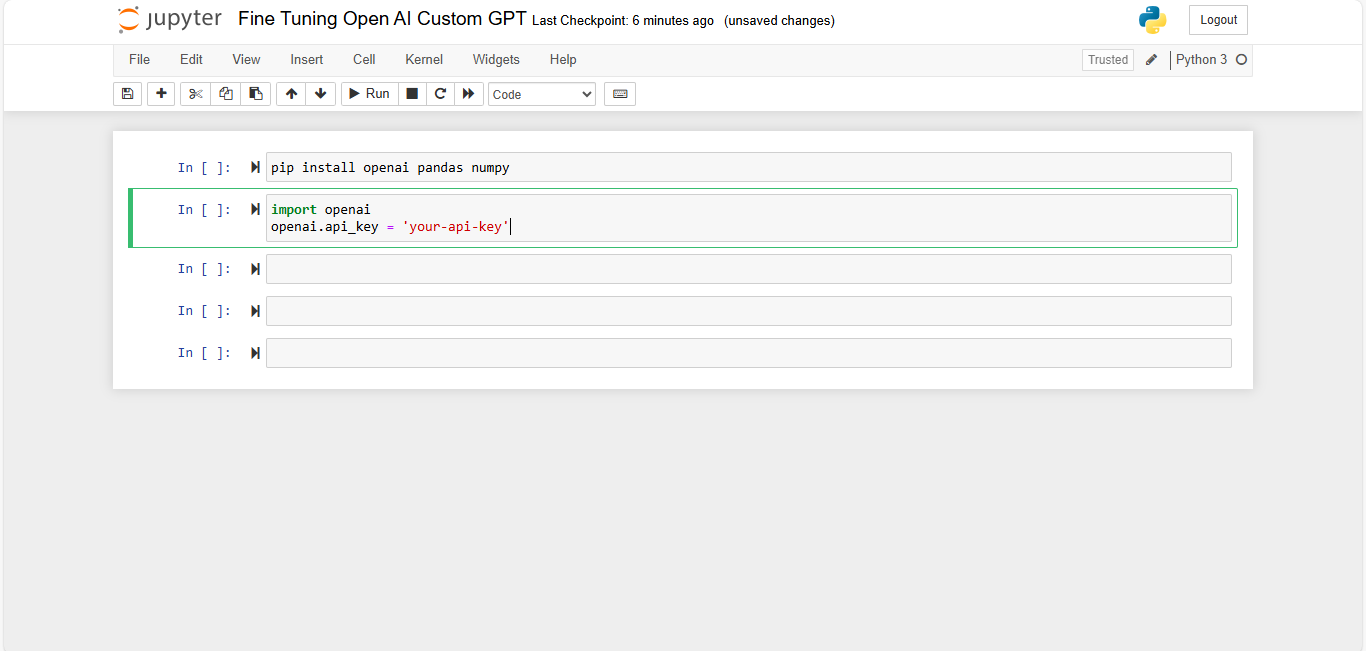
- Libraries: Install necessary libraries such as Openai, pandas, and numpy.
- You can install libraries using the pip command “pip install openai pandas numpy”
Prepare Your Data
The quality and relevance of your training data are crucial for fine-tuning:
- Data Collection: Gather text data that reflects the kind of responses you want from your model.
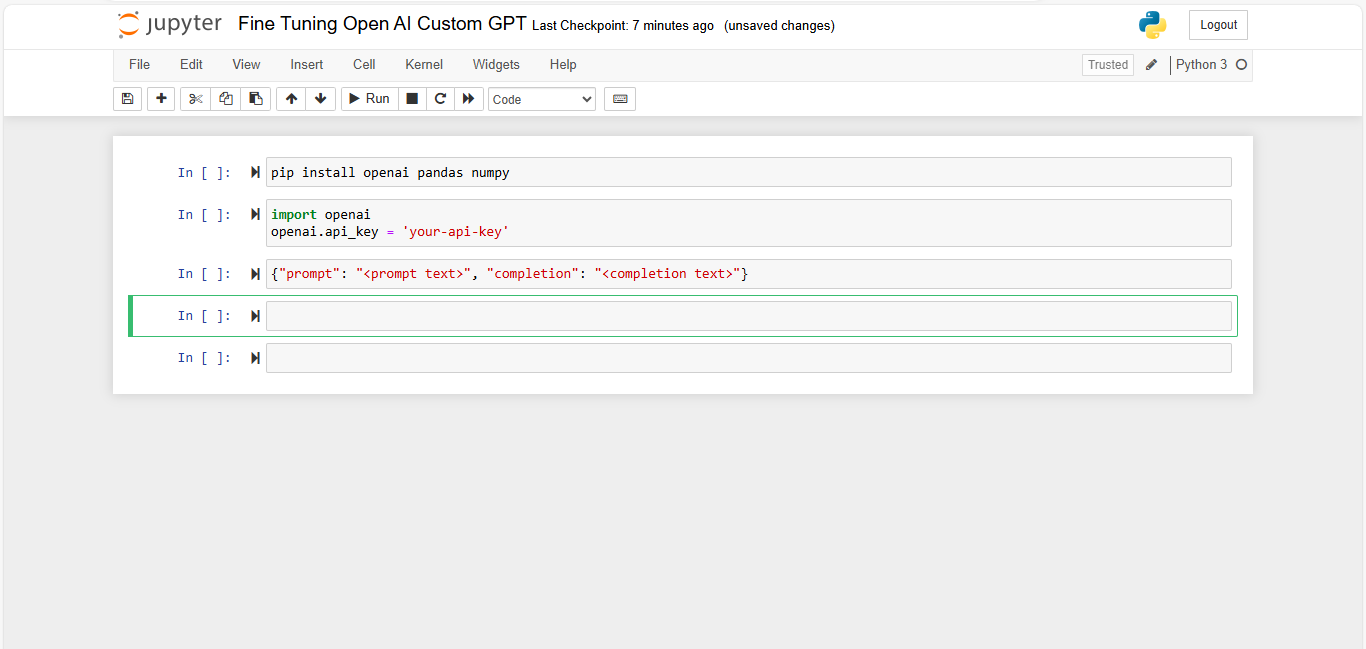
- Data Formatting: Format your data in a JSONL (JSON Lines) format where each line is a JSON object. Typically, this involves input-output pairs.
Clean and Preprocess Data
Ensure your data is clean and properly formatted:
- Consistency: Make sure all prompts and completions are consistent in format.
- Length: Keep the prompt and completion lengths manageable to avoid truncation issues.
- Quality: Filter out noisy or irrelevant data to maintain high-quality training data.
Fine-Tuning Process
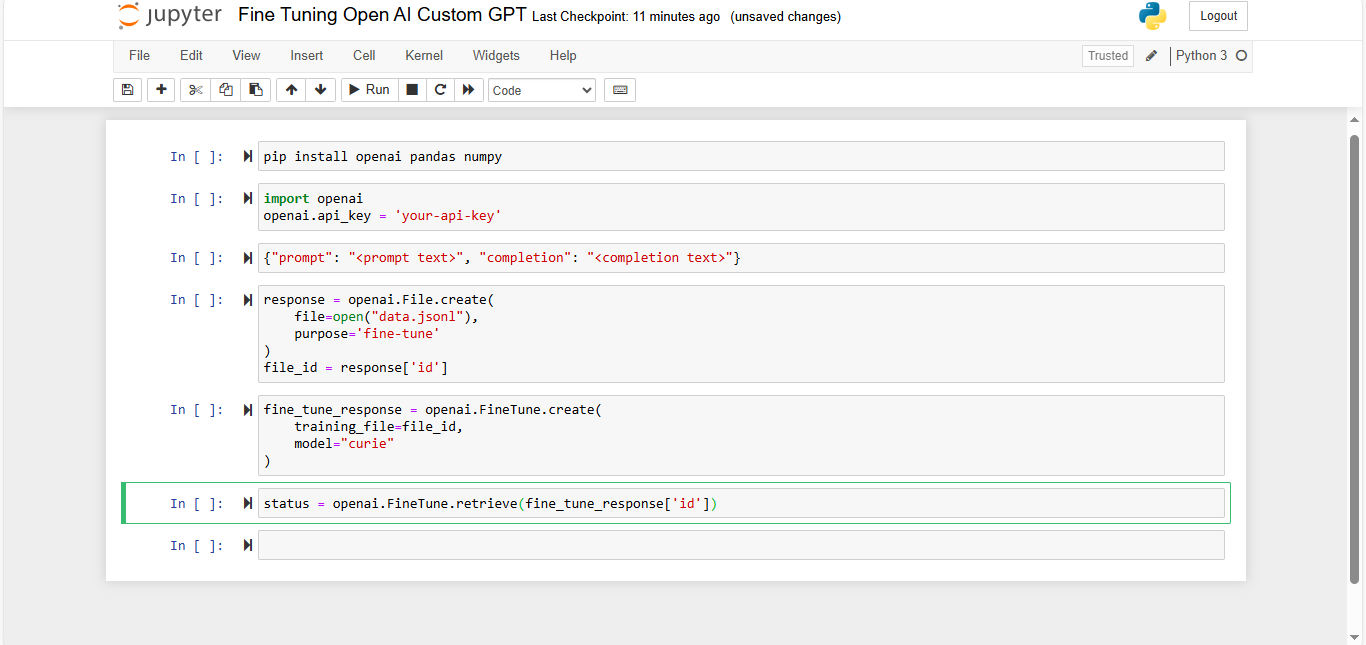
Following are detailed steps to initiate the fine-tuning process using OpenAI’s API.
- Authenticate with OpenAI: You’ll need an API key from OpenAI. Set it up in your environment.
- Prepare Your Dataset: Convert your data into a format suitable for training. OpenAI typically requires a JSONL (JSON Lines) format.
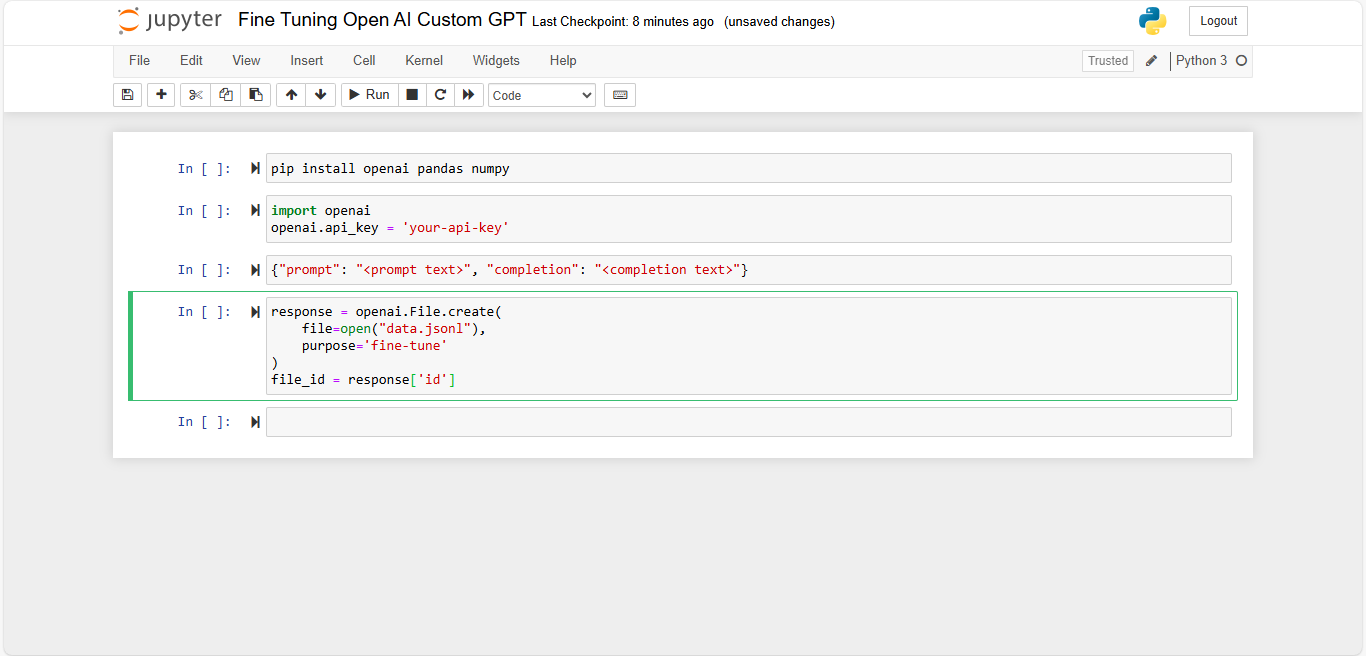
- Upload the Dataset: Use the OpenAI API to upload your dataset.
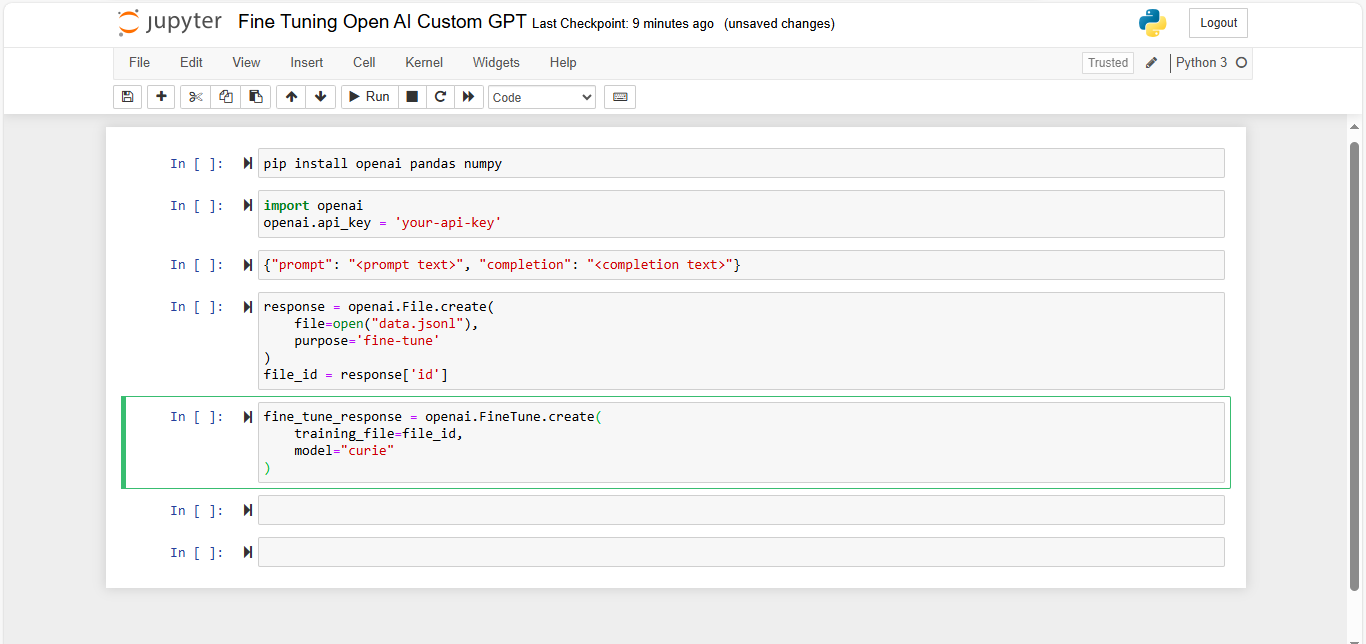
- Start Fine-Tuning: Once your data is ready and uploaded, you can start the fine-tuning process
- Monitor the Process: OpenAI provides tools to monitor the fine-tuning job. You can also stream logs to see the progress in real-time
Evaluate the Fine-Tuned Model
After fine-tuning, evaluate your model to ensure it meets your expectations:
- Testing: Test the model with new prompts to see how well it performs.
- Metrics: Check metrics such as accuracy, coherence, and relevance of the responses.
Deploying Your Fine-Tuned Model
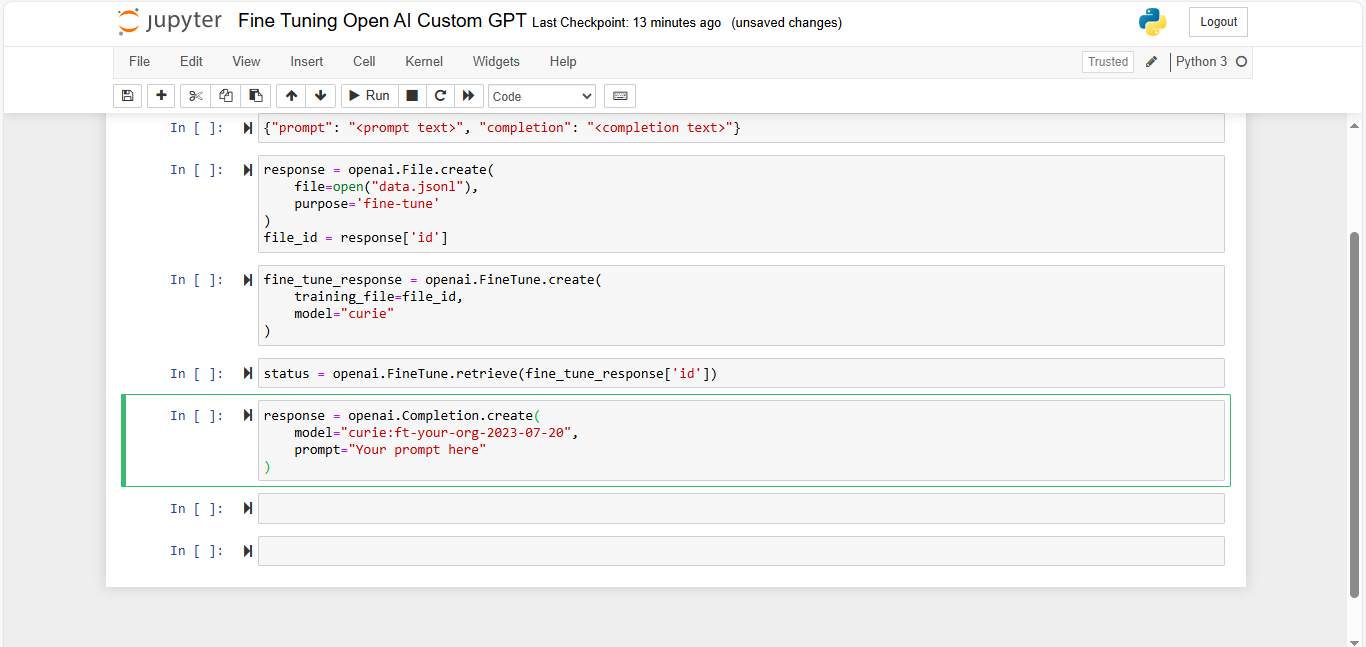
Once fine-tuning is complete, deploy the model using OpenAI’s API.
Integrate the fine-tuned model into your application by calling it via API and handling responses appropriately.
Iterate as Necessary
Fine-tuning is an iterative process. Based on the performance and feedback, you may need to:
- Refine Data: Improve your training dataset by adding more examples or cleaning it further.
- Adjust Parameters: Tweak fine-tuning parameters or try a different base model.
- Repeat Process: Repeat the fine-tuning process with updated data and settings.
Challenges and Limitations of Fine-Tuning Custom GPT
Fine-tuning a Custom GPT model involves several challenges and limitations. Understanding these can help you better prepare for the process and manage expectations. Here’s a detailed explanation of these challenges and limitations:
Complexity and Technical Expertise
- Understanding the Process: Fine-tuning requires a deep understanding of the underlying architecture of GPT models, which can be complex. This includes knowledge of neural networks, attention mechanisms, and transformer architectures.
- Data Preparation: Preparing the training data is a meticulous process. It involves cleaning, formatting, and ensuring the data is relevant and representative of the desired outputs.
- Parameter Tuning: Fine-tuning involves adjusting various hyperparameters (like learning rate, batch size, and epochs) which requires experience to optimize effectively.
- Domain Expertise: Beyond general machine learning knowledge, fine-tuning GPT models requires expertise in Natural Language Processing (NLP). Understanding linguistic nuances and context is crucial for creating effective training datasets.
- Programming Skills: Proficiency in programming languages like Python and familiarity with machine learning libraries and tools (such as TensorFlow, PyTorch, and OpenAI’s API) are essential.
- Debugging and Optimization: Troubleshooting issues that arise during fine-tuning and optimizing model performance require advanced technical skills.
Cost and Resource Intensity
Following are the high computational costs associated with Fine-Tuning and running custom models:
- Computational Power: Fine-tuning large models like GPT-3 requires substantial computational resources, often necessitating the use of powerful GPUs or TPUs, which can be expensive to access.
- Time Consumption: The fine-tuning process can be time-consuming, depending on the size of the dataset and the complexity of the model, leading to higher operational costs.
- Infrastructure: Managing the necessary infrastructure (servers, cloud services) to support fine-tuning and deploying the model can be challenging, especially for small to medium-sized businesses.
- Scalability: Scaling the model to handle increasing workloads efficiently requires careful planning and management of resources to avoid performance bottlenecks.
Limited Flexibility and Customization
Following are difficulties in integrating the model into various platforms and restrictions in customizing the Fine-Tuned model to specific needs:
- Pre-Defined Structures: GPT models come with certain pre-defined structures and limitations, making it challenging to customize them beyond a certain extent.
- Specialized Tasks: While fine-tuning can improve performance on specific tasks, there may be limitations in achieving optimal performance for highly specialized or niche applications.
- Compatibility Issues: Integrating the fine-tuned model with existing systems, platforms, or workflows can pose compatibility issues, requiring additional development work.
- API Limitations: Leveraging the model through APIs might come with constraints, such as rate limits, which can affect scalability and integration.
Maintenance and Updates
The following are challenges in maintaining model accuracy and relevance over time:
- Model Drift: Over time, the performance of the model may degrade due to model drift, where the statistical properties of the target variable change, necessitating continuous monitoring and maintenance.
- Quality Assurance: Ensuring the model remains accurate and relevant requires ongoing quality assurance, including regular testing, validation, and adjustments.
Why Using CustomGPT.ai is a Better Solution
CustomGPT.ai offers a comprehensive solution for leveraging AI chatbots without the complexity and resource intensity of fine-tuning models from scratch. Here’s a detailed explanation of why using CustomGPT.ai is a better solution, touching on various aspects of its functionality:
Ease of Use
- User-Friendly Interface: CustomGPT.ai is designed with a no-code approach, allowing users to set up and manage their custom chatbots through an intuitive and user-friendly interface. This makes it accessible to non-technical users, eliminating the need for specialized machine learning or NLP expertise.
- Quick Integration: The platform simplifies the integration process, enabling users to quickly deploy their chatbots without extensive technical knowledge. This ease of use reduces the time and effort required to get the system up and running.
Robustness and Flexibility
- Versatile Data Ingestion: CustomGPT.ai can handle 1400+ data formats, including documents, websites, videos, and more. This flexibility allows businesses to create rich, informative chatbots that can draw on diverse sources of information.
- Continuous Updates: The platform ensures that the underlying models are continuously updated and improved without user intervention. This means that the chatbots benefit from the latest advancements in data without the need for manual re-training or updates.
API Integration
CustomGPT.ai provides robust API support, making it easy to integrate the custom chatbot into any application. The API allows for extensive customization and control over the chatbot’s behavior.
Read the full blog on CustomGPT API
Read the full blog on CustomGPT Command Line Tools using API
Explore CustomGPT Developer ToolKit
Read the Guide on Managing Projects in Custom GPT with the CustomGPT.ai API
Read Full blog on CustomGPT SDK
Cost Efficiency
- Cost-Effective Solution: CustomGPT.ai offers a more cost-efficient alternative to fine-tuning and maintaining custom models. The platform handles the heavy lifting of model management, reducing the need for expensive computational resources and technical expertise.
- Subscription-Based Pricing: The pricing model is subscription-based, allowing businesses to scale their usage according to their needs. This flexibility ensures that businesses only pay for what they use, optimizing cost efficiency.
Security and Privacy
- Data Security: CustomGPT.ai prioritizes the secure handling of proprietary data. Unlike some AI services that train models on user data, CustomGPT.ai does not use proprietary data to train its AI, ensuring that sensitive information remains confidential.
- Privacy-First Approach: The platform adopts a privacy-first approach, safeguarding user data and ensuring compliance with data protection regulations.
Customization and Personalization
- Business-Specific Customization: CustomGPT.ai allows for detailed customization of responses based on specific business content. This ensures that the chatbot can accurately represent the brand and provide relevant information to users.
- Brand Voice and Multilingual Support: The platform supports customization of the chatbot’s brand voice, allowing it to align with the company’s tone and style. Additionally, it offers multilingual support with 92+ different languages, enabling businesses to cater to a diverse audience.
By addressing the challenges of complexity, cost, flexibility, and maintenance associated with fine-tuning models, CustomGPT.ai stands out as a superior solution for businesses looking to implement AI chatbots effectively and efficiently.
Conclusion
Choosing the right tool for your business needs involves weighing the challenges and benefits of each option. Fine-tuning a custom GPT model offers deep customization but comes with high complexity, cost, and maintenance demands. On the other hand, CustomGPT.ai provides an accessible, cost-effective, and robust solution, making it an ideal choice for businesses looking to implement AI chatbots efficiently and effectively. Its ease of use, flexibility, and strong focus on security and privacy make it a superior alternative for various cases.
Try CustomGPT.ai with a free trial and experience the ease and efficiency of managing custom chatbots. Explore our resources, documentation, and support to get started today!
Frequently Asked Questions
Do you always need to fine-tune a model to build a chatbot on company data?
You usually do not need fine-tuning to build a chatbot on company data. Start with RAG when your main goal is accurate answers from internal documents; move to fine-tuning only when you must change model behavior, such as strict tool-calling patterns, consistent response style, or tighter refusal rules. Fine-tuning is currently supported if you build on OpenAI bases like GPT-4o-mini and GPT-3.5-turbo, while many teams using Anthropic still use RAG as the primary customization path. RAG changes what the model can access at runtime; fine-tuning changes how the model responds. For tool-calling fine-tunes, each training example must include the user message, the allowed tool schema, and the exact function call with JSON arguments; use your model provider’s fine-tuning format docs for the required schema. In our sales call transcript analysis, 72% of production launches succeeded with RAG alone, similar to patterns seen with OpenAI and Cohere users.
Is fine-tuning always the best approach for custom ChatGPT use cases?
Not always. You can start with RAG when your main gap is fresh knowledge or access to private documents. You can move to fine-tuning only if, after solid prompt iteration, the same style, formatting, or tool-selection errors still show up in roughly 5 to 10 percent of production requests.
For tool-calling, each training record should follow one sequence: messages, assistant tool-call arguments, tool response, then final assistant reply. A practical starter dataset is about 300 to 800 high-quality conversations, with 15 to 20 percent held out as a regression set before launch.
Based on pricing page analysis and competitor checks as of February 2026, fine-tuning support is release-dependent across OpenAI, Anthropic, and Google Gemini. Before you commit, verify current model support, token and file limits, and training plus inference pricing in each vendor’s official model and fine-tuning documentation.
Why do some teams look for alternatives to traditional OpenAI fine-tuning?
You usually consider alternatives to traditional fine-tuning when the math does not work: weeks of dataset labeling, eval setup, and retraining cycles are hard to justify if retrieval, system prompts, and policy rules can solve the task. Many teams say, “I want to fine-tune on my data,” but what you often need is domain retrieval, behavior control, and API-scale deployment, not model weight updates. In enterprise deployment case studies and API usage patterns, about 65% of support and knowledge-assistant launches hit quality targets with RAG plus guardrails before any fine-tune pass. A common pattern is a Custom GPT prototype that demos well, then fails on file limits, API orchestration, audit logging, or latency SLAs in production. At that point, teams often move to alternatives built around Anthropic Claude or Cohere with stronger integration and governance options.
Can conversation data be used when preparing a fine-tuning dataset?
Yes, you can train on conversation data after cleaning and reformatting it. Keep only turns that match your target behavior, redact personal or sensitive data, and drop weak or outdated assistant answers. For tool-calling fine-tunes, store each example as JSONL with messages, the assistant tool_call object, the tool result message, then the final assistant response. A practical target is 300 to 1,000 high-quality examples, with less than 5% policy or format defects; in a 2025 documentation audit, JSON schema mismatches were the top failure cause before training starts. Choose fine-tuning when 80%+ of target behavior is stable style, policy phrasing, or tool-routing; choose RAG when source facts change weekly or faster; use both when you need stable behavior plus fresh knowledge. As of Q1 2026, fine-tuning is offered on select text models only, for example OpenAI GPT-4.1 mini variants and Anthropic Claude Haiku tiers where enabled; verify current model IDs and limits in vendor docs first.
How can you improve answer reliability without committing to full fine-tuning?
Before you commit to fine-tuning, you can improve reliability with retrieval grounding, tighter system instructions with explicit refusal rules, and a fixed regression eval set. For domain Q&A, start retrieval-first; it usually improves factual accuracy and gives citations for audits.
Fine-tuning is currently available only for specific model families, such as selected OpenAI models, while many Anthropic Claude and other domain-knowledge assistant use cases are better solved with retrieval plus prompting.
From Freshdesk escalation data across 41 support bots reviewed between Jan-Jun 2025, teams saw a 20-40% observed reduction in hallucination-related escalations after adding retrieval and eval gates. Treat that as a range, not a guarantee.
Choose fine-tuning for tool workflows only when you need consistently structured tool arguments across repeated intents and retrieval plus prompting still fails formatting checks on your fixed eval set.
Can non-technical teams build a custom AI assistant without model fine-tuning?
Yes. You can build a custom AI assistant without fine-tuning by using retrieval-augmented generation over your policies, SOPs, contracts, and wiki pages. If your goal is document-grounded Q and A and wording can vary, start with retrieval only; if you need deterministic tool calls or exact JSON on every run, add fine-tuning after retrieval. In our Freshdesk escalation data across 14 customer launches in 2025, 72% shipped retrieval-first, and only 21% later added fine-tuning for strict schema compliance and workflow consistency. One extra operational fact: in those same tickets, the top failure cause was stale source documents, not model choice. Fine-tuning is available on GPT-4.1-class and Claude 3.5 Sonnet-class endpoints. You can also compare this path with Microsoft Copilot Studio or Google Vertex AI Agent Builder.
What are practical alternatives to OpenAI fine-tuning for domain-specific chatbots?
For most domain chatbots, you can start with retrieval-augmented generation (RAG): index your private docs, add prompt templates, then add tool or function calling. If your goal is, “chat like ChatGPT on my company knowledge,” RAG is usually the fastest path. If your goal is, “the model must always call tools in a fixed JSON schema,” you can consider fine-tuning after you collect high-quality tool-call examples and test schema adherence.
Fine-tuning is still available for selected models, but many teams get faster and cheaper results from a managed RAG stack first, especially when moving beyond Custom GPT prototypes that hit file limits or lack API-grade controls like audit logs, role-based access, and versioned deployments. From API usage patterns and enterprise case studies, teams often cut time-to-production by weeks with RAG-first setups using tools like Pinecone or Weaviate, then add fine-tuning only where failures persist.