
Today, CustomGPT, the leading platform to create custom LLM powered chatbots with your own content, is thrilled to unveil its latest feature: Optical Character Recognition (OCR).
Included in our Premium and Enterprise plans, this addition marks a significant advancement in our platform’s capabilities and our commitment to help businesses build chatbots with ALL their business content.
This introduction of OCR demonstrates our commitment to helping businesses lower customer support costs and improve employee efficiency with cutting-edge, LLM-based tools.
Building on the advancements of Generative AI in enabling vision, hearing, and speech, CustomGPT is proud to offer businesses the ability to integrate text from images, scanned documents, and other visual sources into their custom LLM-based chatbot.
This eliminates the barriers that previously existed between visual content and digital interaction. By bridging this gap, we empower businesses to harness the vast amount of information contained in non-digital formats, bringing a new dimension of interactivity to their customer interactions.
With this feature, the power of CustomGPT expands beyond textual data. It’s not just about enhancing the capabilities of chatbots—it’s about redefining what they can achieve. By enabling a seamless blend of visual and textual content, we’re making it even easier for businesses to create a comprehensive, content-rich chatbot experience that meets the evolving needs of their audiences.
Experience the OCR Advantage: Making Information Access from Images Faster and Easier
Picture a lawyer who has just received a massive scanned contract containing crucial information. Instead of diving deep into the extensive PDF, they want a quick answer to a specific query they have about the content. However, with 200+ pages of data and no tools to ingest the text on the page, the lawyer is out of luck.

Normally, the lawyer would have to manually comb through the document, painstakingly searching for the information they need. This could mean hours of reading, often leading to frustration and wasted time.
In the digital age, spending hours to locate specific pieces of information in vast documents isn’t just tedious; it’s archaic. The conventional method is time-consuming and doesn’t guarantee that they’ll find the exact information they’re looking for.
Enter CustomGPT’s OCR feature. With this, the lawyer simply feeds the scanned document into their CustomGPT chatbot, turns OCR “On,” and allows the chatbot to index the content. Within moments, they receive precise answers to their questions, all without having to read through the entire document. Our OCR feature ensures that information trapped in images becomes easily accessible, saving time and enhancing productivity.

Now, with CustomGPT, the lawyer can interact directly with the contract. Instead of combing through pages of text (or outsourcing the work to a paralegal), they can find the information they need in a matter of seconds. Whether their client has questions about the Equipment Allowance stipulated by the contract or is confused about the definition of one of the terms, CustomGPT can deliver the relevant information quickly and reliably.

How to Upload Data Using the OCR Feature:
For an Instructional Video, please check out our Youtube: https://www.youtube.com/watch?v=-R1Xf1IRxEs
Also, be sure to refer to our OCR Guide for a step-by-step guide in using the OCR feature.
Step 1: Sign in
a) Sign in to https://app.customgpt.ai/.

Step 2: Access the Data Settings
Click on Data
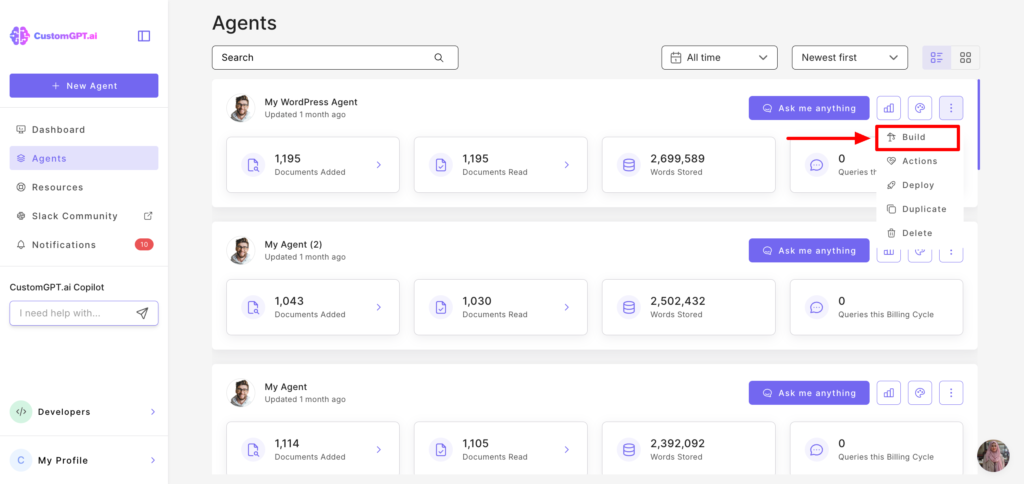
Step 3: Upload your Scanned documents or images:
On the “Upload” section, click in the middle of the box to upload your scanned documents or images.
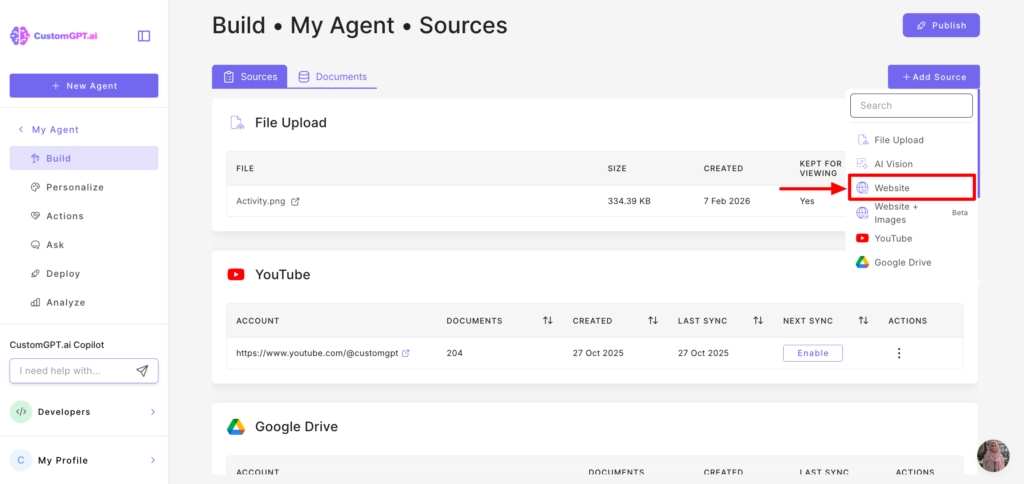
Step 4: Enable OCR (Premium plans only)
a) At the bottom of the page, look for the “OCR” feature.
b) If you have a premium plan, you will have the option to toggle the OCR feature to “ON.” Enabling this feature activates the OCR functionality for your uploaded data.
c) Click “Add Files”

Technical Details
The CustomGPT platform uses OCR to process your documents and images, taking care of technical issues like large document handling, mixed-content, document formats and language processing.

The extracted text is then converted into embeddings that represent the LLM (large language model) and stored in a vector database. When the user asks a question, the vector database, combined with CustomGPT’s proprietary algorithms (such as anti-hallucination, citation generation, and query relevancy) and advanced LLMs, generates a response to the user’s query.
Frequently Asked Questions (FAQs)
- What is OCR, and how does it benefit my business?
- OCR stands for Optical Character Recognition. It’s a technology that converts different types of visual content (like images, scanned documents, etc.) into editable and searchable text. By incorporating OCR into CustomGPT, businesses can extract information from visual sources and seamlessly integrate it into their chatbot knowledge base.
- OCR stands for Optical Character Recognition. It’s a technology that converts different types of visual content (like images, scanned documents, etc.) into editable and searchable text. By incorporating OCR into CustomGPT, businesses can extract information from visual sources and seamlessly integrate it into their chatbot knowledge base.
- How does the OCR feature maintain the accuracy and reliability of CustomGPT’s responses?
- Our OCR technology has been rigorously tested to ensure high accuracy in text extraction. When combined with CustomGPT’s context boundary feature, the chatbot will continue to provide reliable responses based solely on your business content.
- Our OCR technology has been rigorously tested to ensure high accuracy in text extraction. When combined with CustomGPT’s context boundary feature, the chatbot will continue to provide reliable responses based solely on your business content.
- How do I integrate visual content using the OCR feature?
- It’s simple! Within the CustomGPT platform, there’s an option to upload visual content. Once uploaded, our OCR technology will process the content, extract the text, and integrate it into your chatbot’s knowledge base.
- Check out our OCR Guide for step-by-step instructions to ensure you upload and process documents properly, using our OCR feature.
- Is there a limit to the amount or type of visual content I can upload?
- Currently, there are size and format guidelines to ensure optimal processing. Detailed specifications can be found in our user documentation.
- Currently, there are size and format guidelines to ensure optimal processing. Detailed specifications can be found in our user documentation.
- How does OCR handle multi-language content or special characters?
- Our system definitely supports the following languages: English, French, Spanish, German, and Italian. In addition, we have tested the system on many latin-based languages (Eg. Romanian, Polish, Portuguese), and our system has passed all of our tests. We recommend testing with 1-2 documents of your preferred language.
- Our OCR feature DOES NOT support non-Latin-based languages. Languages that do not use the roman alphabet like Arabic, Japanese, and Mandarin Chinese are not supported by our OCR feature.
- Is the data I upload for OCR processing secure?
- Absolutely. CustomGPT is built with a privacy-first approach. All uploaded content is processed securely, and we adhere to strict data protection standards. Please see our Enhanced Security Guide for all of our documentation on privacy and security.
- Absolutely. CustomGPT is built with a privacy-first approach. All uploaded content is processed securely, and we adhere to strict data protection standards. Please see our Enhanced Security Guide for all of our documentation on privacy and security.
- What if the OCR doesn’t accurately capture the content from my visual sources?
- While our OCR technology is advanced and aims for high accuracy, occasional inaccuracies can occur. We recommend reviewing your documents to ensure that the text in images is easily visible and recognizable by our system. Additionally, we continuously refine our OCR capabilities based on user feedback and technological advancements. If OCR is not accurately capturing your content, please contact Support.
- While our OCR technology is advanced and aims for high accuracy, occasional inaccuracies can occur. We recommend reviewing your documents to ensure that the text in images is easily visible and recognizable by our system. Additionally, we continuously refine our OCR capabilities based on user feedback and technological advancements. If OCR is not accurately capturing your content, please contact Support.
- Can I use OCR to process handwritten content?
- Yes – the system does have capability to recognize clear and legible handwriting. For best results, we recommend using it primarily for printed content.
- Yes – the system does have capability to recognize clear and legible handwriting. For best results, we recommend using it primarily for printed content.
- What are the limitations of OCR?
- File Size: CustomGPT can only support uploads of up to 50 files or 1GB of data at a time. For files larger than 1 GB, we recommend using a PDF (or your desired file type) splitter, splitting the document up by page, and uploading the pages individually. If you need to upload more than 50 files as a result of the split, please make sure to only upload 50 documents at a time.
- Image Cognition: Our OCR feature can only capture text from images. There is no processing and training done on the actual image. The text is extracted from the image, and the bot is trained on the text extracted. As OpenAI continues to roll out Dall-E 3’s image processing to their ChatGPT API, we will continue to explore image processing capabilities.
- I’m already a Basic/Standard user. Will I also have access to OCR?
- The OCR feature is only available in our Premium and Enterprise-level plans.
Frequently Asked Questions
What is CustomGPT OCR used for?
CustomGPT OCR is used to extract text from images, scanned documents, and other visual sources so that content can be used in chatbot knowledge ingestion.
What kinds of files or sources can OCR help bring into a chatbot?
OCR helps bring text from images, scanned documents, and other visual content into a chatbot-ready knowledge workflow.
Why is OCR important for chatbot knowledge bases?
OCR is important because it removes a common barrier between visual content and digital chatbot interaction, making previously hard-to-use content searchable and usable in responses.
Does OCR expand chatbot knowledge beyond text-only documents?
Yes. OCR expands chatbot knowledge beyond text-only sources by turning image-based and scanned content into usable text for chatbot workflows.
Can OCR help teams use information from non-digital formats?
Yes. OCR helps teams use information stored in non-digital formats by converting visual content into text that can be integrated into chatbot knowledge.
What business outcomes are associated with adding OCR to chatbot workflows?
The feature is positioned to help businesses lower customer support costs and improve employee efficiency by making more business content available to custom LLM-based chatbots.
Is CustomGPT OCR meant for chatbot-ready use cases rather than standalone extraction?
The feature is presented as extracting knowledge from images into chatbot-ready content, which emphasizes OCR as part of a chatbot knowledge workflow.