
Quick Answers:
- How does CustomGPT.ai use Lead Capture?
We run two AI agents – one on our website and one in our app – both collecting leads automatically and sending them to HubSpot via Zapier. - How does Lead Capture integrate with CRM?
Connect CustomGPT.ai to HubSpot through Zapier in under 5 minutes. Leads flow automatically to your sales team the moment they’re captured. - Can Lead Capture route leads to different team members?
Absolutely. We use AI to automatically assign leads to sales, account managers, or solutions engineers based on their needs and subscription status. - What happens after Lead Capture collects contact information?
Your sales team gets notified instantly. They can follow up with context from the entire conversation, not just a name and email.
We built Lead Capture because we were losing money.
Every day, hundreds of people visited our website. They asked questions. They explored features. Some tried the product.
Then they vanished. No email. No follow-up. No second chance.
Your Website Is Leaking Revenue Right Now
Here’s what most companies don’t realize about their website traffic.
For every 100 visitors who land on your site, maybe 2-3 fill out a contact form. The other 97 browse around, read some content, maybe even chat with your bot. Then they leave forever.
You spent money getting them there. Your AI answered their questions perfectly. They seemed interested.
But you have no way to reach them again.
Traditional solutions don’t work. Pop-up forms kill user experience. Gated content blocks access. Contact forms feel like homework. People bounce before you ever get their information.
Meanwhile, your competitors are probably losing the same leads. The difference? They don’t know any better.
You’re about to.
Your AI Agent Can Sell While It Helps
Imagine running two AI agents that work as a single revenue team.
The first agent lives on your website. It answers questions about your product, explains features, helps visitors understand if you’re the right fit. During these natural conversations, it quietly collects their name, email, company. No forms. No interruptions.
When they’re ready to try your product, they click through to your app. A second agent picks up exactly where the first one left off. It already knows who they are, what they asked about, what problems they’re trying to solve.
Both agents feed every conversation into your CRM. Your sales team sees everything – not just “John Smith from Acme Corp requested a demo.” They see the full story: John asked about API limits, mentioned his team of 12, wants to replace his current solution by Q2.
This isn’t hypothetical. This is exactly how we run CustomGPT.ai.
And it generates qualified leads every single day.
The Two-Agent System That Never Stops Selling
We use two CustomGPT.ai agents working together as one system.
Agent One: The Revenue Agent sits on customgpt.ai. Its job is simple – help visitors understand what we do, answer their questions, and capture their information naturally during the conversation.
Someone asks about pricing? The agent explains our plans while casually asking, “What’s your email so I can send you detailed pricing information?”
They mention their company? Captured. Their role? Saved. Their specific use case? Stored.
No forms to fill out. No “before we continue…” interruptions. Just helpful conversation that happens to build a complete lead profile.
Agent Two: The Sales Agent lives inside app.customgpt.ai where people actually use the product. This agent knows everything the Revenue Agent learned. When someone moves from browsing to trying the product, the Sales Agent continues the conversation seamlessly.
It remembers they asked about enterprise features. It knows they’re from a 50-person startup. It understands their timeline.
The magic happens in how these agents share information. A visitor can spend 10 minutes chatting on the website, sign up for a trial, and immediately have context-aware help inside the app. No repeating themselves. No starting over.
Every conversation feeds into HubSpot automatically through Zapier. The moment someone shares contact information, it’s in our CRM. When they try a feature, ask about pricing, or hit a roadblock, the right person on our team knows immediately.
How Our Team Uses These Leads
Here’s where most companies fail with lead capture. They collect information, then… nothing. It sits in a spreadsheet. Maybe someone checks it weekly.
We built something different.
Sales team handles unconverted leads. When someone chats with our agents, asks great questions, but doesn’t subscribe, our sales team gets notified. They have the full conversation history. They know exactly what held the person back. Their follow-up isn’t generic – it’s specific, helpful, and timed perfectly.
Account managers work with new subscribers. The moment someone subscribes, our account management team gets the lead. They see what features the person asked about, what problems they’re solving, how big their team is. Their onboarding call is personalized from minute one.
Solutions engineers engage with complex use cases. Some leads mention enterprise deployments, custom integrations, or specific technical requirements. These go straight to solutions engineering. By the time they reach out, they’ve already reviewed the conversation and know exactly what to build.
The routing happens automatically. We use AI to read the conversation context, understand the lead’s needs and status, then assign them to the right person. No manual sorting. No leads falling through cracks.
Real Results: What We’re Seeing
CustomGPT.ai has transformed how we grow. Here’s what changed after we deployed Lead Capture:
Lead volume increased almost 700%. Before Lead Capture, we relied on form fills and demo requests. Now we capture qualified leads from regular conversations. People who would’ve browsed and left now become contacts we can nurture.
Sales cycle shortened by 40%. Our team starts conversations with complete context. No discovery calls to figure out what someone needs – they already know. First conversations jump straight to solutions.
Trial-to-paid conversion improved 28%. When account managers reach out to trial users, they’re not cold calling. They reference specific features the person asked about, problems they mentioned, goals they shared. It’s not sales – it’s helping.
Zero impact on user experience. This is critical. Our agents ask for contact information naturally. Bounce rates didn’t increase. Chat engagement stayed high. People don’t feel like they’re being sold to – because they’re not. They’re having helpful conversations that happen to include information exchange.
The system runs 24/7. Our agents captured leads at 3 AM when someone in Australia had questions. They grabbed contact info from a startup founder browsing during their lunch break. They collected details from an enterprise VP who wanted information before their budget meeting.
We never would’ve reached these people with traditional methods.
How to Build Your Own Two-Agent Lead System
You can set up the exact system we use in under an hour. Here’s the step-by-step process:
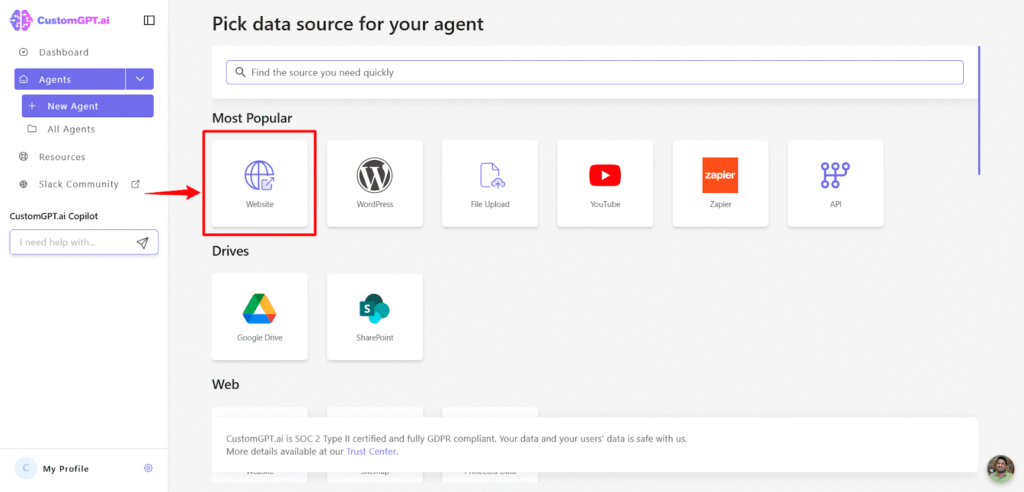
1. Create the agent for your website: Build an agent that knows your product inside and out. Add your documentation, pricing pages, feature descriptions. Train it to answer the questions your visitors actually ask. This becomes your Revenue Agent – the first touchpoint for every visitor.
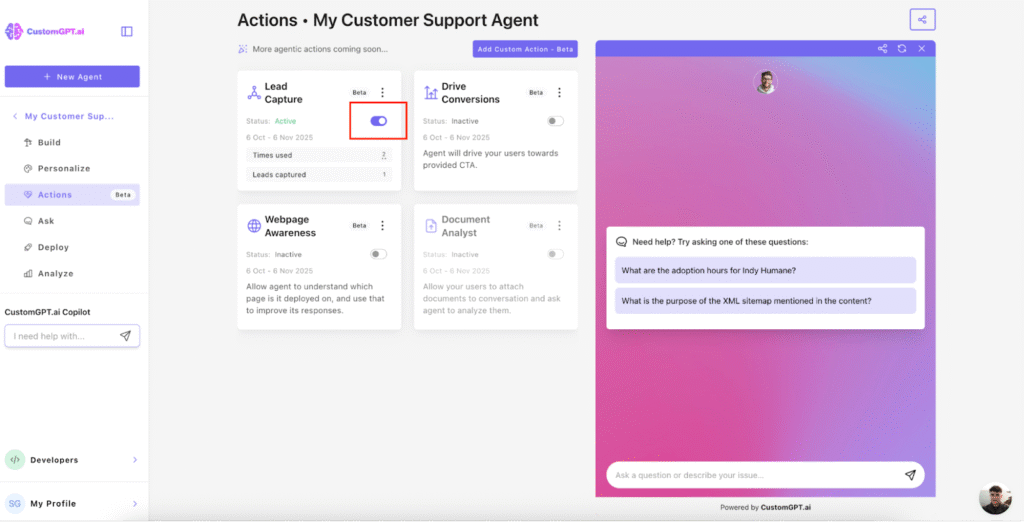
2. Enable Lead Capture on your website agent: Go to Actions in your CustomGPT.ai dashboard. Toggle on Lead Capture. Set it to collect name, email, company, and role. The agent will start gathering this information naturally during conversations. No additional setup required.
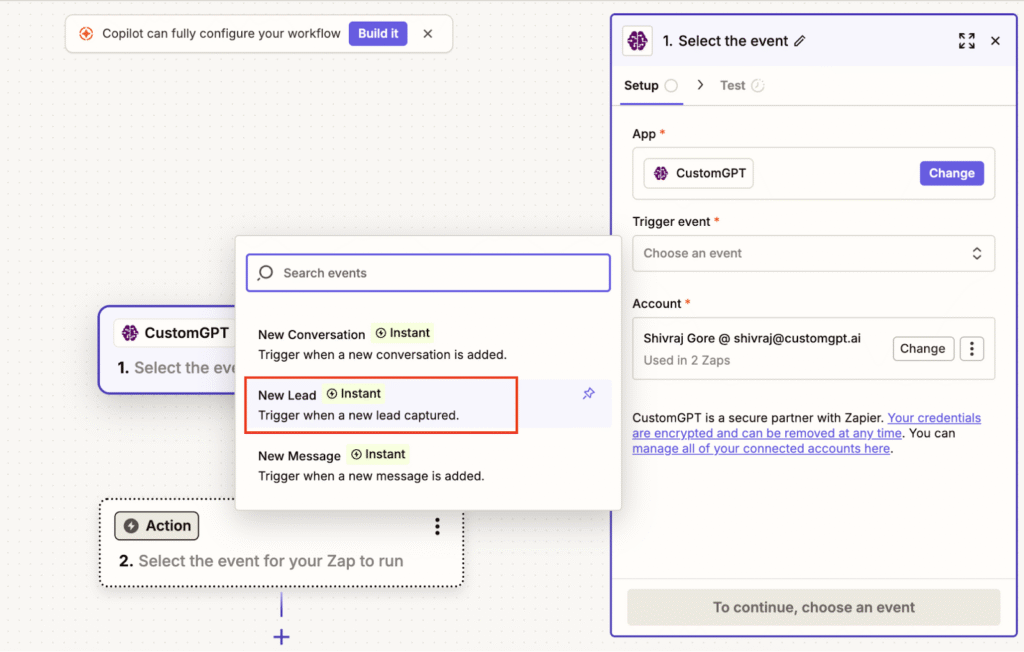
3. Connect CustomGPT.ai to HubSpot through Zapier: Open Zapier and create a new Zap. Select CustomGPT.ai as your trigger. Choose “Lead Captured” as the event. Sign in with your CustomGPT.ai API key from Deploy > API in your dashboard. Select your agent. Test the trigger to confirm it works.
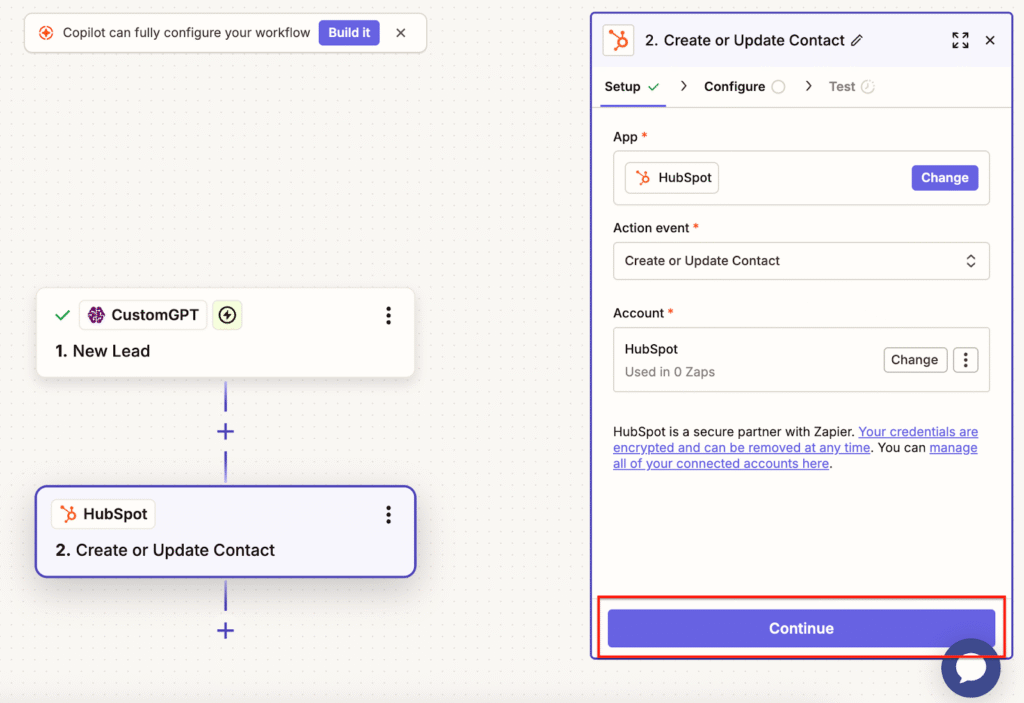
4. Set up HubSpot as your action: Search for HubSpot in Zapier. Choose “Create or Update Contact” as your action. Sign in to HubSpot and connect your account. Map your lead fields – email to email, name to name, company to company. Add any custom properties you want to track. Test the step. Publish your Zap.
5. Configure your lead routing rules: In HubSpot, set up workflows that assign leads based on their status and behavior. Trial users go to account management. Unconverted leads go to sales. Enterprise inquiries go to solutions engineering. Use the conversation context captured by your agents to make smart routing decisions.
Your two-agent system is now live and working.
Advanced Strategies That Maximize Lead Quality
Once your basic system runs smoothly, these tactics extract even more value:
- Combine Lead Capture with Drive Conversions action. This pair is powerful. Drive Conversions guides people toward signing up or requesting demos. Lead Capture collects their information along the way. The result? More leads AND more conversions from the same traffic.
- Use custom fields for qualification. Don’t just collect name and email. Add fields for team size, current solution, timeline, budget range. The more context you capture, the better your sales team can prioritize and personalize.
- Set up conversation triggers in HubSpot. Create workflows that notify your team when leads mention specific keywords – “enterprise,” “migration,” “contract,” “budget.” These indicate high buying intent. Your team can reach out within minutes instead of days.
- Track conversation depth as a quality metric. Leads who chat for 5+ minutes and ask multiple questions are more qualified than someone who asks one thing and leaves. Use conversation length to score leads automatically.
- Create follow-up sequences based on topics discussed. If someone asked about API capabilities, send them technical documentation. If they asked about pricing, send them ROI calculators. Use the conversation context to make every follow-up relevant.
The Metrics That Matter for Lead Capture
Track these numbers to understand if your system works:
- Lead capture rate. How many conversations result in captured contact information? We aim for 40-50%. If you’re below 30%, your agent might be asking too aggressively or at the wrong moments.
- Information completeness. What percentage of leads include all your target fields? Partial leads are still valuable, but complete profiles convert better. Target 70%+ complete.
- Time to first sales contact. How long between lead capture and team follow-up? We keep this under 4 hours during business hours. Faster follow-up dramatically improves connection rates.
- Conversation-to-qualified-lead ratio. Not every chat should become a lead. We see about 1 in 3 conversations producing a qualified contact. Too high might mean you’re capturing everyone, not qualifying anyone.
- Lead-to-opportunity conversion. This tells you if you’re capturing quality leads. We convert 35% of captured leads to sales opportunities. If you’re below 20%, tighten your qualification criteria.
- Source agent attribution. Which agent captures better leads – your website agent or your product agent? Track this separately. It tells you where to focus improvement efforts.
- Average conversation depth before capture. How many messages before someone shares their email? We see 8-12 messages on average. Much lower means you’re asking too early. Much higher means you’re waiting too long.
- CRM integration success rate. What percentage of captured leads successfully flow into your CRM? This should be 99%+. Anything less indicates technical issues that lose leads.
Start Capturing Leads Today
You’re losing qualified leads right now. Every hour you wait, potential customers have conversations on your website and disappear forever.
The difference between companies that grow and companies that struggle often comes down to one thing: they capture and follow up on every opportunity.
Your competitors are still using contact forms that nobody fills out. They’re running chatbots that answer questions and forget. They’re letting qualified leads slip away because they have no system to capture them.
You can be different starting today.
Set up Lead Capture. Connect your agents. Build your two-agent system. Turn every conversation into a potential customer relationship.
The visitors are already there. The conversations are already happening. You just need to capture them.
Frequently Asked Questions
What exactly is the Lead Capture Agent and when should I use it?
Lead Capture Agent is an agentic action that collects visitor contact information during natural conversations. Use it whenever you want to turn engaged website visitors into contacts you can follow up with later. It works best when combined with helpful, value-driven conversations – not pushy sales tactics. The agent asks for details like name, email, company, and role at natural points in the conversation, then stores everything automatically.
How do I activate Lead Capture in my CustomGPT.ai project?
Go to your project dashboard and click on the Actions page. Find Lead Capture in the list of available actions and toggle it on. That’s it. No complex setup, no coding, no additional configuration required. The feature activates immediately and starts working in your next conversation. You can customize which fields to collect and add your own custom fields based on what information matters for your business.
Can the agent collect contact information before the chat starts, like a pre-chat form?
No. Lead Capture always happens inside the conversation itself. The agent waits for natural moments to ask for information, maintaining conversational flow. Pre-chat forms often drive visitors away before they engage. Our approach gets more leads because it builds value first, then requests information after people see your agent is actually helpful.
What user information does Lead Capture try to collect by default?
By default, the agent focuses on name, email, phone number, and company. These are the core fields most businesses need for follow-up. You can remove any of these fields if you don’t need them, or add custom fields specific to your business – like job title, team size, timeline, budget, or current solution. The agent adapts its questions based on which fields you configure.
Can I make certain contact details required before continuing the conversation?
Not currently. All contact information is optional for users. They can decline to share details and continue chatting normally. This keeps the experience friendly and non-pushy. In practice, most engaged visitors willingly share information when asked naturally. Making fields mandatory would increase abandonment without significantly improving lead quality.
How does the agent decide when to ask for contact information without disrupting the conversation?
The agent uses natural language understanding to identify appropriate moments. Typically, it asks early in the conversation, often after answering an initial question but before diving deep into complex topics. It uses built-in persuasion techniques – like explaining why the information helps provide better assistance. The request stays brief and contextual, minimizing disruption. If someone declines, the agent continues helping without making it awkward.
Will the agent ask again if someone refuses to share their contact information?
The agent may follow up politely later in the conversation if the context makes sense. For example, if someone asks about pricing or specific features, the agent might offer to send detailed information via email. But it never gets pushy or repeatedly demands information. The approach stays conversational and respectful throughout.
Can I control the tone and how persuasive the agent is when requesting contact information?
Yes. Adjust your agent’s Persona settings to control tone, style, and assertiveness. Set it to friendly and casual for B2C products, or professional and concise for enterprise B2B. The agent follows your persona guidelines when asking for information, ensuring the request matches your brand voice. You can make it more or less aggressive based on your audience and industry norms.
Does Lead Capture work on embedded widgets, mobile web, and desktop browsers?
Yes. Lead Capture works everywhere your CustomGPT.ai agent runs. Whether visitors chat on desktop, mobile, tablet, or through embedded widgets on your website, the feature functions identically. The conversation flow adapts to screen size and interface, but the lead capture logic stays consistent. Your leads come from every platform without requiring separate configurations.
Will activating Lead Capture slow down my agent’s response time or chat performance?
No. Lead Capture adds no noticeable latency. The agent processes lead information in the background while generating responses. Users see the same fast response times they’re used to. We’ve tested this extensively in production – both with and without Lead Capture enabled – and measured no significant performance difference.
How does the agent handle partial information or conflicting details from users?
The agent extracts whatever contact details it can identify from the conversation and saves them accordingly. If someone shares just their first name, that gets saved. If they later provide their email, that gets added to the same lead record. If they accidentally give two different emails, the most recent one updates the record. Partial information is still valuable – your sales team can always request missing details during follow-up.
Can the agent prefill contact details from previous chats or CRM records?
Not currently. Each conversation starts fresh from a lead capture perspective. However, if you’re using multiple agents that share conversation history, information captured by one agent is available to another agent in future conversations. This creates continuity within your CustomGPT.ai system, even if it doesn’t connect directly to external CRM records yet.
How are captured leads stored, and where does the data reside?
Lead storage follows CustomGPT.ai’s security and data handling practices, which include SOC 2 Type II controls. Your lead data is encrypted and stored securely. For specific details about data residency and regional storage, see our security policy at customgpt.ai/security. We take data protection seriously and maintain enterprise-grade security standards.
How long are captured leads retained by default, and can I set custom retention policies?
Leads are retained indefinitely by default. They remain in your CustomGPT.ai dashboard until you delete them manually. Custom retention settings aren’t available yet. If you need leads removed for compliance or privacy reasons, you can export and delete them manually, or contact support for bulk operations.