

CustomGPT.ai provides an innovative solution by allowing businesses to create and manage AI-powered Custom GPT chatbots that can handle various conversational needs. The CustomGPT.ai RAG API offers a comprehensive suite of tools for advanced conversation management, enabling users to seamlessly create, list, update, and delete conversations within their projects.
In this blog post, we will delve into the capabilities of the CustomGPT.ai RAG API, providing detailed instructions on how you can handle your project conversation management in the CustomGPT.ai RAG API browser to streamline your conversation management processes.
Managing Conversation
Now let’s see how you can manage to create, list, update, retrieve, and send messages to conversations directly from the CustomGPT.ai RAG API browser.
Before starting, ensure you have:
- A RAG API token from CustomGPT.ai.
- The projectId of the project you want to manage conversations within.
You can get this RAG API token and projectId from your CustomGPT.ai account.
Create Conversation
To create a new conversation in your CustomGPT.ai chatbot via RAG API, follow these steps:
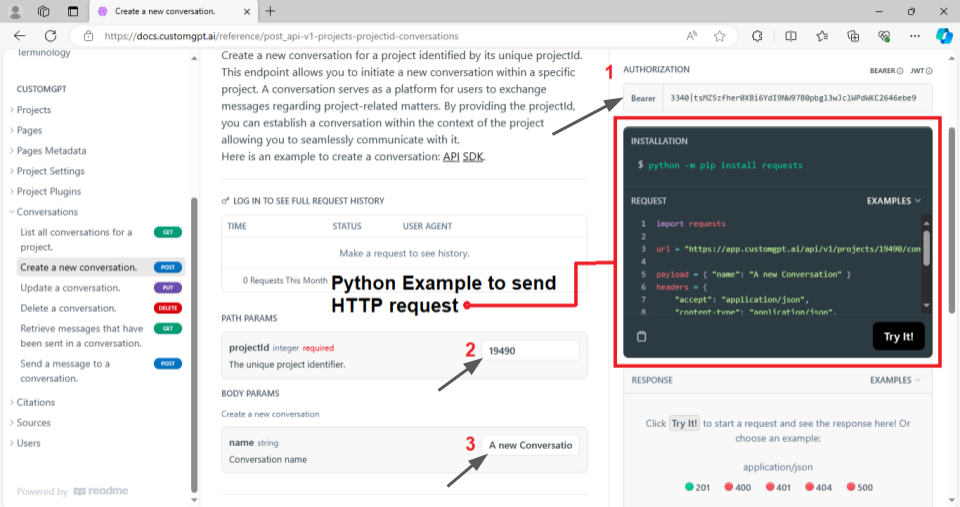
- Authorization: Copy your RAG API key into the authorization box in the RAG API documentation.
- Project ID: From your chatbot settings, copy your project ID and place it in the designated box.
- Conversation Name: Provide a name for your new conversation.
Following is the pre-built code snippet that demonstrates how to send a POST request to the CustomGPT.ai RAG API endpoint to create a new conversation. All you have to do is enter the above information in the box as shown below:
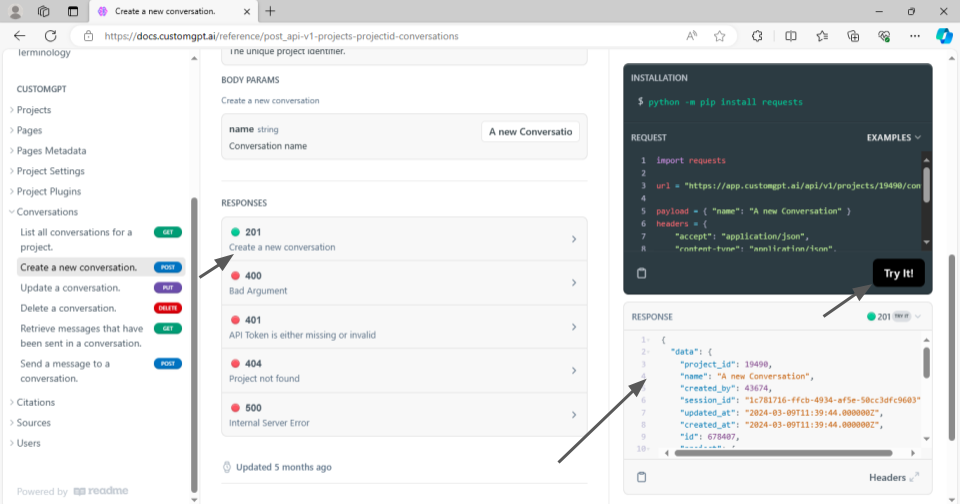
Click “Try it” to execute the code. A successful POST request will return a status code 201, indicating that the new conversation was created successfully.
Now let’s see in our CustomGPT.ai interface whether a new conversation is created with the name we provided or not.
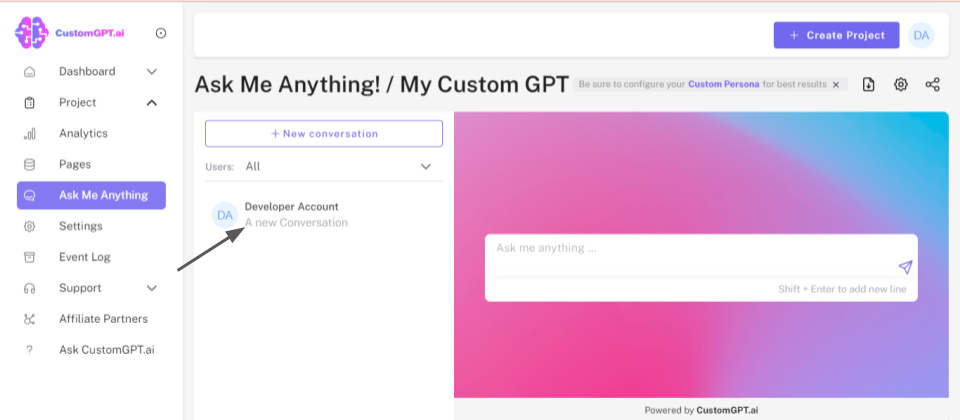
You see that we successfully created A new conversation in our chatbot project by making a CustomGPT.ai RAG API and Python HTTP request.
Update Conversation
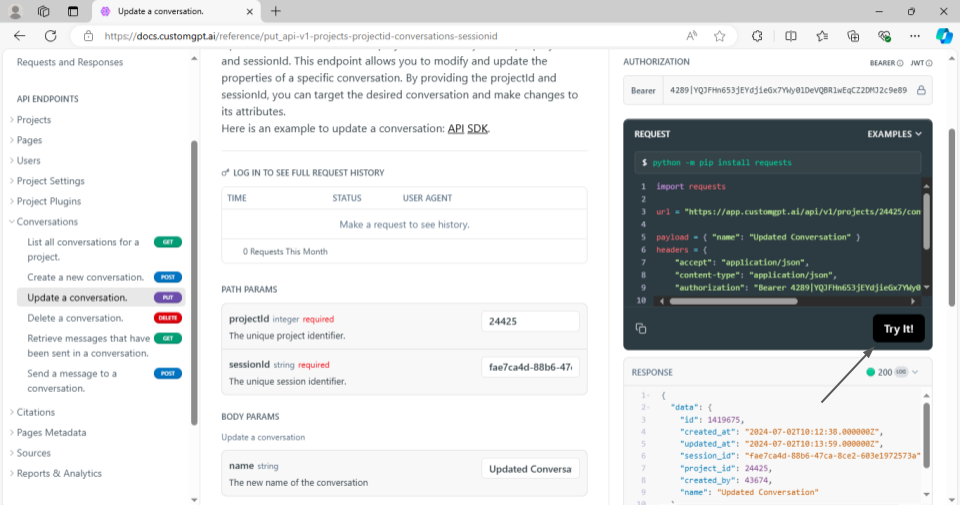
To update a conversation using the CustomGPT.ai RAG API browser, you’ll authenticate with your RAG API key and navigate to the PUT endpoint for updating conversations within a specific project and session.
- Input the project ID and session ID to identify the conversation you wish to modify.
- Provide the desired updates in the request body, such as changing the conversation name or adjusting specific parameters.
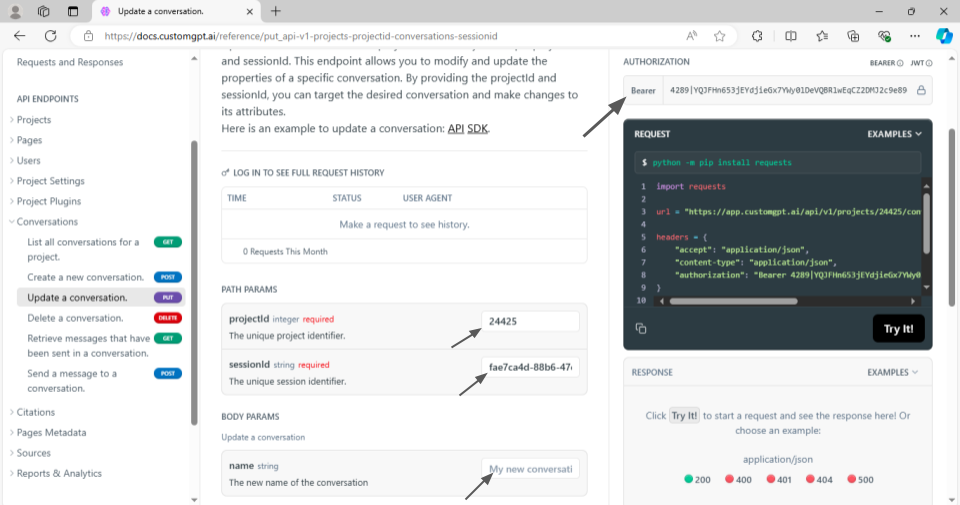
- Execute the request, and upon successful completion, the conversation attributes will be updated accordingly, confirmed by a status code response indicating the operation’s success.
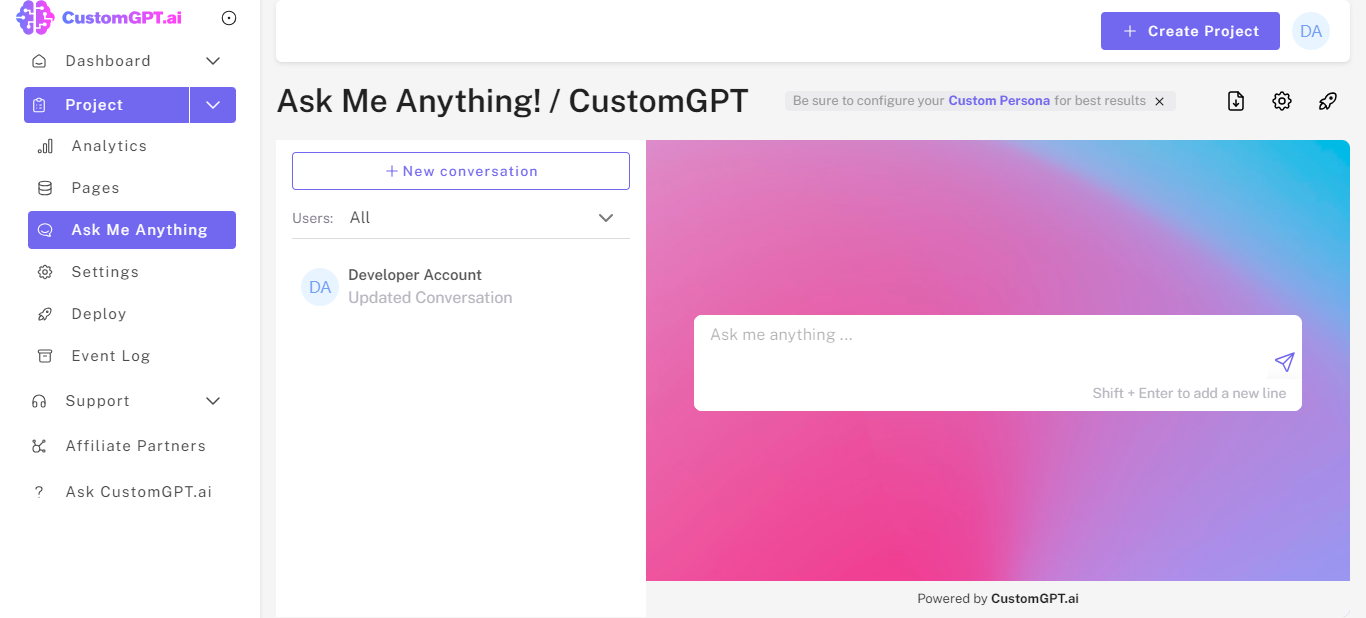
- Now let’s see the updated conversation in the CustomGPT.ai interface.
Retrieve Message within a Conversation
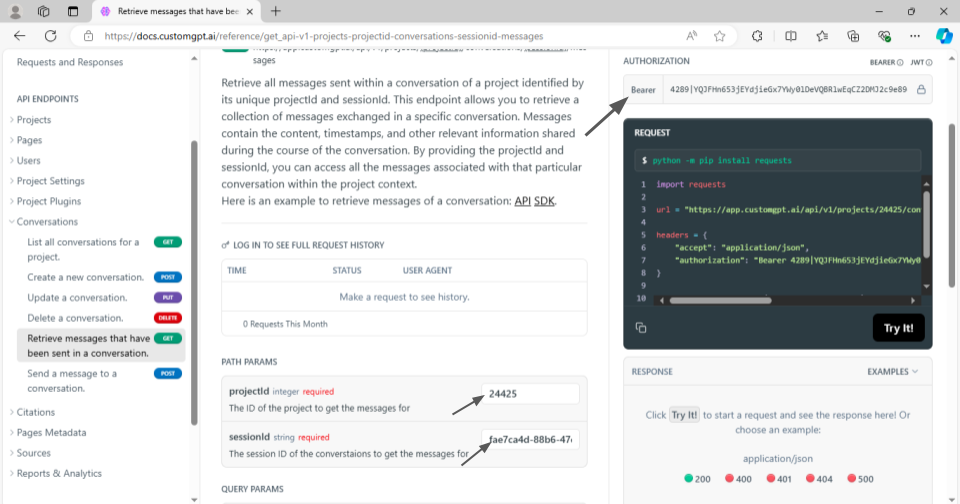
To retrieve messages from a conversation using the CustomGPT.ai RAG API, the GET endpoint will be utilized for accessing message data within a specified project and session. This GET RAG API endpoint facilitates the retrieval of a comprehensive collection of messages exchanged during a particular conversation. Each message typically includes content, timestamps, and other pertinent details shared throughout the conversation’s duration.
- To retrieve the message write the RAG API in the authorization box.
- Write other details such as Project ID and Session ID.
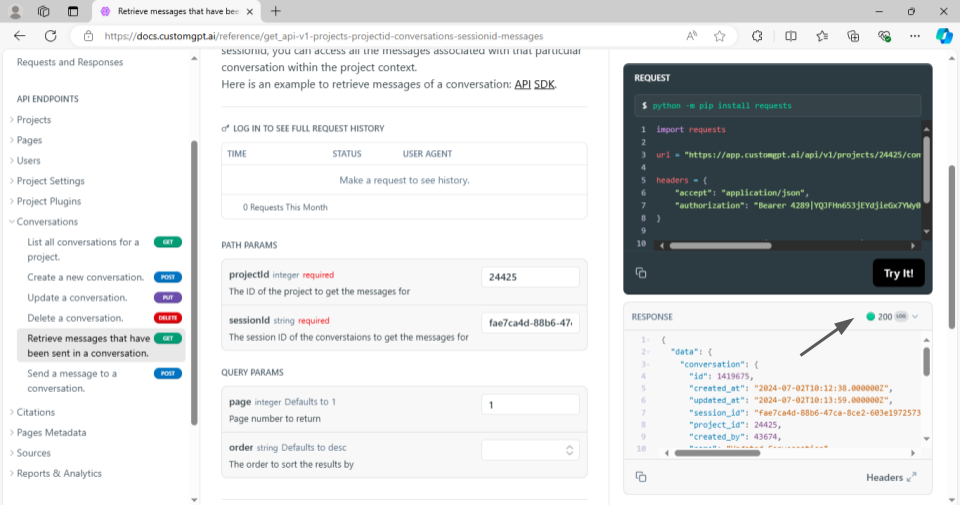
- Now run the code and see the response. The retrieved message and other details will be shown in the response body.
List Conversations
To list all conversations associated with a project using the CustomGPT.ai RAG API browser, the GET endpoint will be used for fetching conversation data. By providing the unique project ID, you can retrieve a collection of all conversations related to that specific project.
This process involves entering your RAG API key for authentication, navigating to the appropriate endpoint, and supplying the project ID.
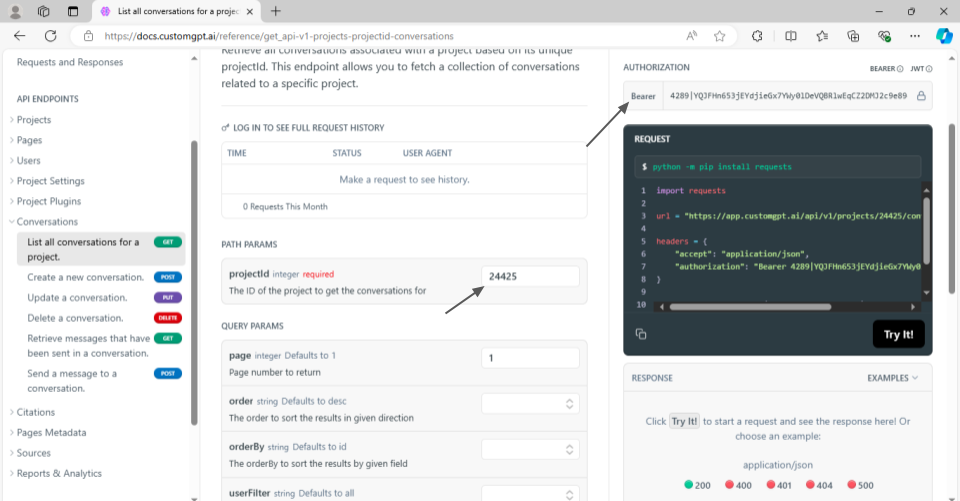
Executing the request will return a list of conversations, each containing relevant details such as conversation names and IDs.
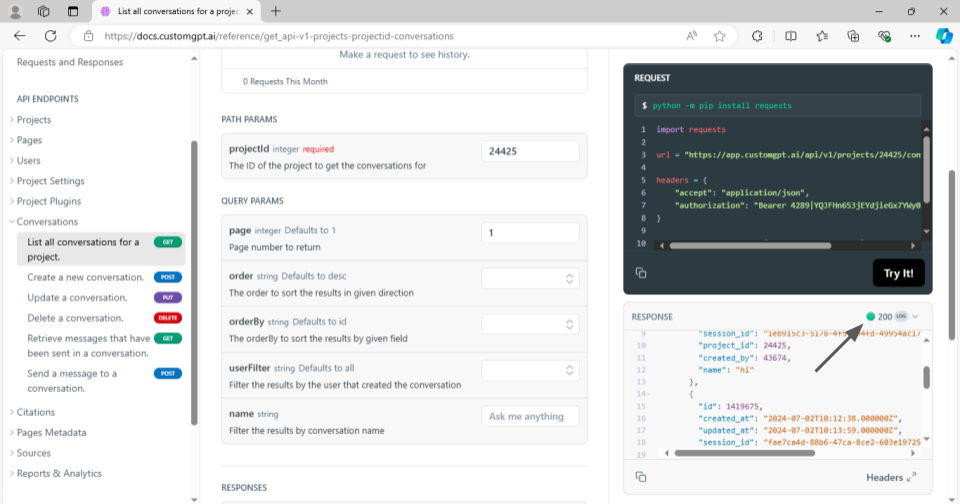
This method allows you to efficiently access and review all conversations within the specified project directly from the CustomGPT.ai RAG API browser.
Delete Conversation
To delete a conversation within a project using the CustomGPT.ai RAG API, the DELETE endpoint will be used. By providing the unique project ID and session ID, you can target the specific conversation you wish to remove. This endpoint will permanently delete the conversation along with all associated messages.
To perform this action, enter your RAG API key for authentication, navigate to the DELETE endpoint, and supply the required project ID and session ID.
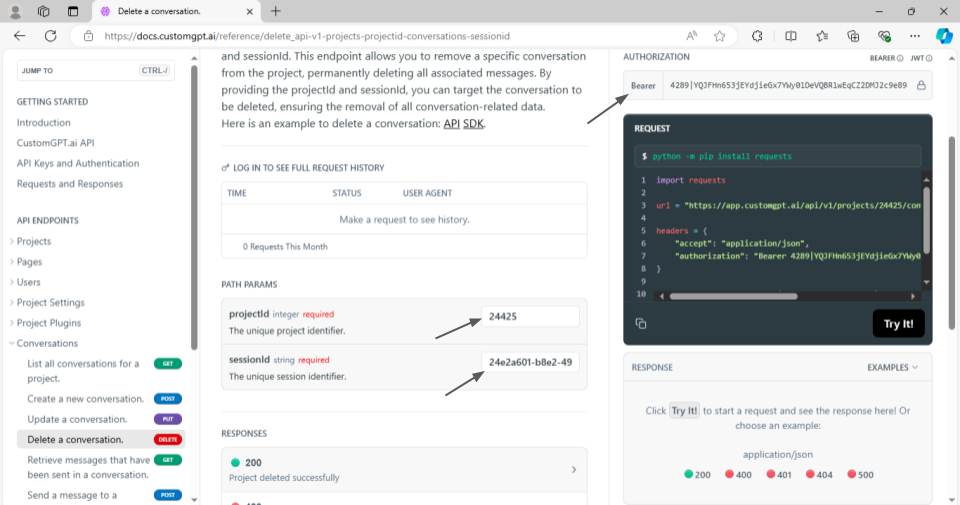
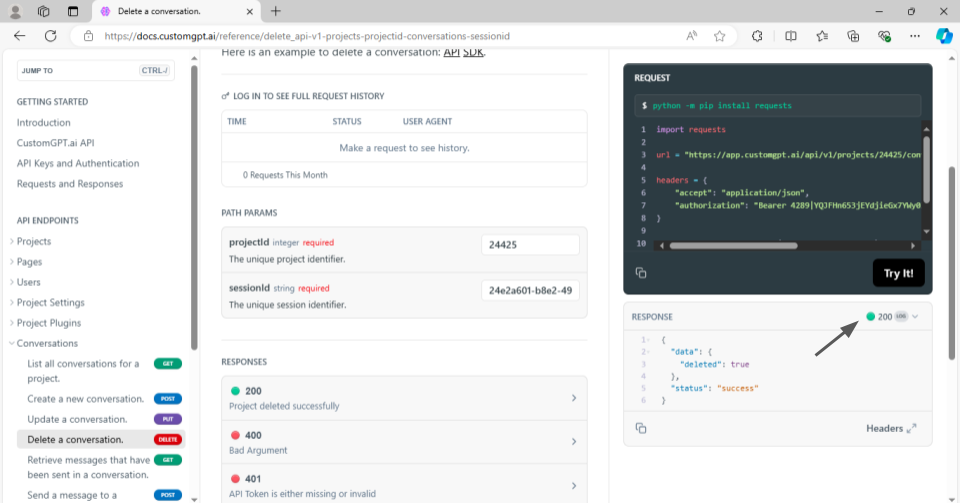
Executing the request by clicking on “Try it” and it will result in the complete removal of the targeted conversation and its data, ensuring it is no longer accessible within the project context.
Conclusion
Managing advanced project conversations using the CustomGPT.ai RAG API offers robust capabilities for efficient project handling. By leveraging various RAG API endpoints, you can create, update, retrieve, list, and delete conversations within your project context. These operations enable precise control over conversation data, ensuring you can maintain up-to-date and organized project records.
The flexibility of the RAG API allows for seamless integration into your workflow, making it easier to manage conversation attributes, access historical data, and remove outdated or irrelevant conversations. Overall, the CustomGPT.ai RAG API provides a comprehensive toolkit for sophisticated conversation management, enhancing your project’s operational efficiency and data-handling capabilities.
Sign up today and start leveraging the features of the CustomGPT.ai RAG API to streamline your project conversation management with easy-to-use RAG API endpoints.