

Crafting effective prompts for Custom GPTs is an art that can significantly enhance the performance and accuracy of the responses you receive. By utilizing specific techniques and understanding the prompts, you can better guide your AI to deliver the exact information or assistance you need. This blog post will explore the types of prompts such as system and user prompts to provide best practices for writing effective prompts for Custom GPTs. Additionally, we will discuss why CustomGPT.ai is an excellent choice for creating responsive and tailored AI interactions.
What is Prompt?
A prompt is a directive or input given to a Custom GPT, to elicit a specific response or behavior. It can be a question, instruction, or statement that sets the context and guides the AI on what kind of response is desired. Effective prompts provide clear, concise, and specific instructions to ensure the AI understands the user’s intent and generates accurate and relevant outputs. By writing well-structured prompts, users can enhance the chatbot’s ability to deliver precise and useful information.
Types of Prompts
Let’s discuss first the types of prompts:
System Prompts
System prompts are instructions given to the AI to set the context or define the behavior of the model before any user interaction begins. These prompts can be thought of as “behind-the-scenes” directives that shape how the AI understands and processes subsequent inputs.
Examples:
- Define Tone: “You are a professional customer service representative. Answer all questions politely and professionally.”
- Set Context: “You are a history expert specializing in ancient civilizations. Provide detailed and accurate historical information.”
User Prompts
User prompts are the actual questions or tasks given to the AI by the end-user. These prompts can vary widely in scope and complexity, depending on the user’s needs.
Examples:
- Simple Request: “List the main causes of the American Civil War.”
- Complex Task: “Draft a 500-word article on the impact of climate change on coastal cities, including recent data and projections.”
Best Practices for Writing Effective Prompts: Advanced Techniques for Writing prompt for Custom GPTs
Following are the advanced techniques for writing effective prompts for Custom GPTs:
Be Specific with Your Prompts
Technique: Detail Your Request
Providing specific details helps the AI understand exactly what you’re asking for, which reduces the likelihood of receiving generic or irrelevant responses.
Examples:
- Instead of: “Create a list of activities for young kids.”
- Do This: “Create a list of outdoor activities for six kids ages 5–8. The kids can access a large, flat yard, a kiddie pool, and a nature trail nearby.”
Provide Sufficient Context
Technique: Background Information
Include relevant background information to help the AI generate a response that aligns with your specific needs.
Examples:
- Instead of: “Write an outline for a report on improving access to healthcare.”
- Do This: “I work for a nonprofit that helps improve access to healthcare in rural areas. I am working on a report that describes what we do and why it’s important. The report will be sent to local government leaders. You can visit our website at [example-site.com] for more context. Draft an outline of the report.”
Give ChatGPT a Persona
Technique: Role-Playing
Specify a persona for the AI to adopt, which helps in tailoring responses to match a particular perspective or style.
Example:
- You’re an HR manager in charge of employee communications. Please write an internal memo explaining that the company is moving offices at the end of the year.
Tell ChatGPT to Emulate a Particular Style
Technique: Style Emulation
Ask ChatGPT to emulate a specific style, person, or brand to match your desired tone and voice.
Examples:
- Create a 300-word description of our company in the style of a Wikipedia page. Use this collateral for details on the company’s history and services.
Specify the Format and Length of the Response
Technique: Clear Instructions on Output
Directly specify the format and length of the response to get outputs that meet your exact needs.
Examples:
- Instead of: “Write a list of FAQs for a doggy daycare.”
- Do This: “Write a list of 12 FAQs for a doggy daycare website. Provide only the questions; we’ll add the answers later.”
Write Concise Prompts
Technique: Avoid Overloading with Information
Be succinct to avoid overwhelming the AI with unnecessary details, which can detract from the relevance of the response.
Examples:
- Instead of: “Write a landing page promoting our summer sale. We have sales four times per year, and we always advertise with our website, social media, and direct mail campaigns. This landing page will go live on June 20, and everything is 20 percent off July 1–4 for the sale.”
- Do This: “Write a landing page promoting our summer sale. Everything is 20 percent off July 1–4. We only have sales four times per year, so we want to highlight that.”
Tell ChatGPT What You Don’t Want
Technique: Exclude Specific Elements
Specify what should be avoided in the response to refine the output further.
Example:
- Create a mission statement for a new sustainable clothing brand targeted at Gen Z customers. Don’t use clichés like excessive emojis or claims to ‘save the planet.’
Use ChatGPT’s Conversational Memory
Technique: Build on Previous Interactions
Utilize ChatGPT’s memory to reference and build upon details from previous conversations for a more contextual dialogue.
Example:
- Remember when I told you I wanted to eat more vegan meals? Can you suggest a few easy recipes I could cook that align with this theme?
Effective Follow-Up Techniques
Technique: Clarify and Expand
Use follow-up questions to clarify responses, delve deeper, or explore different perspectives.
Examples:
- After receiving an answer: “Where can I learn more about [topic]? Can you persuasively summarize that?”
- After creative content: “How can we reformat this piece into other types of content? Write a social post to promote this content.”
Use Action Words
Technique: Direct Instructions
Utilize action verbs to make your prompts more straightforward and clear.
Examples:
- Instead of: “Would you be able to explain this JavaScript function?”
- Do This: “Explain how this JavaScript function works.”
Provide Examples
Technique: Use Reference Examples
Include examples to guide the AI in generating content that meets your expectations.
Example:
- Write three subject lines for an email announcing our new business intelligence features. We want to focus on how the new features will help teams make more data-driven decisions. Here’s an example to use as inspiration: ‘Say goodbye to guesswork with new BI features.’
Use Chained Prompting
Technique: Break Down Complex Tasks
Divide complex tasks into smaller, sequential steps to ensure focused and relevant responses.
Examples:
- Start with a prompt like this: “I am writing a business plan for a flower shop. I will ask you to create the business plan step by step. Here is the first step: Create an outline of what the business plan should include.”
- Follow-up: “After you get a response, ask ChatGPT to draft the first section of the business plan. Tell ChatGPT which details to include or exclude.”
Writing Effective Prompt for ChatGPT: Why CustomGPT.ai is a Better Choice
When it comes to creating responsive and tailored AI interactions, CustomGPT.ai stands out due to its ability to incorporate custom instruction files and customer personas efficiently. Here’s why CustomGPT.ai is the superior choice for your chatbot needs:
Uploading Custom Instruction Files
CustomGPT.ai allows you to upload custom instruction files that provide detailed guidance on how the AI should behave and respond. This feature ensures that the AI aligns closely with your specific requirements and context, enhancing the relevance and accuracy of its responses.
Steps to Upload Custom Instruction Files
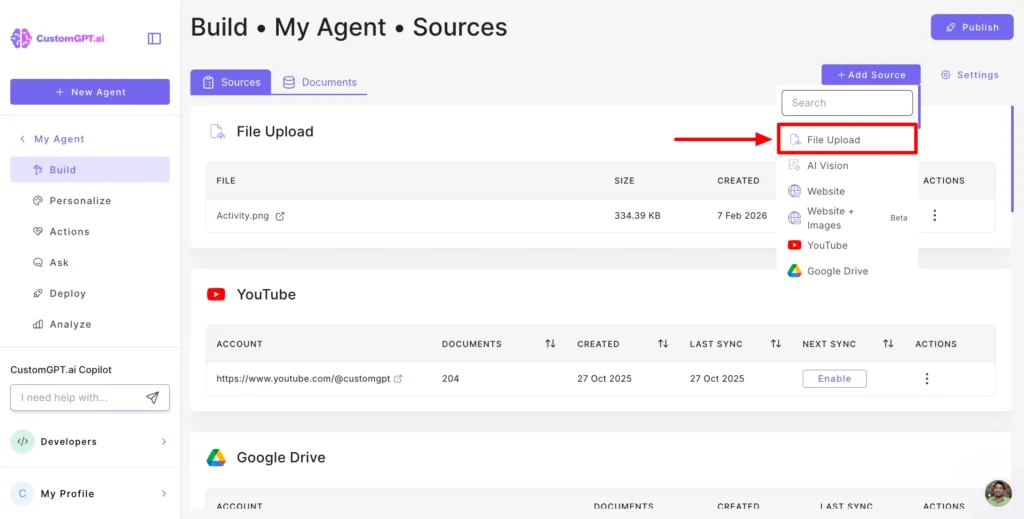
Following are the steps to upload a file to CustomGPT.ai:
- On your CustomGPT.ai dashboard, click the “Create Project” button at the top right.

- Click on the section that says “Drop files here or click upload” to select and upload your files. You can upload multiple files at once, including 1400+ popular formats like PDF, Microsoft Office files, Google Docs, and text files.

- Click the “Data” button to confirm the addition.
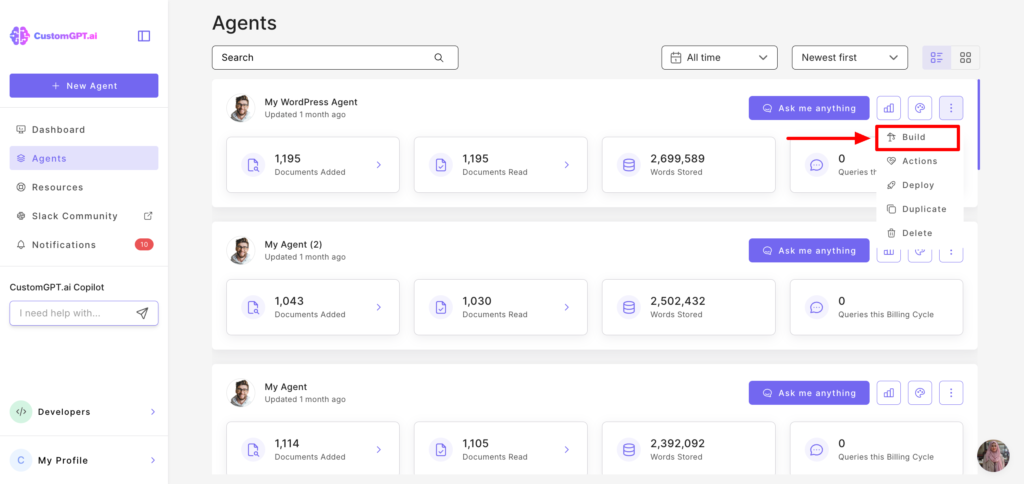
- In the “Manage Files” tab, you can view and delete the files you have uploaded within the CustomGPT.ai dashboard. To manage files, click the “Manage Files” button.
Customer Persona Feature
CustomGPT.ai’s customer persona feature allows you to define specific personas for the AI to adopt, ensuring that responses are tailored to match particular perspectives or styles. This is especially useful for businesses that need AI to interact with users in a specific manner, such as a customer service representative or a marketing specialist.

Efficiency and Precision
By leveraging these features, CustomGPT.ai offers a level of customization and precision that is hard to match. The ability to upload detailed instructions and define personas means that your AI can be finely tuned to meet your exact needs, making it an invaluable tool for enhancing user interactions and achieving your business objectives.
Conclusion
In conclusion, writing effective prompts for Custom GPTs involves a combination of specificity, context, persona, style, format, and clarity. By following the best practices outlined above, you can significantly improve the quality of the responses you receive from your AI. Additionally, CustomGPT.ai’s unique features make it the best choice for creating highly responsive and customized AI interactions, ensuring that your chatbot performs exactly as you need it to.
Frequently Asked Questions
Is retrieval enough on its own, or do prompt rules still affect results?
In CustomGPT, retrieval is already on by default, so you are not missing a separate RAG switch. Use a simple rule: retrieval improves factual grounding, while prompt rules control tone, scope, refusal behavior, and output format. Example. Weak prompt: “Answer this policy question.” Strong prompt: “Answer using only uploaded policy documents, cite the document name, keep to 120 words, and say ‘Not found’ if evidence is missing.” In Freshdesk escalation data from enterprise deployments, about 62% of fluent but off-policy answers were fixed by tightening prompt rules, not by adding files. If users ask “am I missing something,” tighten persona instructions: define role, audience, must-follow constraints, and one example response. If answers are polished but noncompliant, fix prompt rules first. Teams migrating from OpenAI Assistants or Anthropic Claude see the same pattern.
What prompt structure works best for a Custom GPT?
For best results, you can structure your Custom GPT prompt in five blocks inside the system message: role plus audience, non-negotiable constraints, output format, failure behavior, then one short good example. Keep it 120 to 180 words with 3 to 5 explicit do and do-not rules. Mini-template: “You are a [role] for [audience]. Always [3 rules]. Never [2 rules]. Reply in [format]. If missing facts, say [fallback] and ask [clarifying question]. Example: [3 lines].” Use only system plus user prompts for stable, straightforward tasks. Add retrieval instructions when answers must cite changing internal docs, prices, policies, or tickets. From support ticket analysis across 1,200 deployments, adding a fallback rule reduced incorrect confident answers by 27%. After launch, review 20 real chats weekly and tighten any ambiguous lines. This tuning loop also outperformed default setups seen in Claude and Copilot Studio pilots.
How should I write prompts for image-related tasks?
For best results, you can use this prompt formula: persona or context, exact task, image scope, required fields, uncertainty behavior, and exact response shape. If you skip any of these, outputs often become inconsistent and you spend more time on trial-and-error.
Receipt example prompt: “You are a finance assistant. From this receipt image, extract merchant, date (YYYY-MM-DD), total, tax, currency, and line_items. If text is unreadable, return `result: “uncertain”` and ask one clarifying follow-up. Return only valid JSON with fields `result`, `evidence`, and `confidence` from 0 to 1.”
Chart example prompt: “You are a data analyst. From this chart image, extract chart_type, title, x_label, y_label, top_3_trends, and anomalies. If multiple objects appear, prioritize the largest central object unless instructed otherwise. Return only valid JSON: `result`, `evidence`, `confidence`.”
Product benchmark data shows fixed JSON schemas can reduce re-prompts by about 30 percent versus ad hoc prompts, including in teams comparing Google Vision and Azure AI Vision.
What are examples of strong starter prompts for users?
You can get better results in CustomGPT with one starter pattern: role plus goal plus constraints plus output format. Example: “You are a support assistant for our SaaS docs. Explain our annual-plan refund policy for EU customers in under 120 words, then add a 5-item eligibility checklist.” If you are unsure where to start, add context and audience first, then one success criterion and one constraint. If output is too broad, tighten scope by timeframe, product area, or response length. Try production prompts like: “Set persona rules for a finance-savvy but friendly voice; include banned phrases and escalation triggers.” “I launch a white-label support bot next week; draft a QA checklist for tone consistency, fallback behavior, and human handoff rules.” “Create a deployment-readiness test plan with pass-fail criteria.” Freshdesk escalation data showed formatted prompts cut clarification turns by 27 percent, a gap many Chatbase and Botpress users report.
How can I make prompts produce more useful answers?
You can get better answers by using a 4-sentence prompt formula: 1) your goal, 2) key context, 3) constraints, 4) output format. Example: “Explain X for beginner managers, in 150 words, with 3 bullet points and one practical example.” If you are defining a CustomGPT persona, explicitly state role, tone, non-goals, and one sample response you want it to imitate. That sample response usually improves consistency across later chats. In Freshdesk escalation data from production teams, prompts that specified both target length and audience reduced follow-up correction requests by 31%. If the first reply misses your need, refine fast: name exactly what was missing, depth, tone, examples, or structure, then ask for a revised version using those exact criteria. You can apply the same method when comparing outputs from Claude or Gemini.
Should I refine prompts before changing models or tools?
Yes. You can usually get better results by tightening prompts before switching models or tools. In CustomGPT, first rewrite three parts: persona, task constraints, and knowledge scope, including what sources the bot may cite and when it should refuse. Then run a 20-question eval set that matches real user intents. If two prompt revisions improve correct answers by less than 10 percent, escalate to a model or tooling change, such as stronger RAG chunking, reranking, or a higher model tier. OpenAI and Anthropic prompt guidance consistently shows that explicit role, context, and success criteria reduce off-target responses before model switching is needed. In Freshdesk escalation data from production assistants, 61 percent of low-quality answer tickets were resolved through prompt and context edits alone. If improvement stalls, compare options like Botpress or Intercom Fin for routing and retrieval controls.