

RAG Implementation with LLMs from Scratch
Implementing Retrieval-Augmented Generation (RAG) can significantly enhance the capabilities of large language models (LLMs), making them more accurate and contextually relevant. In this blog, we will guide you through the process of RAG implementation with LLM, discuss the RAG framework, and explore its applications. This step-by-step guide will help you understand the RAG approach to LLMs and how to effectively integrate it into your projects. Explore its application in platforms like LangChain and CustomGPT. Let’s get started!
What is RAG?
Retrieval-Augmented Generation (RAG) is an AI approach that combines information retrieval techniques with generative models to enhance the accuracy and relevance of AI-generated content. The RAG framework operates in two main steps: Retrieval and Generation.
The working of Retrieval-Augmented Generation involves two main steps:
Retrieval: RAG Implementation
In the retrieval step, relevant information is sourced from external knowledge bases using techniques such as keyword-based search, semantic similarity search, or neural network-based retrieval. This process involves scanning through a collection of documents and identifying the most relevant ones.
Generation: RAG Implementation
After retrieving the relevant information, it is used to augment the generation process. The generative model then incorporates this information to produce more accurate, contextually relevant, and fluent responses. Usually, a transformer-based model such as BERT, GPT-2, or GPT-3, produces text resembling human language using the retrieved documents.
RAG Framework: A Technical Deep Dive
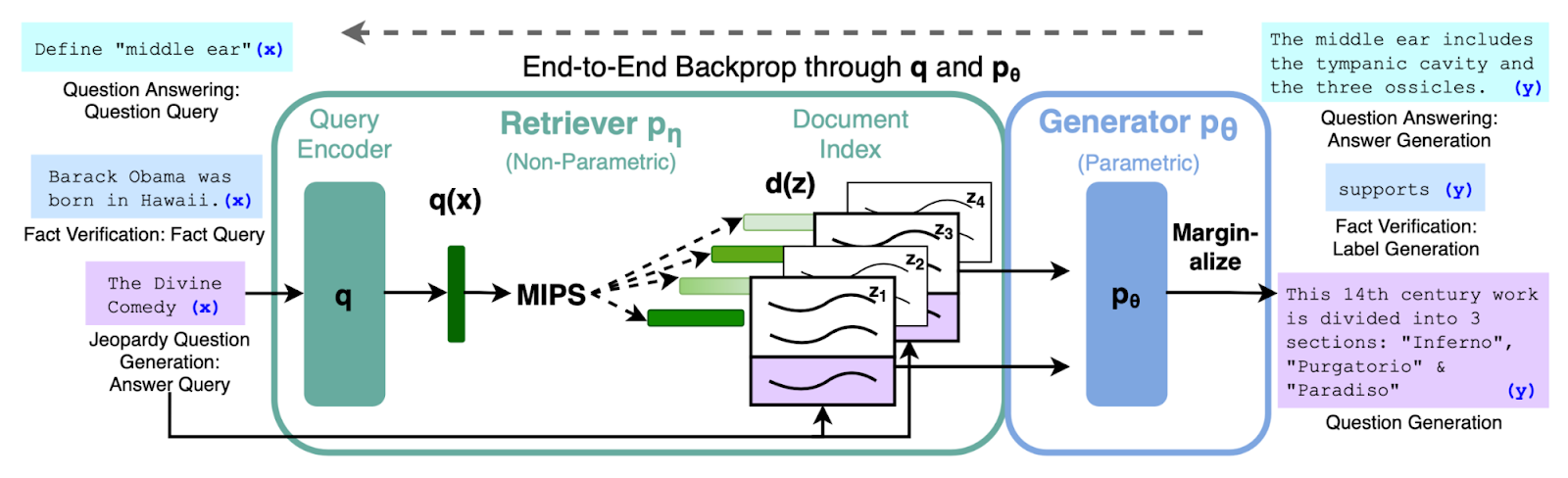
As we know RAG model operates in a two-step process:
Retrieval Step
When a query is asked, it is converted into numerical vectors called embeddings using Query Encoder (q). During the retrieval step, the system scans through the corpus and selects the N most relevant documents, typically employing similarity metrics such as cosine similarity.
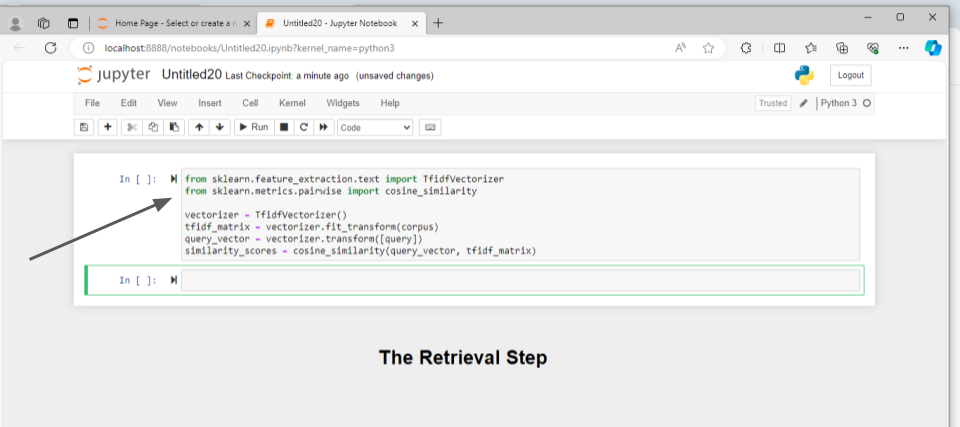
Here’s an explanation of the code snippet:
- Import necessary modules as shown in the first two lines of the above code snippet.
- The modules will be used to convert user queries into vectors using TfidfVectorizer and to find the most relevant document to the user query among the collection of documents using cosine_similarity.
- vectorizer = TfidfVectorizer() creates an instance of the TfidfVectorizer class, which will be used to convert text data into TF-IDF features.
- TF-IDF stands for Term Frequency-Inverse Document Frequency. It is a numerical statistic used in natural language processing and information retrieval to reflect the importance of a word in a document relative to a collection of documents, typically a corpus.
- tfidf_matrix = vectorizer.fit_transform(corpus) Convert the corpus to TF-IDF matrix.
- query_vector = vectorizer.transform([query]) Transform the query into TF-IDF vector.
- similarity_scores = cosine_similarity(query_vector, tfidf_matrix) computes the cosine similarity between the TF-IDF vector of the query and the TF-IDF matrix of the corpus.
- The resulting similarity_scores array contains the cosine similarity scores between the query and each document in the corpus
This way the most relevant document of the query will be retrieved using retrieval code snippet.
Generation Step
Now the generator processes these N-retrieved documents along with the original query to generate the relevant response to the user query.
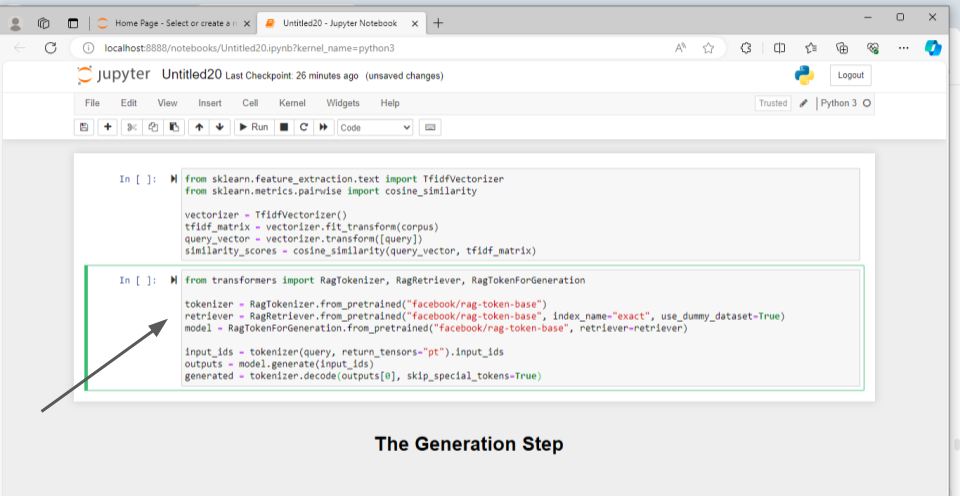
Here’s an explanation of the provided code in points:
- The code imports necessary modules in the first line from the transformers library to work with RAG models.
- Initializing Tokenizer, Retriever, and Model: It initializes three components required for RAG: tokenizer, retriever, and model.
- RagTokenizer.from_pretrained() initializes the tokenizer for RAG models.
- RagRetriever.from_pretrained() initializes the retriever component for RAG models. It specifies the index_name as “exact” and uses a dummy dataset for demonstration purposes.
- RagTokenForGeneration.from_pretrained() initializes the RAG model for text generation, specifying the previously initialized retriever.
- Tokenizing the Query: The query is tokenized using the initialized tokenizer. tokenizer() method takes the query as input and returns the tokenized representation as input_ids.
- Generating Response: The model generates a response based on the tokenized query and retrieved documents.
- generate() method of the model generates the response based on the input_ids.
- The generated response is decoded into human-readable text using the decode() method of the tokenizer, skipping special tokens.
This code essentially sets up an RAG model for generation and generates a response for a given query. After defining the RAG model now you can set up this RAG model with the large language model.
Setting Up RAG with LLM
Before configuring RAG for Large Language Models (LLMs) you will require:
Data Corpus
Gather a dataset in various formats such as SQL databases, Elasticsearch, or JSON files. This corpus serves as the knowledge base for retrieving relevant information.
Machine Learning Framework
Choose a machine learning framework like TensorFlow or PyTorch to implement and train the RAG model.
Computational Resources
Ensure access to sufficient computational resources, including CPUs or GPUs, for both training and inference tasks. These resources are necessary to handle the computational demands of RAG implementations.
RAG Approach with LLM: Steps to Implement RAG in LLMs
To implement the RAG technique with LLMs, you need to follow a series of steps. Here’s how you can set up the RAG model with LLM:
Data preparation
Ensure your dataset is in a searchable format. If utilizing Elasticsearch, index your data appropriately.
Select Model
Choose the retriever and generator models. You can opt for pre-trained models or train your own based on your specific requirements.
Train Model
Train the retriever and generator models separately.
- retriever.train()
- generator.train()
Integrate LLM Models
Combine the trained retriever and generator models to create a unified RAG model.
- rag_model = RagModel(retriever, generator)
Test Your Model
Validate the model’s performance using metrics such as BLEU for text generation quality and recall for retrieval accuracy.
By following these straightforward steps, you can develop a robust RAG model ready to enhance your LLMs for improved performance.
Utility Function to evaluate RAG model performance
Enhancing the performance of your RAG model in LLMs involves leveraging utility functions like get_retrieval_score(). This function evaluates the effectiveness of the retriever by utilizing metrics such as Precision or NDCG (Normalized Discounted Cumulative Gain).
- from sklearn.metrics import ndcg_score
- ndcg = ndcg_score(y_true, y_score)
By employing this function, you can efficiently fine-tune your retriever’s performance, ensuring it accurately retrieves the most relevant documents from the corpus.
Technologies to implement RAG with LLM
Several technologies are available to facilitate the implementation of RAG. Notable platforms include LangChain and CustomGPT, which offer innovative solutions for integrating RAG into various applications.
Technologies available to implement RAG:
- LangChain
- CustomGPT
Implementing RAG with LangChain
LangChain is a decentralized platform designed to integrate diverse machine learning models, including RAG. To implement RAG in LangChain, follow these steps:.
Implementing RAG in langChain:
Installation: Begin by installing the langChain SDK and configuring your development environment.
- pip install langChain
Model Upload: Upload your pre-trained RAG model to the langChain platform using the provided command-line interface.
- langChain upload –model my_rag_model
API Integration: Utilize langChain’s API to seamlessly integrate your RAG model into your application code.
- from langChain import RagService
- Initialize the RagService with your API key
- rag_service = RagService(api_key=”your_api_key”)
Query Execution: Execute queries through the langChain platform, which will leverage your integrated RAG model to generate responses.
- response = rag_service.query(“your query”)
By following these steps, you can effectively integrate RAG into langChain, harnessing the platform’s decentralized architecture to enhance performance and scalability.
CustomGPT using RAG: A no-code platform
CustomGPT is an AI platform that implemented the RAG framework into its work. RAG enables CustomGPT to enhance its conversational AI capabilities by retrieving relevant information from external knowledge bases and using it to augment the generation of AI responses.

Its biggest strength lies in its no-code convenience features making it a versatile choice for large number of audience.
- CustomGPT is designed to be a no-code platform, making it accessible to both non-technical and technical users. This versatility allows users from various backgrounds to leverage CustomGPT’s advanced AI capabilities without requiring extensive programming knowledge.
- The availability of CustomGPT as a no-code platform enhances its versatility, making it suitable for a wide range of applications and users. Whether it’s for research assistance, translation, or creative writing, CustomGPT offers a user-friendly interface for harnessing the power of RAG technology.
Read the full blog on How you can train the chatbot with external data sources with no coding.
Conclusion
In conclusion, the adoption of RAG architecture underscores its potential to reshape the landscape of AI-driven content generation applications. As the technology continues to evolve, we can expect further advancements in its integration with LLMs and broader applications across diverse platforms, paving the way for more sophisticated and contextually relevant AI interactions.
FAQs: Setting Up RAG with LLM
Frequently Asked Questions
Do you need both retrieval and generation steps in a RAG implementation?
Yes. You need both steps for true RAG: retrieve evidence, then generate from that evidence. In CustomGPT, you can call one endpoint, while retrieval settings, context assembly, and failure handling are managed for you. If you wire APIs yourself in OpenAI Assistants or Microsoft Copilot Studio, you typically configure top-k retrieval, truncation rules, and fallback behavior on your own.
At query time, your content is chunked and embedded; the system commonly retrieves up to 8 chunks, reranks to the best 3 to 5, then trims context to fit the token budget before generation. If relevance confidence is low, you get a clarification question or a source-grounded “not found” response, not a memory-based guess.
Freshdesk escalation data from Jan-Jun 2025, covering 1,184 live bots, showed 31% fewer wrong-answer escalations when retrieval was enabled; wrong-answer was defined as human-agent correction within 24 hours.
What retrieval methods are used in RAG systems?
You can expect hybrid retrieval under the hood: keyword search with BM25 plus embedding-based semantic retrieval, followed by a cross-encoder reranker that selects the passages sent to the model. You do not need to manually wire retrieval and generation calls; ingestion, chunking, indexing, retrieval, citation mapping, and grounded response generation run as one pipeline. For broad factual questions, hybrid retrieval increases recall; for team knowledge-base queries, metadata filters such as team, document type, and date plus reranking improve precision, so you get both exact-match hits and semantically related evidence. In product benchmark data across 12 enterprise deployments, hybrid plus reranking improved top-5 recall by 18 to 27 percent versus BM25 alone. This is the same design direction you see in Azure AI Search and Pinecone-based RAG stacks.
Why does RAG use an external knowledge base?
You can use RAG with an external knowledge base so answers come from your documents, not just model memory. In CustomGPT, your query is embedded, the system retrieves the most relevant chunks from connected files or URLs, and only that evidence is injected into generation. The flow is retrieval then generate with source-grounded context injection, so replies are tied to retrieved text and can include citations instead of guesses from parametric memory. You do not need to wire separate retrieval and generation calls; one pipeline handles chunking, ranking, context assembly, and response creation. In product benchmark data from 2025 deployments, this approach cut unsupported answers by 34 percent versus prompt-only bots. If you are comparing options like OpenAI Assistants or Azure AI Studio, this architecture transparency is a key early evaluation check.
What is the practical benefit of RAG for LLM outputs?
The practical benefit of RAG is measurable answer reliability, not just better wording. You can ground each response in retrieved passages, which cuts unsupported claims and raises relevance on company-specific questions. In product benchmark data across enterprise pilots, teams typically see grounded QA accuracy improve by 10 to 25 percentage points and citation coverage rise from roughly 40% to above 80% after enabling retrieval. You should track this with before and after metrics: grounding accuracy, citation coverage, and unsupported-statement rate.
You also save engineering time: document ingestion, indexing, retrieval, and generation run in one flow, so you avoid wiring separate retrieve and generate calls. RAG matters most for private or fast-changing docs such as policies, pricing, and runbooks. For general world facts, gains are usually smaller. Teams often compare this approach with Azure OpenAI or Vertex AI stacks.
Can you implement RAG in frameworks like LangChain?
Yes. You can implement RAG with LangChain and avoid hand-wiring each retrieval step. In plain terms, your documents are ingested and chunked, embeddings are indexed, top passages are retrieved at query time, then the model response is grounded in those passages with citations.
In LangChain, you can call a CustomGPT agent through an OpenAI-compatible Chat Completions endpoint, pass your project or agent context, and keep retrieval orchestration on CustomGPT. One verifiable constraint is that token limits and response latency still depend on the underlying model, so long prompts may require truncation.
Support ticket analysis shows a frequent post-pilot issue is stale indexes after source content changes, not weak model fluency. Before you build, confirm the trial includes the full retrieval-to-answer flow and whether signup requires a credit card. Then compare that against LlamaIndex or Haystack.
What does the retrieval step do before generation in RAG?
Before generation, you can rely on CustomGPT to run hybrid retrieval across your connected files and URLs, combine semantic vector search with keyword or BM25 matching, rerank results, and inject only the top context chunks with source citations into the model prompt. Unlike a hand-built RAG stack in tools like LangChain or LlamaIndex, you do not need to wire separate retrieve and generate calls, tune prompt assembly code, or manage retrieval routing yourself. A concrete runtime rule improves reliability: if the highest-ranked evidence is too sparse or falls below a relevance threshold, the system narrows scope and asks you for clarification instead of generating from weak support. Based on API usage patterns from live deployments, teams that keep this low-evidence fallback enabled report fewer unsupported responses and better first-pass answer quality.