Custom GPT RAG API + Node.js: Enhancing Node.js Applications with CustomGPT.ai Integration

In today’s exploration, we’ll delve into the integration of CustomGPT.ai with Node.js, offering developers a solution to enhance their JavaScript applications with advanced AI capabilities through an enterprise RAG API. This article focuses on the practical integration of CustomGPT.ai with Node.js, one of several AI integration options, showcasing its potential to elevate JavaScript development. Let’s start and see how developers create intelligent and dynamic applications with CustomGPT.ai RAG API integration using Node.js.
Introduction to Node
Node.js stands as a cornerstone in modern JavaScript development, offering a robust runtime environment for building scalable and efficient server-side applications. With its asynchronous, event-driven architecture, Node.js enables developers to create high-performance web applications and RAG APIs. Moreover, Node.js boasts extensive support for integrating with external RAG APIs, allowing developers to interact with third-party services and resources seamlessly.
CustomGPT.ai: A versatile AI platform
CustomGPT.ai, an advanced AI platform, supports various programming languages, environments, frameworks, and applications, including Node.js. This flexibility empowers developers to integrate CustomGPT.ai seamlessly into their Node.js applications, enhancing them with advanced AI capabilities. Through its well-documented CustomGPT.ai API, CustomGPT.ai provides developers with the tools and resources needed to leverage its features programmatically.

Here are some key points highlighting CustomGPT.ai’s flexibility and versatility in RAG API integrations:
- Support for Various Languages and Environments: CustomGPT.ai offers support for a wide range of programming languages, making it accessible across different development environments. This ensures that developers can integrate CustomGPT.ai into their Node.js applications effortlessly.
- Comprehensive Framework Support: Whether it’s a web framework or a desktop application framework, CustomGPT.ai seamlessly integrates with various frameworks, allowing developers to leverage their AI capabilities in diverse application environments.
- Flexible RAG API Integration: CustomGPT.ai’s RAG API allows developers to perform a wide range of tasks programmatically, including managing chatbots, processing natural language, and accessing training data. This flexibility enables developers to tailor their integrations according to their specific application requirements.
- Rich Documentation and Code Snippets: CustomGPT.ai offers comprehensive documentation and code snippets tailored for Node.js developers, making it easier to understand and implement RAG API integrations. These resources guide various integration scenarios, ensuring a smooth development experience.
Integrating CustomGPT.ai with Node: A Practical Example
In this pre-built practical example from CustomGPT.ai’s RAG API documentation., we’ll demonstrate how to retrieve statistical data for a project using its unique identifier. The GET endpoint provided by CustomGPT.ai will be used to provide comprehensive statistics about the project’s performance, activity, and other relevant metrics. Let’s explore implementation details to showcase the integration of CustomGPT.ai with Node.js.

- The code begins by importing the CustomGPT.ai RAG API SDK, which provides methods for interacting with the RAG API.
- It then initializes the SDK with the necessary RAG API version and key.
- Next, it calls a function from the SDK to make a RAG API request for statistical data related to a specific project. Upon successful retrieval, the data is logged to the console.
- In case of errors during the request, such as network issues, error handling ensures logging the error for troubleshooting.
Test and Run the Code in the CustomGPT.ai Browser
To test and run the provided code snippet in the CustomGPT.ai browser, follow these steps:
- If you haven’t already, sign up for an account on the CustomGPT.ai platform. This will give you access to the necessary RAG API key required for making requests to the CustomGPT.ai RAG API.
- Once you’re logged in to your account, navigate to your profile settings. Here, you’ll find an option to generate an API key. Click on this option to generate your RAG API key. Copy the generated RAG API key as it will be required to authenticate your RAG API requests.

- In the CustomGPT.ai RAG API browser interface, locate the authorization box. Paste the RAG API key you obtained in the previous step into this box. This step ensures that your requests are authorized to interact with the CustomGPT.ai RAG API.

- Identify the project ID for which you want to retrieve statistical data. You can find this information within your CustomGPT.ai project settings.
- In the code snippet provided, there is a placeholder for the project ID (projectId). Replace this placeholder with the actual project ID you obtained from your CustomGPT.ai project settings.
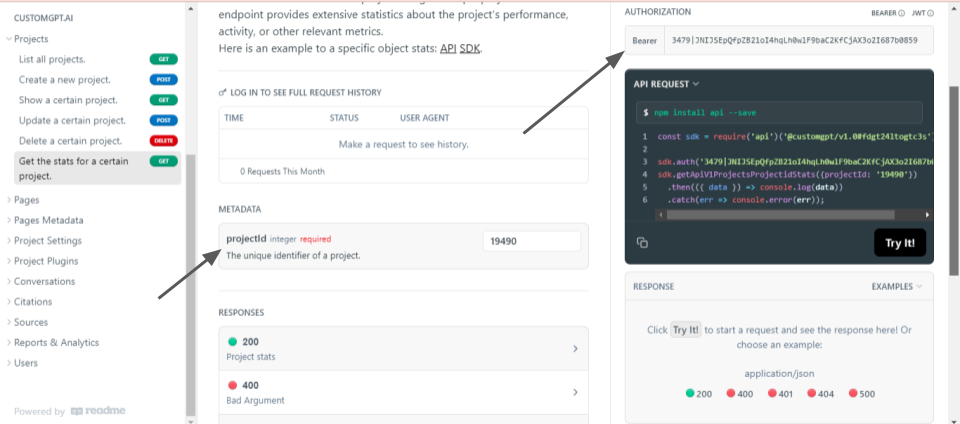
- Execute the code snippet in the CustomGPT.ai browser interface by clicking on the “Try it” button.
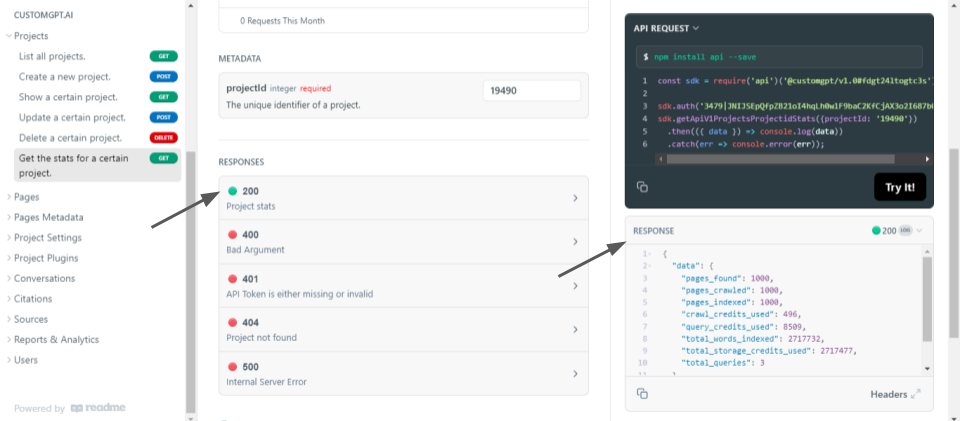
- The response “200“, confirms that the statistical data for the project has been retrieved successfully. Review the response to analyze the statistical metrics provided by CustomGPT.ai for the specified project.
Conclusion
In conclusion, integrating CustomGPT.ai with Node.js offers developers a powerful solution for incorporating advanced AI capabilities into their applications. By leveraging Node.js’s flexibility and CustomGPT.ai’s robust RAGAPI support, developers can create intelligent chatbots with enhanced functionalities and tailored experiences.
Stay tuned for more upcoming blogs on CustomGPT.ai RAG API integration with various programming languages.
Related Resources
These guides expand on the key ideas behind building and integrating AI-powered Node.js apps with CustomGPT.ai.
- Chatbots With External Data — Learn how to connect CustomGPT.ai to external data sources so your chatbot can answer with more relevant, up-to-date information.
- How CustomGPT.ai Works — Get a clear overview of the platform’s architecture, retrieval process, and how CustomGPT.ai turns your content into accurate responses.
- JSON API RAG Integration — Explore how to integrate JSON data with the CustomGPT.ai API to support retrieval-augmented generation in your applications.
- Projects Pagination Guide — See how to list account projects with pagination using the CustomGPT.ai RAG API when managing larger implementations.
Frequently Asked Questions
How hard is it to integrate a RAG API into a Node.js app?
Online Legal Services Limited said, “Custom GPT has allowed us to build a series of AI assistants for our legal businesses at speed without having to build them ourselves at great cost. We now deploy AI customer-service chatbots outside of office hours on 3 websites and have seen a massive increase in leads and sales during these times.” For a Node.js app, the core integration is relatively straightforward because the API is OpenAI-compatible at /v1/chat/completions and uses API-key authentication. You still need to choose the websites, documents, or other sources the assistant should retrieve from.
Can I put my AI assistant on a website without making users sign in to ChatGPT?
Yes. Online Legal Services Limited deploys AI customer-service chatbots outside office hours on 3 legal websites, which shows the assistant can run in your own site experience rather than behind a ChatGPT login. Supported deployment options include an embed widget, live chat, search bar, and API, so visitors can use the assistant directly on your website. In a Node.js setup, keep the API key on the server because authentication is API-key based.
Should I call the RAG API from the browser or through a Node.js backend?
A Node.js backend is the safer default because authentication is API-key based. That lets your app call the OpenAI-compatible /v1/chat/completions endpoint without exposing the key in browser code. If security or compliance are part of the requirement, the service is SOC 2 Type 2 certified, GDPR compliant, and states that data is not used for model training.
How do I make a Node.js chatbot answer from my own documents instead of generic AI knowledge?
“I just discovered CustomGPT, and I am absolutely blown away by its capabilities and affordability! This powerful platform allows you to create custom GPT-4 chatbots using your own content, transforming customer service, engagement, and operational efficiency.” — Evan Weber, Digital Marketing Expert. In a Node.js integration, you get that own-content behavior by calling a RAG API that retrieves from your uploaded sources before generating the reply. Supported sources include PDFs, DOCX, TXT, CSV, HTML, XML, JSON, audio, video, and URLs.
How reliable is a Node.js RAG integration in production?
Dlubal Software’s assistant “Mia” supports 130,000+ structural engineering users across 132 countries in 10 languages. George Dlubal said, “The assistant has enabled us to offer 24/7 support while improving accuracy and speed of response. This has led to a noticeable increase in customer satisfaction and even faster support.” That kind of deployment is strong evidence that a RAG integration can operate reliably at scale. For a Node.js app, reliability depends on grounded retrieval and language coverage, not just whether the HTTP request succeeds.
What should I test before shipping a Node.js RAG API integration?
Bill French, Technology Strategist, said, “They’ve officially cracked the sub-second barrier, a breakthrough that fundamentally changes the user experience from merely ‘interactive’ to ‘instantaneous’.” Before shipping a Node.js integration, test whether your app can authenticate with the API key, call /v1/chat/completions successfully, and return answers fast enough for the experience you want. If you plan to ingest files, also verify supported formats and the 100MB per-file limit.