Custom GPT RAG API + Objective-C: Empowering iOS Apps with CustomGPT.ai
Today, we’re focusing on integrating CustomGPT.ai with Objective-C, a key language in iOS app development. Objective-C is fundamental to many iOS applications, offering a strong foundation for leveraging the CustomGPT.ai platform in iOS apps. With CustomGPT.ai integration, developers can elevate their apps and provide users with exceptional experiences. Let’s explore the seamless integration of CustomGPT.ai into Objective-C, enabling intelligent app interactions and enhancing user engagement. Let’s get started!
Introduction to Objective-C and CustomGPT.ai Integration
Objective-C, a primary programming language for iOS and macOS app development, is renowned for its robust features and extensive support within the Apple ecosystem. It provides developers with powerful tools to create sophisticated applications for various Apple devices, including iPhones, iPads, and Macs. One of the key advantages of Objective-C is its seamless integration with external RAG APIs, allowing developers to make HTTP requests and interact with web services directly from their applications.
Support for External RAG APIs
Objective-C offers support for integrating with external RAG APIs, enabling developers to make HTTP requests to access data and services from the web. This capability provides possibilities for developers to enhance their applications with dynamic content and functionality.
CustomGPT.ai Integration
CustomGPT.ai, an advanced AI platform, provides extensive support for Objective-C, allowing developers to leverage its powerful AI capabilities within their iOS and macOS applications. With CustomGPT.ai integration, developers can enhance their apps with intelligent chatbots, natural language processing, and context-aware responses, enriching the user experience and adding value to their applications.
Practical Programming Examples
CustomGPT.ai offers a rich collection of practical programming examples and code snippets specifically designed for Objective-C developers. These resources simplify the implementation of various functions and HTTP requests, making it easier for developers to incorporate advanced AI features into their applications.
Extensive Language Support
CustomGPT.ai boasts extensive support for a wide range of programming languages, including Objective-C, making it accessible to developers across different platforms and environments. This broad language support ensures that developers can integrate CustomGPT.ai into their applications regardless of their preferred programming language.
Incredible Features of CustomGPT.ai
CustomGPT.ai offers incredible features, including advanced natural language processing, context-aware responses, and sophisticated AI capabilities. These features enable developers to create intelligent and conversational experiences for users, taking their applications to the next level of sophistication and functionality.
Integrating CustomGPT.ai with Objective-C: A Practical Example
In this practical example, we’ll see how to retrieve a list of all sources associated with a given project in CustomGPT.ai using Objective-C. The GET endpoint we’re using provides a collection of sources that are linked to a specific project, serving as references or contexts for that project. We will use a code snippet from CustomGPT.ai RAG API documentation to send an HTTP request for retrieving the list of sources of a chatbot.

- The above code snippet initiates a GET request to a designated endpoint URL, aiming to obtain a list of sources linked to a particular project within CustomGPT.ai.
- It configures the HTTP request with necessary headers, such as the Accept header, indicating that the client anticipates a JSON-formatted response from the server.
- Upon receiving a response from the server, the code logs both the status code, which denotes the outcome of the request (e.g., success or failure), and the response data itself.
- By executing this code snippet, developers can retrieve vital information regarding the sources associated with a specific project in CustomGPT.ai, facilitating contextual understanding and reference within the application.
- Understanding the project sources allows developers to customize and personalize the application’s responses based on the context provided by these sources. This level of customization leads to more tailored and relevant interactions with users.
Test and Run the Code in the CustomGPT.ai Browser
To test and run the provided code snippet for retrieving project sources from CustomGPT.ai, follow these steps:
- Sign up for a CustomGPT.ai account to obtain the necessary RAG API key and access to the platform’s features.
- Once logged in, navigate to your profile then click on the generated RAG API key. The RAG API key will be generated now copy this key. This key will be required to authenticate and authorize RAG API requests.

- Now place this RAG API key in the authorization box.

- Identify the project ID for which you want to retrieve the sources. You can find this information within your CustomGPT.ai project settings.
- Replace the placeholder “projectId” in the code snippet with the actual project ID you obtained from CustomGPT.ai.
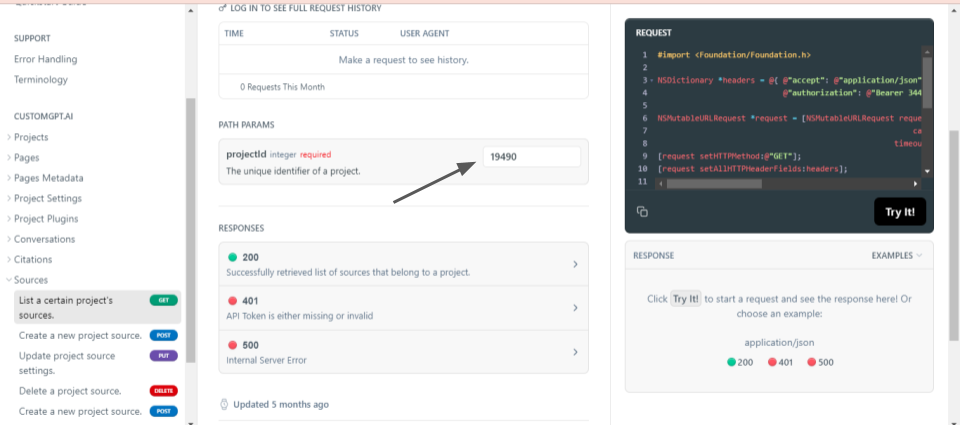
- Execute the code snippet in the CustomGPT.ai browser by clicking on Try it.
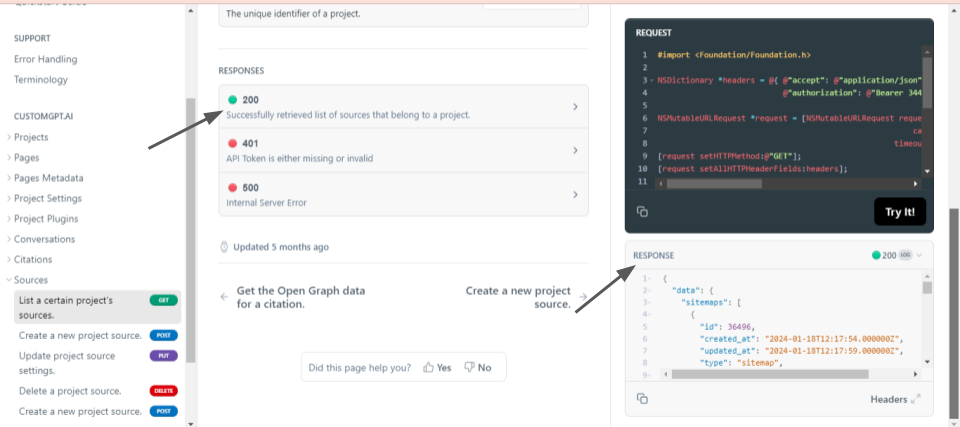
- The code “200” shows that the function is performed successfully. And list of sources associated with a chatbot project is received in the response body.
Similarly, you can also perform various other operations using HTTP requests in Objective-C from CustomGPT.ai RAG API documentation.
Conclusion
In conclusion, integrating CustomGPT.ai with Objective-C offers possibilities for enhancing iOS applications with advanced AI capabilities. By leveraging CustomGPT.ai’s extensive RAG API support and robust features, developers can create intelligent and engaging chatbot experiences within their Objective-C apps. Whether it’s retrieving project sources, managing conversations, or generating dynamic responses, CustomGPT.ai helps developers build innovative solutions for their users.
As we continue to explore the integration of CustomGPT.ai with different programming languages, stay connected for our upcoming blog on integrating CustomGPT.ai with OCaml.
Frequently Asked Questions
Can I add a RAG chatbot to an existing Objective-C iOS app without rewriting it in Swift?
Yes. Objective-C can call the same HTTPS API pattern as Swift, so you can keep your existing iOS codebase and add retrieval-backed chat without a language rewrite. Joe Aldeguer, IT Director at Society of American Florists, said, “CustomGPT.ai knowledge source API is specific enough that nothing off-the-shelf comes close. So I built it myself. Kudos to the CustomGPT.ai team for building a platform with the API depth to make this integration possible.” In practice, you keep your current UI and networking flow, send requests to the OpenAI-compatible /v1/chat/completions endpoint, and render the response in your app.
How do I connect an Objective-C app to a RAG API in practice?
Collect the user’s message, send an authenticated HTTPS POST request to the /v1/chat/completions endpoint, parse the JSON response, and display the answer in your chat UI. The API uses key-based authentication and follows an OpenAI-compatible request pattern, so the main Objective-C work is request formatting, networking, JSON parsing, and UI updates. Bill French, Technology Strategist, described the user-experience impact this way: “They’ve officially cracked the sub-second barrier, a breakthrough that fundamentally changes the user experience from merely ‘interactive’ to ‘instantaneous’.”
Do I need to host or train my own model to use RAG in an Objective-C app?
No. A typical RAG setup lets you upload your own source material and query it through the API, while the service handles retrieval and response generation. Supported knowledge sources include PDFs, DOCX, TXT, CSV, HTML, XML, JSON, audio, video, and URLs, so your Objective-C app mainly handles the interface and API calls rather than model training. Evan Weber summarized the appeal of this approach: “I just discovered CustomGPT, and I am absolutely blown away by its capabilities and affordability! This powerful platform allows you to create custom GPT-4 chatbots using your own content, transforming customer service, engagement, and operational efficiency.”
Is a RAG API more accurate than calling a base LLM directly from an iOS app?
Usually yes when your app needs answers grounded in your own documents. The provided benchmark states that CustomGPT.ai outperformed OpenAI in RAG accuracy, which is especially relevant for manuals, policies, PDFs, and support content. A base LLM API can work well for general conversation, but a RAG API is the better fit when you need retrieval from a defined knowledge base and citation support.
Can one Objective-C integration support multiple languages for iOS users?
Yes. The platform supports 92+ languages, so one Objective-C app can use a single API integration for users in many locales. That means you can keep one chat interface and one backend integration pattern instead of building separate language-specific implementations for each region.
How do I let iOS users access the chatbot without requiring a ChatGPT login?
You do not need a ChatGPT account for each user. The integration uses API-key authentication, so your app connects directly to the RAG API instead of sending users through a separate ChatGPT login flow. For security and compliance, the provided materials state that the service is SOC 2 Type 2 certified, GDPR compliant, and that customer data is not used for model training.
Related Resources
For teams extending iOS experiences with CustomGPT.ai, this guide adds useful context on backend retrieval architecture.
- Enterprise RAG API — Explore how an enterprise-grade retrieval API supports secure, scalable AI responses across production applications.