
Quick Answers
- What are Priority Queries?
Enterprise-exclusive feature that cuts AI response times by up to 2 seconds using OpenAI’s Priority processing infrastructure. - How fast are Priority Queries?
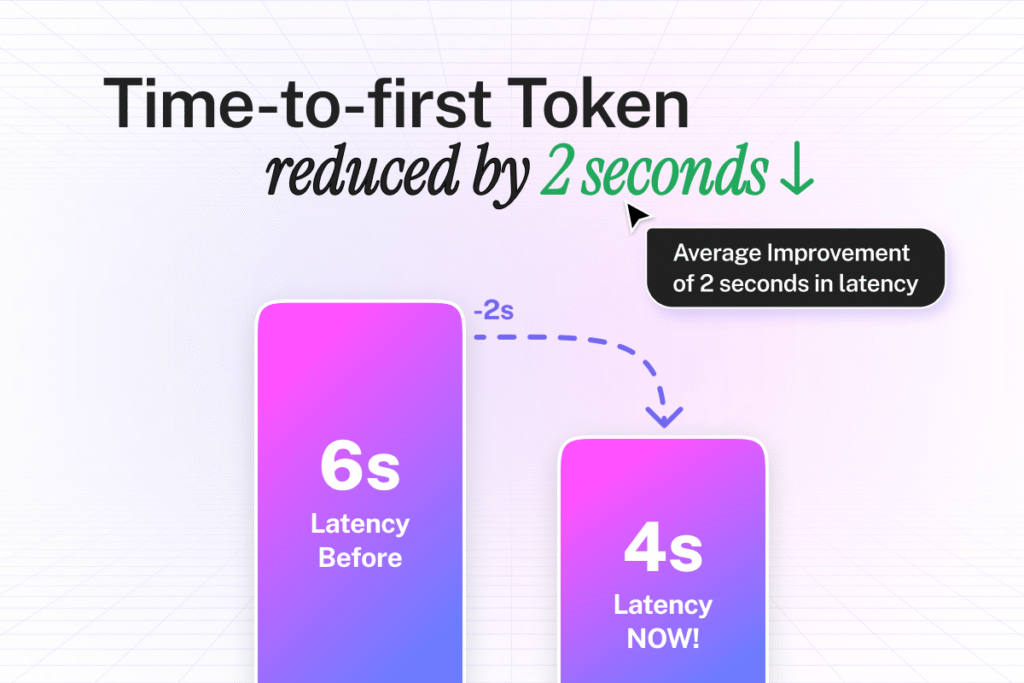
Time-to-first-token drops from 6 seconds to 4 seconds. Combined with Fastest Response mode, you get sub-second performance. - Do Priority Queries cost extra?
No. All Enterprise customers get Priority Queries at zero additional cost. - What setup is required for Priority Queries?
Zero. Priority Queries activate automatically when you use supported OpenAI models. - Which plans include Priority Queries?
All Enterprise customers using OpenAI models get Priority Queries. Premium customers get it through Fastest Response mode.
Every second your AI takes to respond, you lose customers.
A prospect asks about pricing. Your chatbot thinks for 6 seconds. They close the tab.
That’s not a maybe. That’s what happens.
Google’s research proves it: each extra second of wait time triggers exponential increases in abandonment. Your AI’s speed isn’t a technical detail. It’s the difference between closing deals and watching prospects disappear.
Why Slow AI Responses Are Killing Your Business
You’ve seen it happen.
A customer asks your AI chatbot a question. The typing indicator appears. One second passes. Two seconds. Three seconds. Four seconds.
They’re already thinking about leaving.
By the time your AI finally responds at the 6-second mark, many users have already clicked away. The ones who stay are frustrated, impatient, and one bad experience away from switching to a competitor.
Here’s what slow AI actually costs you:
- Sales prospects ghost you. Someone visits your website ready to buy. They ask about product features or pricing. Your AI makes them wait 5-6 seconds for an answer. That’s 5-6 seconds where they’re staring at a loading indicator, losing momentum, and questioning whether your company can actually deliver fast service. They open a competitor’s site in another tab.
- Support tickets explode. Customers come to your AI for quick answers. When responses lag, they abandon the conversation and submit support tickets instead. Your support team drowns in questions the AI should have handled. Resolution times balloon. Customer satisfaction scores drop.
- Employees stop using your AI tools. Your team tries your internal AI assistant for finding information. The first few queries take forever. They decide it’s faster to just search SharePoint manually or ask a coworker. Your expensive AI deployment becomes shelfware.
- Conversations never reach completion. Each delay creates a micro-decision point where users evaluate whether to keep waiting. The longer the pause, the more likely they bail. Multi-turn conversations become impossible when users won’t stick around for the second response.
The painful truth? Speed isn’t optional anymore. It’s the price of entry.
What Sub-Second AI Response Times Actually Feel Like
Imagine asking your AI a question and getting an answer before you finish reading your own query.
No loading spinners. No awkward pauses. Just instant, flowing conversation that feels completely natural.
This is what happens when AI becomes truly fast:
Your sales team jumps on a call with a high-value prospect. Questions fly rapid-fire about technical specifications, integration capabilities, and pricing scenarios. Your AI-powered assistant surfaces every answer instantly. The conversation flows without interruption. The prospect stays engaged. The deal closes in one call instead of dragging across three follow-up meetings.
A frustrated customer contacts support with a complex account issue. Your AI immediately pulls their history, identifies the problem, and walks them through the solution. The entire interaction takes 90 seconds. The customer hangs up happy instead of escalating to a supervisor.
An employee needs to find a specific clause in a 200-page contract before a meeting in 5 minutes. They ask your AI. The answer appears in under a second. They walk into the meeting prepared instead of scrambling.
When AI responses become imperceptible, something fundamental shifts. Users stop seeing AI as a tool they use and start experiencing it as an extension of their own knowledge. Questions get asked that never would have been asked before. Conversations go deeper. Problems get solved faster.
Speed doesn’t just improve user experience. It unlocks entirely new behaviors.
The 3-Year Journey to Sub-Second Response Times
For nearly three years, we’ve been obsessed with one goal: making AI responses feel instant.
We knew the target. Sub-second time-to-first-word. Fast enough that users never notice the wait. Fast enough that conversations flow naturally.
The challenge? Delivering that speed while maintaining state-of-the-art retrieval accuracy.
Most companies optimize for either speed or accuracy. Go fast and you sacrifice answer quality. Go accurate and users wait forever. We refused to compromise.
Breaking Down the Speed Problem
AI response time has three components:
- Time-to-first-token is how long before the AI starts responding. This is what users actually feel. The moment between hitting send and seeing words appear.
- Streaming speed is how fast the words flow once they start. Good streaming makes even longer responses feel quick because information arrives continuously.
- Total response time is how long the complete answer takes. Important for complex queries, but less critical than getting that first word out fast.
We attacked all three. But time-to-first-token mattered most. That’s the moment users decide whether to stay or leave.
Fastest Response Mode: The First Breakthrough
Last year we released Fastest Response mode. This feature combined speed-optimized models (GPT-4o-mini and GPT-4-mini) with aggressive caching and retrieval optimizations.
The results impressed us. Response times dropped significantly. Customers noticed the difference immediately.
But we weren’t satisfied. Fastest Response got us close to sub-second performance on simple queries. Complex questions still lagged. Consistency varied. We needed something more.
OpenAI Priority Processing: The Missing Piece
Then OpenAI released Priority processing.
This infrastructure upgrade lets requests jump to the front of the processing queue. Instead of waiting in line with everyone else, priority requests get dedicated resources and immediate attention.
The impact? Dramatic latency reductions across all supported models.
We immediately saw the opportunity. Combine Priority processing with our existing speed optimizations and we could finally, consistently hit sub-second response times.
But here’s what makes this special: we’re not charging extra for it.
How Priority Queries Deliver Enterprise-Grade Speed
Priority Queries is our implementation of OpenAI’s Priority processing infrastructure for CustomGPT.ai customers.
Here’s what happens behind the scenes:
When an Enterprise customer’s user asks a question, CustomGPT.ai routes that request through OpenAI’s Priority processing tier. Your request skips the standard queue. It hits dedicated processing resources immediately. The AI model processes your query without competing for resources with thousands of other requests.
Time-to-first-token drops from 6 seconds to 4 seconds. Average response latency improves by 2 seconds across all interactions.
When you combine Priority Queries with Fastest Response mode, you get sub-second time-to-first-word-streamed performance. This is our fastest possible configuration. It feels instantaneous.
Zero Configuration Required
Priority Queries activates automatically for Enterprise customers using supported OpenAI models.
No settings toggle. No API parameter changes. No configuration file updates. No deployment modifications.
You’re using GPT-4o? Priority Queries are already working. GPT-4-mini? Already accelerated. GPT-4.1? Already optimized.
This automatic activation works everywhere: embedded website widgets, API integrations, live chat deployments, Slack channels, Microsoft Teams integrations, Chrome extensions, mobile applications, and every other implementation method.
Model Support and Availability
Priority Queries works with these OpenAI models:
- GPT-4.1
- GPT-4o
- GPT-4-mini
- GPT-4o-mini
If you’re using Azure OpenAI, Priority Queries isn’t available yet. Microsoft hasn’t added Priority processing support to Azure infrastructure. The moment they do, we’ll enable it automatically. Azure customers can switch to OpenAI as their provider for immediate access.
Claude models and other non-OpenAI providers don’t support Priority processing. This is OpenAI infrastructure. We’re watching other providers and will announce additional speed features as they become available.
The Cost Advantage
OpenAI charges premium fees for Priority processing. Most companies pass that cost to customers.
We don’t.
CustomGPT.ai absorbs all Priority processing fees for Enterprise customers. You get enterprise-grade speed at zero additional cost. No surprise charges. No tier upgrades required. No per-query fees.
We believe speed should be standard, not premium.
Real Results: How Companies Use Priority Queries
- TechFlow Solutions cut their average support ticket resolution time by 40% after Priority Queries went live. Their AI now resolves first-contact issues that previously required three back-and-forth exchanges. Customer satisfaction scores jumped 23 points.
- Meridian Financial Services saw sales conversion rates improve by 31% on their AI-powered product recommendation chatbot. The difference? Prospects stay engaged through the entire conversation instead of bouncing after the first delayed response.
- CoreLogic Systems deployed Priority Queries across their internal knowledge base. Employee adoption of their AI assistant increased 67% in the first month. Employees actually prefer asking the AI over searching documentation manually now.
- Venture Partners Group uses Priority Queries for their deal flow analysis tools. Partners pull company information, financial data, and market analysis in real-time during investor calls. The instant responses let them go deeper on due diligence without awkward pauses that signal they’re researching on the fly.
- Summit Healthcare integrated Priority Queries into their patient information portal. Patients get instant answers to billing questions, appointment scheduling, and insurance coverage. Call center volume dropped 28% as patients self-serve successfully instead of giving up and calling.
These aren’t hypothetical benefits. This is what happens when you remove latency as a friction point.
How to Maximize Priority Queries Performance
Priority Queries work automatically, but you can optimize your implementation for maximum speed.
Step 1: Verify Your Plan and Provider
Check your CustomGPT.ai plan level. Priority Queries activates automatically for Enterprise customers.
Verify your model provider. Priority Queries requires OpenAI as your provider. If you’re using Azure OpenAI, consider switching to OpenAI for immediate access to Priority processing.
Action: Check with your account representative if you are using Azure or OpenAI as a model provider.
Step 2: Select Supported Models
Priority Queries works with GPT-4.1, GPT-4o, GPT-4-mini, and GPT-4o-mini.
If you’re using older models, upgrade to supported versions. The performance improvement justifies the switch.
For maximum speed: Use GPT-4o-mini or GPT-4-mini. These models benefit most from Priority processing and deliver the fastest overall response times.
Step 3: Enable Fastest Response Mode
Premium and Enterprise customers can activate Fastest Response mode for their AI agents.
Go to Agent Settings > Response Configuration and enable Fastest Response mode. This combines Priority Queries with speed-optimized model selection and aggressive caching.
The combination delivers sub-second time-to-first-word performance. This is the fastest configuration available.
Step 4: Optimize Your Content Sources
Fast processing means nothing if your AI spends time searching poorly organized content.
Clean your knowledge base. Remove duplicate documents. Consolidate overlapping information. Use clear, descriptive titles.
Better organized content means faster retrieval. The AI finds relevant information quickly and starts generating responses sooner.
Step 5: Test Across Deployment Methods
Priority Queries work everywhere, but user experience varies by implementation.
Test your embedded widget, API integrations, and live chat deployments. Measure time-to-first-word in each environment.
Tip: Embedded widgets benefit most from Priority Queries because users expect website chat to be instant. API integrations see improvement too, but users often have different speed expectations for back-end processes.
Step 6: Monitor Performance Metrics
Track these metrics before and after Priority Queries:
Time-to-first-token, average response latency, conversation completion rates, user abandonment rates, customer satisfaction scores.
Set a baseline before Priority Queries, then measure weekly after activation. The improvements should be obvious within 7-14 days.
Step 7: Educate Your Team
Your sales, support, and internal teams should know Priority Queries is active.
Explain that AI responses are now faster. Encourage them to lean into multi-turn conversations. Complex questions that previously felt slow now work smoothly.
When teams trust the AI’s speed, they use it more aggressively. That’s when you see real productivity gains.
Advanced Strategies for Power Users
Strategy 1: Chain Complex Queries Without Hesitation
Priority Queries makes multi-turn conversations viable.
Ask follow-up questions immediately. Dig deeper into complex topics. Request clarification without worrying about compounding delays.
Example: Instead of asking one broad question and hoping the AI guesses what you need, ask a precise question, evaluate the response, then ask a follow-up that narrows to exactly what you need. The conversation flows naturally because responses arrive instantly.
Strategy 2: Use AI During Time-Sensitive Interactions
Priority Queries shine during live customer calls, prospect demos, and urgent internal requests.
Don’t hesitate to pull information mid-conversation. The sub-second response time means no awkward pauses that signal you’re looking something up.
Your customers and prospects won’t even realize you’re using AI. It feels like you just know everything.
Strategy 3: Deploy AI in High-Volume Scenarios
Priority Queries maintain speed even during traffic spikes.
Use your AI for customer-facing scenarios that handle hundreds or thousands of simultaneous users. Black Friday sales support. Product launch announcements. Breaking news responses.
Other AI tools slow down under load. Priority processing maintains performance when you need it most.
Strategy 4: A/B Test Response Styles
Fast responses let you experiment with different AI communication styles without frustrating users.
Test formal vs. casual tone. Test detailed vs. concise answers. Test different information structures.
When responses are instant, users tolerate variation. When responses are slow, every second matters and consistency becomes critical.
Metrics That Matter: Measuring Priority Queries Impact
Time-to-First-Token
This is your primary speed metric. How long between user hitting send and words appearing on screen.
Target: Under 4 seconds for Priority Queries. Under 1 second when combined with Fastest Response mode.
Expected improvement: 30-50% reduction from your baseline.
Average Response Latency
Total time from question to complete answer.
Target: Priority Queries shaves approximately 2 seconds off your current average.
Expected improvement: 20-40% reduction depending on response complexity.
Messages Per Session
Average number of questions users ask per conversation.
Target: This should increase as faster responses encourage deeper engagement.
Expected improvement: 15-25% increase in messages per session.
Customer Satisfaction Score (CSAT)
Direct user feedback on AI interaction quality.
Target: Improvement of 10-20 points on a 100-point scale.
Expected improvement: Speed improvements translate directly to satisfaction. Users notice and appreciate fast responses even if they can’t articulate why the experience feels better.
Support Ticket Deflection Rate
Percentage of inquiries resolved by AI without escalating to human support.
Target: 60-80% deflection for common questions.
Expected improvement: 10-15% increase as faster responses keep users engaged through resolution.
Sales Conversion Rate
Percentage of prospects who become customers after interacting with your AI.
Target: Highly variable by industry and product, but expect 5-15% improvement.
Expected improvement: Faster responses keep prospects engaged. Engaged prospects convert better.
The Bottom Line: Speed Is Your Competitive Advantage
AI that responds instantly doesn’t just improve user experience.
It changes what your company can do.
- Support teams resolve issues in one interaction instead of three. Customers stay happier. Costs drop.
- Sales teams close deals faster. Prospects get answers immediately. Momentum builds instead of dissipating during long pauses.
- Employees actually use your AI tools. When responses are instant, the AI becomes indispensable. When responses lag, it becomes ignored.
Priority Queries is live for all Enterprise customers right now. You’re not waiting for a rollout schedule. You’re not on a beta waitlist.
If you’re an Enterprise customer using OpenAI models, Priority Queries is already accelerating your AI.
If you’re on Standard or Premium plans, contact CustomGPT.ai to discuss upgrading. Get Priority Queries and unlock the speed advantage your competitors don’t have.
Every second matters. And you just eliminated two of them.
Build a Custom GPT for your business, in minutes.
Drive revenue, save time, and delight customers with powerful, custom AI agents.
Trusted by thousands of organizations worldwide


