

How To Build A Sitemap From Website Scraping
A sitemap plays a crucial role in organizing and structuring website content, enabling search engines to navigate and index pages effectively. However, there are situations where websites, helpdesk platforms, or hosting providers lack built-in sitemap functionality. In such cases, the “Building Sitemaps from Website Scraping” tool comes to the rescue. This tool empowers you to extract information directly from websites and create a sitemap tailored to your needs. Whether you want to incorporate helpdesk articles into a custom chatbot or generate a sitemap for a website hosted on a platform without built-in support, this guide will walk you through the process step by step.
Why Scrape Websites for Sitemaps?
Scraping websites to build sitemaps offers several advantages. For instance, some helpdesk software, like Zendesk, may not provide a built-in sitemap feature. When you aim to integrate all your helpdesk articles into a custom chatbot, scraping the helpdesk website becomes the optimal solution. Similarly, if your website is hosted on platforms such as Wix or Squarespace, which lack native sitemap functionality, scraping your website and generating a sitemap from the extracted pages becomes necessary.
Sitemap Generator from Website Scraping: Overview
The Sitemap Generator from Website Scraping tool allows you to create a comprehensive sitemap by leveraging the power of scraping. Below is an overview of the tool and a breakdown of how to use it effectively.
Step 1: Identify the Target Websites
Begin by navigating to the Website Scraping Tool. To initiate the sitemap creation process, you first need to identify the target website(s) you want to scrape. Ensure that the websites you select are publicly accessible and can be crawled by the scraper. This step is crucial as the tool relies on accessing and extracting information from these websites to generate large sitemaps from websites.
Step 2: Set the Maximum Number of Pages to Scrape
Once you’ve determined the target websites, it’s essential to define the maximum number of pages you want to scrape.
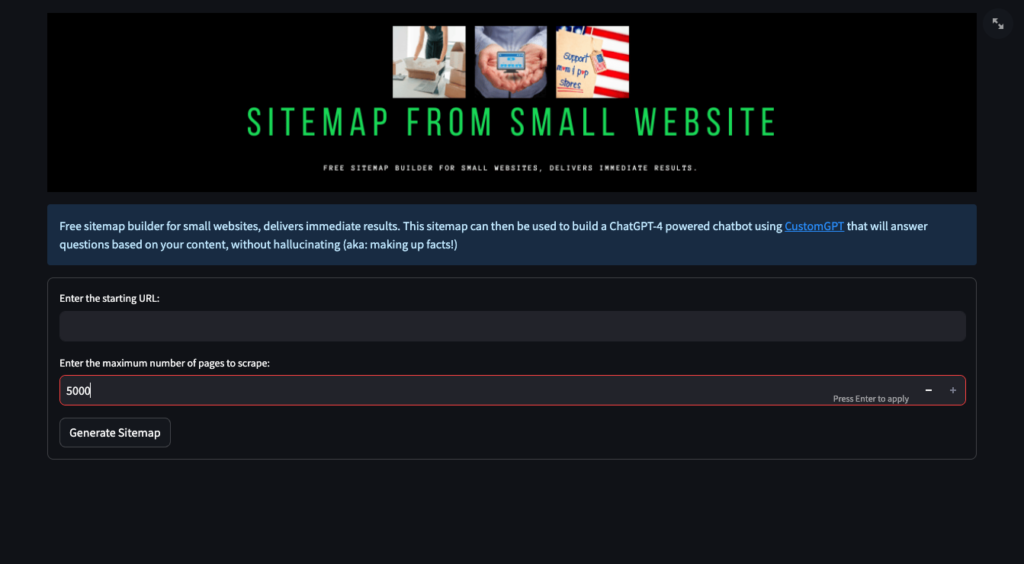
While the Sitemap Generator from Website Scraping tool provides a generous limit of 5000 pages, you can adjust this number according to your specific requirements. Consider factors such as the size of the website and the relevance of its content to optimize the scraping process.
Step 3: Generate the Sitemap
With the target websites identified and the scraping parameters set, it’s time to generate the sitemap.
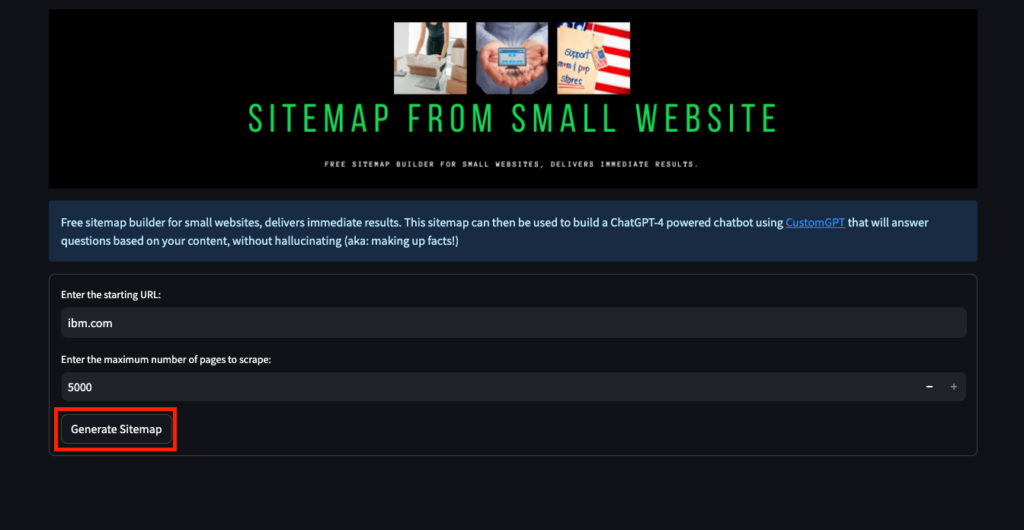
The tool will automatically scrape the selected websites, extract relevant information, and construct a well-structured sitemap encompassing the detected pages. This sitemap will serve as a foundation for integrating the scraped content into your desired applications, such as a chatbot or other conversational AI experiences.
The Power of CustomGPT Tools
By utilizing the Sitemap Generator from Website Scraping tool, along with other free CustomGPT tools, you can streamline the process of sitemap creation for your chatbot. Whether you have existing URLs, need to explore relevant Google search results, or wish to scrape specific content from websites, these tools provide practical and efficient solutions. CustomGPT-powered chatbots can leverage well-structured sitemaps to deliver accurate, informative, and engaging interactions with users, thereby elevating conversational AI experiences to new heights.
Frequently Asked Questions
How do I create a sitemap for a website that doesn't already have one?
Dan Mowinski, AI Consultant, said, “The tool I recommended was something I learned through 100 school and used at my job about two and a half years ago. It was CustomGPT.ai! That’s experience. It’s not just knowing what’s new. It’s remembering what works.” If a website has no built-in sitemap, you can create one by scraping its public, crawlable pages and generating a sitemap from the detected URLs. The documented workflow is to choose the target website, confirm it is publicly accessible, set a page limit of up to 5,000 pages, and then generate the sitemap. This is especially useful for help centers and sites on platforms such as Zendesk, Wix, or Squarespace when native sitemap support is missing.
How do I keep a website-scraped sitemap focused on the right pages?
Start by selecting only the public website or help center you actually want to crawl, then set a maximum page count that matches your goal. The scraping workflow supports a limit of up to 5,000 pages, which helps you control scope based on site size and content relevance. If you need only a specific content set, keeping the target source narrow before you generate the sitemap is the most reliable way to avoid pulling in too much unrelated material.
Can a scraped sitemap include custom metadata like product specs or publish dates?
Stephanie Warlick, Business Consultant, said, “Check out CustomGPT.ai where you can dump all your knowledge to automate proposals, customer inquiries and the knowledge base that exists in your head so your team can execute without you.” In a scraping-based sitemap workflow, the primary job of the sitemap is URL discovery. The documented process describes extracting information from websites and building a sitemap of detected pages, but it does not describe adding custom sitemap fields such as product specs or publish dates. If those details matter for search or AI retrieval, keep them in the source content itself rather than assuming the sitemap will carry extra metadata.
Can I build one sitemap from multiple websites?
Joe Aldeguer, IT Director at Society of American Florists, said, “CustomGPT.ai knowledge source API is specific enough that nothing off-the-shelf comes close. So I built it myself. Kudos to the CustomGPT.ai team for building a platform with the API depth to make this integration possible.” Yes. The workflow explicitly refers to identifying the target website(s) you want to scrape, so you can generate a sitemap from more than one public website. The important requirement is that each source be publicly accessible and crawlable before you start the scrape.
Can a scraped sitemap include help-center pages, PDFs, or password-protected URLs?
Evan Weber, Digital Marketing Expert, said, “I just discovered CustomGPT, and I am absolutely blown away by its capabilities and affordability! This powerful platform allows you to create custom GPT-4 chatbots using your own content, transforming customer service, engagement, and operational efficiency.” A scraping-based sitemap works best with public, crawlable sources, which makes public help-center pages a strong fit. Password-protected pages are not a fit for this workflow because the scraper must be able to access the content publicly. PDFs are supported elsewhere in the platform as a data format, but the scraping instructions do not state that linked PDFs are automatically added to a generated sitemap.
Conclusion
Building sitemaps from website scraping offers a powerful solution when websites lack built-in sitemap functionality. Whether you aim to incorporate helpdesk articles into a custom chatbot or generate a sitemap for a platform without native support, the Sitemap Generator from Website Scraping tool provides an effective approach. By following the steps outlined in this guide, you can create well-structured sitemaps that empower your CustomGPT-powered chatbot to deliver enhanced user experiences. Take advantage of these tools and unlock the full potential of conversational AI in your applications. For more free sitemap tools, please visit this blog post. For more information on sitemaps and how you can leverage them, click here.
Related Resources
If you’re refining scraped content into better outputs, this tool complements the workflow.
- CustomGPT.ai Prompt Optimizer — Improve unclear or underperforming prompts so your CustomGPT.ai results are more precise, consistent, and useful.


