

In our last blog post, we explored the integration of CustomGPT.ai with Shell programming language, demonstrating how pre-built shell code snippets can be used to send HTTP requests to CustomGPT.ai, enhancing application functionality and showing how CustomGPT.ai works. Today, we will delve into a new integration with PowerShell. PowerShell, known for its robust scripting capabilities in the Windows environment, offers a powerful platform to interact with external APIs like CustomGPT.ai.
Let’s see how to integrate CustomGPT.ai with PowerShell to enhance application workflows and automation tasks further.
Key functionalities and purposes of PowerShell
PowerShell is a powerful scripting language and command-line shell developed by Microsoft primarily for task automation and configuration management in the Windows environment. Introduced in 2006, PowerShell has become a central component for system administrators, developers, and IT professionals due to its robust functionalities and seamless integration with Windows services and applications.
Key functionalities and purposes of PowerShell include:
- It provides a command-line interface for executing commands, managing system configurations, and interacting with Windows components.
- PowerShell supports task automation through cmdlets (command-line utilities), enabling users to perform programmatically various system management tasks.
- PowerShell offers robust support for integrating with external APIs, enabling users to interact with third-party applications and services seamlessly.
CustomGPT.ai Features and Capabilities

CustomGPT.ai is an advanced AI platform known for its advanced features and capabilities, including:
- CustomGPT.ai uses NLP algorithms to understand and generate human-like text based on user inputs.
- It offers a comprehensive API that allows developers to integrate CustomGPT.ai’s AI capabilities into their applications, enabling features such as text generation, language translation, analysis, and more.
- CustomGPT.ai enables users to customize and train AI models based on specific domains or use cases, enhancing the accuracy and relevance of generated responses.
- With its scalable infrastructure, CustomGPT.ai can handle large volumes of requests and deliver fast response times, making it suitable for enterprise-level applications.
- CustomGPT.ai provides SDKs and documentation for seamless integration with programming languages like PowerShell, Python, Node.js, and more, making it easy for developers to incorporate AI capabilities into their workflows.
Benefits of integrating CustomGPT.ai with PowerShell using APIs
Here are some of the benefits of integrating CustomGPT.ai with Powershell using APIs:
Enhanced Automation
PowerShell scripts can leverage CustomGPT.ai’s AI capabilities to automate tasks such as text generation, data analysis, and content summarization, streamlining workflows and improving productivity.
Intelligent Insights
By integrating CustomGPT.ai, PowerShell users can gain valuable insights from text data, perform sentiment analysis, extract key information, and make informed decisions based on AI-generated insights.
Extended Functionality
Integration with CustomGPT.ai extends the functionality of PowerShell scripts by adding advanced AI capabilities, enabling users to perform complex text-related tasks with ease.
Improved User Experience
CustomGPT.ai’s natural language processing capabilities enhance the user experience by enabling interactive and conversational interactions within PowerShell scripts, making them more intuitive and user-friendly.
Integrating CustomGPT.ai with Powershell: A Practical Example
Integrating CustomGPT.ai with PowerShell offers a practical solution for incorporating custom chatbots into PowerShell scripts using APIs, much like its Shell programming integration. In this example, we will utilize a pre-built code snippet to retrieve metadata for a specific page using CustomGPT.ai’s API. The API endpoint allows users to fetch metadata associated with a particular page, providing valuable insights and information.

The above code snippet utilizes
- PowerShell’s Invoke-WebRequest cmdlet to send an HTTP GET request to the CustomGPT.ai API endpoint.
- It includes necessary headers, such as the “accept” header specifying the response format as JSON. Upon executing the request, the response containing the metadata for the specified page is stored in the $response variable, which can then be further processed or utilized within PowerShell scripts.
This straightforward approach demonstrates how PowerShell users can seamlessly integrate CustomGPT.ai’s AI capabilities into their workflows to access and utilize metadata for enhanced functionality and automation.
Test and Run the Code in the CustomGPT.ai Browser
To test and run the provided code snippet in the CustomGPT.ai browser interface, follow these simple steps:
- Log in to your account, and navigate to your profile settings. Here, you’ll find an option to generate an API key. Click on this option to generate your unique API key. Make sure to copy the generated API key as it will be needed to authenticate your API requests.

- In the CustomGPT.ai API browser interface, locate the authorization box. Paste the API key you obtained in the previous step into this box. This ensures that your requests are authorized to interact with the CustomGPT.ai API.

- Next, identify the project and page ID for which you want to retrieve metadata. You can find this information within your CustomGPT.ai project settings.
- Replace the placeholders in the provided code snippet (projectId and pageId) with the actual project and page IDs obtained from your CustomGPT.ai project settings.

- Finally, execute the code snippet in the CustomGPT.ai browser interface by clicking on the “Try it” button.
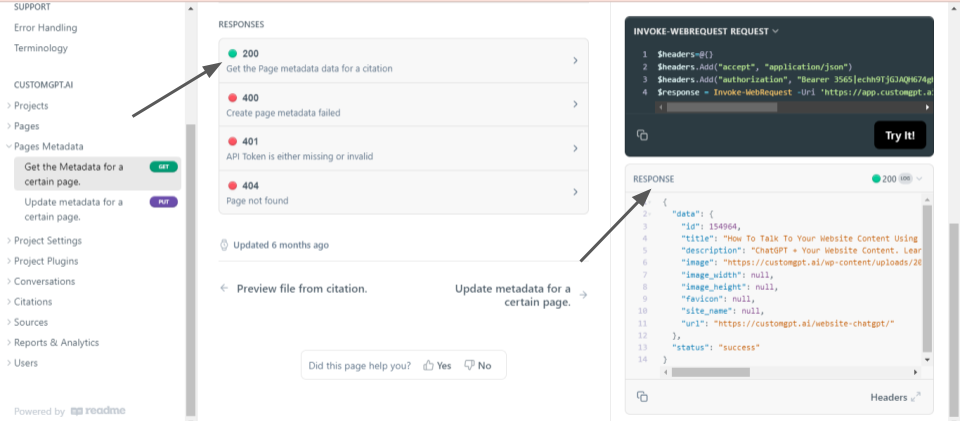
- Upon successful execution, you will receive a response containing the metadata for the specified page, allowing you to review and analyze the retrieved information directly within the CustomGPT.ai interface.
By following these steps, you can seamlessly test and run the provided code snippet within the CustomGPT.ai browser environment, facilitating easy integration and experimentation with CustomGPT.ai’s API functionalities.
Conclusion
With PowerShell’s robust scripting capabilities and CustomGPT.ai’s advanced features, developers can streamline processes, automate tasks, and enhance user interactions with intelligent chatbot functionality. Whether it’s retrieving metadata for specific pages or performing other AI-driven tasks, the possibilities are endless with this integration.
Frequently Asked Questions
How do I call an AI API from PowerShell?
Nitro! Bootcamp launched 60 AI chatbots in 90 minutes for 30+ minority-owned small businesses with a 100% success rate, showing that API-driven setup can move quickly. In PowerShell, send a JSON POST request to the OpenAI-compatible /v1/chat/completions endpoint, authenticate with an API key, and parse the JSON response for the next step in your script. If you already use the OpenAI chat format, this endpoint is designed as a drop-in replacement.
What PowerShell tasks benefit most from an AI API?
Bill French, Technology Strategist, said, u0022They’ve officially cracked the sub-second barrier, a breakthrough that fundamentally changes the user experience from merely ‘interactive’ to ‘instantaneous’.u0022 In PowerShell, the best candidates are text-heavy automation steps where a fast response improves the next action, such as text generation, language translation, data analysis, content summarization, and turning internal knowledge into short answers.
Do I need to fine-tune a model before using AI in PowerShell scripts?
Usually not for a first rollout. The service is RAG-powered and supports knowledge ingestion from websites, documents, audio, video, URLs, and structured files, so a PowerShell script can send a prompt grounded in existing content instead of waiting for a separate fine-tuning project. The Kendall Project said, u0022We love CustomGPT.ai. It’s a fantastic Chat GPT tool kit that has allowed us to create a ‘lab’ for testing AI models. The results? High accuracy and efficiency leave people asking, ‘How did you do it?’ We’ve tested over 30 models with hundreds of iterations using CustomGPT.ai.u0022
Can PowerShell automate internal policy or compliance questions with AI?
Yes, if the answers are grounded in approved internal sources. A PowerShell workflow can send a question to the API and return an answer based on ingested documents, websites, or supported formats such as PDF, DOCX, TXT, CSV, HTML, XML, JSON, audio, video, and URLs. RAG and citation support matter here because policy and compliance responses should stay tied to source material.
Is a PowerShell AI integration secure enough for business workflows?
For many teams, the key published controls are SOC 2 Type 2 certification, GDPR compliance, API key-based authentication, and a stated policy that data is not used for model training. Those controls make it a plausible fit for business workflows, but your team should still compare them against your own security and compliance requirements.
What is the best way to handle errors when calling an AI API from PowerShell?
Treat it like any REST integration in a script: capture the HTTP response, log failures, and validate that your API key and request body are present before the call. Because the endpoint is OpenAI-compatible and uses API key authentication, keeping the request format and auth values explicit in your PowerShell code makes troubleshooting much easier.
How is this different from Microsoft AI Shell or a plain OpenAI API call in PowerShell?
Microsoft AI Shell is aimed at interactive command-line assistance, while a plain OpenAI API call is a general model request. If your PowerShell script needs answers grounded in your own documents, a RAG-focused endpoint is a better fit. In the published benchmark, CustomGPT.ai outperformed OpenAI on RAG accuracy, and the API is OpenAI-compatible at /v1/chat/completions, so teams can often keep a familiar request format while adding retrieval from their own knowledge base.
Related Resources
If you’re exploring API workflows with CustomGPT.ai, this guide shows how retrieval fits into industrial use cases.
- Industrial RAG Solutions — See how CustomGPT.ai supports industrial teams with retrieval-augmented AI for technical documents, operations, and domain-specific knowledge.