Custom GPT RAG API + Java: Integrating CustomGPT.ai into Your Java Applications

CustomGPT.ai chatbots offer advanced AI solutions that are reshaping businesses of all sizes. They streamline operations and enhance customer engagement by seamlessly integrating custom chatbots into workflows, applications, and frameworks through versatile RAG API support for various programming languages.
In this blog, we will provide a practical, step-by-step guide to integrate CustomGPT.ai chatbots into Java applications programmatically, grounded in how CustomGPT.ai works. Whether you’re a small startup or a large enterprise, this guide will help you integrate the capabilities of CustomGPT.ai into your Java projects using its enterprise RAG API, transforming user interactions and optimizing business processes.
Introduction to Java and its support for CustomGPT.ai
Java, a versatile and widely used programming language renowned for its portability and scalability, offers robust support for integrating RAG APIs into applications. With its extensive ecosystem of libraries and frameworks, Java simplifies the process of incorporating third-party services like CustomGPT.ai API integrations. CustomGPT.ai, a leading AI platform, provides developers with powerful tools to create custom chatbots tailored to their needs. Integrating CustomGPT.ai with Java applications provides many benefits, enhancing user experiences and streamlining workflows.
Here’s a closer look at Java’s support for RAG APIs and how it facilitates the integration of CustomGPT.ai into Java applications:
RAG API Integration in Java
- Java boasts comprehensive support for making HTTP requests and handling RAG API responses.
- Libraries like Apache HttpClient and OkHttp provide developers convenient ways to send requests and process data from RAG APIs.
- Java’s object-oriented paradigm and intuitive syntax make it easy to encapsulate RAG API interactions into reusable components.
Benefits of Integrating CustomGPT.ai with Java
The following are the benefits of integrating CustomGPT.ai with Java:
- Enhanced User Experiences: CustomGPT.ai enables developers to create intelligent chatbots that engage users in natural conversations, enhancing overall user satisfaction.
- Workflow Automation: By leveraging CustomGPT.ai’s RAG API, developers can automate repetitive tasks and streamline workflows within Java applications, boosting productivity.
- Personalization: CustomGPT.ai helps developers personalize user experiences by tailoring responses and interactions based on individual preferences and behavior.
- Scalability: Java’s scalability allows for seamless integration of CustomGPT.ai chatbots into applications of any size, from small-scale projects to enterprise-level systems.
- Community Support: Java’s large and active community provides developers with access to abundant resources, tutorials, and forums for assistance with integrating CustomGPT.ai and resolving any issues that may arise.
CustomGPT.ai’s Support for Java
- CustomGPT.ai offers comprehensive documentation and resources for integrating its services with Java applications, ensuring a smooth development process.
- The platform provides a RESTful API that allows Java applications to interact with CustomGPT.ai’s features programmatically, including creating and managing chatbots, processing user queries, and retrieving chatbot responses.
- With CustomGPT.ai’s support for Java, developers can easily incorporate advanced AI capabilities into their applications, enabling them to deliver innovative solutions to their users.
Java’s robust support for RAG APIs, coupled with CustomGPT.ai’s powerful features and support for Java integration, makes it an ideal combination for developers looking to enhance their applications with intelligent chatbot capabilities.
Integrating CustomGPT.ai with Java: A practical example
Now we will explain the integration of CustomGPT.ai with Java, showcasing a practical example to create a new chatbot project source. This demonstration illustrates how to enrich your chatbot project’s information by adding a new data source. By specifying a sitemap URL or uploading a file, you can provide additional context, enhancing the capabilities of your chatbot. Let’s explore how to implement this functionality programmatically using Java.

In this Java example, we’re using
- The OkHttpClient library sends an HTTP POST request to the CustomGPT.ai RAG API endpoint for creating a new project source.
- We specify the URL of the RAG API endpoint and set the request method to POST. Additionally, we include headers for accepting JSON responses and specifying the content type.
- Then, we execute the request using OkHttpClient and obtain a Response object containing the result and the program will send an HTTP POST request to the specified CustomGPT.ai RAG API endpoint. The endpoint will process the request and create a new project source in CustomGPT.ai.
Test and Run the Code in the CustomGPT.ai Browser
To test and run the provided code snippet, follow these steps:
- If you haven’t already, sign up for a CustomGPT.ai account by going to the website.
- Get RAG API key: After signing up, navigate to your profile and click on the API section to obtain your RAG API key. This key will be necessary for making requests to the
- .

- Go to CustomGPT.ai browser: Access the CustomGPT.ai browser interface where you can interact with your projects and perform various actions.

- Provide RAG API key: Within the CustomGPT.ai browser interface, paste the RAG API key in the authorization box below.

- Update the code snippet: Replace “projectId” in the URL of the code snippet with the actual project ID you obtained from CustomGPT.ai. And provide the source you want to add to your chatbot, it could be a website sitemap or any document.

- Run the Java program: Execute the Java program containing the provided code snippet. This will initiate an HTTP POST request to the CustomGPT.ai RAG API endpoint, attempting to create a new project source.
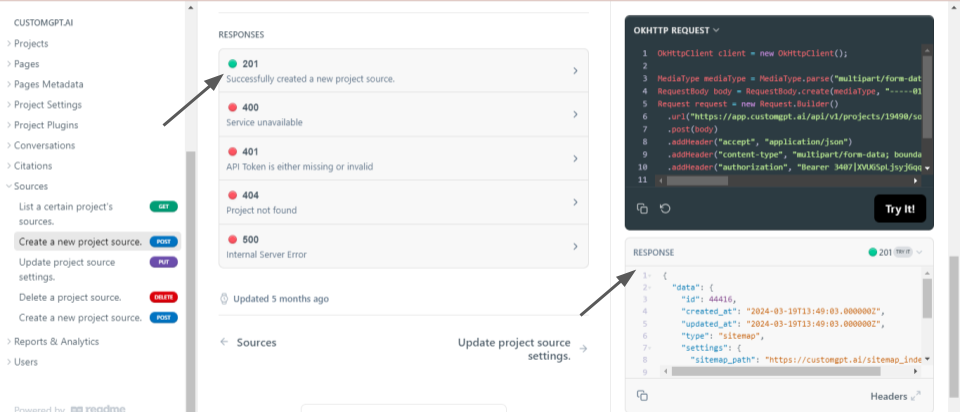
- Check the response: Once the request is processed, examine the response received from the server. The response message “201” shows that the new project source was created without any errors.
By following these steps, you can effectively test and run the code snippet to integrate CustomGPT.ai with Java and create a new project source programmatically. Similarly, you can perform various other operations using Java code snippets from CustomGPT RAG API documentation.
Conclusion
By seamlessly integrating CustomGPT.ai’s RAG API with Java, developers can create intelligent chatbots and conversational interfaces for their applications, including chatbots for WordPress, that enhance user engagement and streamline operations. As we continue to explore integrations with more programming languages, stay connected for upcoming enhancements and opportunities to incorporate CustomGPT.ai into a wider range of applications and platforms.
Frequently Asked Questions
Can I integrate the CustomGPT.ai RAG API into an existing Java app without rewriting my stack?
Yes. Because the API is OpenAI-compatible at /v1/chat/completions and uses API-key authentication, you can call it from an existing Java application instead of rebuilding your stack. Java already has mature HTTP clients such as Apache HttpClient and OkHttp, so most teams add one API client and keep their existing controllers, business logic, and UI.
How do I add the CustomGPT.ai RAG API to a Spring Boot application?
In Spring Boot, the usual starting point is a service class that sends an HTTP request to /v1/chat/completions, authenticates with your API key, and returns the response to your controller or REST layer. The source material specifically points to Java HTTP tooling such as Apache HttpClient and OkHttp for making requests and handling responses, which makes a standard REST integration a practical first implementation.
How can I reduce wrong or inconsistent answers in a Java RAG integration?
Use retrieval over approved content rather than relying on model memory alone, and enable citation support so users can verify where an answer came from. The platform includes anti-hallucination with citation support and outperformed OpenAI in a RAG accuracy benchmark. Brendan McSheffrey of The Kendall Project said, “We love CustomGPT.ai. It’s a fantastic Chat GPT tool kit that has allowed us to create a ‘lab’ for testing AI models. The results? High accuracy and efficiency leave people asking, ‘How did you do it?’ We’ve tested over 30 models with hundreds of iterations using CustomGPT.ai.”
Can I use the API in a Java app that handles sensitive HR or legal data?
Yes, if your integration needs documented security and privacy controls. Relevant credentials in the source materials include SOC 2 Type 2 certification, GDPR compliance, and a policy that your data is not used for model training. In a Java deployment, that lets you keep your application’s existing access controls while using API-key authentication for the model call.
Can I put the chatbot on a website or customer portal without requiring a ChatGPT login?
Yes. Supported deployment options include an embed widget, live chat, search bar, and direct API access, so you can surface the chatbot in your own website or customer portal. Bill French, a technology strategist, said, “They’ve officially cracked the sub-second barrier, a breakthrough that fundamentally changes the user experience from merely ‘interactive’ to ‘instantaneous’.” Fast responses matter when you are serving external users through a Java application.
What content should go into the knowledge base for a Java RAG setup?
The indexed knowledge base can include PDFs, DOCX, TXT, CSV, HTML, XML, JSON, audio, video, and URLs, with a maximum file size of 100MB per file. That makes it suitable for manuals, policies, help content, and other reference material your Java application needs to answer against. Dan Mowinski, an AI consultant, said, “The tool I recommended was something I learned through 100 school and used at my job about two and a half years ago. It was CustomGPT.ai! That’s experience. It’s not just knowing what’s new. It’s remembering what works.”
Related Resources
These articles expand on working with the CustomGPT.ai API across different languages and workflows.
- Clojure API Guide — Explore how to use the CustomGPT.ai API with Clojure for retrieval-augmented generation and application development.
- Available Integrations — Review the platforms and tools that connect with CustomGPT.ai to streamline deployment and automation.
- R API Integration — See how to integrate the CustomGPT.ai API with R for data-driven AI workflows and custom applications.