Custom GPT RAG API + PHP: Enhancing PHP Applications with CustomGPT.ai

In this final blog post of our integration series, we will explore the integration of CustomGPT.ai with PHP, one of the most popular server-side scripting languages. So today, we’ll explore how integrating CustomGPT.ai with PHP can enhance the functionality and intelligence of web applications, opening up new avenues for interactive user experiences and streamlined automation. Let’s see the details of how to integrate CustomGPT.ai’s advanced AI capabilities into PHP applications, starting with how CustomGPT.ai works.
Introduction to PHP and its key features
PHP, or Hypertext Preprocessor, is a widely used server-side scripting language that is especially suited for web development and creating dynamic web pages. It offers developers a powerful toolset for building interactive websites, web applications, and content management systems. PHP’s versatility and ease of use make it a popular choice among developers, enabling them to handle form data, manage databases, generate dynamic content, and interact with external RAG APIs.
Here are some key features and purposes of PHP:
- PHP enables developers to generate dynamic web pages and content based on user input or database queries. This dynamic nature allows for personalized and interactive user experiences.
- PHP provides built-in support for connecting to various databases, such as MySQL, PostgreSQL, and SQLite. This enables developers to store and retrieve data from databases, making PHP suitable for building database-driven web applications.
- PHP supports seamless integration with external RAG APIs, allowing developers to interact with third-party services and resources. This opens up a wide range of possibilities for integrating PHP applications with external platforms and services, such as CustomGPT.ai.
CustomGPT.ai
CustomGPT.ai provides a comprehensive RAG API that allows developers to integrate its advanced AI capabilities into PHP applications. With CustomGPT.ai’s RAG API, developers can seamlessly incorporate chatbots, natural language processing, and text generation features into their PHP-based projects.

Now, let’s explore the features and capabilities of CustomGPT.ai and its API integrations in a CustomGPT.ai vs. Forethought comparison
Integration Flexibility
One of the key benefits of RAG API integrations with CustomGPT.ai is the flexibility it offers, which helps illustrate why MCP matters to developers. Developers can integrate custom chatbots into a wide range of applications, including websites, web applications, desktop applications, workflow automation systems, and more.
Enhanced Functionality
By integrating CustomGPT.ai’s RAG API into PHP applications, developers can enhance the functionality and intelligence of their projects. They can leverage CustomGPT.ai’s advanced AI capabilities to create interactive chatbots, automate text generation tasks, and improve user engagement.
Benefits of RAG API Integrations
RAG API integrations with CustomGPT.ai offer several benefits, including improved efficiency, enhanced user experiences, and streamlined workflow automation. Additionally, integrating CustomGPT.ai with PHP allows developers to leverage the power of AI in their projects without having to build AI capabilities from scratch.
Chatbot Integration
CustomGPT.ai provides developers with tools and RAG APIs to create custom chatbots that can engage users in natural language conversations. Developers can train chatbots to respond to user queries, provide information, and perform tasks based on predefined workflows.
Text Generation
With CustomGPT.ai’s RAG API, developers can generate human-like text responses for a variety of use cases, including content generation, customer support, and conversational interfaces. CustomGPT.ai’s text generation capabilities are powered by large language models trained on vast amounts of textual data.
Multi-Language Support
CustomGPT.ai’s RAG API supports integration with multiple programming languages, including PHP, Python, JavaScript, and more. This multi-language support enables developers to integrate CustomGPT.ai into their projects using their preferred programming language.
By leveraging CustomGPT.ai’s capabilities, developers can create interactive chatbots, automate text generation tasks, and improve workflow automation in PHP projects.
Integrating CustomGPT.ai with PHP: A Practical Example
In the practical example of integrating CustomGPT.ai with PHP, we will demonstrate how to retrieve details of a project using a pre-built code example from the RAG API documentation. This example utilizes a GET request to fetch specific information about a project based on its unique project ID.
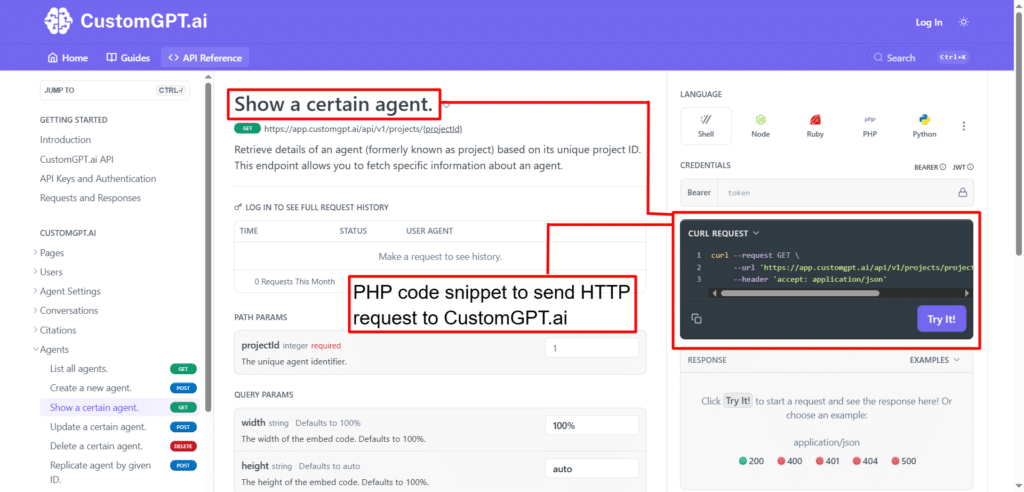
This example demonstrates how easily CustomGPT.ai’s RAG API can be integrated into PHP applications using the GuzzleHttp library, allowing developers to interact with CustomGPT.ai’s features programmatically and retrieve project details with minimal effort.
Test and Run the code in CustomGPT.ai Browser
To test and run the code snippet in the CustomGPT.ai browser, follow these steps:
- After signing up and logging into your account, navigate to your profile settings. Here, you’ll find an option to generate an RAG API key. Click on this option to generate your RAG API key. Copy the generated API key as it will be needed to authenticate your RAG API requests.

- Place the RAG API in the authorization box as shown below.
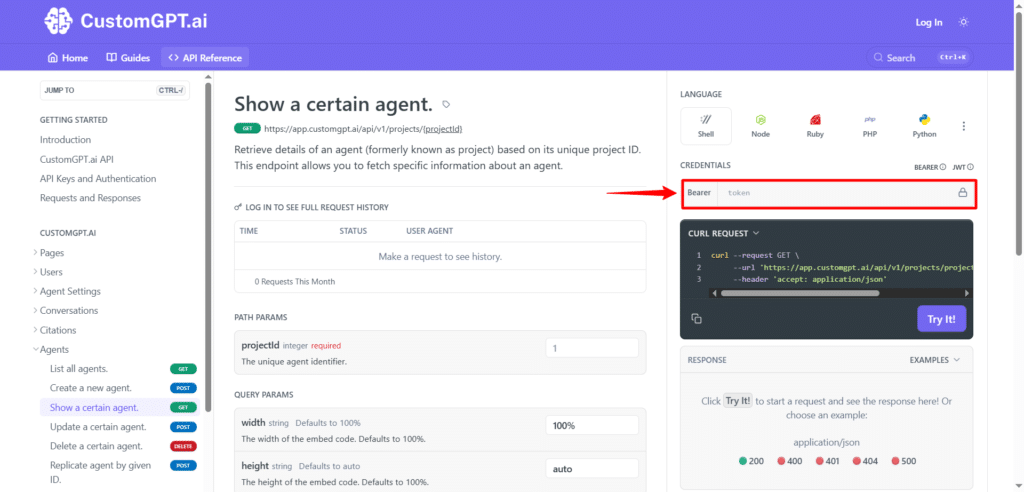
- Place Project ID in the placeholder as shown below.
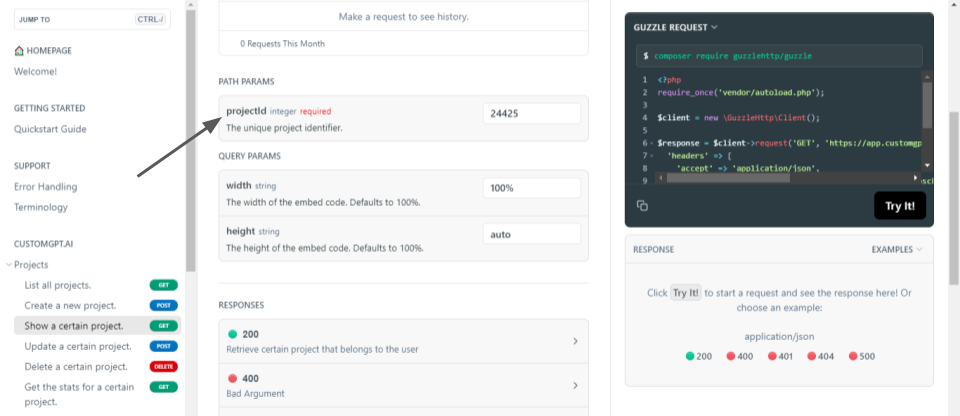
- Once you’ve added your RAG API key, click on the “Try it” button in the browser interface to execute the code snippet.
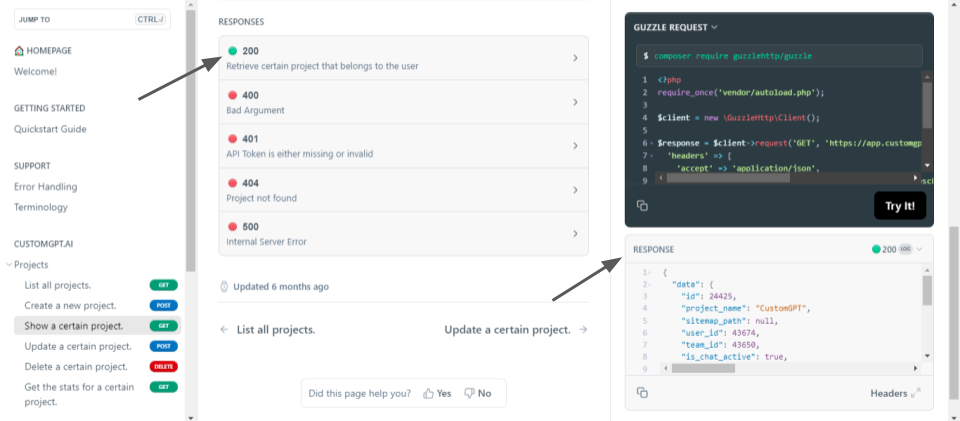
- After executing the code snippet, you’ll receive a response from the CustomGPT.ai RAG API. Review the response to ensure that it contains the expected project details as per the code snippet.
By following these steps, you can test and run the provided PHP code snippet directly in the CustomGPT.ai browser interface, allowing you to interact with the RAG API and retrieve project details in real time.
Conclusion
In conclusion, integrating CustomGPT.ai with PHP provides developers with a powerful tool to enhance their applications with advanced AI capabilities. By leveraging the CustomGPT.ai RAG API and PHP programming language, developers can seamlessly incorporate intelligent chatbot functionality into their web applications. This integration helps create dynamic and interactive user experiences, ultimately empowering developers to deliver innovative solutions to their users.
Frequently Asked Questions
How do I connect a PHP app to a RAG API without rewriting my code?
Often, yes. Because the API is OpenAI-compatible at /v1/chat/completions, a PHP app that already uses an OpenAI-style chat pattern can usually keep the same request flow: send the prompt from PHP, authenticate with your API key, parse the JSON response, and render the result in your application. Joe Aldeguer, IT Director at the Society of American Florists, said, “CustomGPT.ai knowledge source API is specific enough that nothing off-the-shelf comes close. So I built it myself. Kudos to the CustomGPT.ai team for building a platform with the API depth to make this integration possible.”
Can I add my assistant to a PHP website without forcing visitors to log in to ChatGPT?
Yes. When your PHP website calls the API from your server, visitors interact with your own form, chat widget, live chat, or search experience while your server handles API key authentication. That means users do not need ChatGPT accounts to use the assistant on your site. GEMA’s 24/7 digital assistant “Melody” and its API-driven automated ticket handling show how an assistant can live inside your own support experience rather than inside ChatGPT.
Is a PHP RAG integration fast enough for internal legal or support workflows?
Yes. GEMA’s AI deployment answers 248,000 inquiries a year, reaches an 88% query success rate, and saves 6,000 staff hours annually, which shows RAG can support real operational workloads. In a PHP employee portal, support console, or legal workflow, your app can send the question to the API and return the grounded answer in the same interface. GEMA also uses API-driven automated ticket handling, which is a strong fit for internal support and compliance processes.
How do I keep private data secure when my PHP app calls a RAG API?
A safer PHP setup keeps the API call on the backend so API key-based authentication stays under your control instead of being exposed in client-side code. For compliance-sensitive use cases, the documented safeguards include SOC 2 Type 2 certification, GDPR compliance, and a policy that data is not used for model training.
Can a PHP app serve users in multiple languages from the same knowledge base?
Yes. The platform supports 92+ languages, so a PHP application can use one knowledge base and deliver answers in multiple languages through the API. This is useful when the same manuals, policies, or help content need to serve users across regions without creating separate assistants for each language.
What does RAG add to a PHP app that a normal LLM call does not?
RAG grounds the answer in your own source material before the model responds. In a PHP app, that means the assistant can retrieve from websites, documents, audio, video, and structured files instead of relying only on general model knowledge. Compared with a plain LLM call, that improves relevance for company-specific questions and supports citation-backed answers. Stephanie Warlick, Business Consultant, described the business impact this way: “Check out CustomGPT.ai where you can dump all your knowledge to automate proposals, customer inquiries and the knowledge base that exists in your head so your team can execute without you.”
Related Resources
If you’re evaluating API options beyond this PHP walkthrough, this guide adds useful context.
- Enterprise RAG API — Explore how a production-ready retrieval-augmented generation API supports scalable, secure AI applications with CustomGPT.ai.