CustomGPT.ai for Email Writing: Transform Your Business Email Communications

Emails remain a cornerstone of business and personal interactions in digital communication. Crafting effective, personalized, and engaging emails can be time-consuming and challenging.
Today, in this blog post, we will explore how CustomGPT.ai works to streamline and enhance your email writing process. Whether you’re a business professional, marketer, or customer support agent, CustomGPT.ai offers tailored capabilities to elevate your email communications.
CustomGPT.ai for Writing Business Emails
CustomGPT.ai is an AI platform that harnesses the advanced capabilities of OpenAI’s GPT architecture. This platform provides customized solutions across various applications. By leveraging AI, CustomGPT.ai automates and optimizes the email writing process, ensuring that your messages are not only efficient but also highly effective.
Key Features of CustomGPT.ai for Email Writing
Following are the key features of using CustomGPT.ai for email writing:
Personalized Content Creation
CustomGPT.ai excels in generating personalized email content. By analyzing recipient data and previous interactions, it crafts messages that resonate with your audience. This level of personalization can significantly enhance engagement and response rates.
Adaptive Tone and Style
Whether you need a formal business proposal or a casual follow-up, CustomGPT.ai can adjust the tone and style of your emails to suit the context. This ensures that your communication is always appropriate and professional.
Error-Free Writing
Maintaining professionalism in emails requires error-free writing. CustomGPT.ai provides error-free content, ensuring that your messages are polished and free of mistakes.
Enhanced Efficiency
Writing emails from scratch can be a tedious process. CustomGPT.ai can generate email drafts based on brief inputs or templates, allowing you to quickly produce well-structured messages. This feature is especially useful for repetitive tasks like sending out meeting reminders or promotional emails.
Intelligent Content Suggestions
If you’re unsure about what to write, CustomGPT.ai can provide content suggestions to help you get started. It can suggest subject lines, introductory phrases, and closing remarks, making the email writing process smoother and more efficient.
Benefits of Using CustomGPT.ai for Email Writing
The following are the benefits of using CustomGPT.ai for email writing, one of its many real-life chatbot applications:
Time Savings
By automating the email writing process, CustomGPT.ai allows you to focus on more critical tasks. This can save you significant time, especially if you manage large volumes of email communications.
Consistency and Professionalism
CustomGPT.ai ensures that your emails maintain a consistent tone and style, enhancing your professional image. The platform’s real-time error-checking capabilities also help maintain high standards of writing.
Improved Engagement
Personalized and well-crafted emails are more likely to engage recipients. CustomGPT.ai’s ability to tailor content to individual recipients can lead to higher open rates and better responses.
How to Get Started with CustomGPT.ai for Email Writing
Following these steps, you can leverage CustomGPT.ai to create effective, personalized, and engaging emails that resonate with your audience.
Step1: Sign Up
Sign up and create an account on CustomGPT.ai with your Name and email. Create a CustomGPT chatbot for writing emails by clicking on Create New Agent.

Step 2: Know Your Audience
The key to a successful email campaign is targeting the right audience. To input relevant questions or prompts about your ideal customer analyze demographic and psychographic data. It will help CustomGPT.ai generate a buyer persona, a fictional character representing your perfect customer. Knowing their interests, pain points, and values, you can craft messages that speak directly to their needs.
Step 3: Set Up Templates
Create example email templates for different scenarios, which can be customized with placeholders for personalization.
Step 4: Provide Context
Before you start writing your email, provide context to CustomGPT.ai. Brief on the topic, audience, and purpose of your email. For example, if you’re writing a business email, let CustomGPT.ai know the name of the client or the product you’re discussing. This ensures that the generated content is relevant and precise.
Step 5: Upload Data
Provide CustomGPT.ai with recipient information and relevant data from past interactions. To upload all these custom data to CustomGPT.ai, including through a Siteimprove integration, click on your project’s settings>Data>Upload.

Upload the custom files to CustomGPT by clicking on add files.

Step 6: Generate Emails
Now generate email drafts based on your templates and input data. Review and edit the drafts to ensure they meet your standards and align with your communication goals.
Step 7: Customize the chatbot
You can customize the conversational setting to adapt the tone and style of your chatbot according to your business. You can customize by clicking on Agent Settings>Conversational settings.

Step 8: Send
Once you’re satisfied with the email, send it directly from your email client or through CustomGPT.ai’s platform. You can also use Zapier triggers to automate your email-sending workflow, streamlining your business processes and saving you time.
Real-World Applications of CustomGPT.ai in Email Writing
Following are the domains where CustomGPT.ai can be used for email writing tasks:
Business Communication
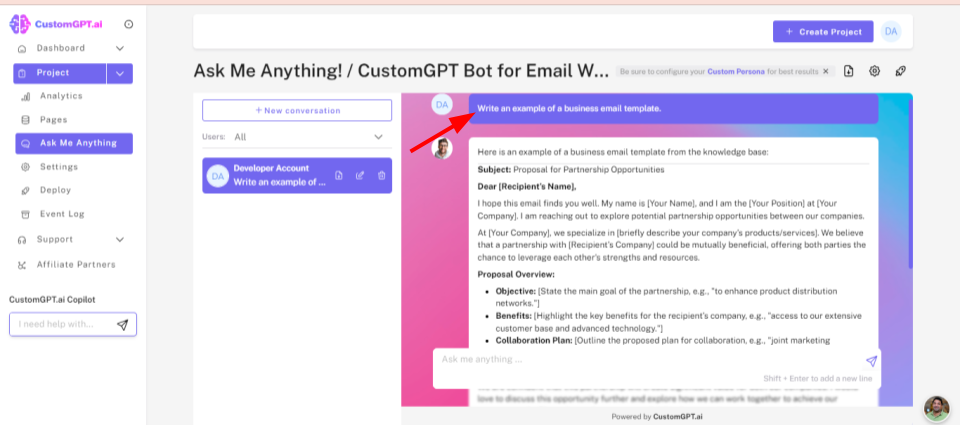
CustomGPT.ai helps professionals draft business proposals, project updates, and internal communications efficiently and effectively. Let’s ask CustomGPT.ai to create an example template of business email writing and see how it generates email.
Customer Support
Customer support teams can use CustomGPT.ai to draft responses to common inquiries and answer customers’ issues, saving time and ensuring consistency in communication. Here is the CustomGPT-generated email for customer support tasks.
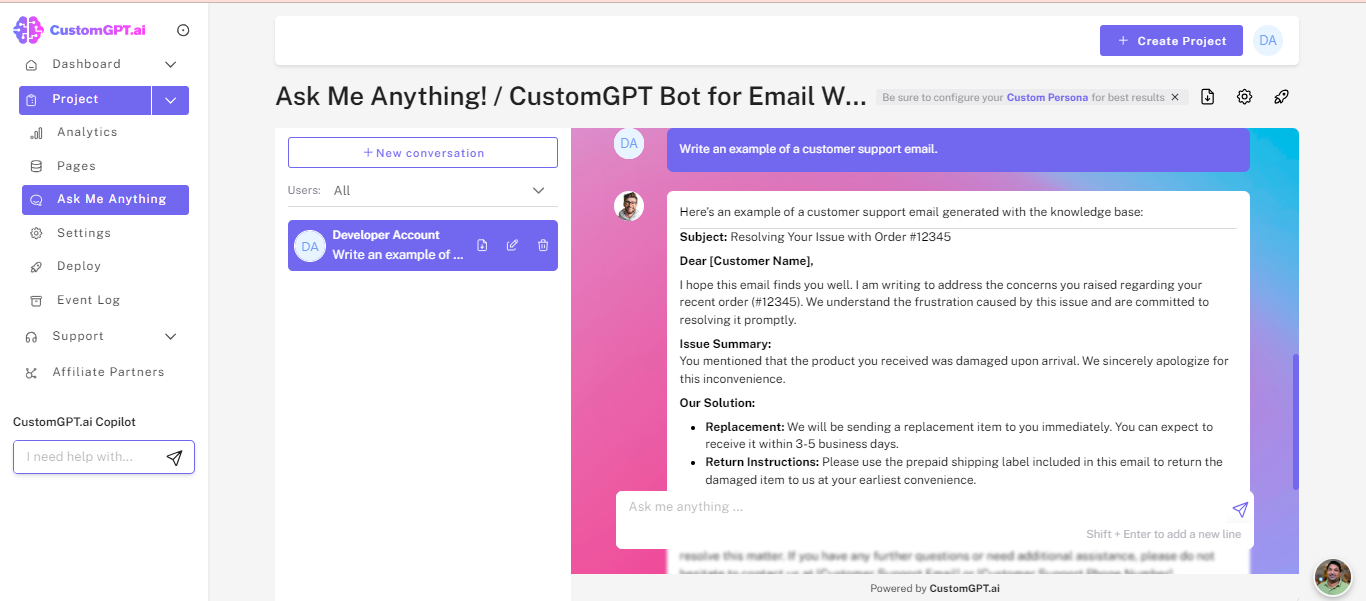
You can customize email specifically according to your customers.
Marketing Campaigns
Marketers can create compelling and personalized marketing emails that capture attention and drive conversions using CustomGPT.ai. Here is an example of using CustomGPT.ai for marketing campaign tasks.
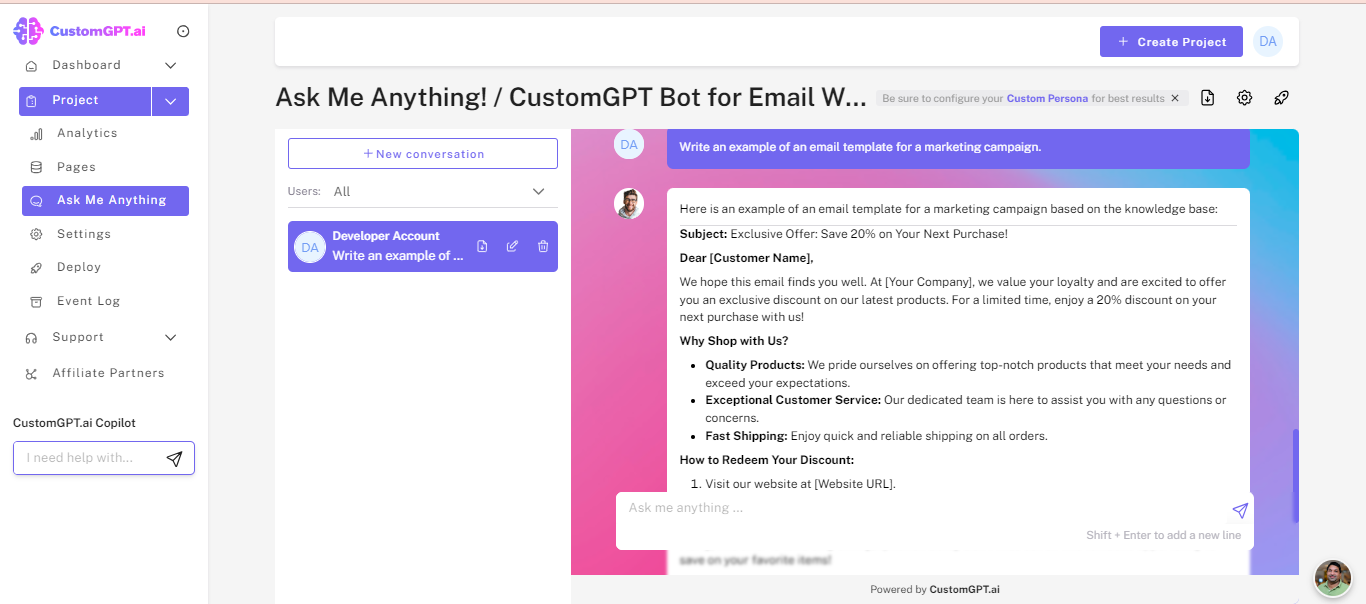
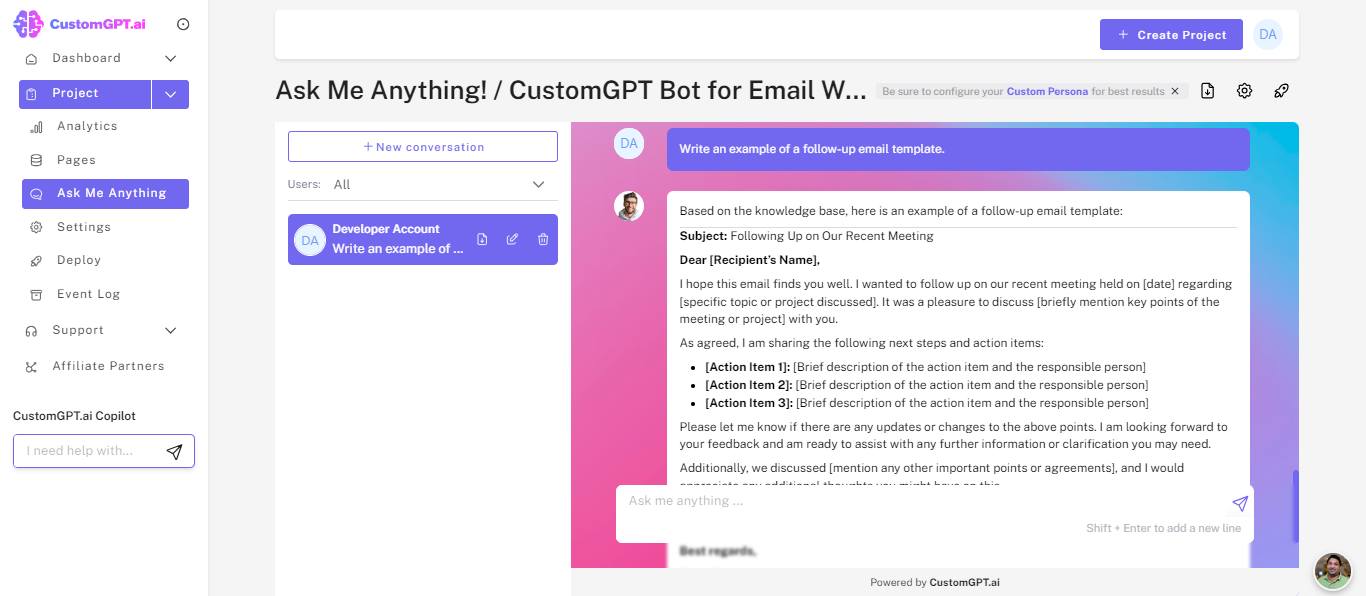
Follow-Up Emails
Automate the creation of follow-up emails for meetings, sales leads, or customer inquiries, ensuring you maintain strong relationships with your contacts. Here is how CustomGPT.ai creates an email template for follow-up emails.
Conclusion
CustomGPT.ai offers a range of features that enhance efficiency, accuracy, and personalization. By leveraging CustomGPT.ai, you can streamline your email communications, making them more effective and engaging. Whether you’re a business professional, marketer, or customer support agent, CustomGPT.ai provides the tools you need to elevate your email writing.
Ready to transform your email writing experience? Try CustomGPT.ai’s free 7-day trial today and see the difference it can make.
Frequently Asked Questions
Can AI help me write professional business emails faster?
Yes. AI can speed up business email writing by generating drafts, subject lines, follow-ups, and replies from brief inputs or reusable templates. Stephanie Warlick describes the practical benefit clearly: “Check out CustomGPT.ai where you can dump all your knowledge to automate proposals, customer inquiries and the knowledge base that exists in your head so your team can execute without you.” For email workflows, that means you can start from approved messaging instead of writing every message from scratch, then review and personalize before sending.
What works better for business email writing: generic ChatGPT or a trained AI assistant?
For general brainstorming, generic ChatGPT can help. For business emails that need your product details, policies, and brand voice, a trained assistant is usually the better fit because it can retrieve from your own approved sources instead of relying only on a prompt. Brendan McSheffrey of The Kendall Project said, “We love CustomGPT.ai. It’s a fantastic Chat GPT tool kit that has allowed us to create a ‘lab’ for testing AI models. The results? High accuracy and efficiency leave people asking, ‘How did you do it?’ We’ve tested over 30 models with hundreds of iterations using CustomGPT.ai.” That supports the idea that a grounded setup is stronger when accuracy and consistency matter.
Can AI write follow-up emails and customer reply emails accurately?
Yes, when the assistant is grounded in your approved knowledge sources. Follow-up and reply emails are more accurate when the system can pull from documents, websites, and policies instead of guessing. Joe Aldeguer, IT Director at Society of American Florists, said, “CustomGPT.ai knowledge source API is specific enough that nothing off-the-shelf comes close. So I built it myself. Kudos to the CustomGPT.ai team for building a platform with the API depth to make this integration possible.” That is especially relevant for customer replies, where accuracy depends on retrieving the right source material.
How do I train AI to match my company's email tone and style?
Start with the material you already trust. Upload strong examples of sales emails, support replies, proposals, brand guidelines, and policy documents. Then define the persona or tone you want, test drafts against common scenarios, and refine based on what sounds most like your team. Dan Mowinski captures the principle well: “The tool I recommended was something I learned through 100 school and used at my job about two and a half years ago. It was CustomGPT.ai! That’s experience. It’s not just knowing what’s new. It’s remembering what works.” For email writing, matching tone usually comes from grounding the assistant in what has already worked for your organization.
Can someone tell if you used AI in a business email?
Sometimes, especially if the email sounds generic or misses the relationship context. Emails are less likely to feel robotic when they are personalized, use previous interaction history, and match the intended tone. Those are the same strengths highlighted for AI-assisted email writing: personalized content creation and adaptive tone and style. In practice, the more your draft is grounded in real context and your own examples, the more natural it tends to read.
Will my email drafts or prompts be used to train AI models?
The documented policy says customer data is not used for model training. The service is also GDPR compliant and SOC 2 Type 2 certified, which matters if your email prompts include client names, contract details, or internal notes. For most teams, the key privacy check is whether the vendor isolates customer data and has independently audited controls.
Related Resources
For more ways to apply CustomGPT.ai beyond email writing, explore this broader guide.
- CustomGPT.ai Use Cases — See how teams use CustomGPT.ai across support, sales, research, and other everyday business workflows.