

Businesses are always looking for new ways to connect with customers and make their operations smoother. One promising method is integrating advanced AI chatbots into their apps. These smart chatbots boost customer engagement and automate tasks, making workflows more efficient and improving the user experience.
To meet the increasing demand for AI-driven solutions, we’ve created a series focusing on integrating CustomGPT.ai with more than 15+ different programming languages. This series is a valuable resource for businesses interested in using CustomGPT.ai chatbots in their apps with more control over customization. Each part of the series offers practical examples and insights into integrating CustomGPT.ai into various platforms and scenarios.
In this article, we will explain the integration of CustomGPT.ai using the HTTP using a practical explanation. Let’s get started!
Integrating CustomGPT.ai by sending an HTTP REST request: A practical example
In this example, we will demonstrate how to retrieve all messages from a specific conversation within a chatbot project using HTTP requests. This illustrates how business applications, acting as clients, can send requests to CustomGPT.ai, which serves as the server, to perform operations.

- HTTP Method: The above example uses GET to send HTTP requests to retrieve data.
- Endpoint:/api/v1/projects/projectId/conversations/sessionId/messages
- This endpoint specifies the route to retrieve messages from a conversation within a project on CustomGPT.ai.
- The projectId and sessionId parameters are placeholders for the project ID and session ID, respectively.
- Additional query parameters include a page for pagination and order to specify the order of messages.
- Accept: application/json specifies that the client expects JSON-formatted responses.
- Authorization: The bearer is an authentication token for authorization purposes.
- Host: app.customgpt.ai identifies the hostname of the server.
This example demonstrates how a client application can interact with CustomGPT.ai’s RAG API by sending HTTP GET requests to retrieve data, such as messages from specific conversations using RAG API, Project ID, and Session ID. It facilitates the seamless integration of CustomGPT.ai’s chatbot functionality into business applications.
Run and Test the Code
To run and test the provided code example in the CustomGPT.ai browser, follow these steps:
- Visit the CustomGPT.ai website and create an account using your email, name, and password.
- Once logged in, navigate to your profile settings.
- Select the “API” section and generate a new RAG API key. Copy the generated RAG API key.

- Place the RAG API key in the Authorization box and replace the placeholder values in the code snippet with your actual project ID and session ID.

- Now run the code and see the response.
- The response “200” shows that all messages are retrieved successfully.
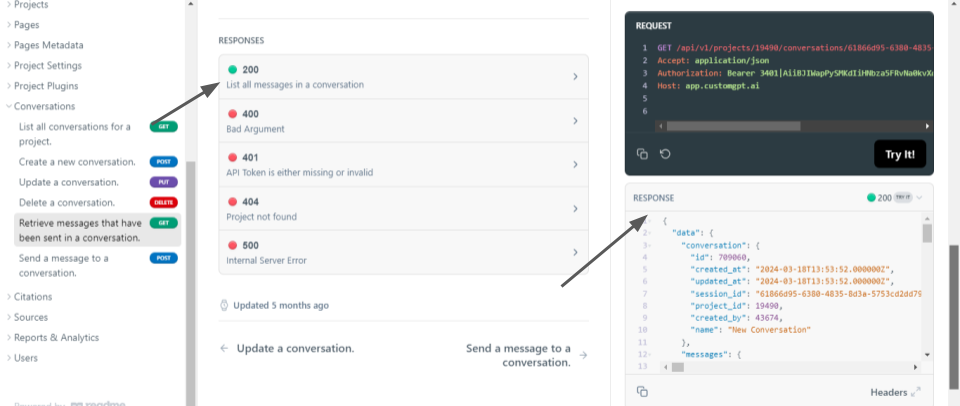
- The response provides information about a conversation in CustomGPT.ai. It lists the messages exchanged in the conversation, each containing an ID, creation timestamp, user ID, user query, response, citations, and metadata The response provides answers to user queries. This data helps track and manage conversations within the CustomGPT.ai platform, facilitating the development and improvement of chatbot interactions.
Similarly, you can perform various other operations using HTTP requests practical examples from CustomGPT RAG API documentation.
Conclusion
In conclusion, CustomGPT.ai offers businesses a versatile and accessible means of incorporating advanced AI capabilities into their applications. By using HTTP requests to communicate with the CustomGPT.ai RAG API, developers can seamlessly integrate chatbots and AI features into their software projects across different platforms and environments.
Additionally, the ability to interact with CustomGPT.ai’s RAG API using HTTP requests opens up a wide range of possibilities for customization and scalability, allowing businesses to tailor their chatbot solutions to meet their specific needs and scale them as their requirements evolve.
Frequently Asked Questions
Where do I find the correct CustomGPT.ai HTTP REST API URL?
Use the official RAG API developer documentation to get the base URL and endpoint paths. For conversation-level operations, requests are scoped to a chatbot project and a specific conversation, so use API endpoint paths rather than dashboard/browser URLs.
Can I use the WordPress REST API with CustomGPT.ai?
Yes. Because the integration method is standard HTTP REST, a WordPress-based workflow can act as the source system and send or trigger requests through your integration layer. A practical approach is to use WordPress to detect content changes and your backend to call chatbot-related API endpoints.
Why do I get a 405 error or gateway timeout when calling the API?
A 405 error usually means the HTTP method does not match the endpoint (for example, sending GET to a POST route). Timeouts are commonly caused by network or upstream latency. Start by validating method, path, headers, and payload with a minimal test request, then tune retries and timeout settings in your application.
Can I connect my company’s internal REST APIs so the assistant can pull business data?
Yes. A common enterprise pattern is to place a middleware service between internal systems and the chatbot integration. This lets you control authentication, transform internal payloads, and expose only the fields needed by the application.
What is the safest way to roll out HTTP API integration in an enterprise environment?
Start with a limited read-focused use case, validate logging and access controls, and then expand scope in phases. Keeping rollout incremental helps teams verify reliability and governance before enabling broader automation.
Can I enforce citation-only answers and short responses through the API?
You can enforce output rules at the application layer by validating response format before showing it to users. In practice, teams define response requirements (such as citation presence and length limits) and programmatically handle responses that do not meet policy.
Should I use CustomGPT.ai HTTP API or alternatives like LangChain, Azure AI Search, or Botpress?
Choose based on your delivery speed needs, control requirements, and team capacity. If your priority is a direct HTTP integration path for chatbot use in business applications, start by evaluating API workflow fit, security model, and operational complexity across options—including CustomGPT.ai and alternatives.