

Are you interested in improving your customer engagement through a smart SMS bot? In this article, I will guide you through the steps of how to integrate CustomGPT.ai with Twilio to create an advanced SMS Custom chatbot solution for your website. By integrating these two platforms the capability of Twilio’s messaging platform and CustomGPT.ai’s chatbot features can be combined to create a responsive SMS chatbot that can generate responses intelligently to your website customers’ queries.
Let’s explore how an SMS Bot can be created, we will explain every step in detail so you can also develop such a chatbot solution for your website.
Why Integrate CustomGPT.ai with Twilio?
The main purpose of a Twilio SMS chatbot is to communicate seamlessly in an interactive way for businesses to keep their customers engaged through text messages. As Twilio is a messaging platform, that allows developers to integrate SMS functionality into their applications, which enables businesses to send messages to all their subscribed customers at a time conveniently. Therefore we are using CustomGPT.ai chatbot, with fast and accurate response-generated capabilities it can provide an enhanced chatbot solution to improve customer interactions. A CustomGPT.ai chatbot can intelligently understand the user’s queries and can provide personalized and dynamic interactions through SMS, ultimately improving customer engagement and satisfaction.
A step-by-step guide on Integrating CustomGPT.ai with Twilio for Creating SMS Bot
Let’s have a look at how to integrate CustomGPT.ai with Twilio:
Create your Twilio Account
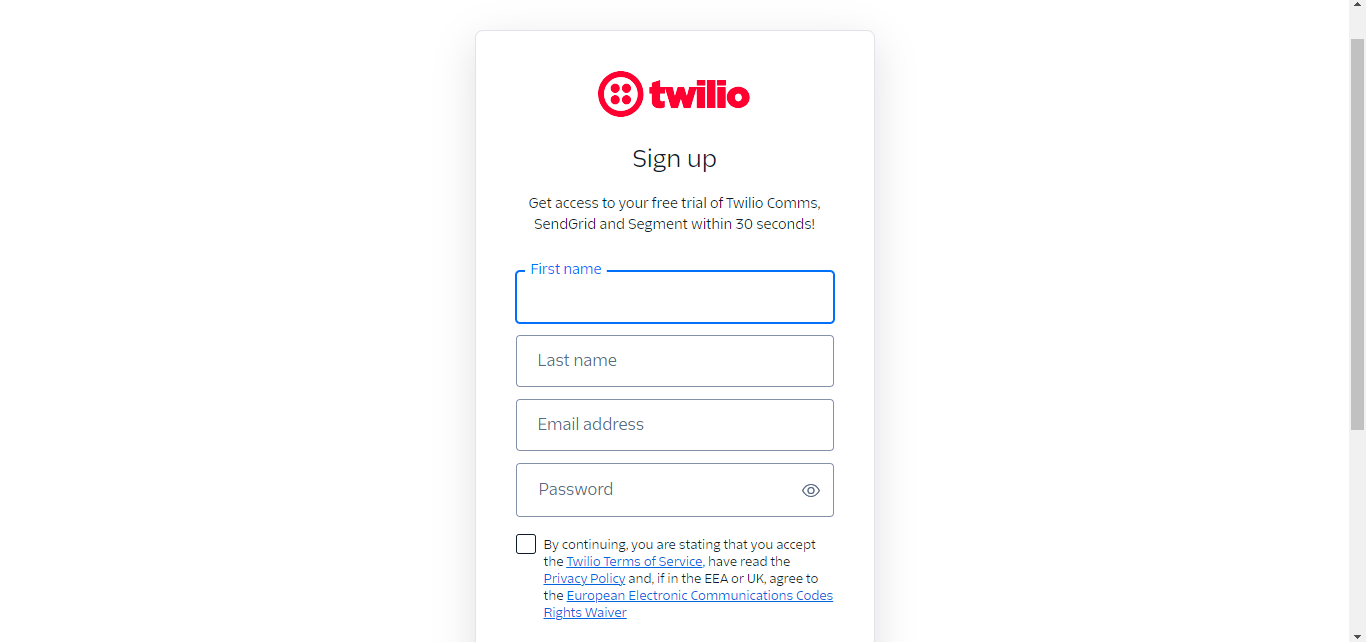
Create your Twilio account by signing up with your Name and Email.
Get your Twilio API_key
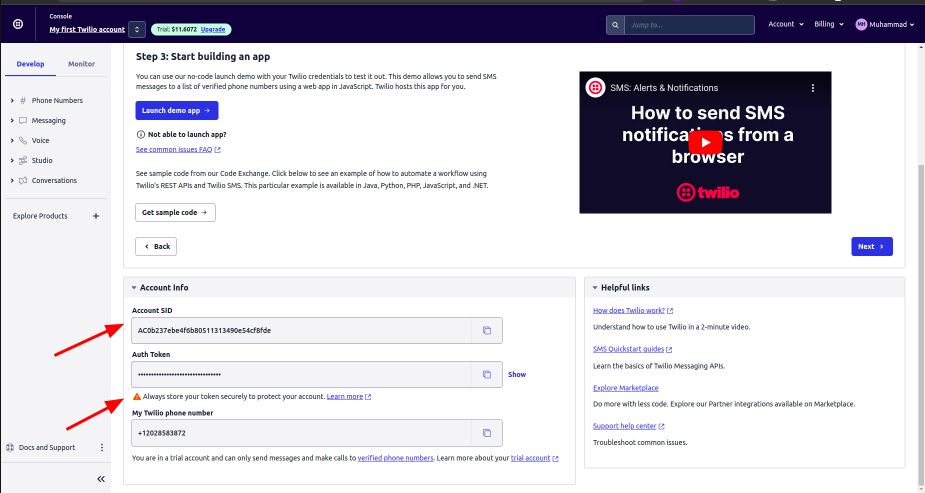
In your Twilio account console, click on “Develop” and you will see your Twilio API_key, Phone Number, and Account SID in the Account information part as shown below. This account info will be further used for your SMS Bot development process.
Create your CustomGPT.ai Account
On the CustomGPT.ai website click on Sign up and create your CustomGPT.ai account by providing your “Name”, “Email” and “Password”.

Create your CustomGPT.ai chatbot
Create your CustomGPT.ai chatbot by clicking on Dashboard in your CustomGPT.ai account. Name your chatbot and train it on your custom data. Once the chatbot is created get your CustomGPT.ai API_key which will be further used for the integration process.
See the blog on How to train your CustomGPT chatbot
See the full blog on How to get your CustomGPT API_key
Integrate CustomGPT.ai with Twilio
To integrate CustomGPT.ai with Twilio, we need to follow these steps:
Choose the development Environment and Install all the Dependencies
Select the development environment for writing Python script to develop our chatbot application. In this guide, I am using Visual Studio Code to write the script. We need to install all the dependencies first for our app to run smoothly.
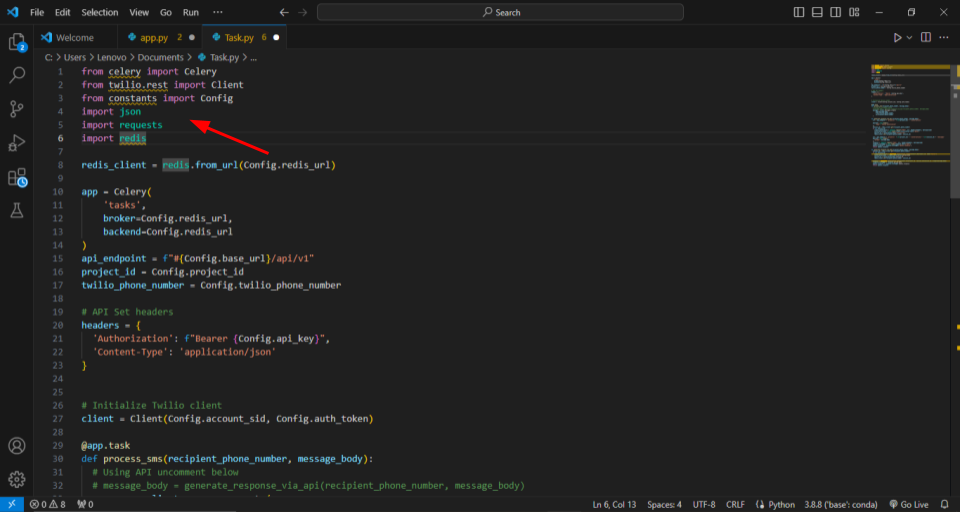
I created a separate file named “Task.py” in Python to set up and install the necessary Python libraries. For our SMS chatbot, I installed Celery, which is a Twilio Python Library to handle multiple tasks, and Redis for task queuing. I imported the Twilio library for the SMS handling process and the Config module for configuration constants. At last, I imported the ‘requests’ library that handles HTTP requests.
These dependencies will facilitate the foundation for developing an advanced SMS chatbot using CustomGPT.ai and Twilio.
Configuration Setup for Integration
In this part, we need to initialize some essential components in the configuration block, to integrate CustomGPT.ai with Twilio. Redis is a small database that is used for task management, we will use redis_client to connect Redis within the Celery app. For CustomGPT.ai API calls the API_endpoint is established for communication. And headers are set to authorize these requests through API_endpoints.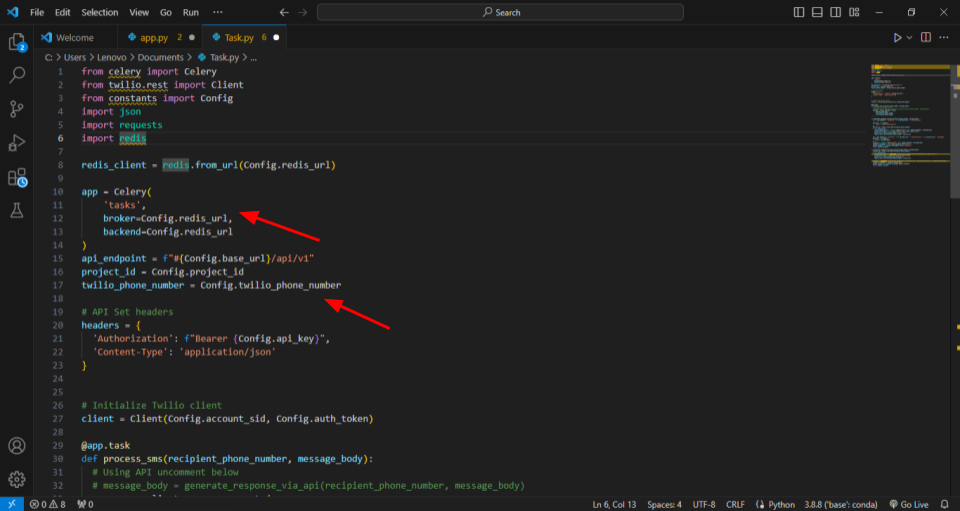
The project-specific details, such as the Twilio phone number and API credentials, are loaded into the environment. For effective communication between Twilio and CustomGPT.ai the Twilio client is initialized. The purpose of this setup is to provide a tailored SMS chatbot experience for users.
Processing SMS Messages
Now to provide tailored SMS to the users we will see how messages will be processed in this part. We defined a process_sms function within the Celery app, that will efficiently generate and dispatch SMS messages. When the recipient’s phone number and message body are passed as parameters, this function will utilize the Twilio client library for sending messages.
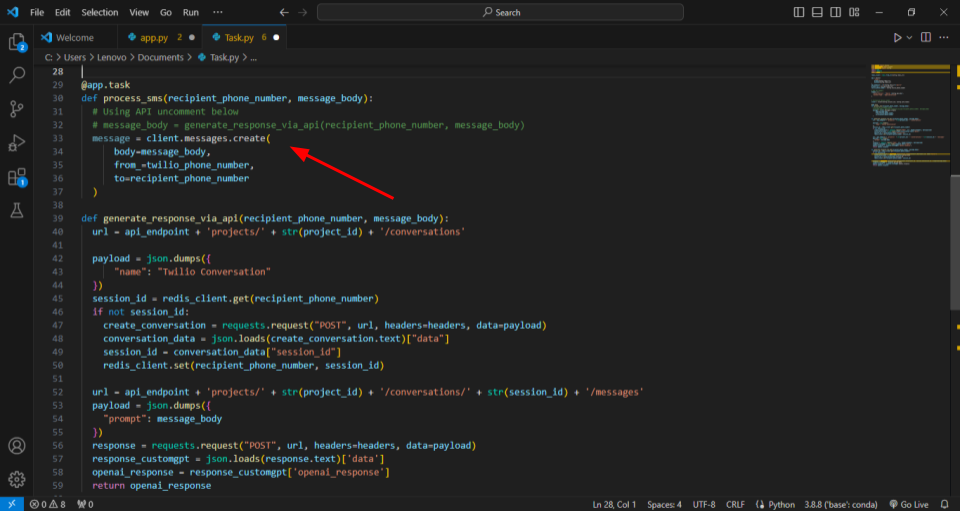
Generating CustomGPT.ai Responses via API
Now we will define a function for CustomGPT.ai to send messages to the users via CustomGPT.ai API. The function “generate_responses_via_api” will take two parameters “recipient phone number” and “message Body” and generate responses for Twilio conversations. It initiates by forming the URL and payload to create or retrieve a conversation session. The session ID is stored in Redis for future reference.
After that, the function puts together the API request to CustomGPT.ai about the user queries.
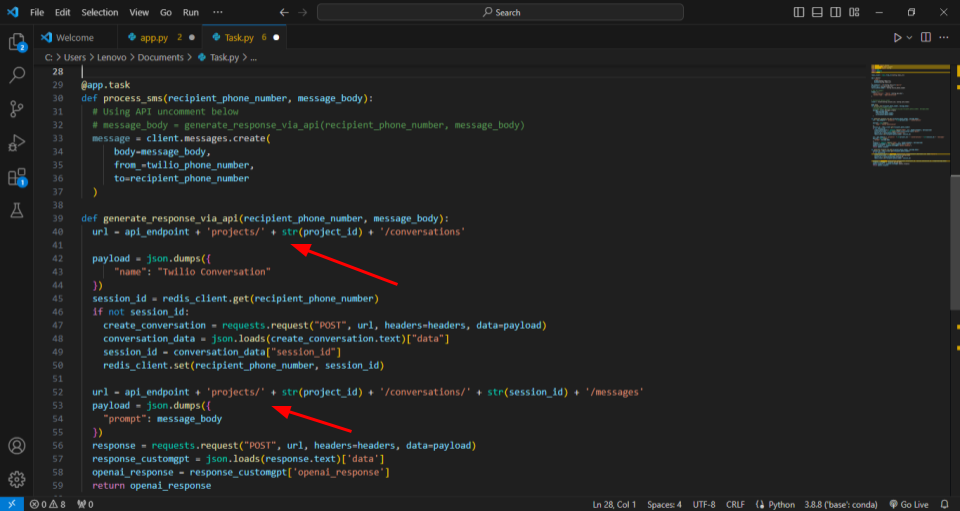
The generated response through the CustomGPT.ai chatbot will be extracted and sent back through the API Endpoint. This function ensures to provision of a personalized interaction between the Twilio chatbot and CustomGPT.ai, enhancing the overall user experience.
You can see the full blog on How requests are sent through API Endpoints.
Now we created the backend functionality of how the messages will be processed by CustomGPT.ai and the generated responses will be sent. Now let’s create the Flask App for sending all these responses whenever a user sends a query.
Handling SMS Webhook Requests in Flask
I created another Python file named “app.py” to implement a Flask web application to receive incoming SMS messages via a webhook. When an SMS is received, the application extracts the message content and the sender’s phone number. The crucial task of processing this SMS is then offloaded to a background worker function named process_sms from the “tasks.py” file using the Celery distributed task queue.
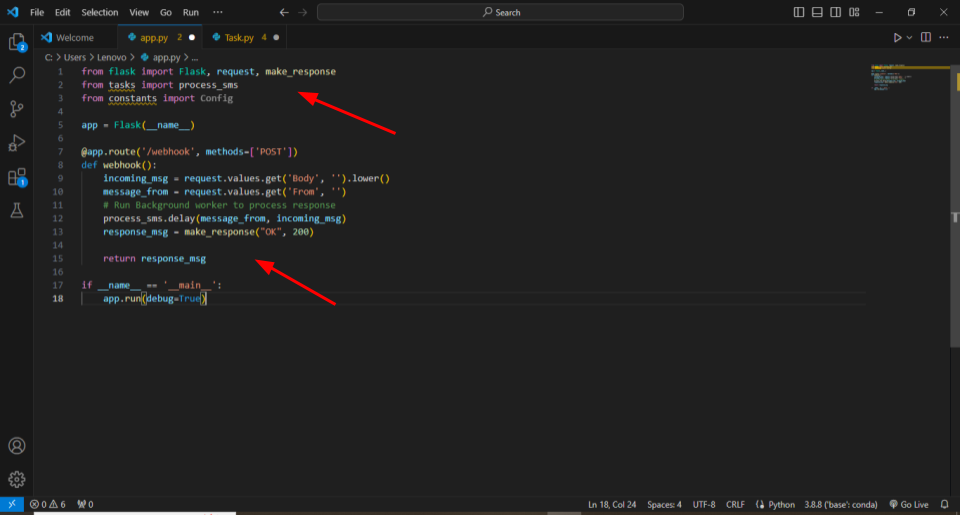
This setup ensures that text message processing is taken care of without any delays in responding to messages. The script shows a simple and effective way to connect Twilio with CustomGPT.ai, making the management of text message interactions smoother and quicker. Now host this Chatbot App on ngrok which enables users to access local-hosted servers from outside the machine.
Create a Messaging service for your Chatbot App
Messaging services are containers that bundle message functionality for your specific use case. In the Twilio console click on Messaging and then on Service. I created a default Messaging service for conversations. You can create a new one for your application.
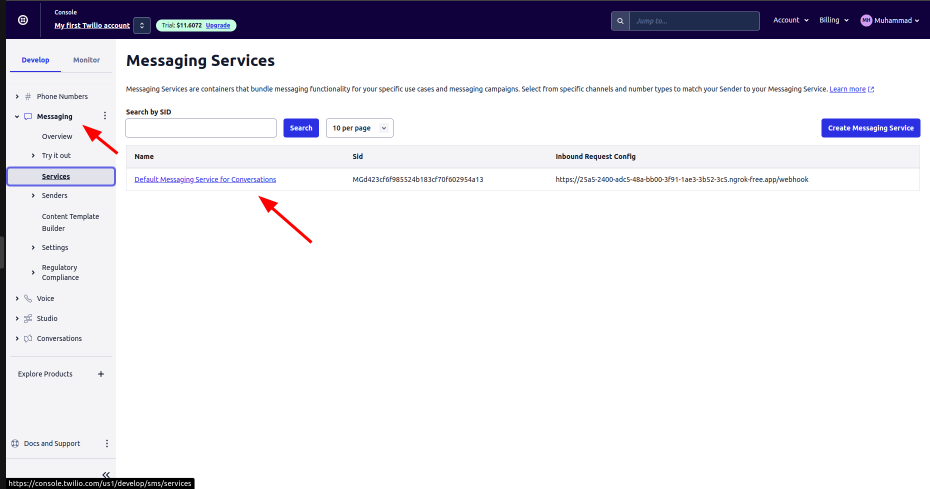
Click on Default Messaging service for Conversations, then on Integration. And place the Webhook URL here to handle HTTP requests of all incoming messages.
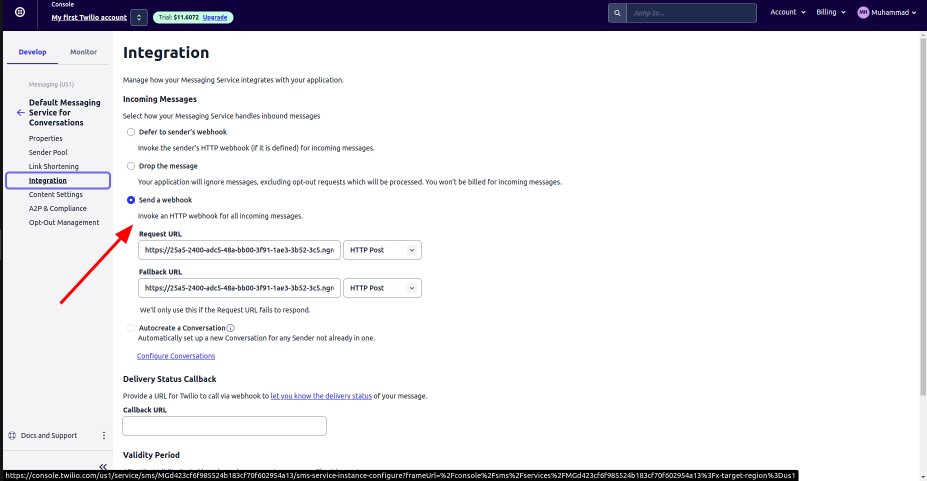
Navigate to your phone number settings, specifically under “Active Numbers.” Choose the desired phone number, and within its configuration, look for the messaging section. Here, select the SMS service that corresponds to your webhook URL. This step ensures that your chosen phone number is linked to the correct service, enabling seamless integration with your SMS webhook.
Your Twilio Chatbot, seamlessly integrated with CustomGPT.ai, is now configured and ready to go!
Conclusion
Businesses can create a powerful SMS Bot for enhancing customer experience by integrating CustomGPT.ai with Twilio. This not only leads to improved customer satisfaction but also provides businesses with a competitive edge in delivering messages to many numbers of customers at a time. Using CustomGPT.ai for text message bots allows for creativity and customization, making sure that businesses can adapt their messaging solutions to exactly fit their specific needs. As you explore this integrated approach, you’ll discover how using CustomGPT.ai alongside Twilio can noticeably enhance the communication experiences you offer to your users. It’s a valuable tool for businesses looking to improve their messaging solutions.
Frequently Asked Questions
How does a Twilio SMS chatbot work with CustomGPT.ai?
A user sends a text message to your Twilio number, your application receives that message, sends the user’s question to your CustomGPT.ai chatbot with an API key, and returns the generated reply through Twilio as an SMS. To set it up, you typically need a Twilio account, Twilio credentials, a phone number, a CustomGPT.ai chatbot, and a small integration script.
What do you need before integrating Twilio with CustomGPT.ai?
You typically need a Twilio account, your Twilio API key, phone number, and Account SID, plus a CustomGPT.ai account, a trained chatbot, and its API key. The setup in the guide also uses a Python development environment and installs dependencies before writing the integration script.
Can you add ChatGPT-style replies to text messages?
Yes. Twilio can handle SMS delivery, while the AI layer generates the reply. If you want answers based on your own business content instead of only a general model, a retrieval-augmented setup can pull from your documents and other sources to answer with business-specific context.
How do you make an AI SMS bot more accurate?
Accuracy improves when the bot uses retrieval-augmented generation and answers from approved source material instead of relying only on general model knowledge. Citation support can also help you trace where an answer came from, which is useful when you need more reliable customer-facing responses.
Can a Twilio SMS bot connect to other business tools?
Yes. You can connect the bot through an API-based workflow, and CustomGPT.ai also supports more than 1,400 integrations via Zapier. That makes it possible to route conversation data into other systems when you want follow-up automation, tracking, or reporting.
Can you customize the bot’s tone or persona for SMS replies?
Yes. You can train the bot on your own data and use custom personas and branding so its SMS responses align more closely with your business voice. That is useful when you want more personalized and consistent interactions over text.
What kind of content can an SMS bot use as its knowledge base?
The knowledge base can include websites, PDFs, DOCX files, TXT, CSV, HTML, XML, JSON, audio, video, and URLs. The platform supports multi-source ingestion, and individual files can be up to 100 MB each.