

ChatGPT Custom Instructions Template: Copy-Paste Example + Step-by-Step Walkthrough [Updated for 2026]
ChatGPT Custom Instructions let you give ChatGPT persistent guidance about what it should know about you and how you want it to respond. OpenAI says Custom Instructions are applied across chats, can be edited or deleted, and are available on web, desktop, iOS, and Android.
Related resource: client-ready white-label ChatGPT chatbot guide.
After drafting your instructions, use the OpenAI Custom GPT setup guide to decide whether the assistant should stay inside ChatGPT or move into a CustomGPT.ai deployment.
Custom instructions shape behavior, but a source-grounded no-code AI agent can go further and become a digital ChatGPT clone of your own expertise.
This guide gives you a copy-ready Custom Instructions template, a setup walkthrough, role-based examples, and a clear explanation of where Custom Instructions stop being enough. Clear instructions also head off the most common ways chatbots get answers wrong.
For reusable role and tone setups, pair this template with the ChatGPT personas guide and the custom persona guide. If you want a faster starting point, CustomGPT.ai also has two free tools: the Custom Instructions Generator and the Prompt Improver.
What Custom Instructions Actually Do
Custom Instructions are persistent guidance attached to your ChatGPT account. They tell ChatGPT what to know about you and how you want it to respond. OpenAI describes them as direct user-managed instructions, while Memory is different: Memory can save relevant details from conversations and update them over time.
A simple way to split the fields:
| Field | Use It For | Example |
|---|---|---|
| What ChatGPT should know about you | Role, audience, recurring work, constraints | “I lead support for a B2B SaaS product.” |
| How ChatGPT should respond | Tone, format, length, things to include or avoid | “Use numbered steps under 150 words.” |
Custom Instructions are not retrieval, fine-tuning, or a document knowledge base. They shape how ChatGPT responds; they do not give it access to your private product docs, policy library, help center, or customer records.
One privacy note: do not paste confidential customer data, account numbers, unreleased plans, or sensitive internal details into Custom Instructions. OpenAI says individual ChatGPT content may be used for training unless users opt out, while business products and API data are not used for training by default unless the organization opts in.
The Two-Field Template
Paste this into ChatGPT and replace the brackets.
Field 1: What should ChatGPT know about you?
I am a [role] at [company / context] working on [primary task] for [audience].
My recurring goals are:
- [goal 1]
- [goal 2]
Important context:
- [context 1]
- [context 2]
Hard constraints:
- [constraint 1]
- [constraint 2]
Do not assume I want [thing X]. I rarely need [thing Y].
Field 2: How should ChatGPT respond?
Respond in a [tone] tone using [format: bullets, numbered steps, short paragraphs, table, etc.].
Keep replies under [N] words unless I ask for more depth.
Always include:
- [thing I always want]
- [thing I always want]
Never include:
- [thing I never want]
- [thing I never want]
If my request is ambiguous, ask up to three clarifying questions before drafting.
If you are unsure, state your assumption and label your confidence as high, medium, or low.
This structure follows standard prompt engineering principles: give clear context, be specific, define the desired output, and state tone, length, and format directly. OpenAI’s prompt guidance recommends clear, specific prompts with enough context, plus explicit tone and formatting direction.
If you do not want to fill the brackets manually, use the CustomGPT.ai Custom Instructions Generator to create a first draft. If you already have a prompt that almost works, use the Prompt Improver to tighten the wording and add clearer constraints.
Setup Walkthrough
- Sign in at ChatGPT.
- Open Settings.
- On web or desktop, go to Personalization and open Custom Instructions.
- On iOS or Android, open Customize ChatGPT.
- Make sure customization is enabled.
- Paste your “what ChatGPT should know” text into the Custom Instructions field.
- Paste your response-style rules into the same Custom Instructions area if your current UI uses one combined field, or into the response field if your UI still shows two fields.
- Save.
- Test with a real prompt.
OpenAI says updates to Custom Instructions are applied immediately across chats, including existing conversations. For testing, though, a fresh chat is still the cleanest way to see whether your instructions are doing what you expect.
If you want one chat to ignore your usual preferences, turn customization off before sending that request or explicitly override the instruction in the prompt. Temporary Chat does not use or create memories, but OpenAI says it still follows Custom Instructions if they are enabled.
Field-by-Field Examples by Role
B2B SaaS Sales
Field 1
I sell B2B SaaS to CFOs at mid-market companies with 200-2,000 employees. My ICP is finance leaders evaluating cost-control tools. Deal stages I care about: discovery, technical evaluation, procurement.Field 2
Write cold outreach in 120 words or fewer. Lead with a specific business outcome, include one ROI line with a placeholder number in brackets, and end with a soft CTA. Use plain English. Never use "leverage", "synergy", or "revolutionary".Customer Support
Field 1
I am a support lead for a SaaS product. My tickets usually come from technical admins doing setup or troubleshooting. Common topics include SSO, API rate limits, account access, and billing.Field 2
Reply with numbered troubleshooting steps at a sixth-grade reading level. End with one suggested next action and one escalation trigger. Keep replies under 150 words.HR and Policy
Field 1
I draft internal policy documents for a 500-person company. My audience is non-legal managers. I need clear language that flags legal-review points without trying to provide legal advice.Field 2
Respond in plain English under 220 words. Use H3 headings for each policy section. Mark anything counsel should review with [LEGAL REVIEW: topic]. Never invent statutes, regulations, or case names.Marketing
Field 1
I write LinkedIn posts for SMB founders in e-commerce. My recurring formats are short observations around 100 words and tactical breakdowns around 250 words.Field 2
Open with a concrete hook: a number, quote, objection, or specific scenario. Never start with "In today's fast-paced world." Use short paragraphs. End with one question or one CTA, not both.Custom Instructions vs. Memory vs. a RAG Agent
These tools solve different problems.
| Tool | Best For | Limit |
|---|---|---|
| Custom Instructions | Stable rules: role, tone, format, recurring preferences | Does not retrieve from your documents |
| Memory | Personal context that changes over time | Can drift because it updates from conversations |
| RAG agent | Answers grounded in your own content | Requires source content to be uploaded or connected |
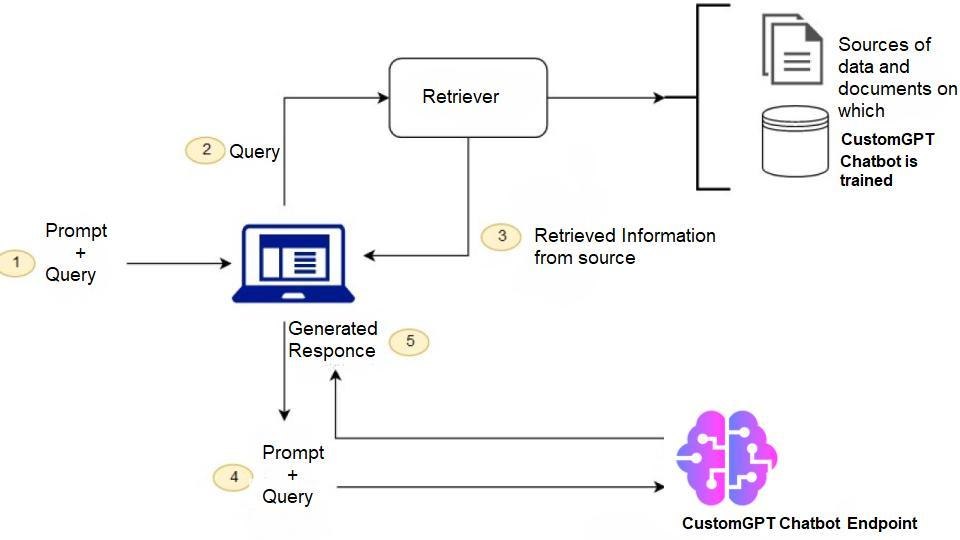
Use Custom Instructions for stable behavior. Use Memory for evolving personal context. Use a RAG agent when the answer needs to come from a source: a product manual, policy library, help center, sales deck, transcript archive, or knowledge base.
Retrieval-augmented generation, or RAG, is the pattern of pairing an LLM with a retrieval step over external content so answers can be grounded in source material rather than relying only on the model’s general training data. Source: Lewis et al., 2020, “Retrieval-Augmented Generation for Knowledge-Intensive NLP Tasks.”
Best Practices
Start With the Outcome
“Draft five-bullet cold emails with one ROI line” is stronger than “be helpful and concise.” OpenAI’s prompt guidance recommends being clear and specific, providing context, and stating the desired tone, format, and outcome. (help.openai.com)
Be Specific About What to Avoid
Negative constraints are useful. If you hate certain phrases, formats, or assumptions, name them directly.
Good:
Never use "delve", "unlock", "game-changing", or "in today's fast-paced world."Weak:
Do not sound generic.Cap Length Explicitly
“Under 150 words” is better than “be concise.” A numeric limit gives the model a clearer target.
Use Placeholders, Not Sensitive Data
Use placeholders like [customer], [product], [deal stage], and [policy name]. Fill in real details per chat only when appropriate. Do not persist confidential data in your account-level instructions.
Re-Read Your Instructions Monthly
Roles shift. Audiences shift. Tone preferences shift. Stale Custom Instructions quietly degrade every new conversation.
Test Against Five Real Prompts
Before you keep a version, test it against five prompts you actually use. If four out of five outputs match your expectations, keep it. If not, rewrite the most ambiguous instruction first.
Generate a Baseline Before Editing
Most people write Custom Instructions too vaguely on the first try. The CustomGPT.ai Custom Instructions Generator gives you a structured first draft that you can edit instead of starting from a blank field.

Frequently Asked Questions
What is a good ChatGPT Custom Instructions template I can copy and paste?
Use the two-field template above. Put role, audience, recurring goals, and constraints in the context field. Put tone, format, length, and “never do this” rules in the response field.
Is there a tool that writes Custom Instructions for me?
Yes. The CustomGPT.ai Custom Instructions Generator creates a structured draft from a short role description. If your issue is one specific prompt rather than your overall setup, use the CustomGPT.ai Prompt Improver instead.
What is the character limit for Custom Instructions?
OpenAI says the longer-form Custom Instructions text fields have a 1,500-character limit. Check the <a href=”https://help.openai.com/en/articles/8096356-chatgpt-custom-instructions”>OpenAI Help Center</a> before publishing exact limits in product documentation because these limits can change.
What is the difference between Custom Instructions and Memory?
Custom Instructions are direct guidance you write and manage. Memory can save relevant details from conversations and update them over time. Use <a href=”https://help.openai.com/en/articles/8983151-is-memory-different-from-custom-instructions”>Custom Instructions</a> for explicit rules. Use Memory for personal context that changes.
Do Custom Instructions apply to existing chats?
<a href=”https://help.openai.com/en/articles/8096356-chatgpt-custom-instructions”>OpenAI</a> says updates are applied immediately across chats, including existing conversations. Previous versions may still appear in chat history, so use a fresh chat when testing a new setup.
Does Temporary Chat ignore Custom Instructions?
No. <a href=”https://help.openai.com/en/articles/8914046-temporary-chat-faq”>Temporary Chat</a> does not use or create memories, and it does not appear in history, but OpenAI says it still follows Custom Instructions if they are enabled.
How do I control response length and detail?
Put the default in your instructions:<br>
Keep replies under 200 words unless I say “go deep.”<br>
Then use the override phrase when you want a longer answer.
How often should I rewrite my Custom Instructions?
Monthly is a good cadence, plus any time your role, audience, or recurring task changes.
When Custom Instructions Stop Being Enough
Custom Instructions shape how ChatGPT answers. They do not change what it knows. They are useful when the task is: “Answer in my style.” They are not enough when the task is: “Answer from our actual source material.” If you need answers grounded in a 200-page product manual, a support knowledge base, internal policy documents, meeting transcripts, or a pricing page, you need retrieval against those sources. A prompt rule cannot replace source-backed retrieval.
CustomGPT.ai Builds RAG Agents From Your Content
CustomGPT.ai is a no-code platform for building RAG agents grounded in your own content. You connect sources such as documents, websites, sitemaps, and supported cloud storage, then the agent answers using that source material.
Where it fits:
| Need | Use |
|---|---|
| Set tone, format, and behavior | Custom Instructions |
| Improve a one-off prompt | Prompt Improver |
| Generate better Custom Instructions | Custom Instructions Generator |
| Answer from your docs, site, or knowledge base | CustomGPT.ai RAG agent |
A good Custom Instructions template tells the assistant how to behave. A RAG agent gives it the source material it needs to answer accurately.
If your work is “answer customer questions from our docs,” “draft replies grounded in our policy library,” or “give sales reps talking points from the current product page,” that is where CustomGPT.ai fits.
For a broader workflow beyond the template, read how to turn custom instructions into consistent assistant behavior using persistent setup rules, examples, and retesting.
Conclusion
A good Custom Instructions template does three things: it tells ChatGPT who you are, how to respond, and what to avoid.
Start with the two-field template. Use placeholders instead of sensitive data. Add clear length and formatting rules. Re-read the fields monthly.
When the question moves from “how should it answer?” to “what source should it answer from?”, Custom Instructions are no longer enough. That is when you need a RAG agent grounded in your own content.
Related Resources
These guides expand on the setup, prompting, and content-grounding steps that make custom instructions more useful.
- CustomGPT.ai Custom Instructions Generator — Create a ready-to-use Custom Instructions draft from a short description of your role, audience, and goals.
- CustomGPT.ai Prompt Improver — Turn a vague or underperforming prompt into a clearer version with stronger structure, constraints, and output guidance.
- Custom GPT Setup Guide — Follow a practical walkthrough for building a custom GPT tailored to your workflow in CustomGPT.ai.
- Training ChatGPT on Custom Data — Learn how to use your own content to improve responses and create a more useful AI assistant experience.
- Prompt Best Practices — Explore practical prompting techniques for getting clearer, more consistent, and more useful AI responses.
- GPT Language Model — Explore how GPT models are trained, how they predict text, and where they are used.
- RAG Evaluation Metrics — Learn how to measure faithfulness, context precision, answer relevance, retrieval quality, and other metrics for improving RAG systems.
- How to Pick the Right AI Model — Learn how to choose an AI model by use case, retrieval needs, trust controls, model flexibility, and vendor lock-in risk.


