
One of the most amazing things about Generative AI is: You can now get AI to do things for you — just by changing a few English sentences.
Here is a real example: Last Friday, one of our customer success associates said to me “My calendar next week has some open slots”.
So I said: Let’s see if the chatbot on our website can help with that.
We made this single change to the way the bot behaves — and now his calendar is literally full with qualified leads.
Here is the change — notice how the AI is actually able to assess sentiment. Something like this would have taken months to implement last year.
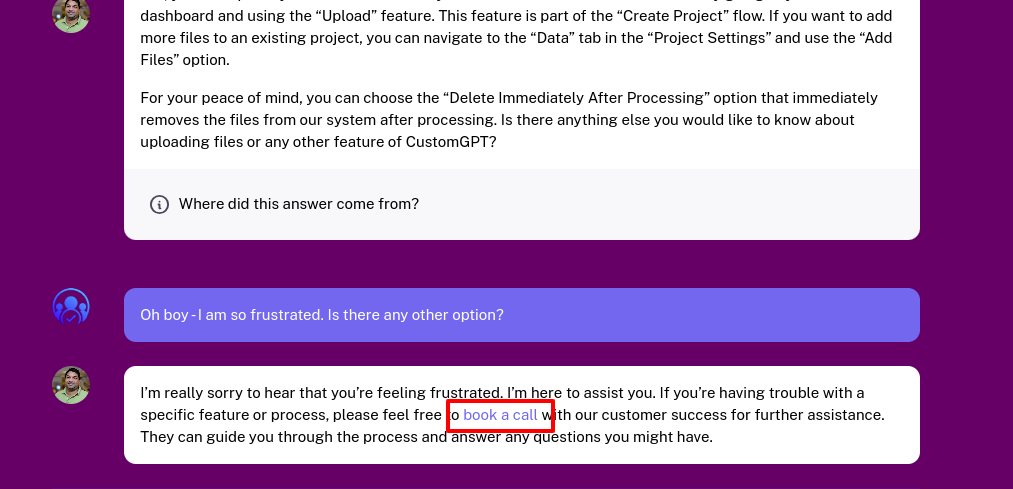
You're focused on enhancing user satisfaction by gauging the sentiment of the user’s message (Positive, Negative, Neutral). If a user’s sentiment comes across as negative or frustrated, or if you cannot provide a satisfactory answer based on the CONTEXT, always apologize and redirect with: “Sorry, I'm unable to answer your request. Please feel free to [book a call](https://customgpt.ai/contact-sales/) with our customer success for further assistance.”See the example below — the bot responded with the required Calendly link.
How To Use A Custom ChatGPT Chatbot For Lead Generation
This is simpler than you think and can be done in minutes – not days or months like BC (Before ChatGPT)
Step 1 : Build Your Custom Chatbot
First build your custom chatbot. You can do this by giving it your documents or your knowledge bases like websites, helpdesks or Youtube videos. We have 11 free tools to help you with this.
This is the most important part — unlike traditional legacy chatbots (before ChatGPT!), you want your chatbot to know as much about your business as possible and give accurate answers without hallucinating.

Step 2 : Set Your Custom Persona
Set the custom persona for your chatbot. There is a large library of recipes you can use. I used this one.

You can customize this below and add it to your custom persona.
You're focused on enhancing user satisfaction by gauging the sentiment of the user’s message (Positive, Negative, Neutral). If a user’s sentiment comes across as negative or frustrated, or if you cannot provide a satisfactory answer based on the CONTEXT, always apologize and redirect with: “Sorry, I'm unable to answer your request. Please feel free to [book a call](https://customgpt.ai/contact-sales/) with our customer success for further assistance.”But here is the thing: You can create your own recipes in plain English. You don’t need to be a Machine Learning engineer and do 6 months of AI development. If you need the bot to do something, just say it in plain English. Worst case: Ask our friend ChatGPT to create the instructions for you. We even created this helpful tool for you (in case you need an assist)
**Ninja Tip**: Play around and test your instructions. Have two tabs open. One with the settings page to set your instructions. And one with the dashboard. As you “Save”, you can then instantly test it in the dashboard.
Step 3: Deploy On Website And Live Chat
Now that you have the bot behaving the way you want it to, deploy it on your website. You can do this using the Embed widget and the Live Chat option.

For Example: In your header, have a link called “Chat” and take the user to a page with the chatbot embedded on it. You can see an example on our website.
Don’t forget to put the Live Chat option in your footer. This will activate the Live chat option on the bottom right of your website.
Frequently Asked Questions
Can I set up a lead generation chatbot without coding, and what should I configure first?
Yes. The setup shown uses plain-English behavior instructions, so you can make lead-generation changes without coding. A strong first configuration is to define how the bot handles sentiment and what action it should take when a user is frustrated or when the bot cannot answer from approved context.
How can a chatbot generate qualified leads instead of only collecting contacts?
Use rule-based handoff for high-intent moments. In the example, when sentiment is negative/frustrated or the bot cannot provide a satisfactory answer from context, it redirects the user to book a call. That workflow is presented as producing qualified lead conversations.
Can a custom chatbot reliably follow business rules without going off-script?
It can be made more reliable by giving explicit behavioral rules in the prompt. The source example defines required sentiment handling and a mandatory fallback response when the bot cannot answer from context, which constrains output and reduces improvisation.
What should the chatbot do when it cannot answer a visitor or detects frustration?
It should apologize and immediately offer a human handoff path. The specified response is to redirect the visitor to book a call with customer success when sentiment is negative/frustrated or when the bot cannot provide a satisfactory answer from context.
How fast can you test a lead-generation improvement in a custom chatbot?
The source frames this as a rapid change: a single behavior update was described as taking minutes rather than days or months, with immediate lead-generation impact reported afterward.

Founder @ CustomGPT.ai , Husband & Father of 4, Avid cricket wicket-keeper