Trusted by teams at 10,000+ organizations that need AI answers they can trust
Trusted by
Why Verify Responses matters
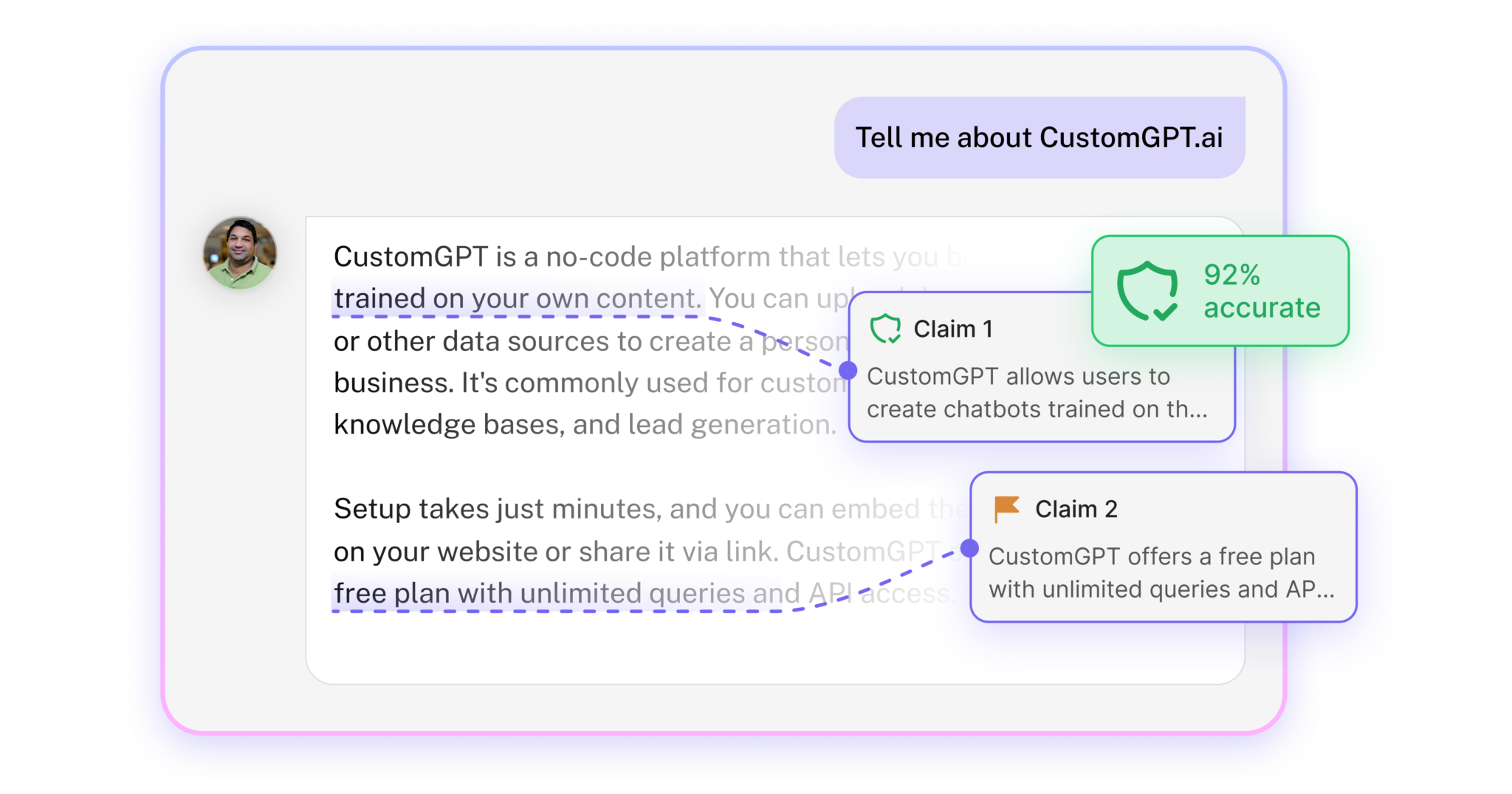
Verify Responses allows you to deploy AI confidently. The feature gives you full visibility into every claim made by your AI, the sources referenced, and compliance across legal, security, risk, PR, and executive perspectives.
The "Verify Responses" feature is an excellent way to build trust and resilience by offering six different perspectives on the same answer and by showing how the answer was constructed and composed.
Per Bergfors
Assistant Professor at Copenhagen Business Academy
"CustomGPT.ai has continually impressed us. Our own assessor loves it and frequently comments on how it provides the right answers. It's a very valuable tool that people need to understand and utilize."
Verify Responses is a feature that analyzes an AI’s answer claim by claim and checks each statement against approved source documents. It provides visibility into accuracy, supporting evidence, and potential compliance risks. In CustomGPT, Verify Responses operates within the platform to show verified claim scores, highlight unsupported statements, and document how each response was constructed.
Why should organizations verify AI responses before deployment?
Organizations should verify AI responses to reduce legal, compliance, reputational, and operational risk. Even accurate AI systems can produce unsupported claims if knowledge gaps exist. CustomGPT’s Verify Responses allows teams to review answers across multiple stakeholder perspectives before approving them for production use.
How is Verify Responses different from simply reading the AI’s answer?
Reading an AI answer shows the output, but verification reveals how that output was built and whether each claim is supported by approved sources. CustomGPT breaks down responses into individual claims, assigns verification scores, and flags unsupported statements automatically.
What is a Verified Claim in AI verification?
A Verified Claim is a factual statement in an AI response that is directly supported by an approved source document. CustomGPT extracts each claim from the response and checks it against connected knowledge sources to determine whether it is supported, partially supported, or unsupported.
What is a Verified Claims Score?
A Verified Claims Score is a quantitative measure of how many claims in a response are supported by approved sources. It helps teams quickly assess answer reliability. In CustomGPT, this score highlights which parts of the response meet documentation standards and which require review.
What happens if a claim cannot be verified?
If a claim cannot be verified, it is flagged for review as unsupported or insufficiently backed by available sources. CustomGPT surfaces these gaps immediately so teams can correct the knowledge base, adjust retrieval logic, or refine the agent configuration.
Does a high Verified Claims Score guarantee the response is correct?
No, a high score indicates strong alignment with available sources, not absolute truth. Verification confirms that the answer matches approved documentation. CustomGPT ensures responses are grounded in trusted content, but organizations remain responsible for maintaining accurate source material.
What are the six stakeholder perspectives in Verify Responses?
The six stakeholder perspectives evaluate AI responses from the viewpoint of End User, Security IT, Risk Compliance, Legal Compliance, Public Relations, and Executive Leadership. CustomGPT applies these structured lenses to surface potential concerns beyond factual accuracy.
Can Verify Responses help compliance and legal teams?
Yes, verification supports compliance and legal review by generating audit-ready documentation for each AI answer. CustomGPT provides structured analysis and explainability records that legal and compliance teams can reference during internal reviews or regulatory checks.
How does Verify Responses support security reviews?
Verify Responses helps security teams identify potential exposure risks, unsupported statements, or sensitive data issues before answers are widely deployed. CustomGPT performs verification within its secure environment and maintains access-controlled analysis.
Can Verify Responses be used for quality assurance before launch?
Yes, it is commonly used for pre-deployment quality assurance to detect knowledge gaps, unsupported claims, and retrieval errors. CustomGPT allows teams to test and refine responses before enabling broad user access.
Will Verify Responses slow down AI performance?
Verification can be run either automatically after every query or on demand, depending on operational needs. CustomGPT allows organizations to balance speed and oversight by choosing persistent verification for high-risk environments or selective review when needed.
Can verification be run on past conversations?
Yes, verification can be applied to historical conversations to identify low-scoring responses and improvement opportunities. CustomGPT integrates this capability with Customer Intelligence tools to help teams refine their knowledge base over time.
Is Verify Responses secure and compliant?
Yes, verification is conducted within the CustomGPT platform under enterprise-grade security standards, including SOC 2 Type II and GDPR-compliant processing. Access to verification analysis is restricted to authenticated users.
Which plans include Verify Responses?
Verify Responses is available on Premium and Enterprise plans. CustomGPT provides this feature as part of its governance and risk-mitigation framework for organizations that require controlled, audit-ready AI deployment.