How to Use Claude in Your Chatbot: 3 Methods Compared [Updated for 2026]
Before standardizing on Claude for every workflow, compare Claude, Gemini, and GPT models against the actual support or knowledge tasks you need to run.
If self-hosting or deployment control is a requirement, the open-source versus closed model trade-off matters more than the model ranking.
Related: If you are evaluating API compatibility, this guide shows how to point OpenAI-compatible developer tools at CustomGPT.ai RAG.
You use Claude in a chatbot by choosing a suitable Claude model, wiring it into your stack (API, cloud platform, or no-code AI agent builder), designing prompts and safety rules, and optionally combining it with a RAG layer like CustomGPT.ai so Claude can answer from your own docs and data.
TL;DR
Building a reliable AI support bot with Claude? This guide (updated March 2026) breaks down the technical path: from choosing the right model to wiring Claude through an API, cloud AI platform, or no-code builder. If you want answers grounded in your own business data, CustomGPT.ai lets you build a knowledge-backed agent from your content and expose it through website chat, API, or MCP workflows. No code required.
Scope: Last updated: March 2026. Applies globally; align data collection and consent with local privacy laws such as GDPR in the EU and CCPA/CPRA in California.
Choosing a Claude model for your chatbot
Claude is a family of models with different trade-offs in intelligence, speed, and cost. Anthropic’s docs currently recommend Claude Sonnet 4.5 as the default for most use cases because it balances capability and latency well.
For a typical support/FAQ chatbot:
- Start with Sonnet 4.5 for production traffic.
- Use Haiku–class models for very high-volume, simple Q&A where speed and cost matter most.
- Reserve Opus/Opus-class models for complex reasoning, deep troubleshooting, or high-stakes workflows that need maximum accuracy and chain-of-thought style planning.
Whichever you pick, try it in your real flows and measure:
- Response time
- Cost per 1,000 conversations
- Resolution rate / “did this answer your question?” feedback
For a full side-by-side comparison of Claude, GPT, and Gemini for chatbot use cases, see Best AI Model for Your Chatbot.
Using Claude in a custom-coded chatbot via the API
This path is ideal if you control the backend (Node, Python, etc.) and want full flexibility.
Steps
- Get API access and keys: Sign up for a Claude account and obtain an API key from the console. The Claude API is a standard HTTPS API you call from your server code.
- Call the Messages API: Use the Messages APIendpoint, which takes a list of messages (role + content) and returns the next assistant message. This is the primary API for chatbots.
- Structure conversation turns: Send messages as an array like: system (rules), user (what the user typed), and any previous turns you want to resend. Keep history concise to stay within context limits.
- Enable streaming for responsive UX: Use the streaming option so your UI can display Claude’s response token-by-token, making the bot feel more real-time and reducing perceived latency.
- Implement error handling and timeouts: Handle network errors, invalid parameters, and timeouts gracefully. Show a friendly fallback message and optionally log the error for debugging.
- Log prompts and responses (with care): Store enough metadata to debug issues and improve prompts later, but avoid logging sensitive user data unless you have a clear policy and consent. If your chatbot uses business documents or customer conversations, define private GPT data controls before logging, retaining, or sharing prompts and responses.
Using Claude in chatbots on cloud AI platforms
If your stack already runs on a cloud provider like AWS, it can be convenient to use Claude via that platform.
Steps (example: Amazon Bedrock)
- Enable Claude models in Bedrock: In your AWS account, enable access to Anthropic Claude models in Amazon Bedrock.
- Use the Claude Messages API variant: AWS provides a Claude Messages API surface where you send messages, max_tokens, and related parameters to generate chatbot responses.
- Choose the model in Bedrock settings: Select the desired Claude model (for example, a Sonnet or Haiku variant) in your Bedrock client or SDK configuration.
- Wire into your backend: Replace your previous LLM calls with Bedrock’s Claude endpoint. Map user messages to messages payloads and forward Claude’s output to your chatbot UI.
- Tune parameters per use case: Adjust temperature (creativity), maximum tokens, and stop sequences to match your UX. Use lower temperature for factual support bots, higher for creative assistants.
- Monitor and scale: Use your cloud’s monitoring and logging tools to track latency, errors, and usage, then autoscale as traffic grows.
Not sure whether to use Anthropic API directly or Bedrock? How to Pick the Right AI Model walks through the decision by team size and compliance requirement.
Using Claude in no-code or low-code chatbot builders
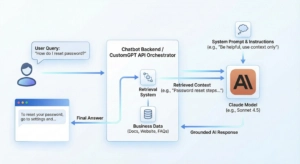
Many chatbot builders now offer custom LLM steps or direct Claude connectors.
Typical pattern
- Create or open a bot flow: In your builder, create a chatbot project and locate the “AI”, “LLM”, or “Custom model” step.
- Select Claude or custom LLM: If Claude is built-in, choose it and paste your API key or connect via OAuth. If not, use the builder’s generic HTTP/LLM block to call the Claude Messages API.
- Map user input to Claude: Configure the block so the user’s last message (plus any important variables like user ID or language) is sent as the user content.
- Add system instructions in the flow: Many builders let you add “System” or “Instruction” text. Use this to define your bot’s role, tone, and boundaries.
- Capture Claude’s reply into variables: Map the model’s reply into a variable like ai_response, then use it in your message node shown to the user.
- Test with realistic conversations: Run through real support or sales chats. Tweak prompts, parameters, and routing logic until results are stable.
The Economics of Claude: API Costs Simplified
Switching to Claude means paying for “Cognitive Labor” via tokens. Understanding the “Input vs. Output” dynamic is key to predicting your ROI.
- The “Read vs. Write” Rule
Like most models, Claude bills based on volume, but the price depends on the direction:
- Input (Reading) is Cheap: Sending your documents and instructions to the model costs very little.
- Output (Writing) is Premium: The text Claude generates usually costs more than the text you send into the model.
- The CustomGPT Benefit: Our RAG architecture saves you money by surgically extracting only the relevant snippets for the model to read, rather than dumping entire files into the conversation.
- Choose Your Intelligence Tier
Anthropic offers three tiers. In 2026, the choice usually comes down to Speed vs. Nuance:
| Feature | Claude Sonnet | Claude Haiku | Claude Opus |
| Best For | Balanced support agents, coding help, and production chatbot flows | High-volume routing, simple Q&A, and latency-sensitive tasks | Deep reasoning, complex troubleshooting, and high-stakes review |
| When to Use | Start here when you need strong answers without over-optimizing for edge cases. | Use when speed and budget matter more than nuanced reasoning. | Reserve for workflows where answer quality matters more than cost or latency. |
| Cost and context | Claude pricing, context windows, and model availability change over time. Check Anthropic’s current model and pricing documentation before estimating production costs. | ||
Which Integration Method fits your Team?
| Integration Method | Tech Skill Required | Setup Speed | Key Benefit | Best For |
| CustomGPT.ai + MCP | Low / No-Code | Fast to launch | Grounded answers from your own content with a RAG-backed agent | Support teams that need answers tied to approved documents. |
| No-Code Builder | Low | Fast (Hours) | Visual Flow | Marketing/Sales teams creating simple, linear conversation flows. |
| Direct API (Node/Python) | High | Slow (Days/Weeks) | Max Flexibility | Dev teams building a highly custom UI or complex backend logic. |
| Cloud Platform (AWS Bedrock) | Medium / High | Medium | Security & Compliance | Enterprise teams already working within the AWS ecosystem. |
How to do it with CustomGPT.ai
Here’s how to make Claude use your own knowledge via a CustomGPT.ai agent, and/or deploy CustomGPT as the chatbot that runs on Claude-powered models behind the scenes.
Build a knowledge-backed agent in CustomGPT.ai
- Create your CustomGPT.ai account and agent: Follow the “Welcome” and “Create agent” flow to set up an AI agent based on your business content.
- Connect your data sources: Use Manage AI agent data to add websites, sitemaps, files, and other sources so the agent can answer from your docs, help center, and knowledge base.
- Fine-tune behavior and prompts: In the agent settings, configure persona, tone, and behavior so the answers sound like your brand and respect your policies.
Deploy the agent as a chatbot
- Embed it as a website/chat widget: Use the Embed AI agent into any website or Add live chat to any website guides to drop a floating chat widget, embedded iframe, or “copilot” button into your site or help desk.
- Expose it via the CustomGPT API: Follow the API quickstart guide to call your agent over HTTPS from any custom UI. Your own frontend becomes the chatbot, CustomGPT handles retrieval over your data.
Let Claude talk to your CustomGPT.ai agent
- Deploy an MCP server for your agent: Use the Deploy using MCP server guide to host or deploy the open-source customgpt-mcpserver connected to your CustomGPT API key.
- Connect MCP to Claude Web/Desktop: Follow Deploy to Claude Web (and Desktop) docs to add your MCP endpoint and token in Claude’s settings. Claude can now call your CustomGPT tools as a connector.
- Use Claude as the front-end chatbot: In Claude’s chat, talk to your MCP-backed tool (your CustomGPT agent). Claude remains the conversational interface; CustomGPT.ai provides grounded answers from your content.
Designing prompts, context, and memory for Claude chatbots
Good prompt and context design is the difference between a “smart” chatbot and a chaotic one.
- Write a clear system prompt: Use Anthropic’s prompt-engineering guidance: specify role, audience, style, and what to do when unsure (ask clarifying questions or admit uncertainty).
- Use examples (few-shot prompts): Include a few example Q&As that show the kind of answers you want, especially for tricky edge cases.
- Separate rules from user input: Keep stable instructions in a dedicated system prompt, and treat user messages as data, not something allowed to override rules.
- Manage conversation history: Only send relevant turns back to Claude to stay within context limits and avoid confusing the model.
- Combine with retrieval: If you’re using CustomGPT or another RAG layer, pass retrieved snippets in a structured way (e.g., “Context” section) so Claude knows what information is supporting its answer.
Handling safety, abuse, and guardrails in Claude-powered chatbots
Claude has built-in safety behaviors aimed at reducing harmful, hateful, or policy-violating outputs, and Anthropic publishes detailed safeguards guidance.
To keep your chatbot safe:
- Align your system prompt with Claude’s policies: Explicitly forbid disallowed behavior (e.g., hate, self-harm instructions, harassment) and tell the bot to refuse those requests.
- Implement input and output filters: Before sending user content to Claude, optionally block obviously malicious or disallowed inputs. After getting a response, you can run additional checks.
- Handle abusive users gracefully: Detect repeated abuse and respond with a neutral “cannot help with that” message or gently end the conversation.
- Log safety-relevant events: Record attempted policy violations, both to improve your guardrails and to comply with internal risk processes.
- Respect Anthropic’s usage policy: Make sure your use case complies with Anthropic’s Usage Policy and any guidance about agentic features.
While other models race for speed, Claude excels at nuance. If you are building a chatbot for sensitive customer support or internal HR policy, you do not just need an answer; you need the right tone. Pairing Claude with a CustomGPT.ai knowledge-backed agent can help keep that tone connected to your approved business content.
Example: customer support FAQ chatbot with Claude
Here’s a simple blueprint you can adapt.
Scenario
You run a SaaS app and want a chatbot on your docs site that:
- Answers FAQs accurately
- Escalates to human support when needed
- Optionally uses CustomGPT.ai + MCP so Claude can reference your full knowledge base
Implementation steps
- Prepare your knowledge
- Index your docs and FAQ into CustomGPT.ai as an agent using “Manage AI agent data”.
- Create the chat backend
- Either:
- Call Claude’s Messages API directly from your server and plug in your own retrieval, or
- Use CustomGPT’s API to query your agent, then optionally send a condensed answer + sources to Claude for final wording.
- Either:
- Design the system prompt
- “You are a helpful support assistant for {YOUR_COMPANY}. Always answer using the provided knowledge. If unsure or the question is out of scope, say you don’t know and offer to contact support.”
- Build the UI
- Embed CustomGPT’s live chat widget on your docs site, or build a small JS chat box hitting your backend or CustomGPT API.
- Add Claude + MCP front-end (optional)
- Deploy a CustomGPT MCP server and connect it to Claude Web so you (or your team) can test support conversations directly inside Claude, powered by your CustomGPT agent.
- Test and iterate
- Run real support questions through the bot, inspect logs, tweak prompts, and adjust data sources until users consistently get correct, concise answers.
Conclusion
The challenge is not just using Claude; it is making Claude useful with the right business context. CustomGPT.ai helps ground chatbot answers in your approved documents, FAQs, and help center content so your team can reduce off-source responses without building the retrieval layer from scratch. Create your custom Claude agent today.
Frequently Asked Questions
Can I use Claude models in my chatbot, or am I limited to GPT-style models?
Yes. You can use Claude in a chatbot through the Anthropic API, Amazon Bedrock, or another builder that explicitly supports Claude. With CustomGPT.ai, the supported approach is to build a knowledge-backed agent from your content and expose it through live chat, API, or MCP so Claude can work with grounded business context. Confirm model availability in your approved plan documentation before promising Claude as a production provider.
If I bring my own Anthropic API key, can I use Claude for a custom chatbot?
You can bring an Anthropic API key only in stacks that explicitly support external provider keys. For a custom build, keep the Claude API key on your backend, call Claude from the server, and connect retrieval from your approved knowledge base. For CustomGPT.ai, use the documented API, live chat, or MCP workflow unless your plan documentation explicitly lists a provider-key option.
What is the simplest no-code way to run Claude with my own knowledge base?
The simplest path is to create a CustomGPT.ai agent from your websites, files, FAQs, and help center content, then deploy it as a website chat widget or expose it through API or MCP. If you specifically want Claude as the front-end experience, connect Claude to the CustomGPT.ai agent through the documented MCP flow so responses can draw from your approved content.
Why does my Claude chatbot answer from general knowledge instead of only my uploaded documents?
This usually means retrieval or grounding is misconfigured. Check that your knowledge source is connected, retrieval is enabled, citations or source references are expected, and general-knowledge fallback is limited for support answers. Set low-confidence behavior to ask a clarifying question or say it does not know when the answer is not in your approved content.
Should I integrate Claude through Anthropic API directly or through Amazon Bedrock?
Use the Anthropic API directly when you want a simpler API surface and direct access to Claude from your own backend. Use Amazon Bedrock when your security and governance requirements are already centered on AWS controls such as IAM, regional access, and CloudTrail. In either case, keep provider credentials server-side and add retrieval if the chatbot must answer from company documents.
Can I use Claude in a fully white-labeled support chatbot without exposing model vendors to end users?
Yes, if the chatbot layer controls the user-facing brand, logs, and exports. CustomGPT.ai supports custom branding such as logos, colors, and custom domains. To avoid exposing vendors, redact provider names, model names, upstream request IDs, and authorization-related headers from transcripts, logs, analytics, and exports before storage or sharing.
How do I connect Claude to my existing customer support chatbot?
Connect Claude by calling the Claude Messages API from your backend or through a cloud AI platform such as Amazon Bedrock, then map user messages into the messages payload and stream responses back to your UI. Add retrieval from your knowledge base, define a support-specific system prompt, and log enough metadata to debug quality without storing sensitive data unnecessarily.
Can I use Claude in my chatbot with my own docs and knowledge base?
Yes. Combine Claude with a retrieval layer like CustomGPT.ai so answers can draw from your docs, FAQs, and help center. Create a CustomGPT.ai agent, add your data sources, and expose the agent through API, live chat, or MCP. Claude Web or Desktop can then call that agent as a connector for grounded, document-aware responses.
Related Resources
Choosing the right AI model
- Best AI Model for Your Chatbot — compare Claude, GPT, and Gemini for chatbot use cases
- How to Pick the Right AI Model — decision framework by task type and budget
- Which AI Model for My Chatbot? — side-by-side breakdown for support, sales, and internal bots
Connecting Claude via MCP
- Claude Desktop with CustomGPT.ai Hosted MCP — connect Claude directly to your knowledge base via MCP
- Connect MCP to My Chatbot — step-by-step MCP setup guide
- Hosted MCP Servers for RAG-Powered Agents — run MCP without managing your own infrastructure
RAG vs fine-tuning (the alternative to provider-key setup)
- Fine-Tune ChatGPT: When to Skip It — why most teams succeed with RAG before fine-tuning
- RAG vs Fine-Tuning: Safety & Enterprise Data — which approach is safer for regulated industries
- build RAG with LLMs — technical guide to building a retrieval pipeline
- RAG Vector Database Selection — choose the retrieval storage layer for grounded chatbot answers
Building your chatbot
- How to Create Your Own Chatbot — no-code setup from scratch
- Train ChatGPT on Custom Data — add your own docs, FAQs, and help content
- Developer Guide to RAG APIs — API integration for developers building on CustomGPT.ai
- Custom AI Models — overview of model options available on the platform
- How to Build a No Login AI Chatbot: guide to creating chatbot access without requiring users to sign in.