Elevating Chatbot Conversations: A Guide to External Data Integration with CustomGPT.ai SDK (Part 2)

In our previous article, we talked about making chatbot conversations more interesting by adding information from other sources using the CustomGPT.ai API. Now we will explore how to enhance conversational experiences by leveraging external data with the CustomGPT.ai SDK. While the API provided valuable insights into accessing external data, the SDK offers a more streamlined approach for developers to seamlessly integrate sources such as websites and custom business data into their chatbot applications.
Instead of diving into complex technicalities, we’ll guide you through a simple process to seamlessly integrate external data, making your chatbots even more helpful and user-friendly.
Advantages of Using the CustomGPT.ai SDK for Integrating External Data Sources into Chatbots
Using the CustomGPT.ai SDK for performing operations and integrating external data sources into a chatbot knowledge base offers several advantages for developers:
Simplified Integration
The CustomGPT.ai SDK provides a streamlined approach to integrating external data sources into chatbot applications. Developers can easily incorporate this functionality into their applications without the need for extensive coding or technical expertise.
Comprehensive Documentation
The SDK comes with comprehensive documentation and resources, making it easy for developers to understand and implement the integration process. Detailed guides and tutorials, including those covering available integrations, are available to help developers navigate the SDK’s features and functionalities.
Pre-built Tools and Functions
With the CustomGPT.ai SDK, developers have access to a variety of pre-built tools and functions specifically designed for integrating external data sources. These tools simplify the development process and reduce the time and effort required to add this functionality to chatbots with external data.
Flexibility and Customization
The SDK offers flexibility and customization options, allowing developers to tailor the integration of external data sources to suit their specific requirements. Developers can choose the data sources they want to access, define how the data is retrieved and processed, and customize the behavior of an SDK-powered chatbot accordingly.
Real-time Data Access
Using the SDK, developers can programmatically access external data sources in real-time, ensuring that chatbot responses are always up-to-date and accurate. This real-time access enables chatbots to provide contextually relevant information to users, enhancing the overall user experience.
Overall, the CustomGPT.ai SDK empowers developers to enhance their chatbot applications with external data sources, providing users with more personalized and engaging experiences. With its simplified integration process, comprehensive documentation, and pre-built tools, the SDK makes it easy for developers to explore the full potential of their chatbots.
Adding External Data Sources (Sitemap) to a CustomGPT.ai Chatbot using SDK: A Practical Example
In this example, we will demonstrate how to incorporate a website sitemap into a CustomGPT.ai chatbot using the CustomGPT.ai SDK.
- First, we need to install the CustomGPT.ai SDK by running the command !pip install customgpt-client.
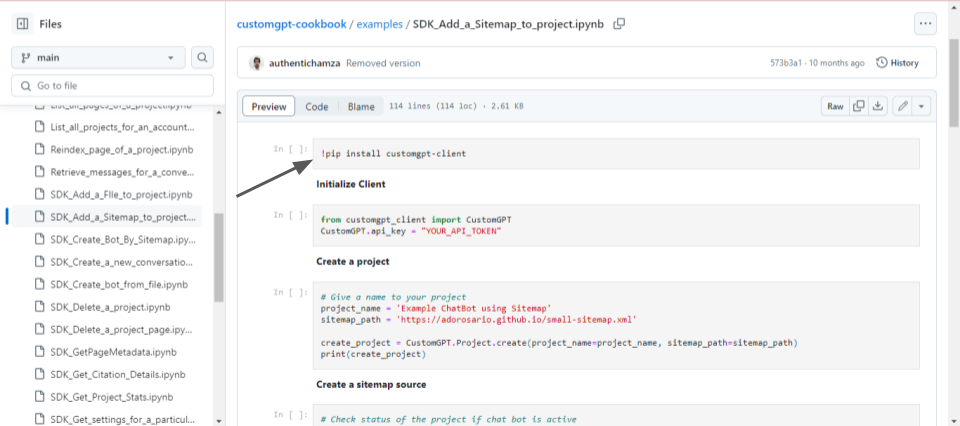
- Next, we import the CustomGPT class from the customgpt_client module. We set the API key to authenticate our requests to the CustomGPT.ai platform.
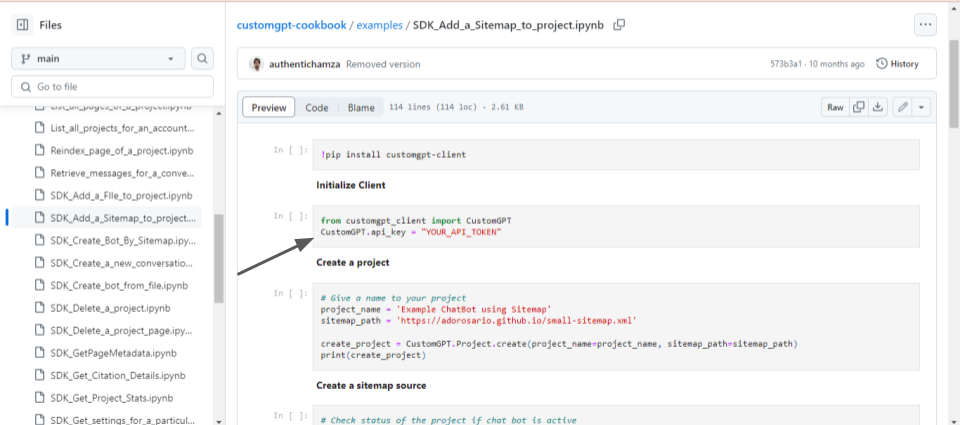
- We define a name for our chatbot project, such as “Example ChatBot using Sitemap”.
- We specify the URL path to the sitemap, which contains structured information about the website’s pages. Then, we use the CustomGPT SDK to create a new project, providing the project name and the sitemap path.
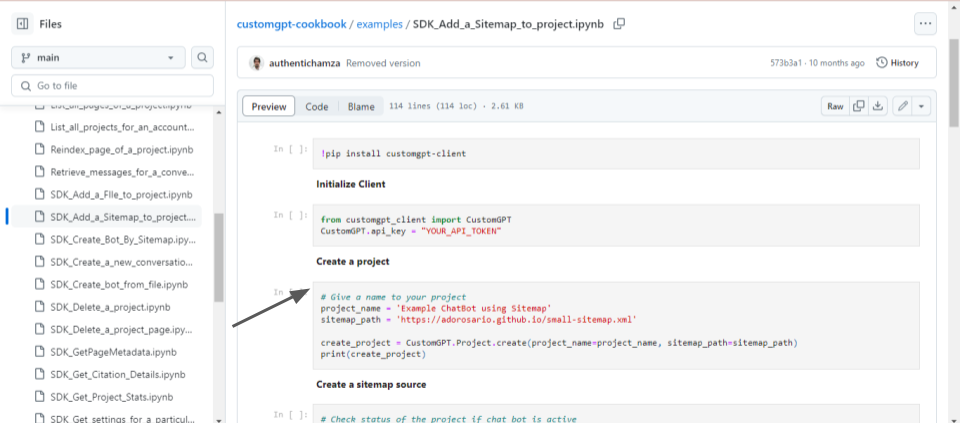
- Finally, we print out the response from the creation of the project.
- We check the status of our project to ensure that the chatbot is active and ready to receive data.
- Then, we extract the project ID from the response of the project creation step. After obtaining the project ID, we used the CustomGPT SDK to add a sitemap source to our project.
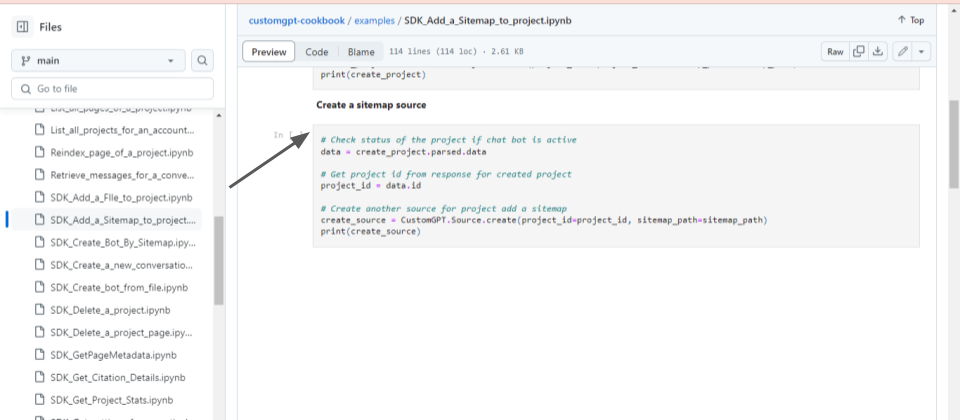
- Finally, we print out the response by adding the sitemap source of the desired website.
This code example demonstrates how to use the CustomGPT.ai SDK to seamlessly integrate external data sources, such as a website sitemap, into your chatbot project.
Adding External Data Sources (Custom Data File) to a CustomGPT.ai Chatbot using SDK: A Practical Example
In this example, we will demonstrate how to incorporate a custom data/business file into a CustomGPT.ai chatbot using the CustomGPT.ai SDK.
- Installs the CustomGPT.ai SDK into our Python environment using the pip package manager.
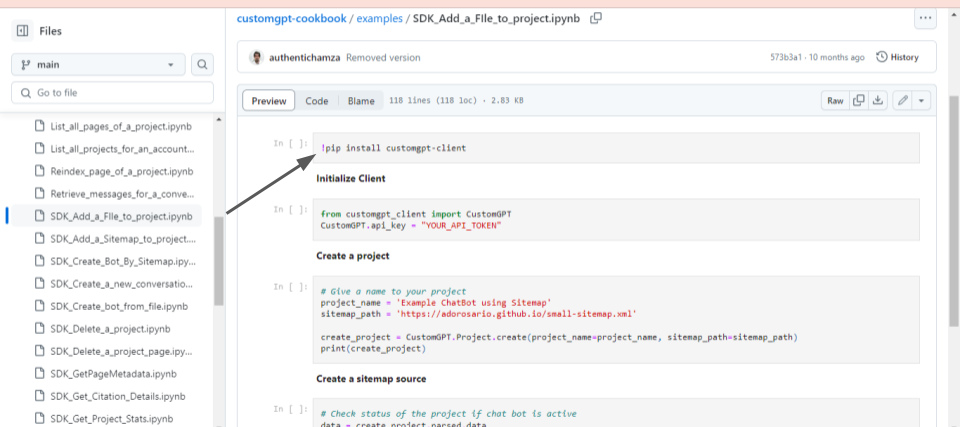
- Now we import the CustomGPT class from the customgpt_client module. We set the API key to authenticate our requests to the CustomGPT.ai platform.
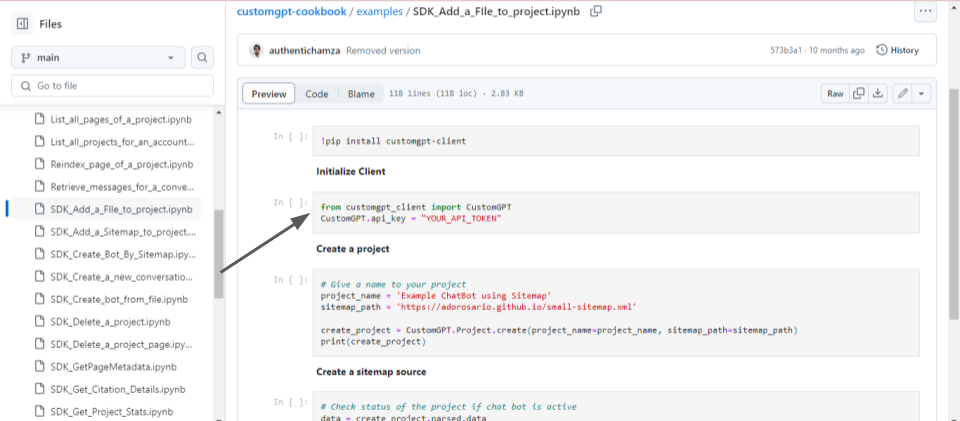
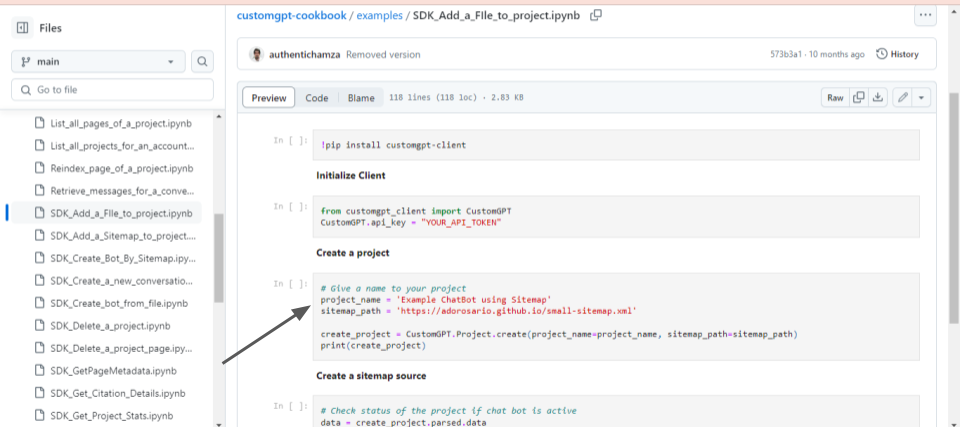
- We define a name for our chatbot project, such as “Example ChatBot using Sitemap”.
- We specify the URL path to the sitemap file, which contains structured information about the website’s pages. Then, we use the CustomGPT SDK to create a new project, providing the project name and the sitemap path.
- Finally, we print out the response from the creation of the project.
- We check the status of our project to ensure that the chatbot is active and ready to receive data.
- Then, we extract the project ID from the response of the project creation step. We import the necessary module to upload a file using Google Colab.
- We upload the custom data file using the files.upload() function and store its content.
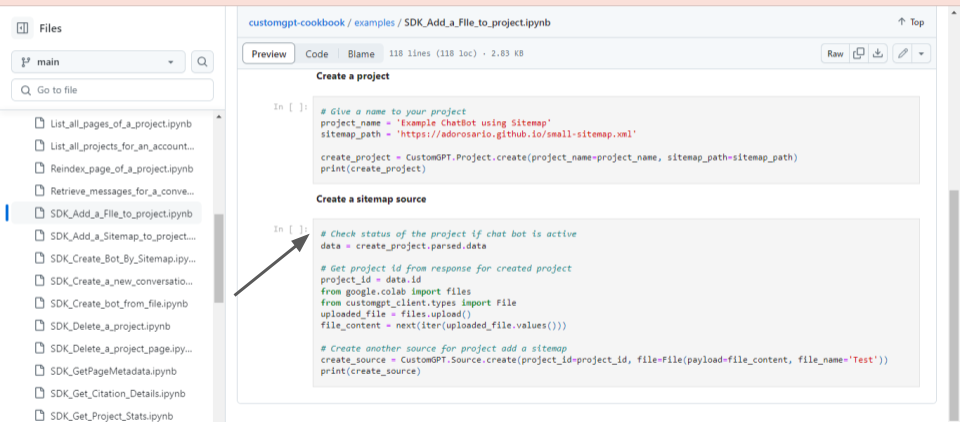
- After obtaining the project ID and the file content, we use the CustomGPT SDK to add a custom data source to our project. Finally, we print out the response from adding the custom data source.
These code snippets demonstrate how to use the CustomGPT.ai SDK to add external data sources, such as a custom data file, to your chatbot project.
Conclusion
Developers can seamlessly integrate these built-in functionalities into their chatbot applications by directly installing and utilizing the CustomGPT.ai SDK in Python. This SDK offers a straightforward approach to incorporating external data sources, such as website sitemaps or custom business files, into chatbot knowledge bases. With easy-to-use methods and intuitive syntax, developers can add CustomGPT.ai’s features without the need for extensive coding into their applications.
Simply install the SDK, initialize the client with your API key, and leverage the provided functions to create projects, add data sources, and enhance your chatbot’s capabilities. This streamlined process empowers developers to enrich their chatbots with external data efficiently, creating more intelligent and versatile conversational experiences for users.
Frequently Asked Questions
Should external data stay in your database or go into the chatbot knowledge base?
Use the knowledge base for reusable content such as website pages, manuals, policies, and FAQs. Keep fast-changing or account-specific business data in your existing system and pull it in through the SDK when needed, since the SDK supports real-time access to external data sources. Stephanie Warlick described the knowledge-base use case this way: “Check out CustomGPT.ai where you can dump all your knowledge to automate proposals, customer inquiries and the knowledge base that exists in your head so your team can execute without you.”
Can a chatbot use long customer profiles and still answer from your main knowledge base?
Yes. A practical pattern is to send only the profile fields needed for the current turn while letting the chatbot retrieve stable reference content from its knowledge base. The SDK is built for external data integration and real-time data access, so you do not need to turn every changing user record into a stored document. Evan Weber summarized the broader benefit of combining your own content with chatbot workflows: “I just discovered CustomGPT, and I am absolutely blown away by its capabilities and affordability! This powerful platform allows you to create custom GPT-4 chatbots using your own content, transforming customer service, engagement, and operational efficiency.”
Do you need to re-ingest conversation logs into a chatbot knowledge base?
Not usually. If conversation history changes often, keep it in your app or database and pass in the relevant parts at runtime. Re-ingest information only when it becomes stable reference knowledge that should be retrievable in future conversations. That fits an SDK designed for real-time external data access, and the provided benchmark notes that the platform outperformed OpenAI in RAG accuracy.
How do you add a sitemap or website to a chatbot with an SDK?
Use the SDK to add the website or sitemap as a source instead of copying page text manually. Supported ingestion includes websites, URLs, HTML, XML, and other common formats, and a documented SDK use case is adding a sitemap as an external source. Dan Mowinski emphasized the tool’s practical reliability: “The tool I recommended was something I learned through 100 school and used at my job about two and a half years ago. It was CustomGPT.ai! That’s experience. It’s not just knowing what’s new. It’s remembering what works.”
Why use a chatbot platform if you already have your own database and workflows?
A chatbot platform can still save time because it adds source ingestion, retrieval, citation support, analytics, and deployment options like widget, live chat, search bar, API, and MCP server. You can build directly on a general LLM stack or an OpenAI-compatible API, but a dedicated platform reduces setup work for grounded answers from your own data. If security matters, the provided materials also list SOC 2 Type 2 certification, GDPR compliance, and a policy of not using customer data for model training. The Kendall Project put the value this way: “We love CustomGPT.ai. It’s a fantastic Chat GPT tool kit that has allowed us to create a ‘lab’ for testing AI models. The results? High accuracy and efficiency leave people asking, ‘How did you do it?’ We’ve tested over 30 models with hundreds of iterations using CustomGPT.ai.”
When is a custom app better than a standalone chatbot for external data integration?
A custom app is usually better when the chat experience must trigger workflows, account actions, reminders, or other business logic alongside retrieval from stored knowledge. A standalone chatbot is often enough when users mainly need answers from websites, documents, or FAQs. The SDK supports both approaches because it is available in Python, Node.js, .NET, Java, Go, PHP, Ruby, and Swift. Barry Barresi described this kind of tailored implementation as: “Powered by my custom-built Theory of Change AIM GPT agent on the CustomGPT.ai platform. Rapidly Develop a Credible Theory of Change with AI-Augmented Collaboration.”
Related Resources
These articles offer useful context on building, deploying, and securing CustomGPT.ai integrations.
- CustomGPT.ai SDK Features — Explore how the CustomGPT.ai SDK helps you add chatbot capabilities and application functionality more efficiently.
- How CustomGPT.ai Works — Get a clear overview of the platform’s architecture, workflow, and core mechanics behind CustomGPT.ai deployments.
- GPT Jailbreaking Risks — Understand common jailbreaking vulnerabilities and the security considerations that matter when working with AI systems.