Enhancing Chatbot Interactivity: A Guide to Using CustomGPT.ai SDK for Tailored User Experiences

Customization is key to creating chatbots that truly resonate with users as it plays a crucial role in enhancing user experiences. The CustomGPT.ai SDK offers developers the tools they need to tailor their chatbots to specific requirements, ensuring they deliver personalized interactions. In this article, we’ll explore how developers can utilize the CustomGPT.ai SDK to customize their chatbots effectively. Whether you’re just starting or have experience in chatbot development, we’ll guide you through the process of leveraging the SDK’s capabilities to create chatbots that truly meet your needs, with a clear sense of how CustomGPT.ai works.
Exploring the Benefits: Customizing Your Chatbot with CustomGPT.ai SDK
Customizing your chatbot using the CustomGPT.ai SDK offers several benefits that enhance the user experience and align the bot with your business needs:
Tailored User Experience
By customizing your chatbot, you can ensure that it provides responses and interactions tailored to your specific audience, leading to a more engaging and personalized user experience.
Improved Brand Representation
Customizing your chatbot allows you to incorporate branding elements such as colors, logos, and messaging tone, ensuring consistency with your brand identity and enhancing brand representation in conversations.
Enhanced Functionality
The SDK provides a wide range of customization features, including the ability to add external data sources, integrate with other applications, and implement advanced conversational logic, enhancing the functionality and capabilities of your chatbot.
Better User Engagement
Customized chatbot can engage users more effectively by providing relevant information, proactive assistance, and personalized recommendations based on user preferences and behavior.
Increased Efficiency
By customizing your chatbot to automate tasks and processes specific to your business, including through external data integration, you can improve operational efficiency and reduce manual workload, leading to cost savings and resource optimization.
Using the SDK and adding code snippets into your chatbot backend functionality provides more control over customization, allowing you to tailor the chatbot according to your business needs and user preferences. This approach empowers developers to create chatbots that deliver a seamless and personalized experience, driving user engagement and satisfaction.
Customizing Chatbot Project using CustomGPT.ai Project: A Practical Example
In this example, we’ll demonstrate how to customize your chatbot project using the CustomGPT.ai Project feature. Let’s get started!
- First, ensure you have the necessary package installed by running !pip install customgpt-client in your environment.
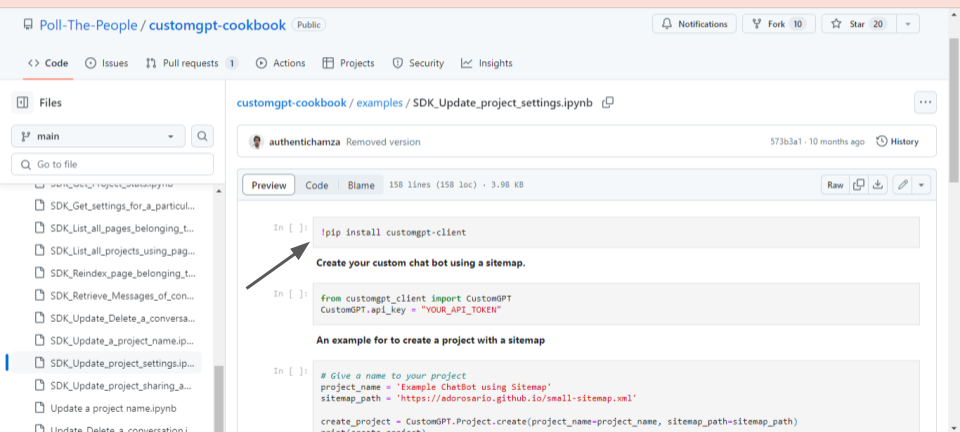
- Import the CustomGPT class from the customgpt_client module and set your API key to authenticate your requests to the CustomGPT.ai platform.
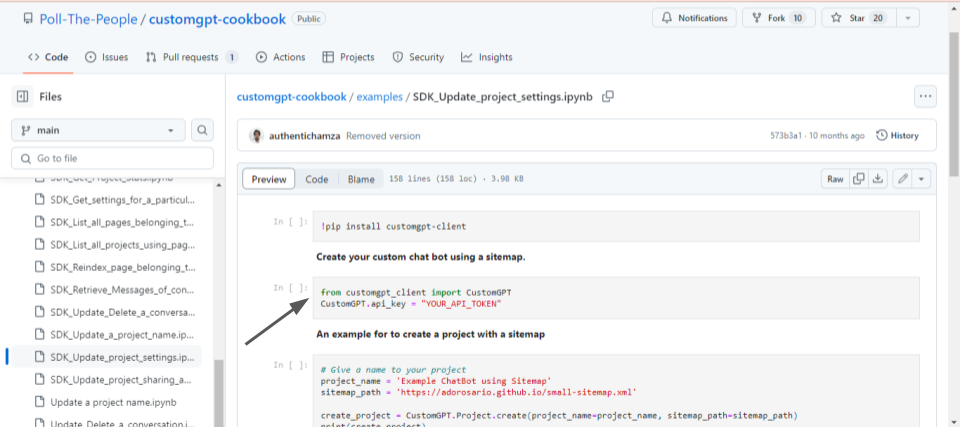
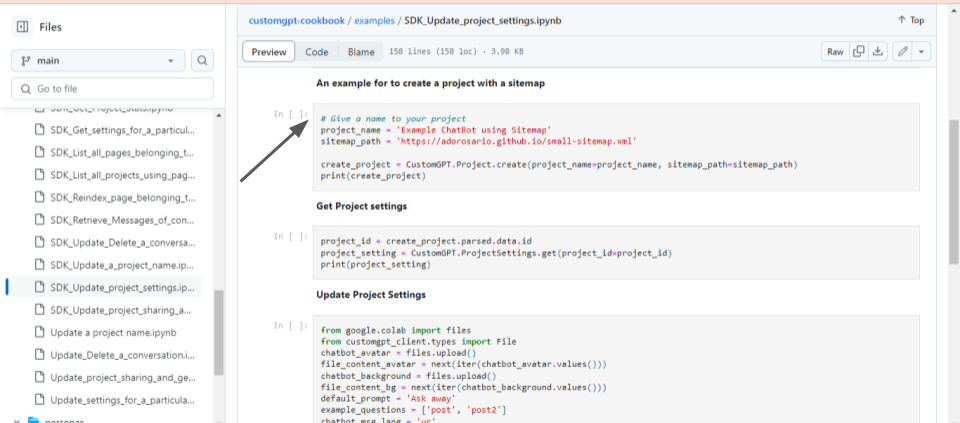
- Now if you don’t have a chatbot project then create one by defining a name for your project and specifying the URL path to the sitemap containing structured information about your website’s pages. Then, use the CustomGPT.Project.create() method to create a new project with the provided details.
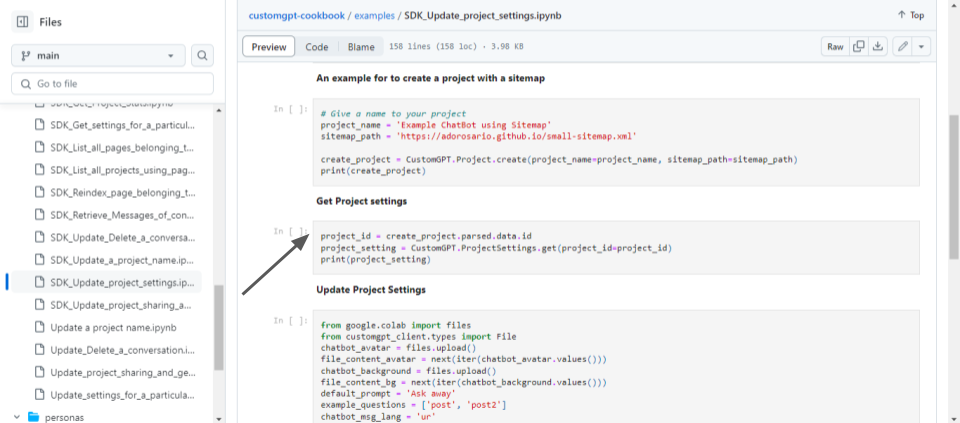
- Now run this code in your environment retrieve the project ID from the response of the project creation step and use it to fetch the project settings using the CustomGPT.ProjectSettings.get() method so that you can customize and update it according to your needs.
- Upload files for your chatbot’s avatar and background, define a default prompt, example questions, and message language. Then, use the CustomGPT.ProjectSettings.update() method to update the project settings with the new customizations.
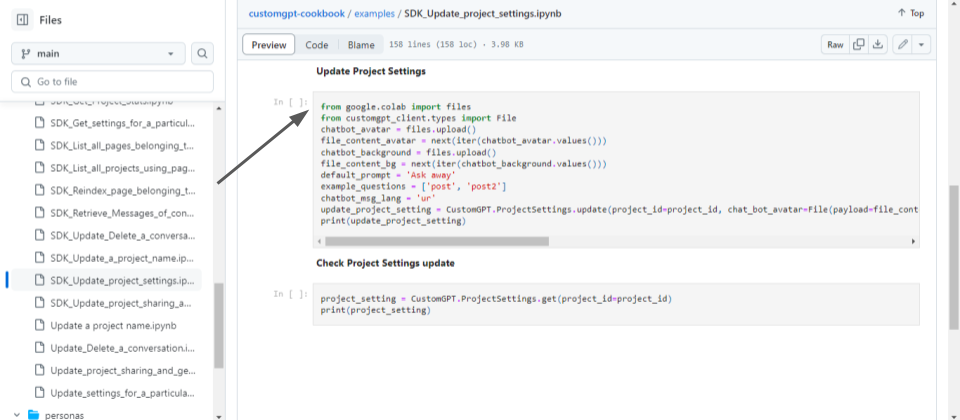
- Finally, verify that the project settings have been updated successfully by fetching them again using the CustomGPT.ProjectSettings.get() method.
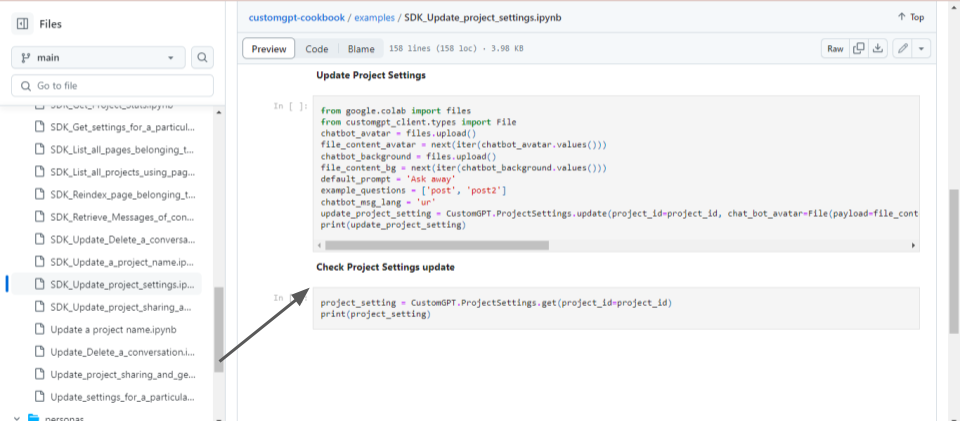
These code snippets illustrate how to customize your chatbot project using the CustomGPT.ai SDK, allowing you to personalize various aspects of your chatbot’s appearance and behavior for an enhanced user experience.
The Advantages of CustomGPT.ai SDK over Scratch Code
Using the CustomGPT.ai SDK offers several advantages over writing code from scratch:
Simplified Development
The SDK provides pre-built tools and functions that streamline the process of integrating external data sources and customizing chatbot functionality. Developers can leverage these tools to achieve desired outcomes with minimal coding effort.
Time-Saving
With the SDK, developers can save time by avoiding the need to write complex code for common tasks. Instead of reinventing the wheel, they can use SDK functionalities to quickly add features and enhance their chatbots.
Reduced Complexity
Writing code from scratch can be daunting, especially for developers with limited experience. The SDK abstracts away many technical complexities, making it easier for developers to implement customizations without diving deep into the intricacies of the underlying code.
Consistency and Reliability
The SDK is maintained by the CustomGPT.ai team, ensuring that it stays up-to-date with the latest features and best practices. This consistency and reliability help developers build robust and stable chatbots without worrying about compatibility issues or deprecated functionality.
Overall, the CustomGPT.ai SDK empowers developers to customize their chatbots more efficiently and effectively, enabling them to deliver richer and more engaging user experiences. By leveraging the SDK’s advantages, developers can focus on adding value to their chatbots rather than getting bogged down in implementation details, especially during a step-by-step SDK setup.
Conclusion
In conclusion, leveraging the CustomGPT.ai SDK offers substantial advantages over starting from scratch when customizing chatbot projects. By utilizing the SDK, developers can streamline the development process, saving time and effort while benefiting from pre-built tools and functions. This approach provides greater flexibility, enabling developers to tailor chatbot functionality to their specific needs with ease. Additionally, the SDK empowers developers to implement advanced features and integrations seamlessly, enhancing the chatbot’s capabilities and user experience. Overall, the CustomGPT.ai SDK is a valuable resource for maximizing efficiency and achieving optimal customization in chatbot development projects.
Frequently Asked Questions
How can SDK customization improve chatbot customer experience?
SDK customization improves customer experience by letting you tailor responses, branding, and conversation logic to your audience instead of relying on generic replies. You can add relevant data sources, personalize tone, automate common tasks, and make answers more useful for the specific journeys users care about. Evan Weber described that impact this way: “I just discovered CustomGPT, and I am absolutely blown away by its capabilities and affordability! This powerful platform allows you to create custom GPT-4 chatbots using your own content, transforming customer service, engagement, and operational efficiency.”
What is the fastest step-by-step way to build a customized chatbot app with the SDK?
The fastest path is usually: 1) install the customgpt-client package, 2) import the CustomGPT class, 3) authenticate with your API key, 4) create a project with a name and a sitemap URL or other supported content source, 5) connect your app through the OpenAI-compatible /v1/chat/completions endpoint or a supported SDK, and 6) test tone, branding, and conversation logic with real prompts before expanding the knowledge base. Starting with a narrow source set makes it easier to validate answer quality quickly.
We already have a support bot. How is a content agent built with the SDK different?
A content agent is usually designed to answer grounded questions from your knowledge sources, while a basic support bot often focuses on triage, routing, or scripted workflows. With retrieval-augmented generation, multi-source ingestion, and citation support, you can make the assistant function more like a searchable knowledge layer for customers or internal teams. Stephanie Warlick summarized that broader use case well: “Check out CustomGPT.ai where you can dump all your knowledge to automate proposals, customer inquiries and the knowledge base that exists in your head so your team can execute without you.”
How do I integrate the SDK with my existing AI tools or a chat UI?
You can keep your current frontend and connect it to an OpenAI-compatible REST API at /v1/chat/completions, which makes integration easier if your app already uses OpenAI-style clients. If you prefer language-specific tooling, SDKs are available for Python, Node.js, .NET, Java, Go, PHP, Ruby, and Swift, with API-key authentication. Speed also matters for chat UX once the knowledge layer is connected. Bill French noted: “They’ve officially cracked the sub-second barrier, a breakthrough that fundamentally changes the user experience from merely ‘interactive’ to ‘instantaneous’.”
Can I securely use private content when customizing a chatbot?
Yes. You can ground replies in private PDFs, DOCX, TXT, CSV, HTML, XML, JSON, audio, video, and URL-based sources, then access the system with API-key authentication. For sensitive deployments, the most useful checks are whether the provider is SOC 2 Type 2 certified, GDPR compliant, and explicitly states that customer data is not used for model training. Those are concrete trust signals for teams working with internal or restricted content.
Can the SDK support a white-labeled, multilingual chatbot experience?
Yes. You can customize branding and persona, then deploy the experience as an embed widget, live chat, search bar, or API while supporting 92+ languages. That combination helps you white-label the interface and keep answers grounded in your own content across different audiences. Barry Barresi described this kind of specialized build as: “Powered by my custom-built Theory of Change AIM GPT agent on the CustomGPT.ai platform. Rapidly Develop a Credible Theory of Change with AI-Augmented Collaboration.”
Related Resources
This guide pairs well with a deeper look at designing and deploying a tailored AI assistant.
- Custom AI Chatbots — Explore how to build a custom AI chat bot that fits your data, workflows, and customer experience goals with CustomGPT.ai.