Enhancing App Functionality with CustomGPT.ai SDK: Integrating Chatbot Features

Our previous blog post delved into one specific task: creating a conversation using the CustomGPT.ai SDK. We also explored the CustomGPT.ai SDK toolkit in detail, understanding its components and functionalities. In this blog, we will explore how CustomGPT.ai helps developers simplify app development with its SDK. We will perform another operation using a practical example from the CustomGPT.ai SDK: sending a message to the conversation we previously created.
This demonstration will show developers how to seamlessly integrate message-sending functionality into their applications using the CustomGPT.ai SDK. By directly implementing code snippets from the SDK, developers can enhance their applications without starting from scratch. Let’s dive into this process and see how to use the CustomGPT.ai SDK to add AI-powered chatbot capabilities to your applications.
Simplifying App Development with CustomGPT.ai SDK
CustomGPT.ai SDK empowers developers to enhance their applications without the need to start from scratch. Here’s how it simplifies the app development process:
Pre-built Functionality
CustomGPT.ai SDK comes with a wide range of pre-built functionalities, allowing developers to easily integrate advanced AI capabilities into their applications. These functionalities cover various aspects of natural language processing, making it easier for developers to add features like chatbots, language understanding, and text generation.
Ready-to-Use Code Snippets
The SDK provides ready-to-use code snippets that developers can directly incorporate into their applications. These snippets are well-documented and easy to understand, saving developers valuable time and effort in coding complex AI algorithms from scratch.
Streamlined Integration
With CustomGPT.ai SDK, developers can seamlessly integrate AI-powered features into their applications with versatile Python programming language or development environment. The SDK offers compatibility with Python and frameworks, ensuring a smooth integration process.
Comprehensive Toolkit
CustomGPT.ai SDK is a comprehensive toolkit that caters to the diverse needs of developers. From basic functionalities like text generation to more advanced features. The SDK provides everything developers need to make their applications fully functional.
Reduced Development Time
By leveraging the capabilities of CustomGPT.ai SDK, developers can significantly reduce development time and accelerate the deployment of their applications. The pre-built functionalities and code snippets eliminate the need for extensive coding and testing, allowing developers to focus on other aspects of their projects.
Overall, CustomGPT.ai SDK serves as a complete package for developers, offering a wide range of pre-built functionalities and code snippets to make their applications more intelligent and user-friendly. With its streamlined integration process and comprehensive toolkit, CustomGPT.ai SDK empowers developers to create innovative and impactful applications with ease.
Sending Messages to CustomGPT.ai chatbot using SDK: A Practical Example
In this practical example, we’ll demonstrate how to send a message to the CustomGPT.ai chatbot using the CustomGPT.ai SDK. To begin, you’ll need to install the CustomGPT.ai python SDK into your application where you’re integrating chatbot functionality, as shown in this CustomGPT.ai SDK chatbot guide.
I am using Jupyter Notebook to run the CustomGPT.ai Python code snippets.
- To begin, we set up the API URL and API Token needed to connect to the CustomGPT.ai platform. This includes defining the endpoint URL and providing your unique API token for authorization.
Read the full blog to get your CustomGPT.ai API.
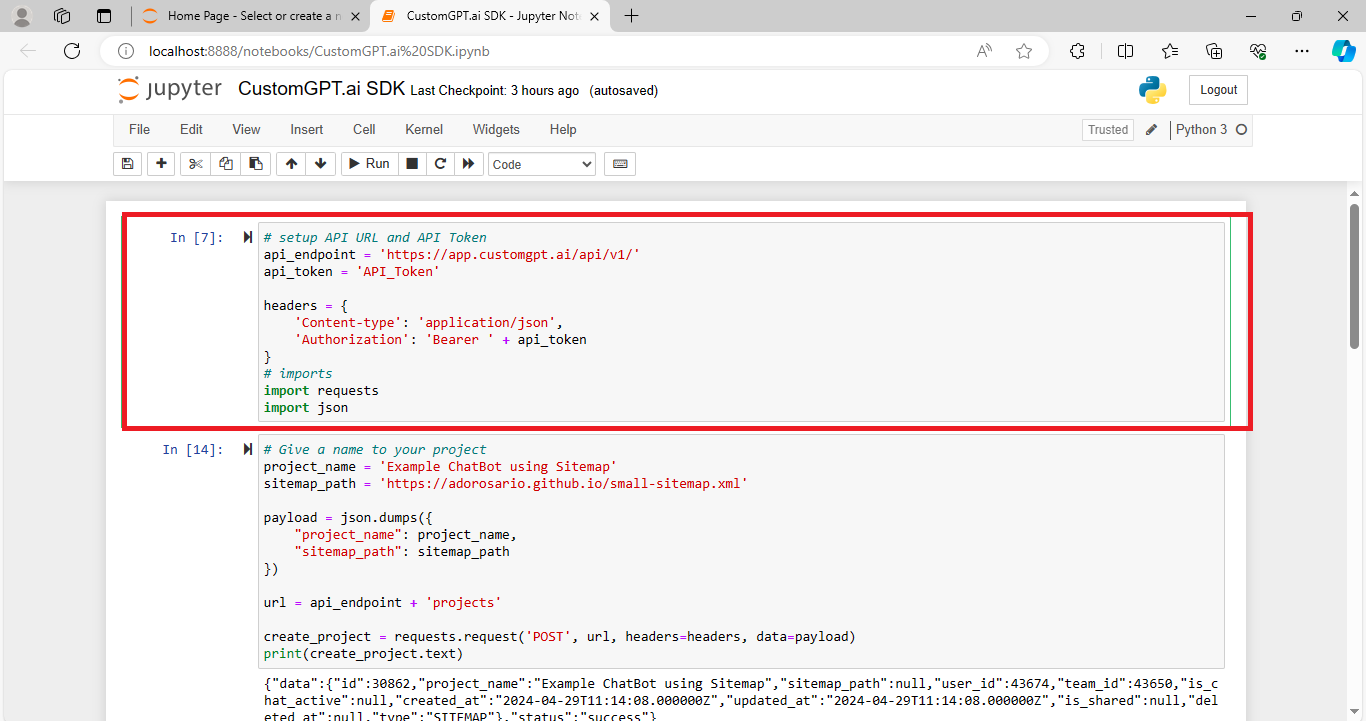
- Next, we import the necessary libraries for making HTTP requests and handling JSON data.
- Then define the name of your project if you have not created one. Write the path to the sitemap file you want to use for training our chatbot. This information is structured into a JSON payload.
- With the project details ready, we send a POST request to the CustomGPT.ai API to create the project. The response includes data about the newly created project, including its ID.
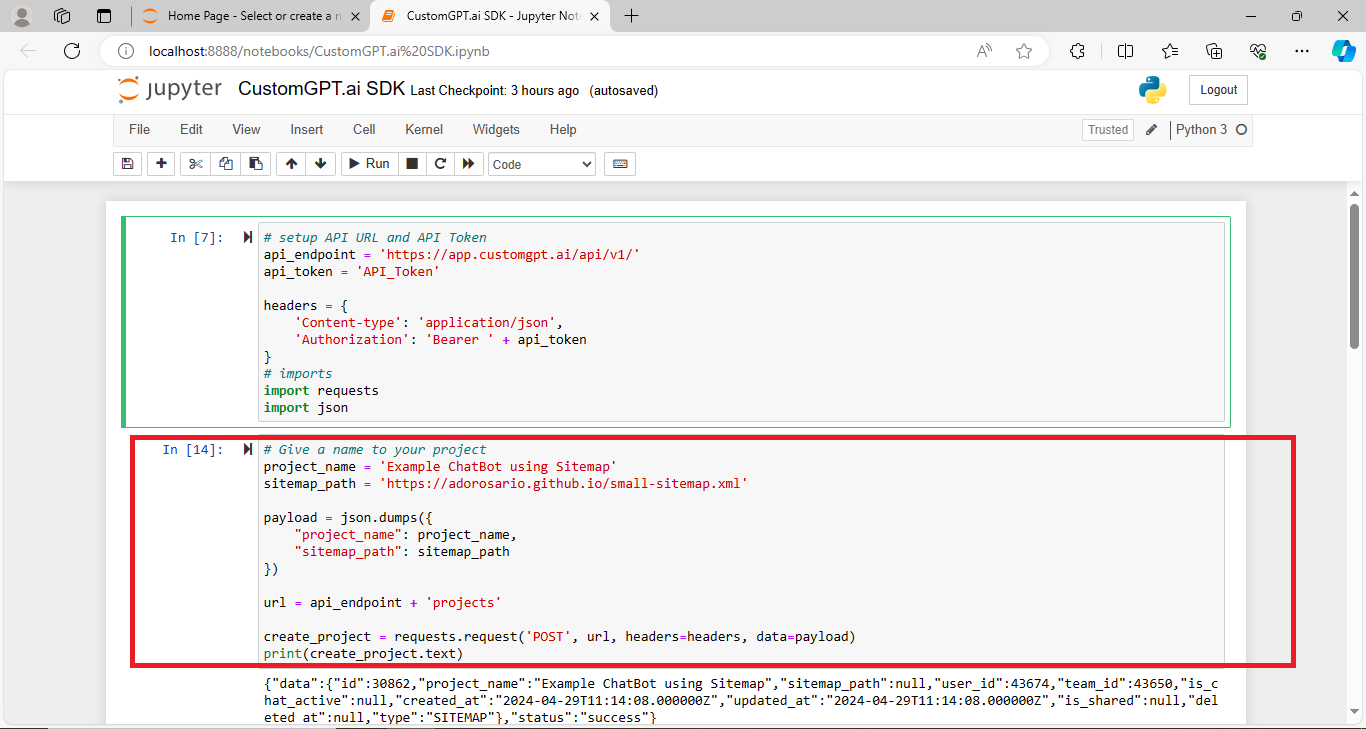
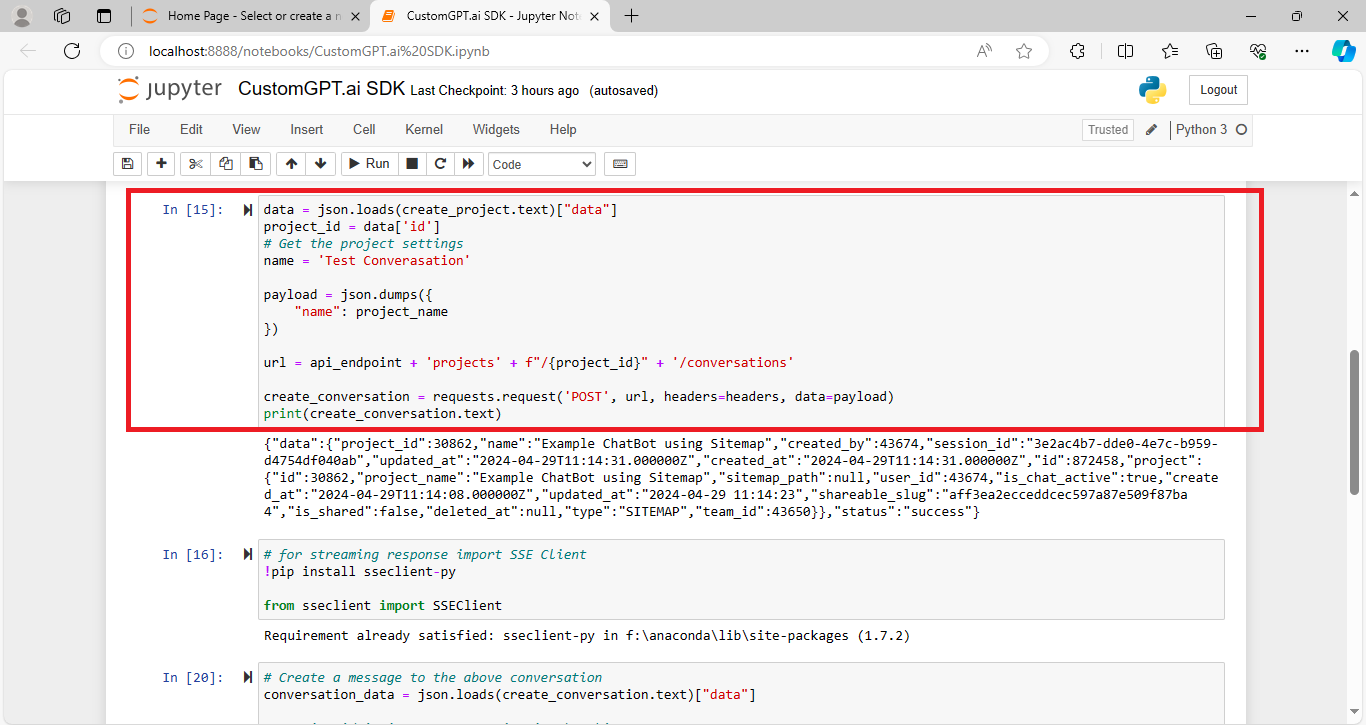
- After creating the project, proceed to create a conversation within the project. This involves sending another POST request to the API endpoint specific to conversations, using the project ID obtained earlier.
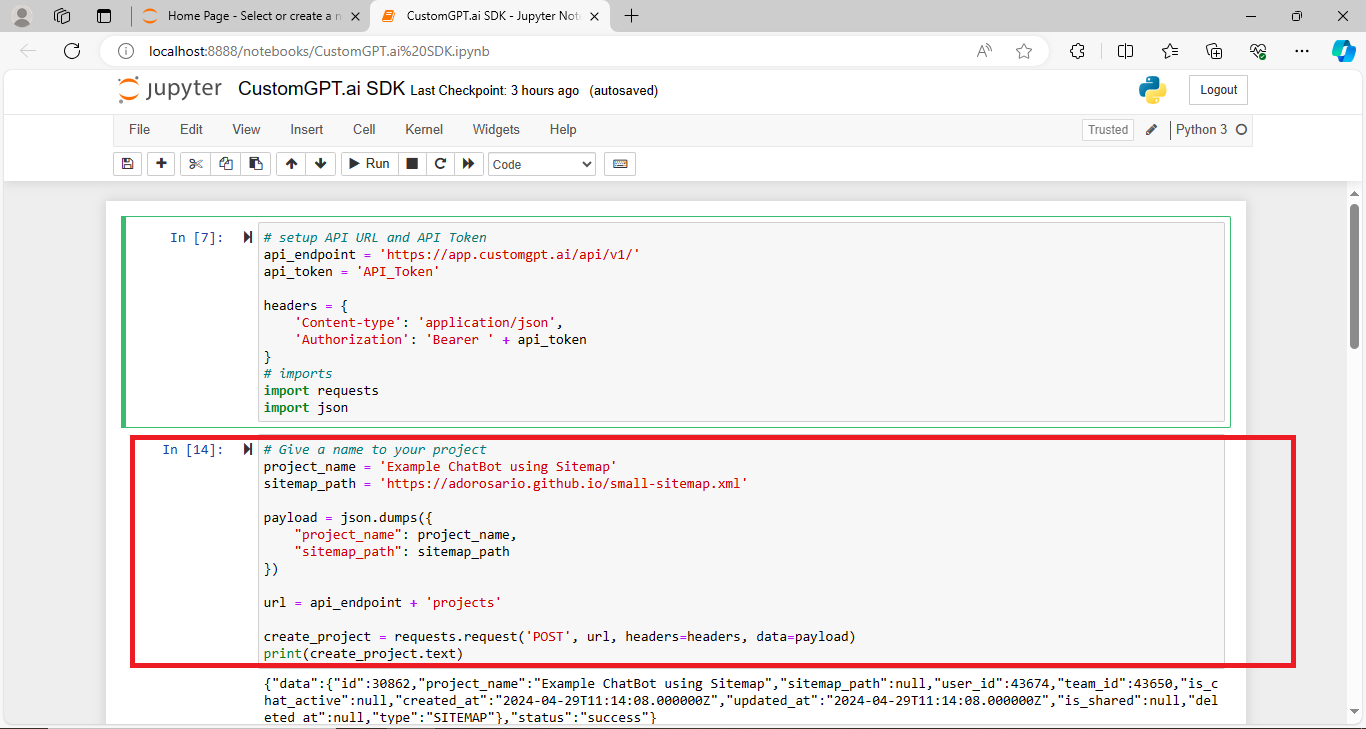
- When the code runs, the response will also contain other information, such as project ID, session ID, etc.
Read the full blog on Creating Conversation using CustomGPT.ai SDK in detail
- Once the conversation is created, generate a message to send to the chatbot. We extract the session ID from the conversation data, which is essential for maintaining the chat history.
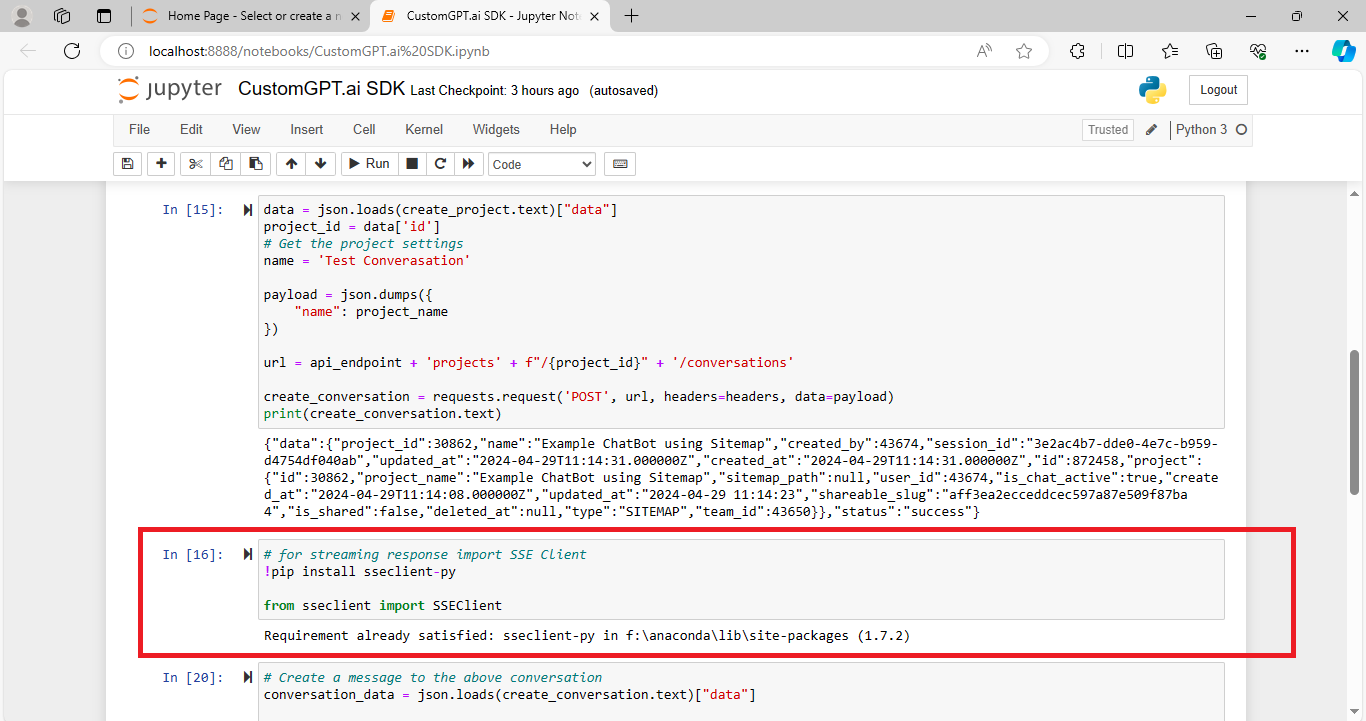
- To enable streaming responses, we need to install the SSEClient library before sending a message to CustomGPT.ai. This command installs the necessary library that allows us to handle streaming responses from the server. Once installed, we can import the SSEClient module to use it in our code.
- Define the prompt, which is the question or input we want to send to the chatbot. Additionally, we specify whether we want to receive a streaming response or not.
- Finally, it will send a POST request to the API endpoint for messages within the conversation, including the prompt and stream parameters. We receive a response containing the chatbot’s message based on the prompt provided upon running the code.
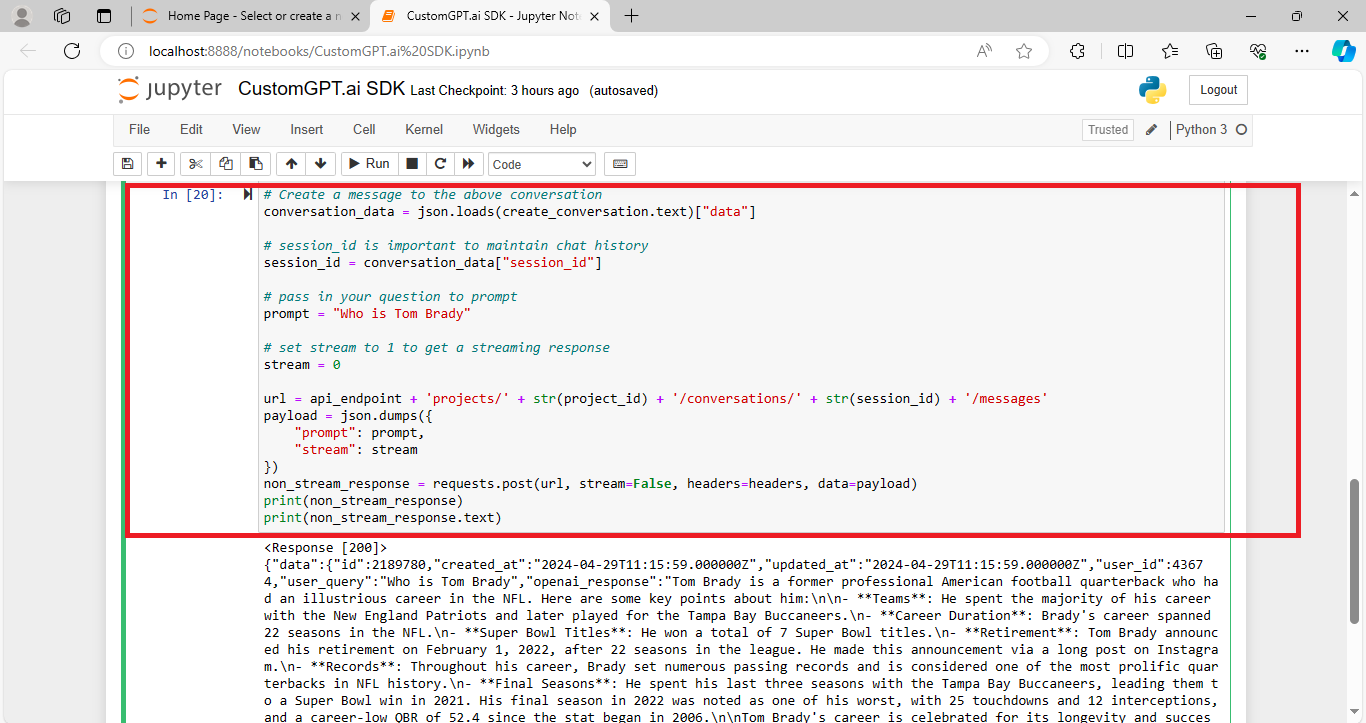
This is how you can send a message to CustomGPT.ai using SDK code snippet directly into your apps,
Conclusion
In conclusion, by following the provided code snippet, developers can seamlessly integrate chatbot functionality into their projects without starting from scratch. The CustomGPT SDK offers a comprehensive toolkit with pre-built code snippets, enabling developers to enhance their applications with advanced conversational AI capabilities effortlessly. With the ability to perform various operations using the SDK, developers can create more interactive and engaging user experiences in their applications.
Frequently Asked Questions
How quickly can I add chatbot messaging to an existing app?
You can usually add basic chatbot messaging faster than building the stack from scratch because the integration flow is already defined: create a conversation, send the user message, render the reply, and keep the conversation ID for the next turn. The SDK also includes ready-to-use code snippets, so if your app already has authentication and a UI, the main work is wiring chat state and the message call rather than building the entire message pipeline yourself.
What is the difference between a chatbot SDK and a generic AI SDK?
A chatbot SDK is usually the better choice when your app needs answers grounded in your own content, not just raw model output. It adds retrieval, knowledge ingestion, citations, analytics, and deployment options on top of model access. If you only need basic model calls, a generic AI SDK may be enough. Brendan McSheffrey, Managing Partner & Founder at The Kendall Project, said, “We love CustomGPT.ai. It’s a fantastic Chat GPT tool kit that has allowed us to create a ‘lab’ for testing AI models. The results? High accuracy and efficiency leave people asking, ‘How did you do it?’ We’ve tested over 30 models with hundreds of iterations using CustomGPT.ai.”
Can I use the same chatbot backend for web, iOS, and Android?
Yes. You can keep one chatbot backend and one knowledge base, then connect multiple clients through the OpenAI-compatible REST API. The available SDKs include Swift and Java, alongside Python, Node.js, .NET, Go, PHP, and Ruby, so teams can mix native and server-side integrations while keeping the same conversation logic. Each client still needs its own interface and authentication handling.
How can chatbot features improve customer interaction inside an app?
Chatbot features can improve customer interaction by giving users self-service answers without forcing them to leave the app for email, support forms, or separate help centers. Stephanie Warlick, Business Consultant, said, “Check out CustomGPT.ai where you can dump all your knowledge to automate proposals, customer inquiries and the knowledge base that exists in your head so your team can execute without you.” This works best when answers are grounded in approved help docs, policies, product instructions, or other stable sources through retrieval-augmented generation.
What should I build myself in the app UI, and what should the SDK handle?
A practical split is to keep layout, branding, and interaction design in your frontend, while the SDK or API handles message sending, retrieval from knowledge sources, answer generation, and conversation tracking. Joe Aldeguer, IT Director at Society of American Florists, said, “CustomGPT.ai knowledge source API is specific enough that nothing off-the-shelf comes close. So I built it myself. Kudos to the CustomGPT.ai team for building a platform with the API depth to make this integration possible.”
Is it safe to connect sensitive documents or business data to a chatbot in my app?
It can be, if you use controls designed for enterprise data handling. The strongest baseline in the provided sources is SOC 2 Type 2 certification, GDPR compliance, and a policy that data is not used for model training. You can further reduce risk by keeping answers retrieval-based, limiting access with API keys, and using citation-supported responses so users can trace answers back to approved sources.
Related Resources
These additional guides expand on the CustomGPT.ai features, integrations, and implementation patterns covered above.
- External Data Integration — Learn how to connect outside data sources to CustomGPT.ai so your chatbot can deliver more relevant, context-aware responses.
- Conversation History Analysis — Explore how to retrieve and work with past messages in CustomGPT.ai to support debugging, reporting, and better user experience design.
- Platform Integrations — Review the available integration options for connecting CustomGPT.ai with the tools and workflows your team already uses.
- How CustomGPT.ai Works — Get a clear overview of how the platform works, from data ingestion to response generation and deployment.
- White-Label AI Platform — See how CustomGPT.ai supports branded AI experiences for teams that want a fully customized customer-facing solution.
- SDK Chatbot Guide — Follow a practical walkthrough for building a chatbot with the CustomGPT.ai SDK and streamlining the development process.
- C# RAG Integration — Understand how to integrate CustomGPT.ai into C# applications with retrieval-augmented generation for more capable chatbot functionality.
If you prefer MCP alongside SDK integration, the CustomGPT.ai MCP chatbot integration guide covers the hosted server connection flow.