
Every answer now comes with receipts – providing full visibility into how your AI thinks.
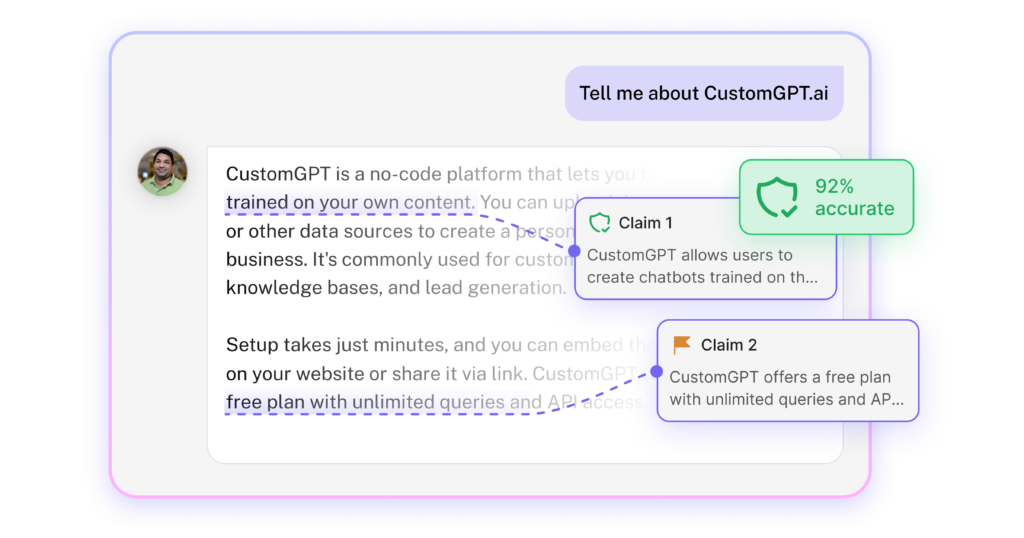
With Verify Responses, your CustomGPT.ai agent doesn’t just give answers – it shows exactly how it got there. Every claim traced. Every source visible. Full transparency, on demand.
Why building trust in AI matters
Your team sees the potential of AI. But your CISO, compliance officer, and legal team see risk.
- “Where did that answer come from?”
- “Can we audit this?”
- “How do we know it’s not hallucinating?”
These questions keep powerful AI tools stuck in pilot mode forever. Verify Responses answers all of them – automatically.
How we use it at CustomGPT.ai
We became our own first users. Again.
We enabled Verify Responses on our own support agents and tracked every response. What we found surprised us.
The AI wasn’t always the problem. Our documentation was.
We discovered gaps we never knew existed – questions users were asking that our knowledge base didn’t fully cover. The AI was doing its best with incomplete information. And “doing its best” meant guessing.
“Every inaccurate response is a signal,” says Marko Mitrović, Product Manager at CustomGPT.ai. “It’s telling you something. Either your AI needs tuning, your system needs fixing, or your content has gaps. You just have to listen.”
The result? We fixed persona configurations, resolved system-level retrieval issues, and published two new documentation articles that directly addressed user needs.
Want the full breakdown? Read our complete case study here.
What you can do with this
- Corporate compliance & audit trails – Give your CISO and compliance teams the documentation they need. Every claim is traceable. Every source is logged.
- Security & QA reviews – Prove to stakeholders that your AI isn’t making things up. Verify the quality of responses before deploying to production.
- Find knowledge gaps – Discover what’s missing from your documentation. Low verified claims scores point directly to content you need to create.
- Debug AI behavior – Stop guessing why your agent gave a weird answer. See exactly which sources it used and where it went wrong.
- Clear approval bottlenecks – Get Legal, Security, and Compliance to yes. Produce the evidence pack they actually need to approve.
What’s inside
- Claim Verifier – Automatically extracts every factual claim from a response and cross-references it against your source documents. You see exactly what’s verified and what’s not.
- Verified Claims Score – Simple math: verified claims divided by total claims. If your AI makes 10 statements and 8 trace back to your docs, it scores 80%.
- Trust Score – A virtual committee of six stakeholders – End User, Security / IT, Risk Compliance, Legal Compliance, Public Relations, Executive Leadership – analyzes every response for potential risks.
- Customer Intelligence Integration – Filter conversations by verified responses score in your analytics dashboard. Identify problem responses instantly.
Learn more about how it works.
Two ways to use it
- Builder mode – Enable Verify Responses via Actions and verification runs automatically on every chat. Perfect for development and QA.
- Audit mode – Run verification manually on any conversation – even old ones. Results appear in seconds. Ideal for production audits and spot-checks.
Pro tip: In production, keep it on if you need full auditability for your CISO or CIO. This also surfaces trust scores in your Customer Intelligence analytics.
See all use cases and workflows.
Connect With Us
Want to see how other businesses are using Verify Responses to build trust and improve their AI? Share your own results or get ideas from teams solving similar problems in our CustomGPT.ai Slack Community today!
Frequently Asked Questions
Q: What is Verify Responses?
A: Verify Responses is a transparency feature that shows you exactly how your AI arrived at its answer. It extracts every factual claim from a response, checks each one against your source documents, and analyzes the response from six stakeholder perspectives. You get full visibility into what’s verified, what’s not, and where potential risks might exist.
Q: Why should I use Verify Responses?
A: If you need to trust your AI’s answers – whether for compliance, customer-facing use, or internal decisions – this feature gives you proof instead of assumptions. It helps you catch inaccuracies before your users do, identify gaps in your knowledge base, and provide audit trails for regulated industries.
Q: How is this different from just reading the AI’s response?
A: Reading a response tells you what the AI said. Verify Responses tells you why it said it – which specific documents it pulled from, which claims are actually backed by your sources, and which ones aren’t. It’s the difference between trusting and verifying.
Q: Will my end-users see the Verify Responses panel?
A: No. Verify Responses is a behind-the-scenes tool designed exclusively for you – the builder and administrator. Your end-users see a clean, standard chat interface. The feature exists to give you confidence that your chatbot is accurate and safe.
Q: Who is this feature designed for?
A: This feature is built for you, the builder and manager of the AI system. Think of it as your administrative dashboard for trust and safety. It provides the audit trail, fact-checking, and risk analysis you need to build, test, and manage a reliable AI assistant.
Q: How does the Verify Responses button work?
A: When you click the Claim button, the system reads the AI’s response, extracts every factual claim (like facts, dates, numbers, or policy details), and cross-references each one against your source documents. It then shows you exactly where it found supporting evidence – or flags claims that couldn’t be verified.
Q: What is the Verified claim score?
A: The Verified claim score is a simple calculation: verified claims divided by total claims found. If your AI makes 10 factual statements and 8 can be traced back to your source documents, your Verified claim score is 80%. This gives you a quick, quantifiable measure of how well-supported a response is.
Q: What does the Trust Building button do?
A: The Trust Building button runs your response through a simulated review by six virtual stakeholders: End User, Security/IT, Risk Compliance, Legal Compliance, Public Relations, and Executive Leadership. Each perspective analyzes the response for potential concerns – like legally risky phrasing, security issues, or reputation risks – that you might not have considered.
Q: What are the six stakeholder perspectives?
A: The six perspectives are:
- End User – Is this answer helpful and appropriate for customers?
- Security/IT – Are there data exposure or system security concerns?
- Risk Compliance – Does this create regulatory or financial exposure?
- Legal Compliance – Is there liability risk or legally ambiguous language?
- Public Relations – Could this cause negative public perception?
- Executive Leadership – Does this align with brand and strategic goals?
Q: What happens if a claim can’t be verified?
A: Claims without source support get flagged in the interface. This doesn’t necessarily mean the claim is wrong – it means it couldn’t be traced back to your uploaded documents. This is your signal to either add that information to your knowledge base or investigate further.
Q: Can the Verified Claim Score and Trust Score conflict with each other?
A: Yes, and that’s by design. A response can be factually accurate (high Verified Claim Score) but still raise concerns from a stakeholder perspective (lower Trust Score). For example, a statement might be true but use legally risky phrasing. The system highlights these conflicts so you can make informed decisions.
Q: How do I access Verify Responses?
A: You’ll find the Verify Responses button next to AI responses in your builder interface. The shield icon opens the Verify Responses panel. You can also view verification data in the Customer Intelligence tab.
Q: What are the two ways to use Verify Responses
A: There are two modes:
- Persistent mode – Enable Verify Responses via Actions and verification runs automatically on every chat. This is ideal for development, QA, and building your agent.
- On-demand mode – Run verification manually on any specific conversation, including past conversations. Results appear in seconds. This is ideal for production audits and spot-checks.
Q: When should I use persistent mode vs. on-demand mode?
A: Use persistent mode while building and testing your agent – you’ll get instant verification data on every response. When you deploy to production, switch to on-demand mode for spot-checking, to reduce cost. However, if you need full auditability for compliance (like for your CISO or CIO), keep it enabled in production. This also surfaces trust scores in your Customer Intelligence analytics.
Q: Will this slow down my chatbot responses?
A: No. Your standard chat response is generated at normal speed. The Verify Responses analysis is a separate process that runs either automatically (in persistent mode) or when you trigger it manually (on-demand). Your end-users won’t experience any delay.
Q: Can I run verification on old conversations?
A: Yes. You can run Verify Responses on-demand for any past conversation. Results appear in seconds.
Q: How does Verify Responses work with Customer Intelligence?
A: Verification data flows into your Customer Intelligence dashboard. You can filter conversations by verified claim score, stakeholder status, or other criteria to quickly identify responses that need attention. This makes it easy to find patterns, spot problem areas, and prioritize improvements.
Q: How do I find low-scoring conversations?
A: Go to Customer Intelligence in your dashboard and use the filters to sort by verified claim score. You can quickly identify which conversations scored below your threshold and need review.
Q: Can I use Customer Intelligence data to improve my knowledge base?
A: Absolutely. This is one of the most valuable use cases. Filter for low verified claim scores to identify where your knowledge base has gaps. Each flagged claim points directly to content you may need to create or improve.
Q: Which plans include Verify Responses?
A: Verify Responses is available on Premium and Enterprise plans.
Q: Does running Verify Responses cost extra?
A: The Verify Responses features are powerful tools that consume significant resources. For Premium and Enterprise users, enabling them will apply a cost modifier to your queries. This will be clearly communicated in your settings before you proceed.
Q: How can compliance and legal teams use this?
A: Verify Responses creates audit-ready documentation for every AI response. The Legal Compliance stakeholder flags liability risks, while verified claim scores provide verifiable source citations. For regulated industries where “the AI said so” isn’t a valid answer, this gives you the proof you need.
Q: How does this help with security reviews?
A: The Security/IT stakeholder analyzes every response for sensitive information handling and system security implications. You can prove to stakeholders that your AI isn’t exposing data or making things up.
Q: Can I use this to debug why my AI gave a strange answer?
A: Yes. Instead of guessing why your agent gave a weird response, you can see exactly which source documents it used and where it went wrong. This makes troubleshooting much faster.
Q: How can I use this for QA before deployment?
A: Enable testing mode during development so verification runs on every response. Test your agent with real questions, check verified claim score, and fix issues before your users encounter them. Then switch to on-demand mode for production.
Q: Can this help me find gaps in my documentation?
A: Yes – this is one of the most valuable discoveries you can make. When claims get flagged as unverified, it often means your knowledge base is incomplete. Low Verified Claim scores point directly to content you need to create.
Q: What’s considered a “good” Verified Claim Score?
A: This depends on your use case and risk tolerance. For high-stakes applications (legal advice, medical information, compliance), you likely want scores above 90%. For general customer support, 80%+ may be acceptable. Use your scores to set internal benchmarks and improve over time.
Q: What if my Verified Claim Score is low?
A: A low score is actually valuable information. It means you found problems before your customers did. Use the detailed breakdown to identify whether the issue is your persona configuration, the retrieval system, or gaps in your documentation – then fix it.
Q: Does a high Verified Claim Score mean the response is definitely correct?
A: A high Verified Claim Score means the claims in the response can be traced back to your source documents. It doesn’t guarantee the source documents themselves are correct or complete. The feature verifies alignment with your sources, not absolute truth.
Q: What if the AI’s answer is correct but gets a low score?
A: This usually means the information exists but isn’t in your uploaded documents. The AI may have inferred something reasonable, but it couldn’t be verified against your sources. Consider adding that information to your knowledge base.
Q: Is my data secure when using Verify Responses?
A: Yes. Analysis is performed securely within the CustomGPT.ai environment. Verification data is not shared with other users or external systems. Only the authenticated user can access explainability analysis for their queries.
Q: Is this feature compliant with regulations?
A: Verify Responses operates within CustomGPT.ai’s SOC-2 Type II and GDPR-compliant infrastructure.
Q: Can other users see my verification results?
A: No. Only you (the authenticated builder/administrator) can access the Verify Responses analysis for your agents and conversations.
Q: How often should I run verification?
A: During development and testing, run it on everything (persistent mode). In production, the frequency depends on your needs. High-stakes applications may warrant continuous verification; others may only need periodic spot-checks.
Q: What’s the best workflow for improving my AI using this feature?
A: Enable persistent mode while building
- Let real conversations happen
- Check verified claims score in Customer Intelligence
- Categorize problems (persona, system, or content gaps)
- Fix issues and retest
- Switch to on-demand mode for production
- Run periodic audits on production conversations
Q: Should I keep Verify Responses enabled in production?
A: It depends on your requirements. If you need governance and full auditability for compliance teams (CISO, CIO), keep it enabled – this also surfaces trust scores in Customer Intelligence analytics. If you’re primarily doing spot-checks, on-demand mode reduces overhead while still giving you access when needed.