

In the last blog, we explored the seamless integration of CustomGPT.ai with C#, showcasing how developers can enhance their applications with advanced AI capabilities and better understand how CustomGPT.ai works.
Continuing in our series of integrating CustomGPT.ai with various programming languages and frameworks, today we dive into integrating CustomGPT.ai with C++.
We’ll explore the steps of integrating CustomGPT.ai with C++, providing businesses with a higher level of control and customization in their applications to enhance user experiences, automate tasks, and provide intelligent assistance. and solutions for users. Let’s see how CustomGPT.ai can transform your C++ applications with RAG API integration.
Understanding C++: A Versatile Programming Language
C++ is an extension of the widely used C programming language, designed to provide developers with a more robust and flexible language while maintaining compatibility with C.
Key features and enhancements of C++
- Object-oriented programming (OOP) concepts such as classes and inheritance.
- Features like templates, exception handling, and operator overloading.
- Balances low-level control with high-level abstraction for efficient and understandable code.
Purpose and applications of C++
- Developed for building a wide range of software applications, from system software to high-performance applications and games.
- Widely used in industries such as software development, game development, system programming, and embedded systems.
- Offers versatility and performance, making it suitable for developing complex and resource-intensive applications.
In summary, C++ serves as a powerful tool for developers, offering a rich set of features and capabilities for building diverse software applications across various industries.
Benefits of Integrating CustomGPT.ai with C++
Integrating CustomGPT.ai with C++ offers developers the opportunity to enhance their applications with advanced AI capabilities. By leveraging CustomGPT.ai’s RAG API within C++ projects, developers can unlock a wide range of benefits, including:
Enhanced User Experiences
Integrating CustomGPT.ai allows developers to create chatbots and virtual assistants that can interact with users more naturally and intelligently, improving overall user satisfaction.
Automation of Tasks
By integrating CustomGPT.ai, developers can automate repetitive tasks and streamline workflows within their C++ applications, saving time and increasing efficiency.
Intelligent Decision-Making
CustomGPT.ai enables C++ applications to make intelligent decisions based on large datasets and complex scenarios, providing valuable insights and recommendations to users.
Personalization
With CustomGPT.ai, developers can create personalized experiences for users by tailoring responses and interactions based on individual preferences and behavior.
Scalability
CustomGPT.ai’s RAG API allows for seamless integration into C++ applications, enabling developers to scale their AI-powered features as their user base grows.
Versatility
Integrating CustomGPT.ai with C++ opens up possibilities for developers, allowing them to incorporate advanced AI features through an enterprise RAG API into a wide range of applications, from enterprise software to many other platforms.
Overall, integrating CustomGPT.ai with C++ empowers developers to create smarter, more interactive, and more efficient applications that can better meet the needs of their users.
Integrating CustomGPT.ai with C++: A Practical Example
In a previous blog, we demonstrated how to create a chatbot project by integrating CustomGPT with the C language programmatically. Now, let’s explore another practical example of utilizing CustomGPT.ai with C++. In this example, we will update a specific project using the CustomGPT.ai RAG API and C++. This involves sending a POST HTTP request to the RAG API endpoint for updating projects. Just like this example, you can perform various other operations provided in the CustomGPT.ai RAG API Documentation, such as POST, DELETE, and GET HTTP requests, to add powerful functionality to your applications seamlessly.
You can go to RAG API documentation and copy and add the following code snippet to your applications.

The above code snippet is for updating a specific project in CustomGPT.ai:
- It initializes a CURL handle and sets options to perform a POST request to the CustomGPT.ai RAG API endpoint for updating projects.
- The CURLOPT_CUSTOMREQUEST option specifies the request method as POST, and CURLOPT_URL sets the URL of the RAG API endpoint for the specified project ID.
- Headers are added to the request to specify the content type and accept JSON responses.
- Finally, the code executes the CURL request and prints the response to the standard output.
Test and Run the Code
Now test the above example by running the code in CustomGPT.ai Browser. For this
- Get your RAG API key from your CustomGPT.ai account by clicking on your Profile and then on API.
- Click on Create API and give the name to the API key. Your RAG API will be generated.

- Copy and Paste the CustomGPT.ai RAG API key in the box as shown below.
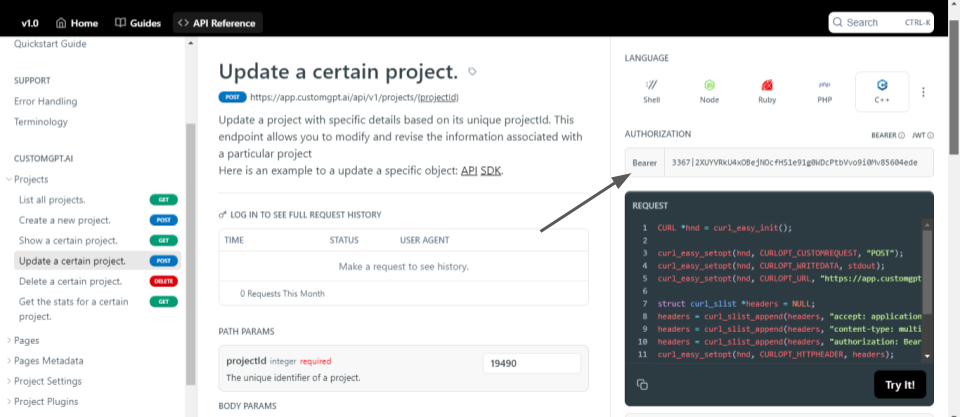
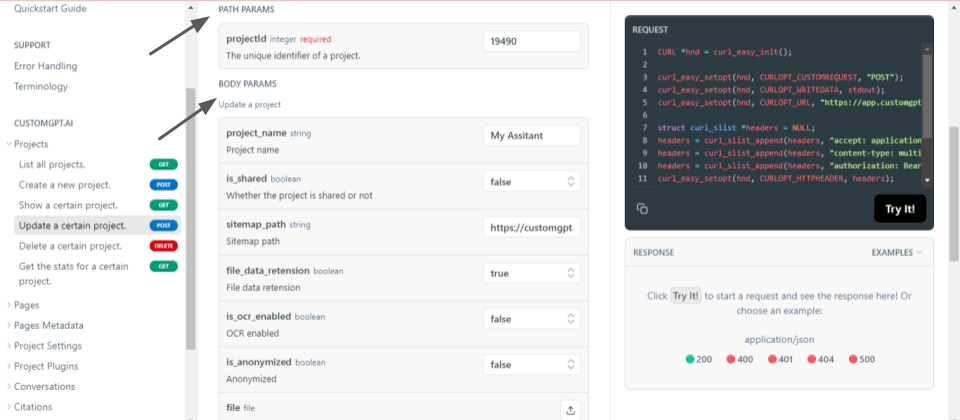
- Now provide the information about the project you want to update. Provide the project_id for the path parameter. Write the details you want to update such as your project Name, Sitemap, and other information as shown below.
- Now run the code and check the response.
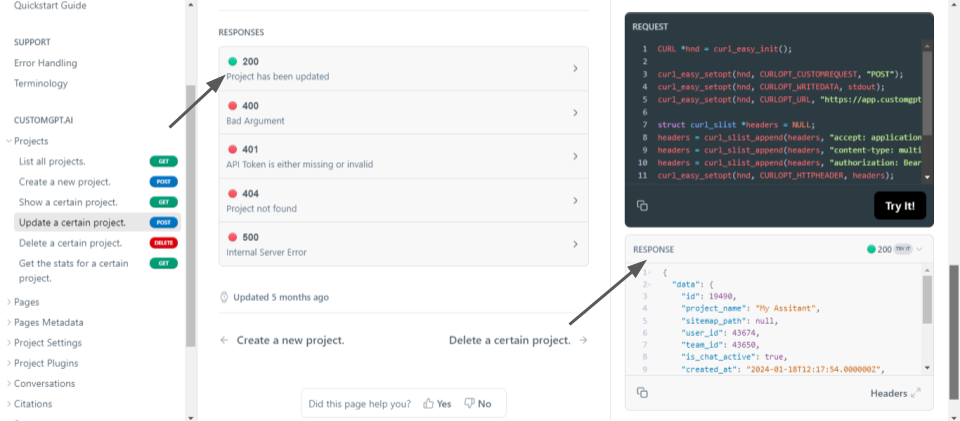
- The response shows “200” which means the chatbot is updated successfully. Now let’s see the updated chatbot in the CustomGPT.ai interface to check whether the chatbot is updated with the given details or not.

- The chatbot is updated with the details I provided.
Conclusion
Integrating CustomGPT.ai with C++ offers developers a powerful way to enhance their applications. By leveraging the CustomGPT.ai RAG API and C++, developers can seamlessly integrate chatbots and AI features into their software projects. This integration opens up new possibilities for enhancing user experiences, automating tasks, and providing intelligent assistance.
In our next blog post, we will explore how to integrate CustomGPT.ai with another popular programming language, further expanding the range of possibilities for incorporating AI into various applications. Stay tuned for more practical examples.
Frequently Asked Questions
How do I integrate a RAG API into a C++ application?
u0022CustomGPT.ai knowledge source API is specific enough that nothing off-the-shelf comes close. So I built it myself. Kudos to the CustomGPT.ai team for building a platform with the API depth to make this integration possible.u0022 — Joe Aldeguer, IT Director, Society of American Florists. In practice, a C++ integration usually has three parts: capture the user’s prompt, send an HTTPS POST to the OpenAI-compatible /v1/chat/completions endpoint with API-key authentication, and parse the JSON response back into your app. Because retrieval is handled by the RAG service, your C++ code mainly needs HTTP handling, JSON parsing, error handling, and UI or workflow logic.
Can I use my existing OpenAI-compatible C++ client with CustomGPT.ai?
Yes. Because the API is OpenAI-compatible and uses the /v1/chat/completions route, many C++ apps can reuse the same HTTP and JSON request pattern they already use for chat-completions calls. In most cases, you only need to update the base URL and authentication details, then test field compatibility in your request and response handling. That makes migration simpler whether your code currently talks to OpenAI or another service that follows the same chat-completions format.
Can a C++ app power a website chatbot without requiring a ChatGPT account?
u0022They’ve officially cracked the sub-second barrier, a breakthrough that fundamentally changes the user experience from merely ‘interactive’ to ‘instantaneous’.u0022 — Bill French, Technology Strategist. Yes. You can run the chat experience on your own website or inside your product and have your backend call the API, so end users do not need ChatGPT accounts. Supported deployment options include an embed widget, live chat, a search bar, or a direct API integration. For security, keep the API key on the server side rather than exposing it in browser code.
What does RAG add to a C++ app that a plain LLM API call does not?
RAG grounds responses in your own documents, websites, audio, video, and other knowledge sources before the model answers. Compared with a plain model-only call, that gives you answers tied to current business content, anti-hallucination support with citations, and better fit for support, policy, and internal knowledge use cases. The provided benchmark also states that CustomGPT.ai outperformed OpenAI in RAG accuracy, which is the core reason teams choose retrieval-based architectures when answer accuracy matters.
What is a realistic project plan for a C++ RAG API integration?
u0022For the past year, I’ve been using CustomGPT.ai as a specialized AI-powered leadership resource for my VIP clients. One that draws directly from my years of experience, research, and proven leadership strategies. What drew me in? Its simplicity, reasonable cost, and constant feature updates.u0022 — Sara Canaday, Leadership Speaker u0026 Author, Sara Canaday u0026 Associates. A practical rollout is to start with one high-value knowledge domain, validate answer quality on real questions, and then expand to more documents, sites, or workflows. For a C++ team, that usually means proving one user flow first, reviewing analytics and conversation tracking, and only then broadening the deployment to chat, search, or automation use cases.
How do I secure private documents when my C++ app calls a RAG API?
Start with controls you can verify: SOC 2 Type 2 certification, GDPR compliance, and a stated policy that data is not used for model training. In your C++ architecture, keep API keys on the server, use HTTPS for requests, and avoid exposing credentials in client-side code. If different users should access different private content, enforce those permissions in your own application before sending the query.
Related Resources
These articles expand on adjacent ways to build, integrate, and automate with CustomGPT.ai.
- Shell Programming Guide — Learn how to work with CustomGPT.ai in shell-based workflows for scripting, automation, and command-line development.
- CustomGPT.ai Integrations — Explore the available integrations that connect CustomGPT.ai with the tools and platforms already used in production environments.
- Objective-C iOS Integration — See how CustomGPT.ai can be incorporated into Objective-C applications to power iOS experiences with AI-driven responses.
- Node.js Integration Guide — This guide shows how to add CustomGPT.ai to Node.js applications for backend services, apps, and conversational features.
- Webhook Trigger Actions — Understand how webhook-based triggers can turn CustomGPT.ai chats into actions that update systems and automate software workflows.