

CustomGPT.ai for Teams
Empower your entire workforce with AI chat access without compromising security, governance, and centralized control. Enjoy role-based access and private deployments.
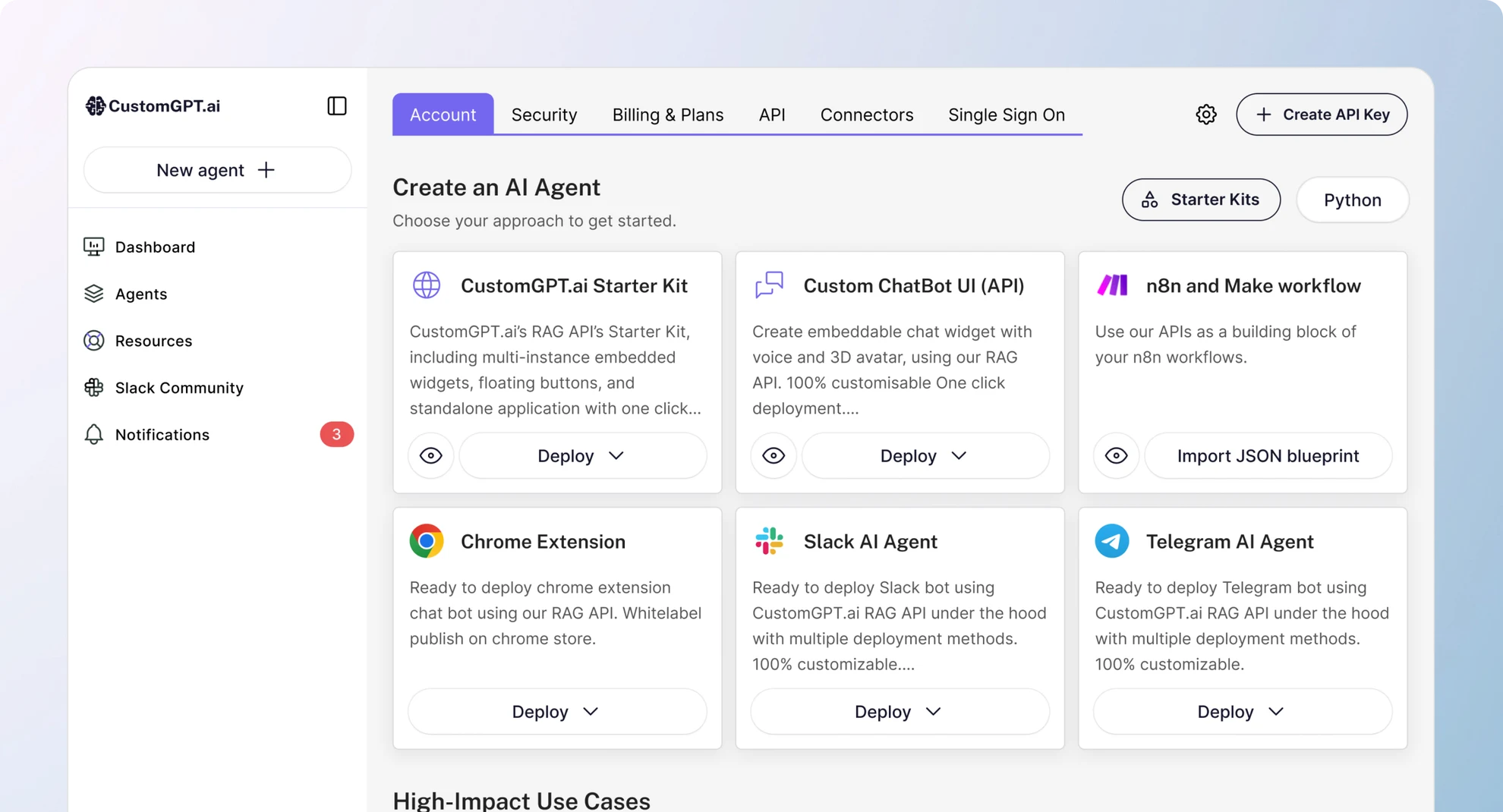
Trusted by 10,000+ organizations worldwide










Collaborate with control
Responsible AI rollout requires enterprise-grade governance. CustomGPT.ai for Teams is built for organizations that need to move fast—without losing control over data, permissions, or deployment.
Empower your entire company to use AI securely, with role-based access, private deployments, and frictionless rollout that respects your security policies.
Secure access
Secure, role-based access
at scale
CustomGPT.ai for Teams now lets admins customize access for different users.
-
Custom roles
Create custom user roles with unique chat permissions
-
Agent-level permissions
Set different user permissions for different agents
-
Granular control
Scale team access confidently with full granular control
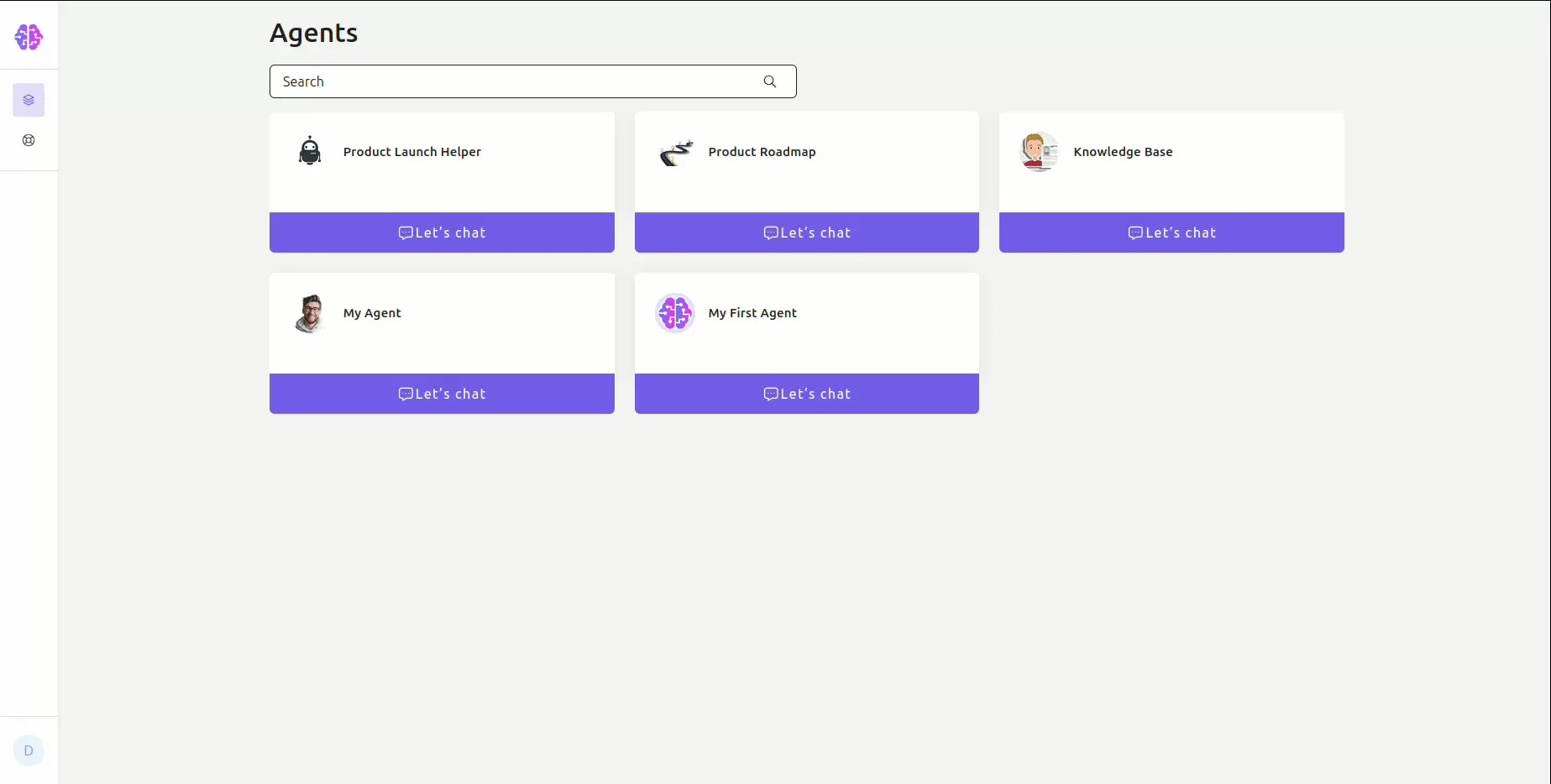
Empower teams
Empower Every Department. Keep IT in Charge.
CustomGPT.ai for Teams breaks down silos without breaking your security model. Give Sales, Support, HR, and other departments the AI tools they need—while IT retains full administrative control. Administrators define permissions, manage deployments, and ensure consistent governance everywhere AI is used.
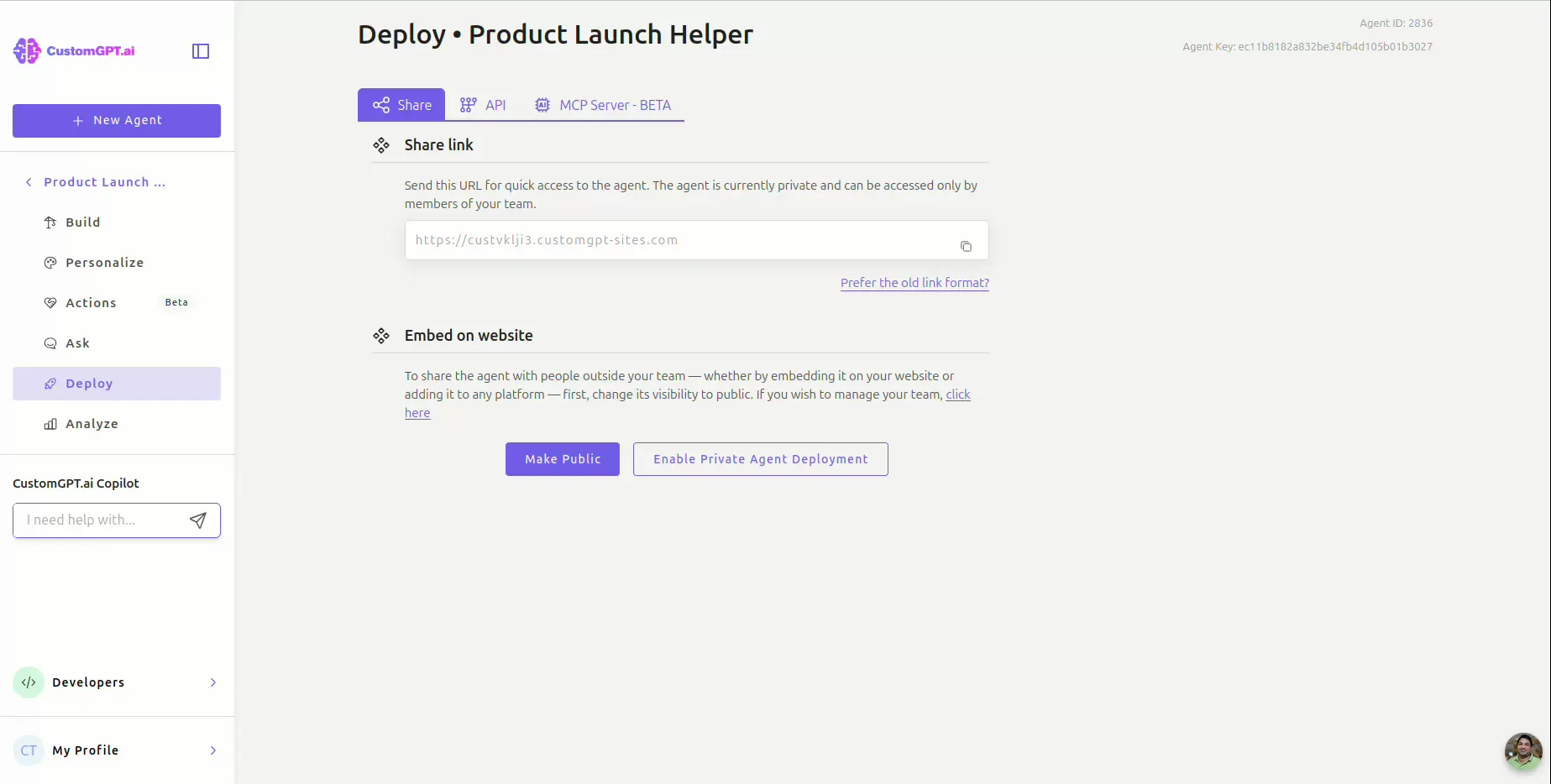
Private Agent Deployment. No-Code Simplicity.
-
Private deployments require team login for access
-
Easy embed code—no developer required
-
Ensure only authorized users can interact with agents
Security & Reliability
Personalized Employee Experiences
Help your teams work smarter, faster, and more securely.
-
Users have personal in-app chat history
-
Agents deliver precise, context-rich answers
Customer stories
Enterprise-Grade Security and Access Control
CustomGPT.ai for Teams is built for companies with strict security and compliance needs.
-
Enforced authentication and role-based permissions with seamless SSO support
-
Private, login-gated agent deployments for internal sites, wikis, or apps
-
No-code embed snippets for easy, secure deployment
-
Full audit logs and access tracking for administrative oversight
Secure access
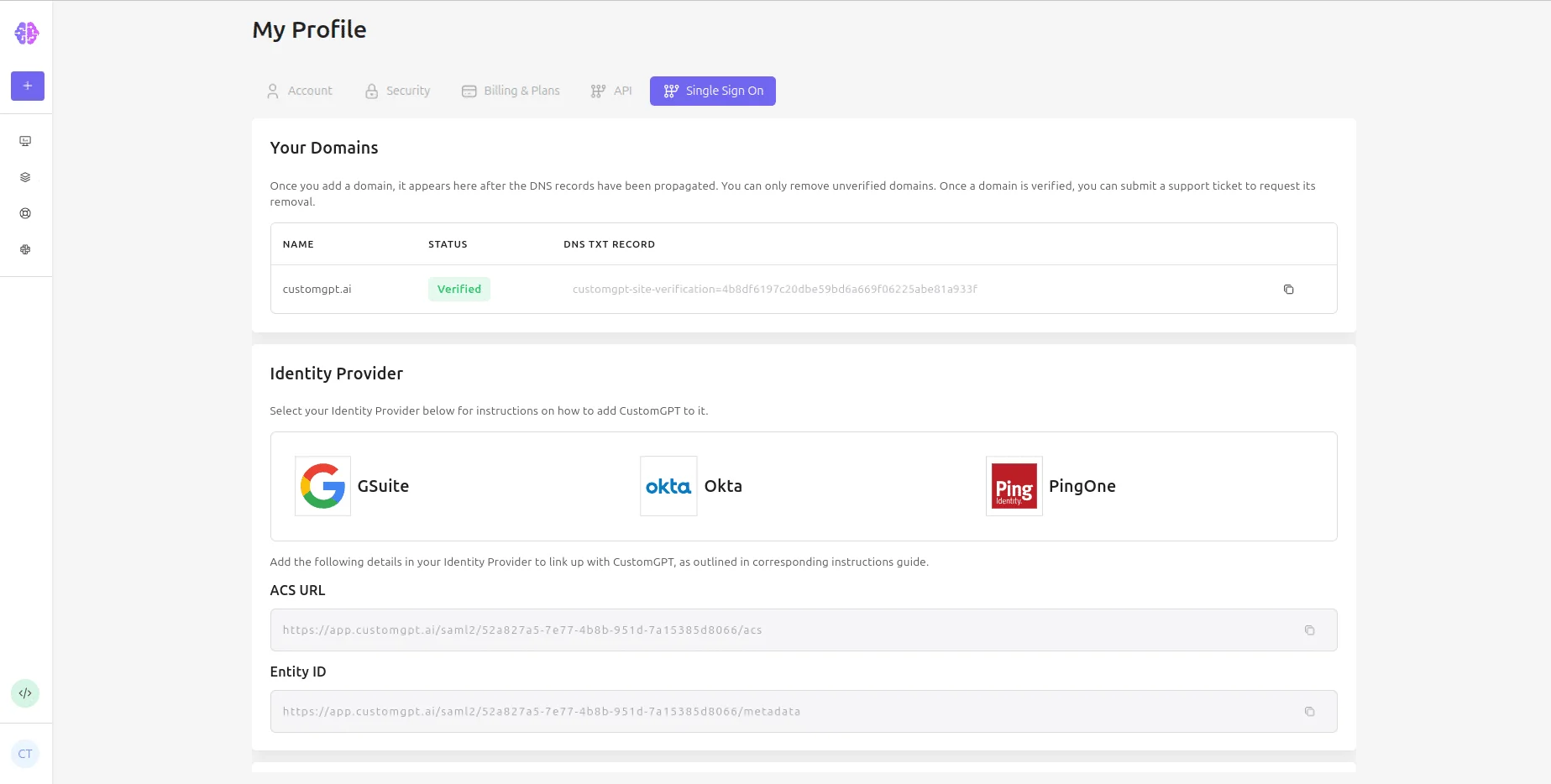
Single Sign-On (SSO) for Teams
Integrate CustomGPT.ai with your existing Identity Provider for secure, unified access management across your organization.
-
Support for major providers like Google Workspace, Azure AD, Okta, and PingOne
-
Streamlined, secure employee onboarding with familiar login flows
Customer stories
Built for Teams. Loved by IT.
CustomGPT.ai for Teams balances powerful employee-facing AI experiences with robust administrative controls.
-
No-code deployment that works out of the box
-
Granular role management and permission controls
-
Designed to fit into your enterprise security stack
Frequently Asked Questions
What is the new Chat-Only access feature in CustomGPT.ai?
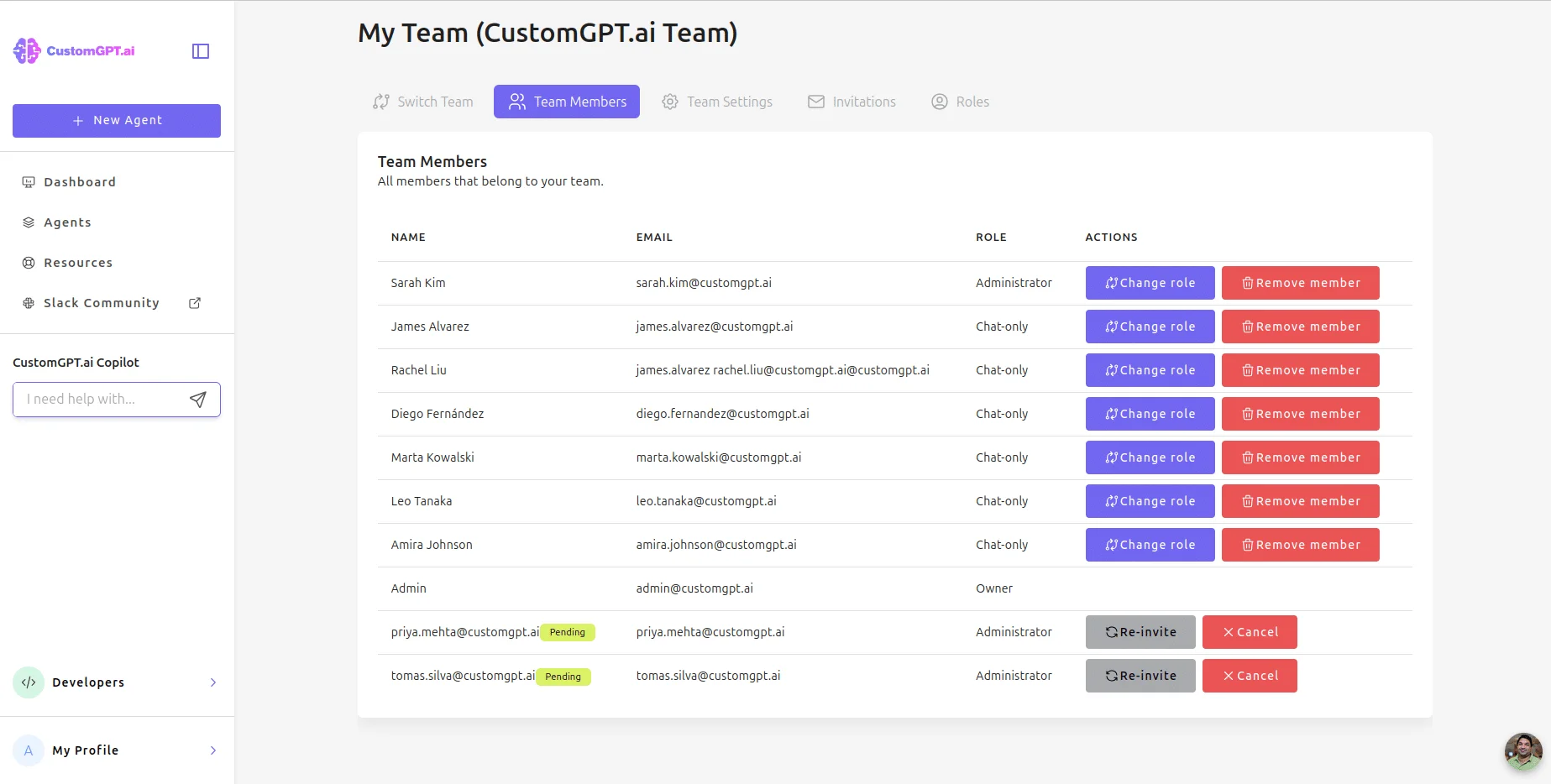
The Chat-Only access feature introduces a new user role designed for large-scale deployments within enterprises. Users assigned the “Chat-only” role can interact with (ask questions to) the AI agents built and managed within their organization’s CustomGPT.ai account, but they cannot access agent settings, data sources, or other administrative functions. This allows companies to safely provide broad access to their custom AI agents across their workforce.
What are the main benefits of using the Chat-Only role?
The primary benefits are enhanced security and simplified access management for large teams. Organizations can confidently deploy AI agents built on proprietary data to many employees, knowing that these users only have permission to chat and cannot view or alter the underlying agent configurations. It enables widespread adoption of internal AI tools while maintaining strict governance and control.
Who is this feature intended for?
The Chat-Only access feature is specifically available for customers on our Enterprise subscription plan. It caters to organizations needing granular control over user permissions for large numbers of users interacting with private AI agents.
What exactly can a user with the Chat-Only role do within CustomGPT.ai?
A user with the Chat-Only role has a focused experience. They can log in to the CustomGPT.ai platform, view the list of AI agents available to their team, and initiate chat sessions with these agents through the “Ask page”. They can also view their own past conversation history for reference.
What actions are restricted for Chat-Only users?
Chat-Only users cannot perform administrative actions. This includes creating or editing agents, managing the data sources used by agents, viewing or changing agent settings, managing team members or roles, accessing billing information, or viewing API keys. Their access is strictly limited to interacting with the agents via the chat interface.
Can Chat-Only users see all agents created in the account?
Yes, users with the Chat-Only role will be able to see and interact with all agents available within their team’s account.
Can Chat-Only users see conversations initiated by other users?
No, Chat-Only users can only view their own conversation history. They do not have access to conversations conducted by other team members.
How does this work with agents deployed on websites or internal portals?
When a private agent is deployed, users attempting to interact with it will be prompted to log in via a new in-agent login screen using their CustomGPT.ai credentials. The system verifies their identity and role, ensuring only authorized users (including those with the Chat-Only role) can access and chat with the private deployed agent.
Is there an additional cost associated with the Chat-Only role?
The Chat-Only role is a feature included within the Enterprise plan structure. For specific details on Enterprise pricing and how user seats, including Chat-Only roles, are factored into your subscription, please contact our Sales team.
What’s the difference between public and private deployments?
Public deployments can be accessed by anyone who has access to the page—no login required. Private deployments, on the other hand, require users to log into the CustomGPT.ai system before they can interact with the AI.
How does authentication work for embedded AI agents?
If a user isn’t logged into CustomGPT.ai, they won’t be able to chat. Instead, they’ll see a prompt with a button that takes them to the login page. Once authenticated, they’re redirected back to the embedded agent.
Can I control who has access to each agent?
Not yet—but this feature is on our roadmap. For now, all authenticated team members can access any private agent.
Do users need a CustomGPT.ai account to access private deployments?
Yes. Only logged-in users with valid CustomGPT.ai accounts can use private embedded agents.
What happens if someone accesses the page with an embedded agent but isn’t authorized?
They’ll be shown a login screen instead of the chat interface. Once they log in, they’ll be redirected back to the page.
Is Single Sign-On (SSO) supported for privately deployed agents?
Yes. If your organization uses SSO, team members can authenticate using your existing identity provider.
How do I embed a private agent on our internal site or wiki?
It’s easy—just copy and paste the provided embed code snippet, just like you would with any regular agent.
Can I deploy the same agent in multiple places?
Yes. You can use the same embed code across different pages, tools, or sites.
Do I need a developer to deploy the agent, or is it no-code?
No developer needed—embedding is fully no-code. Just copy the code snippet and paste it where you want the agent to appear.
Can I customize the look and feel of the agent to match our brand?
Yes. You can customize the appearance to align with your company’s branding.
What does the login experience look like for team members accessing an embedded agent?
Users will see a button to log in. Clicking it takes them to CustomGPT.ai, where they authenticate. They’re then automatically returned to the page, ready to chat.
Will agents remember each user’s chat history?
Yes. Each user’s chat history is saved—though they’ll need to visit the CustomGPT.ai app to view it.
How can users see their chat history?
Team members can log into the CustomGPT.ai app, navigate to the relevant agent, and view all their past conversations.
Can team members access the same agents both via embed and inside the CustomGPT.ai platform?
Yes. The same agent is accessible both through the embed and directly on the platform.
Can we audit who accessed and used each private agent?
Yes. Admins can see full usage logs and insights for each private agent.
Do private agents respect all data access and model restrictions set by admins?
Yes. All permissions, data scopes, and model configurations are enforced consistently—even in embedded environments.
Can I create different agents for different departments (e.g. HR, Sales, Legal)?
Yes. You can build and deploy any number of AI agents, each tailored to the needs of a specific team or use case.
Can agents access different datasets or knowledge bases based on the deployment?
Not yet—but this feature is on the roadmap. For now, all agents draw from their configured data regardless of where they’re deployed.
What is SSO (Single Sign-On)?
SSO is a user authentication process that allows a user to access multiple applications with one set of login credentials (such as username and password). This simplifies the login process by reducing the number of passwords users need to manage.
How do I set up SSO for my team in CustomGPT.ai?
Setting up SSO is straightforward. Navigate to the My Profile page in the CustomGPT.ai app dashboard, select ‘Single Sign On’, and follow the instructions for SSO integration. For detailed guidance, our support team is ready to assist you every step of the way. For more details, please check our user guide.
Which identity providers (IdPs) are supported by CustomGPT.ai for SSO?
CustomGPT.ai supports a wide range of identity providers (IdPs) for Single Sign-On (SSO), accommodating various enterprise needs. While our system is compatible with any IdP that adheres to standard SSO protocols, we currently offer detailed setup guides for four major IdPs: Google Workspace, Azure, Okta, and PingOne.
What are the benefits of using SSO with CustomGPT.ai?
Using SSO can enhance security by minimizing the number of attack vectors, simplify the login process for your team members, and reduce the burden of password management. It also ensures that access management can be centrally controlled through your identity provider.
Is SSO available to all CustomGPT.ai users?
Single Sign-On (SSO) functionality is an exclusive feature available only to our enterprise customers. This restriction is in place because SSO integration often involves complex setups that are typically necessary for larger organizations with advanced security and workflow integration needs. Smaller teams and individual users can use standard authentication methods provided by CustomGPT.ai. If you are interested in upgrading to an enterprise plan to avail of SSO and other advanced features, please contact our sales team for more information.
What happens if our IdP service is down? How will this affect logging into CustomGPT.ai?
In the unlikely event of an IdP service disruption, users might experience login issues. In such cases, please get in touch with our support team.