Custom GPT RAG API + JavaScript: Developing your CustomGPT.ai Application with JavaScript

In our previous blog post, we explored the seamless integration of CustomGPT.ai with Java, offering developers a powerful tool for incorporating AI capabilities into their applications. Continuing this series of integrating CustomGPT.ai with various programming languages, we will explore integration with JavaScript today. This article explores how to seamlessly integrate CustomGPT.ai with JavaScript, providing developers with practical insights and examples to enhance their applications while showing how CustomGPT.ai works. Let’s get started!
JavaScript and its support for Custom chatbot
JavaScript, renowned for its versatility and widespread use in web development, serves as a cornerstone for building interactive and dynamic web applications. Its ability to interact with RAG APIs makes it ideal for integrating external services, such as chatbots, into web-based projects.
With the advent of AI technology, integrating chatbots powered by services like CustomGPT.ai has become increasingly popular, offering developers the means to create intelligent and conversational interfaces for their applications. CustomGPT.ai, with its robust RAG API, provides comprehensive support for integrating custom chatbots into JavaScript applications seamlessly.
Let’s explore how JavaScript leverages CustomGPT.ai’s RAG API, alongside the developer API resources, to help developers with advanced AI capabilities:
- RAG API Support: CustomGPT.ai offers a well-documented RAG API that allows JavaScript developers to interact with its services programmatically, enabling seamless integration of custom chatbots into web applications.
- Code Snippets and Examples: CustomGPT.ai provides JavaScript developers with code snippets and practical examples in its RAG API documentation, making it easier to understand and implement chatbot integration functionalities.
- Benefits for JavaScript Applications: Integrating CustomGPT.ai with JavaScript applications opens up a plethora of benefits, including enhanced user engagement, personalized interactions, automation of tasks, and intelligent decision-making capabilities.
With CustomGPT.ai’s support for JavaScript integration and its array of benefits, developers can harness the power of AI to create compelling and interactive web experiences for their users.
Integrating CustomGPT.ai with JavaScript: A Practical Example
In this practical example, we’ll illustrate how to integrate CustomGPT.ai with JavaScript by utilizing a specific endpoint from the CustomGPT.ai RAG API documentation. Developers can understand how to leverage CustomGPT.ai’s RAG API to access and manipulate project settings programmatically, enabling seamless integration of advanced AI capabilities into JavaScript applications. Let’s explore this practical demonstration of integrating CustomGPT.ai with JavaScript.

This code snippet demonstrates how to retrieve project settings for a specific project using JavaScript.
- It begins by defining the request options, specifying the HTTP method as GET, and setting the headers to accept JSON format.
- Then, the fetch function is used to send a GET request to the CustomGPT.ai RAG API endpoint, which includes the project ID in the URL.
- Upon receiving the response, it is converted to JSON format, and the settings data is logged to the console. If an error occurs during the process, it is caught and logged into the console as well.
Overall, this example showcases a straightforward approach to fetching project settings from CustomGPT.ai using JavaScript.
Run and Test the code
To run the provided code snippet, we first need to obtain a RAG API key from CustomGPT.ai. To do this:
- Sign up for an account on the CustomGPT.ai website. Once logged in, navigate to your account profile>API to generate an RAG API key.

- Place the RAG API key in the authorization box as shown below.

- Next, we need to replace the placeholder “projectId” in the URL parameter with the actual project ID for which we want to retrieve the settings.

- After replacing the placeholder with the appropriate project ID, execute the code in the CustomGPT.ai browser by clicking on Try it.
- Upon execution, the code will send a GET request to the specified endpoint, requesting the project settings. The response will contain the configuration and settings associated with the specified project.
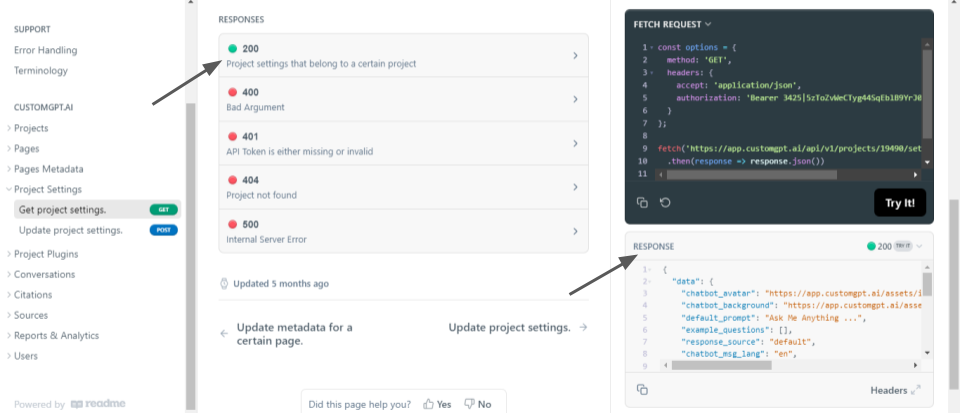
- The response “201” shows that the project setting is retrieved successfully. It shows all the project’s settings like conversational settings, UL, and UX of the chatbot and Custom chatbot behavioral settings. This example demonstrates how JavaScript can be seamlessly integrated with CustomGPT.ai, allowing developers to access and manipulate project configurations effortlessly.
Similarly, you can perform various other operations using CustomGPT.ai RAG API in JavaScript from RAG API documentation.
Conclusion
In conclusion, integrating CustomGPT.ai with JavaScript offers a straightforward way to leverage advanced AI capabilities within JavaScript applications. By using practical examples from CustomGPT.ai RAG API documentation, developers can seamlessly incorporate CustomGPT.ai’s features into their projects. This integration empowers developers to enhance user experiences, automate tasks, and provide intelligent assistance, all within the JavaScript ecosystem.
Stay connected for more upcoming blogs on CustomGPT.ai RAG API integration with many programming languages.
Frequently Asked Questions
How do I call the CustomGPT RAG API from JavaScript?
Use fetch or axios to send an HTTPS request from JavaScript to the OpenAI-compatible REST API at /v1/chat/completions, include your API key in the request headers, send a JSON body, and parse the JSON response. If your app already uses OpenAI-style chat requests, migration is usually simpler because the endpoint is designed as a drop-in replacement.
Can I add the chatbot to my website without making visitors log in to ChatGPT?
Stephanie Warlick says, “Check out CustomGPT.ai where you can dump all your knowledge to automate proposals, customer inquiries and the knowledge base that exists in your head so your team can execute without you.” If you deploy the assistant as an embed widget, live chat, search bar, or custom JavaScript frontend, visitors use it directly inside your site or app rather than logging in to ChatGPT.
Should I call the API from browser JavaScript or from a Node.js backend?
For production, a Node.js backend is usually the safer default. The API uses key-based authentication, so keeping the key server-side reduces the risk of exposing credentials in browser code. A common setup is to let browser JavaScript handle the chat UI while your backend makes the API call and returns the response. That pattern also aligns better with stricter security requirements, especially when SOC 2 Type 2-audited controls matter.
How should I test a JavaScript RAG integration before launch?
Bill French said, “They’ve officially cracked the sub-second barrier, a breakthrough that fundamentally changes the user experience from merely ‘interactive’ to ‘instantaneous’.” Before launch, test both answer quality and speed: use a staging knowledge base, run a fixed list of real user questions, confirm that responses cite the expected sources, and review analytics and conversation tracking to spot weak answers before wider rollout.
Why does the same question sometimes fail and later work in a JavaScript chatbot?
In a RAG chatbot, inconsistent answers usually come from retrieval context, not from JavaScript itself. Even though CustomGPT.ai outperformed OpenAI in a RAG accuracy benchmark, results can still vary if your app sends different conversation history, your knowledge sources are incomplete, or the right content has not been ingested. Check source coverage, citation quality, and whether your frontend is sending the same prompt and chat context on each request.
Do I need a full website rebuild to add this to a JavaScript app?
Barry Barresi describes one deployment this way: “Powered by my custom-built Theory of Change AIM GPT agent on the CustomGPT.ai platform. Rapidly Develop a Credible Theory of Change with AI-Augmented Collaboration.” You usually do not need a full rebuild. Teams can start with an embed widget, live chat, search bar, or a small JavaScript component that calls the API, then expand the integration once it is working.
Related Resources
If you’re planning to scale beyond a basic integration, this guide adds useful context.
- Enterprise RAG API — Learn how CustomGPT.ai supports production-ready retrieval-augmented generation workflows for enterprise use cases.