Custom GPT For Your MediaWiki Site: Ultimate AI Assistant Guide
Imagine you’re a content manager, juggling updates, documentation requests, and user questions across a busy MediaWiki site. CustomGPT.ai can help answer from prepared wiki content so your team spends less time repeating the same explanations.
With CustomGPT.ai, teams can turn prepared content into a no-code assistant that answers common questions, points users to relevant pages, and keeps responses grounded in approved source material. The how it works page explains the retrieval workflow behind those answers.
Welcome to the future of content management, where AI does the heavy lifting, and you focus on creativity and strategy.
This guide will take you through the ins and outs of integrating Custom GPT with your MediaWiki site, making your content management process as smooth and efficient as possible.
The Rise of AI in Content Management
AI is changing everything, especially how we manage content. Remember the days of manually updating website content and sorting data? They feel like a century ago. Now, AI steps in like a superhero, doing these tasks quicker and smarter.
CustomGPT.ai gives content teams a focused assistant for repeated questions, support handoffs, and documentation discovery.
With its no-code setup, it’s like giving wings to your ideas without needing to learn how to fly. This means more time for creativity and strategy, making our lives as Content Managers a whole lot easier.
The rise of AI in content management isn’t just coming; it’s already here, transforming the way we work and interact with digital content.

Understanding GPT and Its Capabilities
When users cannot find the right wiki page, support and content teams lose time answering repeat questions. GPT (Generative Pre-trained Transformer) can help turn prepared content into conversational answers for content management and discovery.
GPT isn’t just another buzzword; it’s a powerful AI capable of understanding, generating, and even predicting text in ways that feel almost human. This capability opens up a world of possibilities for enhancing your MediaWiki site, making it more interactive, engaging, and efficient.
Whether you’re technical or simply responsible for keeping documentation useful, understanding GPT capabilities helps you decide where a MediaWiki assistant can reduce repetitive work and improve answer discovery.

How GPT Can Transform Your MediaWiki Site
Imagine your MediaWiki site not just as a repository of information, but as a living, breathing entity that interacts with your users. That’s the magic GPT brings to the table. With its ability to understand and generate human-like text, GPT can turn your site into an interactive hub.
Users can get faster answers to common questions from prepared source content. CustomGPT.ai’s no-code setup means non-technical teams can create and test an assistant before they deploy it.
It’s like giving your MediaWiki site a superpower, where it not only provides information but also engages and retains your audience. This isn’t just an upgrade; it’s a transformation that can redefine how users interact with your content.
Step-by-Step Guide to Integrating GPT into Your MediaWiki
Using GPT with MediaWiki content works best when the source pages are organized, access needs are clear, and the assistant is tested against real questions before launch.
This guide walks through a practical setup path for using CustomGPT.ai with prepared MediaWiki content, from source planning to retrieval testing.
The goal is simple: help users find accurate wiki answers faster while giving your team a clearer process for testing and improving the assistant.

Step-by-Step Integration
First off, head over to the CustomGPT.ai platform and sign up. It’s a breeze, really.

Then, dive into creating a new agent. This is where the magic begins.

Upload your site’s URL.

Navigate to deploy icon.
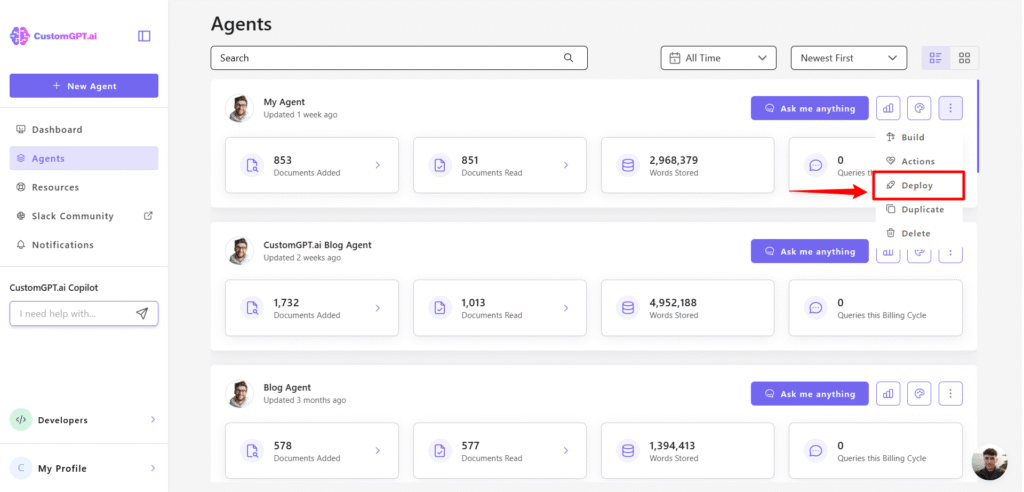
Finally, click on share.

Copy the embed code.

Choosing the Right GPT Model
Picking the perfect GPT model for your MediaWiki site feels a bit like being a kid in a candy store. So many options, right? But here’s the scoop: not all GPTs are created equal. Some are like those giant lollipops – impressive but not quite right for every situation.
You want a model that aligns with your site’s vibe and audience needs. Think of it as matching your favorite sneakers with the right outfit.
CustomGPT.ai shines here because it lets you tailor the AI’s tone, style, and knowledge to fit your site like a glove. It’s about finding that sweet spot where the GPT model doesn’t just answer questions but becomes a part of your community.
CustomGPT.ai lets teams choose GPT-5, Claude 4.7, or Gemini 2.5 for their assistant.

Choose the model that fits your audience, answer-quality expectations, and review process.
Best Practices for Using GPT on MediaWiki Sites
MediaWiki sites often contain the right answer, but users still need a clear path to find it. A GPT assistant can help surface relevant pages and summarize answers from prepared content.
Here’s where the magic of CustomGPT.ai comes into play. Imagine turning your site into a dynamic, interactive hub that not only provides information but engages users in a conversation. It’s like having a virtual assistant that, in a setup like CustomGPT.ai on ReadMe.com, knows your site inside out and can guide visitors to exactly what they’re looking for.
In this section, we’ll cover best practices for using GPT with your MediaWiki site.
From enhancing user engagement to streamlining content creation, these tips will help you harness the full potential of AI, making your site not just a source of information, but a destination.

Maintaining AI Ethics and Privacy
When you use GPT with MediaWiki content, privacy, permissions, and answer review need to be part of the setup plan from the beginning.
Before connecting sensitive wiki content, review user privacy requirements and decide which pages should be available to the assistant.
CustomGPT.ai documents GDPR and SOC 2 Type 2 controls on its security page, which teams should review before connecting private or regulated content.
By choosing CustomGPT.ai for your MediaWiki site, you’re not just enhancing user experience; you’re also safeguarding their privacy and ensuring that your AI interactions are ethical. It’s a win-win.
Real-world success stories
Imagine stepping into a world where your MediaWiki site not only talks back to you but also understands and assists your every need. Sounds like a dream, right? Well, it’s not just a figment of imagination anymore.
With CustomGPT.ai, this level of interaction and personalization is not only possible; it’s happening. Across the globe, from small educational forums to large-scale knowledge bases and Sitecore CMS sites, CustomGPT.ai is revolutionizing the way we interact with content online.
The examples below show practical ways teams can use CustomGPT.ai to reduce repeated questions, improve content discovery, and support users from prepared source material.

Case Study 1: Enhancing Editorial Efficiency
Let’s dive into a story that’s as real as it gets. Imagine an editorial team, swamped with content, deadlines looming like dark clouds. Enter CustomGPT.ai, the hero they didn’t know they needed.
This team used CustomGPT.ai to streamline their workflow, making their content sharper, more engaging, and, importantly, on time.
The no-code setup meant they could integrate it without an IT marathon, and the anti-hallucination feature ensured their content stayed factual and reliable. Suddenly, articles were not just written but polished to perfection, with citations to back up every claim.
The result? A happier team, a boost in productivity, and content that readers couldn’t get enough of. CustomGPT.ai didn’t just change the way they worked; it transformed their output from good to exceptional.

1. What are the key benefits of integrating Custom GPT with my MediaWiki site?
Integrating Custom GPT with your MediaWiki site brings a plethora of advantages that can significantly enhance both the user experience and the efficiency of managing your site. Here are some key benefits:
- Tailored Assistance: Custom GPT allows for the creation of a chatbot that understands the unique context of your MediaWiki content. This means it can provide personalized assistance to users, answering their queries based on the specific content and interactions within your site.
- Increased User Engagement: By offering instant, interactive, and relevant responses, a Custom GPT-powered chatbot can significantly boost user engagement. Users are more likely to stay longer and explore more content when they receive immediate assistance.
- Efficient Content Management: Custom GPT can assist in automating content updates and providing suggestions for content improvement, making the task of managing a MediaWiki site more efficient.
- Source setup: You can add a public MediaWiki URL as a website source in CustomGPT.ai, then test retrieval against your own pages before deploying the assistant.
- Enhanced Learning and Collaboration: For educational or collaborative MediaWiki sites, Custom GPT can facilitate learning and teamwork by providing quick access to information and supporting interactive learning experiences.
These benefits collectively contribute to a more dynamic, efficient, and user-friendly MediaWiki site, ultimately supporting your goals of disseminating information and fostering community engagement.
2. How does Custom GPT ensure the accuracy and reliability of the content it generates?
Custom GPT helps improve the accuracy and reliability of generated answers by grounding responses in the content you provide.
- Firstly, it employs an anti-hallucination feature, which is designed to prevent the AI from fabricating information or generating content that isn’t based on the data provided to it. This is crucial for maintaining the integrity of the content, especially when repurposing or updating existing material.
- Additionally, Custom GPT can provide citations and sources for the information it uses. This not only helps in maintaining credibility and transparency but also allows users to verify the accuracy of the content themselves. By referencing original sources, Custom GPT ensures that the content remains true to the original material’s intent and facts.
- Moreover, Custom GPT is powered by the latest iteration of the GPT model, ensuring that the responses and content generated are of high quality, relevant, and contextually appropriate.
This combination of features makes Custom GPT a reliable tool for generating accurate and trustworthy content for MediaWiki sites.
3. Can Custom GPT be customized to understand and adhere to my site’s specific content guidelines?
Absolutely, Custom GPT can be tailored to understand and adhere to your MediaWiki site’s specific content guidelines. This customization is one of the standout features of Custom GPT, setting it apart from standard AI models. Here’s how it works:
- Learning Your Guidelines: Custom GPT can be fed with your site’s content guidelines, learning the nuances of your preferred style, tone, and the type of content that’s allowed or disallowed on your platform.
- Adapting to Your Needs: Through its no-code visual builder, you can easily set parameters and rules that align with your content guidelines. This ensures that the AI-generated content is not only high-quality but also consistent with your site’s standards.
- Continuous Improvement: As Custom GPT interacts with your site and receives feedback, it continually refines its understanding of your guidelines, ensuring better adherence over time.
This level of customization ensures that Custom GPT acts as a true extension of your team, producing content that feels right at home on your MediaWiki site.
4. What steps should I follow to seamlessly integrate Custom GPT into my MediaWiki site?
Using CustomGPT.ai with your MediaWiki site starts with preparing the public wiki pages you want the assistant to answer from. Here’s how you can approach the setup:
- Plan Your Content: Decide what content you want Custom GPT to handle on your MediaWiki site. This could range from FAQs, editing guidelines, to automated content creation. Having a clear plan acts like a roadmap, guiding the integration process.
- Prepare Your Content: Before integrating, organize and tidy up your MediaWiki content. This step is crucial as it ensures that Custom GPT can easily understand and utilize your site’s content effectively.
- Set Up Custom GPT: Visit the CustomGPT.ai website and sign up. Use the no-code visual builder to create your Custom GPT chatbot tailored to your MediaWiki site’s needs. This process is user-friendly and doesn’t require any coding skills.
- Connect your source content: Add your public MediaWiki URL as a website source in CustomGPT.ai, then test retrieval before deployment.
- Test and Tweak: Once integrated, it’s important to test the Custom GPT chatbot on your MediaWiki site. Gather feedback, monitor its performance, and make necessary adjustments to ensure it meets your site’s needs and enhances user experience.
By following these steps, you can use CustomGPT.ai to answer from prepared MediaWiki content while validating retrieval quality before launch.
5. How does Custom GPT handle user privacy and data security on MediaWiki sites?
Custom GPT prioritizes user privacy and data security on MediaWiki sites through several robust measures, ensuring a secure and trustworthy environment for your digital content. Here’s how Custom GPT safeguards your information:
- Documented security controls: CustomGPT.ai documents its GDPR and SOC 2 Type 2 controls on the security page. Before connecting private MediaWiki content, confirm source permissions, access controls, and retention settings for your project.
- Personal-data review: If your MediaWiki content includes personal or sensitive information, confirm what should be indexed, who can query it, and how responses will be reviewed before launch.
- Access validation before launch: Review which MediaWiki pages should be indexed, who should be able to query them, and how the assistant will be tested before exposing it to users.
Through these measures, Custom GPT demonstrates its commitment to upholding the highest standards of privacy and security for MediaWiki sites.
Conclusion
Users decide quickly whether a documentation page is helping them. A well-tested MediaWiki assistant can make useful answers easier to find without asking visitors to browse every page manually.
Throughout this guide, we’ve covered how to use CustomGPT.ai with prepared MediaWiki content, including no-code setup, anti-hallucination safeguards, and citations for responses.
As we wrap up, remember that the goal isn’t just to implement new technology for the sake of it. It’s about enhancing the user experience, ensuring that your site not only retains visitors longer than those fleeting seconds but also provides them with valuable, accurate, and engaging content.
Use those checks to decide where a CustomGPT.ai assistant can make your MediaWiki content easier to navigate.

The Future of AI in MediaWiki and Beyond
The journey of AI in the realm of MediaWiki is just beginning. Imagine a world where your MediaWiki site evolves with every interaction, becoming smarter and more intuitive.
Custom GPT is leading this charge, transforming how we think about content creation and management. With its no-code setup and anti-hallucination features, it’s like having a digital assistant that not only understands your needs but anticipates them.
The future? It’s a place where AI seamlessly blends with human creativity, making our digital spaces more vibrant and alive.
And with Custom GPT, we’re not just dreaming about the future; we’re building it. So, let’s embrace this journey, exploring the endless possibilities that AI brings to MediaWiki and beyond.
Frequently Asked Questions
Can you set up a MediaWiki GPT assistant if you do not have a company email domain?
The provided source does not state any email-domain requirement for using CustomGPT.ai with MediaWiki content. Signup, ownership, and production authentication requirements should be verified in official product documentation or with support before launch.
How do you keep a custom GPT synced with MediaWiki when pages are updated every day?
The provided material highlights AI-driven content automation but does not document a specific MediaWiki sync mechanism or refresh cadence. If daily updates are critical, confirm the available indexing and update options in product docs before going live.
Can you give different access levels to editors, support teams, and public users in one MediaWiki AI assistant?
Role-based access behavior is not described in the provided source content. For mixed-audience wikis, treat access control validation as a required implementation step and confirm how permissions are enforced before exposing the assistant to users.
What chunk size works best for MediaWiki pages in a RAG assistant?
No chunk-size guidance is provided in the supplied source material for this MediaWiki integration topic. Use documented defaults from your retrieval stack and tune with real query testing rather than relying on fixed universal numbers.
How quickly can a team launch a MediaWiki GPT assistant without a long custom build?
The source positions the setup as no-code and focused on making content management more efficient, but it does not provide a guaranteed deployment timeline. Launch speed will depend on scope, content readiness, and validation requirements.
Should you use a managed MediaWiki GPT setup or build your own with LangChain, Azure AI Search, or Elastic?
The provided source focuses on a managed CustomGPT.ai approach and does not include a technical benchmark against LangChain, Azure AI Search, or Elastic. In practice, teams usually compare speed-to-launch, maintenance burden, and required customization depth when choosing managed versus DIY.
How do you protect private data when connecting an AI assistant to MediaWiki content?
The provided excerpt does not give detailed data-protection steps for MediaWiki ingestion. It does indicate trust and security as a platform area, so privacy controls and content-governance requirements should be confirmed before indexing sensitive wiki content.
Related Resources
If you’re comparing knowledge sources for CustomGPT.ai, these guides expand on similar integrations and use cases.
- Webflow Knowledge Base — Learn how to connect a Webflow site to CustomGPT.ai so your chatbot can answer from published website content.
- GitBook Documentation Chatbot — See how CustomGPT.ai works with GitBook to turn structured docs into a more conversational support experience.
- Contentful CMS Integration — Explore how to use CustomGPT.ai with Contentful to surface answers from content managed across your CMS.
- Member Association Use Cases — Review how member associations use CustomGPT.ai to improve self-service support, resource discovery, and member engagement.