CustomGPT.ai for Health and Wellness: A Comprehensive Guide

In the world of technology, chatbots have emerged as valuable tools in various industries, and healthcare is no exception. Custom chatbots tailored for health and wellness can provide users with instant access to information, support, and guidance, making healthcare more accessible and personalized. This article will guide you through the process of creating a CustomGPT.ai chatbot for healthcare and wellness using the CustomGPT.ai workflow. We will also explore how CustomGPT.ai can be used for various healthcare use cases and its benefits.
Creating a CustomGPT.ai chatbot for Health and Wellness: A step-by-step Guide
Setting up a custom chatbot with CustomGPT.ai is straightforward because of its no-code interface. Define the assistant, add your approved health and wellness content, and publish it as an informational support tool. Let’s create one right now!
Step 1: Define the purpose
The first step is to define the objective of the custom chatbot. For what purpose do you want to use the CustomGPT.ai chatbot, it can be
- Creating a chatbot to assist your patients with general health queries.
- For disease awareness and prevention
- Creating a personal chatbot for nutrition guidance.
- For a balanced diet and planning.
- Crafting a chatbot for mental support and more.
By defining the goal chatbot can be tailored to assist you in the chosen domain by providing valuable information according to your needs.
Before launching a health and wellness assistant, define whether it will support general education, intake preparation, program FAQs, or another clearly scoped workflow.
Keep responses grounded in approved content, use human escalation for diagnosis, treatment, emergencies, crisis language, or worsening symptoms, and review whether HIPAA or other privacy requirements apply before collecting personal health information. For broader guidance, review the WHO guidance on AI ethics and governance for health, FDA guidance on clinical decision support software, and HHS summary of the HIPAA Privacy Rule.
Step 2: Gather relevant information
The most important step is to gather data to train the chatbot. To train a custom chatbot in a specific domain, providing relevant data is necessary for a customized chatbot experience. Here are some of the possible sources to gather datasets for your chatbot knowledge base:
- Medical articles and journals can provide reliable information on various health conditions, diseases, and their treatment.
- You can access information from Health Organizations and Institutes such as the World Health Organization (WHO), Centers for Disease Control and Prevention (CDC), and National Institutes of Health (NIH). These organizations provide authoritative information on health-related topics.
- You can gather nutritional databases like the USDA National Nutrient Database or other reliable sources that provide information on the nutritional content of various foods.
- Gather data from mental health organizations like the National Alliance on Mental Illness (NAMI) or mental health research institutions. This data can include information on mental health conditions and their treatment.
- Collect information from healthcare forums, community platforms, and discussion boards to understand common health queries and user interactions that can help the chatbot respond to health-related conversations.
- Access information from clinical trials and research studies on various health sectors to stay updated on the latest information in healthcare and treatment options.
However, choosing datasets depends upon for what purpose you want to use the custom chatbot.
Step 3: Create your Health Assistant chatbot
To create a Health Assistant using CustomGPT.ai just follow a few easy steps:
- Create a CustomGPT account by providing details like your Name, Email, and Password.
- Login to your CustomGPT.ai account and click on the Dashboard.
- Click on “Create New Agent”.
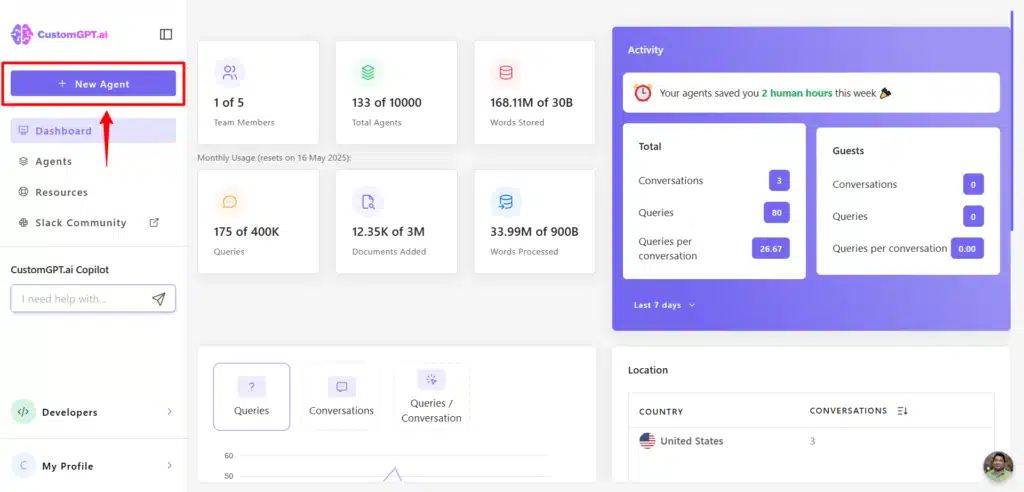
To complete the process of creating a Health Assistant, upload the dataset into the chatbot’s knowledge base in the next step.
Upload the dataset
There are two ways of uploading data sets into the chatbot’s knowledge base.
- Input your website URL.
- By uploading documents.
Upload website URL
Select website.

Enter your website URL

Upload Documents
To upload the document, go into your chatbot’s settings. Click on Data>Upload. And upload documents relevant to the specific domain.
If your health or wellness chatbot uses sensitive user information, review custom GPT privacy for sensitive data before uploading documents or publishing the assistant.
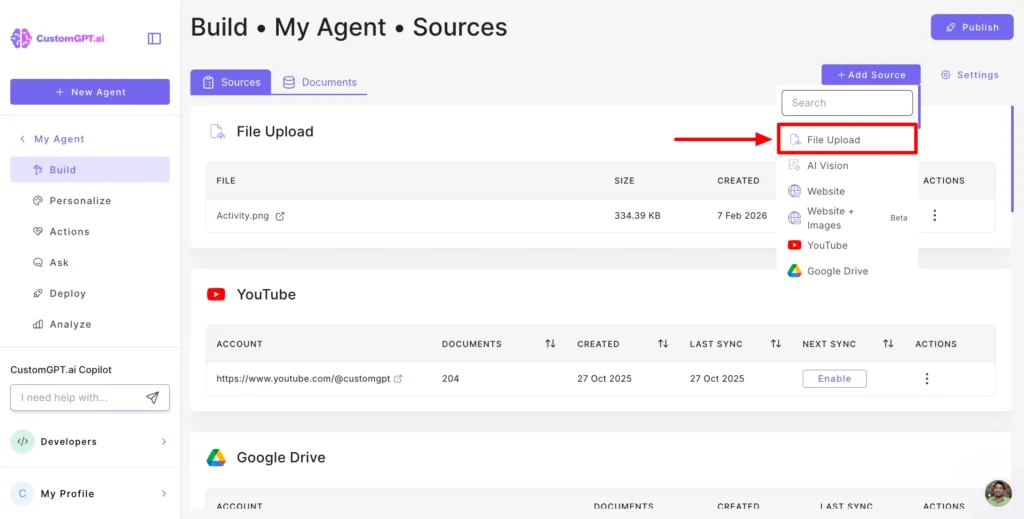
Now test the chatbot built with your custom knowledge base by asking a few relevant questions to check if it is generating the right answers.
Deploy the Chatbot
You can deploy the chatbot to a healthcare website to provide information to your patients with common health queries, schedule appointments, and general information. You can also integrate it into your workflow to guide you with specific information personally. CustomGPT.ai offers the following features to integrate the chatbot into another platform, including finance and financial content use cases. Just go into your chatbot settings and click on Sharing to enable the features.

Read the full guide on How to deploy a chatbot into a website.
Example: Wellness Clinic FAQ Assistant
A wellness clinic could start with one safe workflow: answer program, nutrition class, appointment preparation, and self-care FAQ questions from approved pages and documents. In CustomGPT.ai, upload the clinic’s service pages, intake instructions, nutrition handouts, cancellation policy, and escalation policy.
Set the assistant to answer only from those sources, and route diagnosis, treatment, emergency, or crisis prompts to a clinician or emergency service. This keeps the chatbot useful for routine education while preserving clear human boundaries.
Using Your Custom Chatbot: Practical Examples
Let’s see some examples of using a Health Assistant for various health-related tasks.
General Health Information
You can create and deploy a Health Assistant on a healthcare or wellness website for patients, members, or visitors. If they have general symptom or program questions, the chatbot can provide informational responses from approved content and guide them toward a clinician, coach, or emergency service when the situation requires human care.
Let’s ask some related questions and see how the Health assistant responds.

I asked the above question, and the chatbot returned possible informational causes and general next-step guidance. In a live health workflow, diagnosis and treatment guidance should route to a licensed professional.

Nutrition Guidance
By creating a custom chatbot for nutrition guidance you get a personal assistant for various purposes. Here are some of the tasks that a nutrition guidance chatbot can help you with:
- Personalized Meal Plans
- Nutrient Information
- Recipe Suggestions
- Hydration Tips
- Balanced diet plans
- Weight Management Support
- Nutrition Education
Let’s ask a custom chatbot questions and see how it responds:

I asked the above question and CustomGPT.ai responded by not only providing the source of nutrition-rich food but also defining the benefits.

Let’s ask another question to create a diet plan for a day and see how CustomGPT.ai creates a balanced diet plan:

I asked the above question and CustomGPT.ai created a meal plan for the whole day.


Your personal nutrition guidance chatbot is here to help you manage your balanced diet and improve your health. Sign up and create one for yourself now.
Mental Health and Support
Mental illness, also called mental health disorders, refers to a wide range of mental health conditions like disorders that affect your mood, thinking, and behavior. Examples of mental illness include depression, anxiety disorders, and eating disorders.
You can create a CustomGPT.ai chatbot for mental health education and support. Users can ask general, non-crisis questions and receive informational responses grounded in the content you provide, with clear escalation guidance for professional help.
Here are some mental health support and awareness purposes a chatbot can be used for:
- Self-Care Guidance
- Identifying Warning Signs
- Educational Campaigns
- Customized Coping Strategies
- Encouraging Professional Help
- Promoting Healthy Habits
- Providing Information and Resources
By using CustomGPT.ai for mental health support you can create awareness campaigns that can contribute to creating a more supportive and informed community, fostering open conversations about mental health, and providing valuable assistance to those in need.
Let’s ask CustomGPT.ai some relevant questions and see how it can assist people:
You see how a CustomGPT.ai chatbot provides information and it can be used for various awareness and personal assistant tasks. Let’s ask another question.

Benefits of using CustomGPT.ai for the Health sector
CustomGPT is more than just a platform to create highly customized chatbots, it’s a digital AI solution made to help individuals across various industries. Let’s have a look into some of its benefits when used in the health sector:
No-Code Convenience
One of the most important CustomGPT.ai features is that this platform is designed for everyone and can be used across various industries. Its user-friendly interface helps you effortlessly customize your AI Chatbot within a few minutes with zero coding.
RAG Technology
CustomGPT.ai Retrieval-Augmented Generation (RAG) technology allows you to get chatbot responses based on the data you indexed to the CustomGPT.ai. This technology helps you to stay up to date with the real-time information from the websites. You can get up-to-the-minute information on any topic, making it an invaluable tool for staying informed and relevant in the health sector.
Content-grounded responses
In health and wellness contexts, reliability depends on clear scope and approved source material. CustomGPT.ai builds RAG agents from your content, so teams can ground responses in their own documents, websites, and policies instead of asking a general chatbot to improvise. For medical, nutrition, or mental health topics, keep the assistant informational and route diagnosis, treatment, emergencies, or crisis language to licensed professionals or emergency services.
Source review
When you connect approved source material, review the assistant’s responses and source references before using them in a health or wellness workflow. This keeps the chatbot positioned as an informational support layer rather than a clinical decision-maker.
Multiple-source data integration
CustomGPT.ai supports 1400+ data formats for ingestion and sitemap-based content import. That breadth helps health and wellness teams organize approved educational content, program materials, FAQs, and policy documents in one assistant knowledge base.
Conclusion
In conclusion, CustomGPT.ai can help health and wellness teams build an informational assistant from approved content, publish it quickly, and support routine education, appointment preparation, surveys, awareness campaigns, and self-care reminders. Keep medical diagnosis, treatment decisions, emergencies, and crisis support with qualified professionals, and use the chatbot as a scoped support layer for general guidance.
Related reading: How AI is Revolutionizing Healthcare Marketing: A Guide for Agencies
Frequently Asked Questions
Can a health and wellness chatbot help users without acting as a diagnosis tool?
Yes. You can deploy a health and wellness chatbot as an informational support tool, not a diagnosis tool: use it for general health questions, disease awareness, balanced diet guidance, habit coaching, and non-crisis mental support, while excluding diagnosis, prescription decisions, and emergency triage. Set one explicit rule in every flow: if symptoms are severe, persistent, worsening, or include self-harm, chest pain, or breathing trouble, direct users to a licensed clinician or emergency services immediately. For a wellness business, this can support routine FAQ handling, nutrition education, appointment preparation, and weekly well-being check-ins that route users to a coach when human follow-up is needed.
What is the first step when creating a health and wellness chatbot?
Your first step is to define one business outcome, one user segment, and the safety and brand boundary in the same brief. You can set a measurable goal such as reducing repetitive support tickets, increasing consultation bookings, improving nutrition-plan adherence, or offering non-crisis mental wellness check-ins for existing clients. Then choose implementation based on that goal: for a fast launch with low engineering effort, start with a website widget; for a PHP site that needs booking, EHR, or CRM workflows, map API handoff events and required data fields before writing training content. Also set trust rules early: allowed logo and branding use, approved tone, and escalation steps for medical-risk prompts, including directing emergencies to local emergency services.
How hard is it to set up a custom health assistant chatbot?
You can usually launch a custom health assistant chatbot with a simple flow: add your approved content, set behavior rules, and publish. If your site runs on PHP, the fastest path is the embed widget; pick the API only if you need a custom UI, EHR lookups, or server-side workflow control. API-first projects usually need additional engineering time for authentication, logging, and handoff logic, while widget-first projects are typically faster to launch. You can add your logo, fonts, and brand colors within plan limits. This supports use cases like appointment FAQs, intake preparation, and program guidance while keeping a consistent client-facing experience.
What health and wellness use cases can you launch first?
You can launch three flows first: FAQ triage, preventive education journeys, and nutrition coaching check-ins. Choose the launch order by your main pain point: if inquiry volume is highest, start with general query handling; if lead nurturing is the goal, start with disease-awareness sequences; if retention is slipping, start with weekly nutrition and wellbeing nudges. For implementation, your fastest path on a PHP site is usually widget embed, while API integration is better for custom workflows and EHR handoffs. Confirm branding early: some plans allow logo-only styling, while others allow full white-label options.
Why use a custom chatbot in health and wellness programs?
You can use a custom chatbot to give members timely informational answers on plans, nutrition, classes, and billing while lowering repetitive support work. For a wellness clinic, you can automate intake FAQs, program matching, appointment reminders, and post-visit check-ins, so your team spends more time on care and less time on repeated questions. You can launch through a widget or API, then add your logo and tone within plan limits for faster rollout without heavy engineering. A health-focused custom flow also gives you tighter control over safety language and escalation rules.
FAQ source note: Review these safety boundaries against the WHO AI ethics and governance guidance for health, FDA clinical decision support software guidance, and HHS HIPAA Privacy Rule guidance before launch.
Related Resources
If you’re building a health and wellness assistant, these guides cover adjacent ways to create safer, more useful AI experiences with CustomGPT.ai.
- Generative AI in Healthcare — Explore practical healthcare AI use cases, implementation ideas, and safety considerations for using AI assistants in clinical and wellness settings.
- AI for Mental Health — Learn how AI chatbots can support non-crisis mental wellness, user education, and guided self-care while keeping clear escalation boundaries.
- Chatbots for WordPress: A No-Code Practical Guide — See how to add a CustomGPT.ai chatbot to a WordPress site without heavy development work.
- How to Build a No-Login AI Chatbot — Learn how to create a low-friction chatbot experience that users can access quickly without account creation.
- Build a High-Accuracy AI Search Platform — Understand how grounded AI search helps deliver more reliable answers from approved business or wellness content.