OpenAI Priority Processing: How It Works and When to Use It
OpenAI Priority processing is a paid API service tier designed to provide lower and more consistent model-processing latency than Standard processing for supported models and endpoints. It is intended for latency-sensitive, user-facing workloads where response delay can affect task completion, engagement, or perceived product quality.
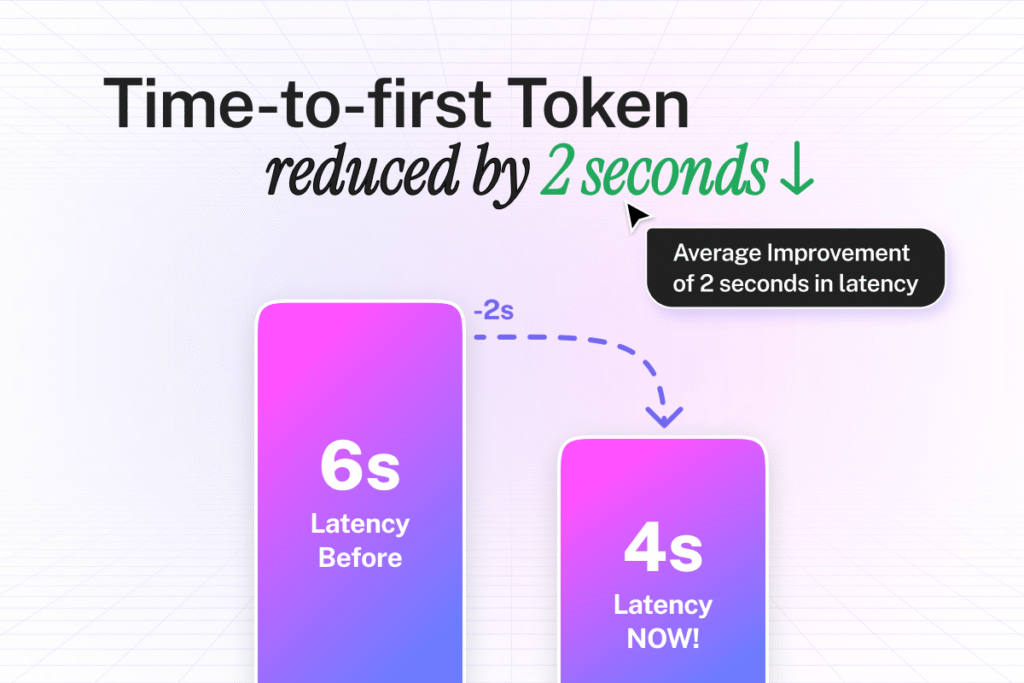
Priority processing doesn’t automatically make every AI application sub-second. It affects only the eligible model-processing portion of the request. Retrieval, prompt construction, tools, network delay, output length, and frontend rendering can still dominate end-to-end response time.
This guide explains how Priority processing is enabled, how it compares with other service tiers, what it costs, which limitations matter, how to benchmark it correctly, and how CustomGPT.ai uses Priority Queries within supported configurations.
OpenAI Priority Processing at a Glance
| Question | Answer |
| What does it do? | Provides lower and more consistent API latency than Standard processing for supported workloads |
| How is it enabled? | Set `service_tier=”priority”` per request or configure Priority at project level when supported |
| Does it cost more? | Yes. Priority tokens are billed at a premium over Standard processing |
| Is every model supported? | No. Support depends on the current model and endpoint list |
| Does it use separate rate limits? | Priority and Standard use the applicable model rate-limit accounting. |
| Can requests fall back to Standard? | Yes. Some requests may be handled as Standard when ramp-rate or service conditions apply |
| Is it intended for batch jobs? | Generally no. It is designed for regular user-facing traffic |
| Does it guarantee sub-second responses? | No universal request-level guarantee |
| Does it speed up retrieval? | Not directly. Retrieval and application overhead must be optimized separately |
How to Enable OpenAI Priority Processing
For an eligible OpenAI API request, set the service tier to Priority:
service_tier=”priority”
Depending on the current API and project configuration, Priority may also be selected as the default service tier at the project level.
Before enabling it, verify:
- The model supports Priority processing.
- The endpoint supports the service tier.
- Your project has the required access and billing configuration.
- The workload is latency-sensitive and user-facing.
- The expected latency improvement justifies the premium token cost.
- The traffic pattern doesn’t create rapid ramp conditions that may trigger fallback behavior.
After sending the request, inspect the response metadata to confirm which service tier actually processed it. A request configured for Priority may not always be handled by Priority if documented fallback conditions apply.
Priority vs. Standard vs. Scale Tier vs. Flex
| Tier | Best for | Cost model | Latency expectation | Traffic profile |
| Standard | General API workloads | Standard per-token pricing | Normal shared performance | General use |
| Priority | Interactive latency-sensitive workloads | Premium per-token pricing | Lower and more consistent latency | Regular user-facing traffic |
| Scale Tier | Predictable enterprise throughput | Purchased token capacity or enterprise commitment | Enterprise service objectives | Sustained provisioned volume |
| Flex | Lower-priority asynchronous work | Lower-cost or discount-oriented pricing | Slower or less predictable | Non-urgent workloads |
Priority is not the same as Scale Tier. Priority is a request or project-level processing choice for eligible workloads, while Scale Tier is designed around provisioned enterprise capacity and separate commercial terms. Flex is intended for less urgent workloads where lower cost matters more than interactive speed.
What Actually Determines AI Response Time?
A retrieval-augmented chatbot may pass through several stages before the user sees an answer:
- Browser or application network time
- Authentication
- Query preprocessing
- Embedding or search operations
- Vector or document retrieval
- Reranking
- Prompt construction
- Model queue and inference time
- Output streaming
- Frontend rendering
Priority processing mainly targets eligible model-processing latency. It doesn’t automatically fix slow retrieval, large prompts, inefficient tools, long answers, network delay, frontend rendering, slow authentication, or poorly optimized application logic.
What Priority Processing Can and Cannot Improve
| May improve | Doesn’t directly fix |
| Model queue and inference latency | Slow document retrieval |
| Time to first token for eligible requests | Oversized prompts |
| Latency consistency under supported conditions | Long generated responses |
| Responsiveness in interactive applications | Slow tools or external APIs |
| User-perceived speed when model latency is the bottleneck | Browser, network, or frontend rendering delays |
How to Measure AI Response Latency
Time to first token: The time between sending the request and receiving the first generated token.
Streaming speed: The rate at which tokens arrive after generation begins.
Full response time: The total time from request submission until the complete response is delivered.
Retrieval time: The time required to search, rank, and prepare source content before the model request.
End-to-end latency: The complete user-perceived delay across the browser, network, application, retrieval, model, streaming, and rendering steps.
Use percentile measurements rather than relying on one average. Track:
- P50, P90, and P95 time to first token
- P50 and P95 full response time
- Retrieval duration
- Prompt and output tokens
- Model used
- Returned service tier
- Error rate
- Fallback rate
- Cost per request
- User abandonment
- Conversation completion
How to Benchmark Priority Processing Correctly
Compare Standard and Priority under controlled conditions. Keep the same model, prompts, knowledge base, retrieval settings, traffic level, geographic conditions, prompt length, output length, frontend, and application stack.
Run enough requests to avoid drawing conclusions from isolated examples, and document the test date, sample size, model, configuration, and traffic pattern. Don’t publish improvement percentages unless the underlying test conditions, sample size, model, and traffic profile are disclosed.
Rate Limits, Ramp Limits, and Fallback Behavior
Priority processing doesn’t remove normal model rate-limit considerations. Priority and Standard traffic may share the applicable model rate-limit accounting.
OpenAI may process some requests as Standard when traffic increases too quickly or when documented ramp-rate conditions are triggered. This matters for workloads with large, sudden spikes.
The exact thresholds and behavior can change. Inspect the returned service-tier metadata and test realistic traffic ramps rather than assuming every configured request will receive Priority handling.
Before production rollout, confirm:
- Current rate-limit treatment
- Current ramp-rate conditions
- How fallback is reported
- How to inspect the returned service tier
- Whether the workload has large or unpredictable spikes
- Whether the application can tolerate occasional Standard processing
Which Models and Endpoints Support Priority Processing?
Priority processing is available for supported OpenAI models and API endpoints. Support varies by model, so confirm that the model and endpoint used by your application are eligible before enabling service_tier=”priority”.
CustomGPT.ai Priority Queries apply only when an eligible Enterprise configuration uses a supported OpenAI model. They don’t apply to Azure OpenAI or non-OpenAI model providers.
How Much Does OpenAI Priority Processing Cost?
OpenAI Priority processing costs more than Standard processing because eligible input and output tokens are billed at premium per-token rates. The exact price depends on the model used.
Cached input tokens still receive the applicable discounted rate. You can review Priority-processing usage and cost in the OpenAI Usage dashboard by grouping results by service tier or line item.
To estimate the model cost of one interaction, use:
Interaction cost = input-token cost + cached-input cost + output-token cost
Also include the rest of the application when calculating total cost per completed interaction:
- retrieval and reranking
- vector database or search infrastructure
- external tools and API calls
- application hosting
- average requests per conversation
- average prompt and response length
Priority processing is worth testing when the business or operational value of lower latency exceeds the additional token cost. Compare Standard and Priority using the same model, prompt, output limits, and traffic conditions.
Last pricing review: August 5, 2026
How CustomGPT.ai Uses Priority Queries
CustomGPT.ai uses OpenAI Priority processing through Priority Queries for eligible Enterprise customers using supported OpenAI models.
The feature should be described separately from Fastest Response mode. Priority Queries refers to eligible model-processing treatment, while Fastest Response mode may include additional model selection, retrieval, caching, or application-level optimizations.
Priority Queries and Fastest Response Mode
| Item | Current detail |
| Priority Queries | CustomGPT.ai’s implementation of OpenAI Priority processing for eligible requests |
| Fastest Response mode | A separate speed-optimization setting that combines faster model selection and application-level optimizations |
| Available plans | Enterprise for Priority Queries; Premium and Enterprise for Fastest Response mode |
| Supported model providers | Supported OpenAI models; not Azure OpenAI or non-OpenAI providers |
| Activation | Priority Queries activate automatically when an eligible plan and supported OpenAI model are used |
| Additional cost | No additional charge for eligible Enterprise customers |
| Main limitation | Priority processing improves model latency but doesn’t guarantee sub-second end-to-end response time |
Premium and Enterprise plans don’t receive the same speed features. Priority Queries are available to eligible Enterprise customers, while Fastest Response mode is available on Premium and Enterprise plans. Fastest Response mode doesn’t automatically mean that OpenAI Priority processing is active.
How to Optimize the Rest of the Latency Path
- Remove duplicate or outdated documents from the knowledge base.
- Use clear file and page titles.
- Reduce unnecessary prompt size.
- Limit response length when concise answers meet the task.
- Measure retrieval and reranking separately from model time.
- Cache repeated results where appropriate.
- Avoid unnecessary tool calls or external API dependencies.
- Test the embedded widget, API, live chat, and other deployment surfaces separately.
- Measure P50 and P95 latency before and after each change.
When OpenAI Priority Processing Is Worth the Cost
Priority may be worth testing when:
- The application is user-facing and interactive.
- Time to first token affects abandonment or task completion.
- Traffic is regular rather than highly erratic.
- Model processing is a meaningful share of end-to-end latency.
- The value of a faster response exceeds the premium token cost.
- The application can measure latency, fallback behavior, and cost accurately.
It may not be the best choice when:
- The workload is batch-oriented.
- Traffic arrives in unpredictable spikes.
- Retrieval or application overhead is the real bottleneck.
- Long prompts and responses dominate total time.
- The use case is not sensitive to latency.
- Cost control matters more than interactive speed.
- The application cannot confirm which service tier handled each request.
Related: CustomGPT.ai pricing and features, components of a RAG system, SharePoint connector guide, and Google Drive connector guide.
Conclusion
OpenAI Priority processing gives supported user-facing workloads lower and more consistent model latency than Standard processing. In CustomGPT.ai, Priority Queries activate automatically for eligible Enterprise customers using supported OpenAI models, with no additional Priority-processing charge.
For the fastest configuration, Priority Queries can be combined with Fastest Response mode. Priority Queries improve the model-processing portion of the request, while Fastest Response mode adds broader speed optimizations across model selection, retrieval, and response delivery.
The best way to measure the impact is to compare Standard and Priority under the same conditions, track P50 and P95 time to first token and full response time, monitor fallback behavior, and compare cost per completed interaction. The strongest results come from optimizing the full latency path, including retrieval, prompt size, model processing, streaming, network delay, and frontend rendering, not the service tier alone.
Frequently Asked Questions
What is OpenAI Priority processing?
OpenAI Priority processing is a paid API service tier designed to provide lower and more consistent latency than Standard processing for supported models and endpoints.
How do I enable OpenAI Priority processing?
For an eligible OpenAI API request, set service_tier=”priority”. Priority processing can also be configured at the project level where supported.
Does Priority processing guarantee sub-second response time?
No. Actual response time depends on the model, prompt size, output length, retrieval, tools, network conditions, application architecture, and traffic pattern.
Does OpenAI Priority processing cost more?
Yes. Priority processing uses premium pricing compared with Standard processing. Exact rates depend on the model and may change.
Does Priority processing have higher rate limits?
No. Priority and Standard traffic use the applicable model rate-limit accounting. Priority processing improves latency and consistency, but it doesn’t provide a separate rate-limit allocation.
Can a Priority request fall back to Standard processing?
Yes. Some requests may be processed as Standard when documented traffic or ramp-rate conditions apply. Inspect the returned service-tier metadata to confirm which tier handled the request.
Is Priority processing suitable for batch jobs?
Generally no. It is intended for regular latency-sensitive user-facing workloads rather than large asynchronous batch processing or highly erratic traffic.
Does Priority processing speed up RAG retrieval?
Not directly. It primarily affects eligible model processing. Retrieval, reranking, prompt construction, network delay, tools, and frontend rendering must be measured separately.
What is the difference between Priority processing and Scale Tier?
Priority uses premium per-token processing for eligible requests. Scale Tier is designed around provisioned enterprise throughput and separate service objectives.
How should I measure whether Priority processing is worth the cost?
Compare Standard and Priority using the same model, prompts, knowledge base, retrieval settings, and traffic conditions. Measure P50 and P95 latency, fallback rate, cost per interaction, abandonment, and task completion.
Does CustomGPT.ai include Priority Queries on every plan?
No. Priority Queries are included for Enterprise customers using supported OpenAI models. They activate automatically and don’t require a separate setup step. Fastest Response mode is available to Premium and Enterprise customers and can be combined with Priority Queries on eligible Enterprise configurations for the fastest response performance.