What Are Alphanumeric Characters, and Why AI Struggles to Search Them
Alphanumeric characters are the letters A through Z and the numbers 0 through 9, sometimes combined with symbols, used together to form a single identifier. ABC123, SHOE-1234, and TRACK12345 are all alphanumeric strings, and you’ll recognize the pattern from passwords, product codes, and ID numbers.
That part is simple. What’s less obvious is that these letter-number strings behave nothing like ordinary words once AI search gets involved. A support agent may type in a tracking number and gets nothing back. A developer searches an error code and wades through pages of unrelated results. A logistics manager tries to reconcile SKUs across two systems and ends up with mismatches instead of answers. All three are running into the same blind spot. AI search tools are built for sentences, not codes, and that gap is where lookups quietly fail.
This guide covers why that happens, how identifiers like these encode structure and meaning that plain keyword or semantic search misses, and what a more reliable retrieval setup looks like.

Why Search Engines Struggle With Codes
Traditional enterprise search does well with natural language. Ask it to find “customer support policy” or “inventory guidelines” and results are usually relevant, the kind of everyday lookup covered in how AI chatbots work. The moment someone types a SKU like SHOE-1234, an order number like TRACK12345, or an error code like ERR1234, results tend to come back incomplete, irrelevant, or missing altogether.
The reason is structural. A single misplaced hyphen, a capitalization change, or one digit can completely change what an identifier refers to, and keyword matching or semantic similarity isn’t built to catch that. In industries like logistics, healthcare, and software, that precision gap isn’t a minor inconvenience. Misidentified codes lead to inventory mismatches, failed order lookups, and unresolved support tickets, each one costing time and eroding trust in the search tool itself.
What Counts as an Alphanumeric Identifier
These strings are everywhere in business operations, even if nobody thinks about them until a lookup fails. Common examples include:
- Product codes and SKUs, such as SHOE-1234
- Order numbers, such as TRACK12345
- Error codes, such as ERR1234
- Version numbers, such as GPT-4.1
- Dates, such as 2026-06-26
Each one ties directly to something operational. A SKU connects a product to its inventory record. An order ID links a customer to their purchase. An error code points to exactly what went wrong in a system, the kind of lookup that shows up constantly in support ticket workflows. When retrieval on these fails, the chain behind it breaks too, showing up as lost inventory, misdiagnosed issues, or a customer left waiting on an answer that technically already exists in the system.

Keyword Search and Its Shortcomings
Traditional keyword search treats identifiers as static strings of text, which works for simple queries but breaks down on structured codes. Searching for ABC-123 might not return ABC123 or ABC_123, even though all three refer to the same product. An order number like ORD-2023-456 can get treated as entirely unrelated to ORD-456-2023, even when the year and sequence both matter.
Two blind spots explain most of this. First, there’s no semantic awareness. An identifier’s position, format, and delimiters carry meaning that plain keyword matching can’t interpret. Second, exact-match logic is rigid. It doesn’t adapt to formatting variations, which causes missed results whenever a dataset spans multiple formats or languages.
Some workarounds help. Normalization standardizes formats, for example converting uppercase to lowercase or replacing underscores with hyphens. Tokenization breaks an identifier into smaller parts, such as ORD, 2023, and 456, treated separately. Search systems typically analyze text for full-text retrieval, which is well suited to language but risky for exact identifiers, since even these workarounds struggle once a dataset has overlapping formats, multiple languages, or regulatory rules layered on top.
Why Position and Structure Matter
Alphanumeric identifiers don’t just store data, they encode meaning through prefixes, suffixes, delimiters, and position. Traditional search flattens all of that into a plain string and loses the structure that made it interpretable in the first place.
Take INV-2026-001. INV likely signals an invoice type, 2026 is probably the year, and 001 is likely the sequence number. To a keyword search engine, that’s just text, no different from typing “INV 2026 001” into a box. In reality, the components form a hierarchy where position carries meaning, and getting that wrong has real consequences. Logistics systems reconcile millions of SKUs across different formats and prefixes. Healthcare codes follow strict compliance rules where a misplaced character can invalidate a record. Software teams depend on error codes mapping directly to the right system state, with no room for guesswork.
The fix is contextual search that recognizes relationships between the parts of a code instead of treating them as a flat string. A context graph, for instance, can connect an order ID to its related shipment and customer record, so retrieval follows intent rather than raw syntax.
Tokenization, Embeddings, and Context Graphs
Handling codes reliably usually takes a combination of three techniques, layered on top of each other rather than used alone.
Tokenization breaks an identifier into smaller components, so ORD-2023-001 becomes ORD, 2023, and 001 for comparison rather than one opaque string. It’s a useful starting point, but on its own it fails once structures overlap or multiple formats exist side by side. Consider ORD-2023-001 versus 2023-ORD-001. To a traditional search engine these look unrelated, but to a business confusing them could mean a missed shipment or an invalid invoice.
Embeddings map codes into vector representations that capture format and structural similarity, which is what lets a system recognize that SKU-123 and 123_SKU likely refer to the same item even though their surface form differs.
Context graphs go a step further and connect identifiers to related data, tying an order ID to its shipment, product, and customer record so a search reflects operational relationships instead of just string similarity.
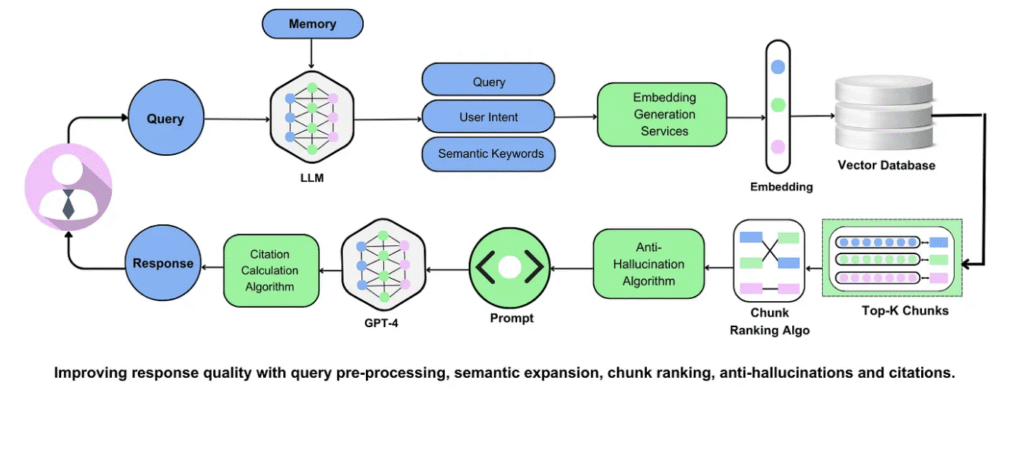
The strongest systems combine all three, plus normalization, into one hybrid retrieval pipeline. Normalize first, tokenize for structure, use embeddings for similarity, and use graphs for relationships. That layered approach is more resilient across industries and formats than any single technique alone, though it’s also computationally heavier and rarely built into search engines by default, which is part of why so many organizations still struggle with code retrieval at scale.
Industry and Regional Complications
Structure alone doesn’t explain every failure. Industry-specific practices and regional conventions add another layer that even good tokenization or embeddings can trip over.
In retail and logistics, a single product’s SKU can differ by region or supplier, and reconciling those mismatches without solid normalization tends to produce inventory errors and shipping delays. Healthcare identifiers are tightly regulated, with standards like ICD codes dictating exact formats, where misreading a code isn’t just inefficient, it can create compliance or patient-safety problems, the same category of risk covered in regulated data handling. Global businesses also run into date and format conventions that vary by region. The same date might appear as 2026-06-26 in one place and 26/06/2026 in another, and without format-aware retrieval those variations produce false mismatches rather than correct matches.
A More Reliable Approach to Code Search
None of this means starting from scratch. The practical fix is augmenting existing search with retrieval methods built specifically for identifiers.
Numeric Search treats identifiers as structured entities rather than flat text. It recognizes variations like ABC-123, ABC_123, and abc123 as the same reference, prioritizes exact matches when precision matters, and runs alongside natural language retrieval instead of replacing it. With Numeric Search enabled, a support agent or developer can resolve code-dependent queries accurately, whether that’s tracking an order or diagnosing a system error, which cuts down on wasted time and mismatched results. It complements rather than replaces standard retrieval. Free-text search still handles unstructured questions, while identifier-aware search handles the codes that need exact precision.
The payoff shows up in day-to-day work. Developers spend less time chasing code fragments or debugging errors hidden behind formatting differences. Teams find reusable components more easily when identifiers stay consistent across projects, which cuts duplicated work in larger organizations. For a broader look at building retrieval that gets both structure and language right, see the RAG implementation guide, how chunking strategy affects what a system can actually find, and how connected data sources feed into the whole pipeline.
The Bottom Line
Alphanumeric identifiers look simple, but they carry structural and contextual meaning that traditional search wasn’t built to understand, and the risks (mismatched SKUs, lost order IDs, misread error codes) compound as a business scales. The fix isn’t abandoning existing search, it’s augmenting it with identifier-aware retrieval that treats codes with the precision they need while still handling natural language queries the way it always has.
Enable Numeric Search on your content →
Frequently Asked Questions
What are alphanumeric characters?
Letters and numbers used together in a string, such as SKU-1234, ERR1234, A1B2C3, or a user ID. They matter in search because the exact pattern, punctuation, and case can identify one specific record, so a good search system should treat them as exact identifiers before applying broader semantic matching.
Why does search fail on a code like SHOE-1234 or ERR1234?
Usually because the parser breaks the identifier apart. Tokenization may split on hyphens, and analyzers may read ERR1234 as ERR plus 1234, which blocks exact matching. The fix is indexing codes in a dedicated exact-match field with consistent normalization (the same casing and punctuation rules) applied at both ingest and query time. If a query matches an identifier pattern, run an exact lookup first. Only fall back to semantic or keyword retrieval if that returns nothing.
How should I format an identifier like a session ID so it stays reliably searchable?
Use an immutable, case-sensitive token, generally 12 to 64 characters, limited to letters, numbers, underscores, and hyphens. Reject anything outside that range or containing spaces, slashes, dots, or emoji before it’s ever stored. Once created, never auto-rewrite the casing or separators, and don’t normalize Unicode, since even small automatic changes cause lookup mismatches later. Store and query it as an exact keyword field rather than full text.
Do character limits cause codes to go missing from search?
Rarely on their own. Truncation can cause a miss if the full code isn’t stored or queried, but most misses happen well within length limits, when search tokenizes or fuzzy-ranks a code as ordinary text instead of matching it exactly. Run an exact full-string match first, including hyphens and casing, before widening to fuzzy or semantic search. In most setups, missed codes trace back to analyzer configuration, not field length.
Should exact search, semantic search, or both be used for SKUs and error codes?
Both, with clear routing between them. If a query matches an identifier pattern, such as letters plus a separator plus digits, send it to exact or keyword retrieval first and reserve semantic search for context, like related troubleshooting notes or past incidents. If the identifier lookup itself fails, that’s usually a formatting or validation problem worth fixing before broadening the semantic search net.
Related Reading
- The RAG implementation guide covers building a retrieval system from the ground up.
- Components of a RAG system breaks down what determines retrieval accuracy overall.
- RAG chunking strategies explains how document splitting affects what a system can find.
- RAG evaluation metrics covers measuring retrieval quality once a system is live.
- Anti-hallucination AI explains the grounding techniques that keep answers tied to real source content.
- Sources, citations, and observability covers verifying where an answer actually came from.
- Enterprise knowledge search applies these retrieval concepts to internal documentation at scale.
- Data connectors covers getting structured and unstructured content into the system in the first place.
Stop losing accuracy — traditional search fails on codes
Get precise, code-based answers for numeric and alphanumeric queries.
Built for exact answers from your own content