Why Customers Keep Opening Support Tickets Even When the Answer Is in Your Help Docs
You published the article. You made it easy to find. You sent the link in the onboarding email.
The customer still opened a ticket.
If you manage a SaaS support team, this happens every day. Your knowledge base has the answer to the majority of incoming tickets. Customers ask anyway. And every one of those tickets costs your team time and your business money. Gartner benchmarks agent-assisted support contacts at $13.50 each, versus $1.84 for self-service [via Lorikeet].
The instinct is to fix the content. Write better articles. Reorganize the help center. Add search. Most teams try all three. The ticket volume does not move.
The content is not the problem.
 The customer’s natural behavior is to ask a question in chat. If asking a question in chat produces a helpful answer, the ticket is never created. If it produces nothing, the ticket happens regardless of how good your help docs are.
The companies that reduce ticket volume significantly are not the ones that write the best articles. They are the ones that put the answers where the customer is already asking, in the chat interface, so the knowledge base is searched automatically, without the customer having to do it themselves.
The customer’s natural behavior is to ask a question in chat. If asking a question in chat produces a helpful answer, the ticket is never created. If it produces nothing, the ticket happens regardless of how good your help docs are.
The companies that reduce ticket volume significantly are not the ones that write the best articles. They are the ones that put the answers where the customer is already asking, in the chat interface, so the knowledge base is searched automatically, without the customer having to do it themselves.
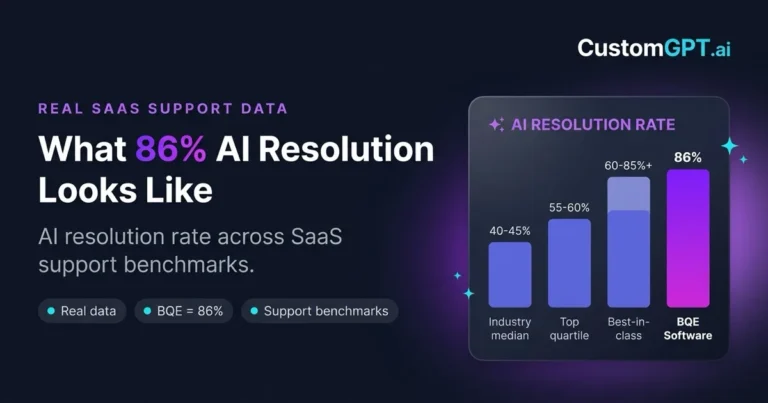
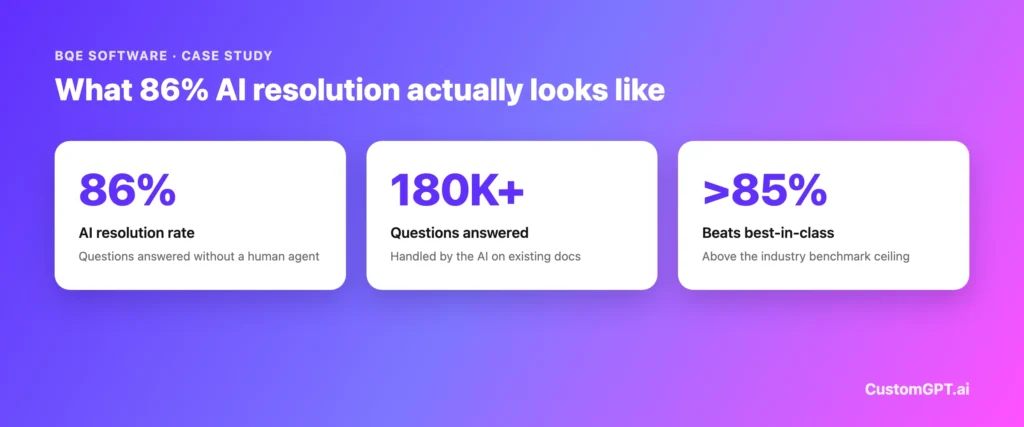 For context: Digital Applied benchmark roundup summarizing CX Trends 2026 reports a median AI deflection rate of 40-45% for SaaS support teams, with top-quartile programs reaching 55-60%. BQE’s result at 86% sits above what the industry considers best-in-class. Results vary based on documentation quality and the range of question types a team receives.
Why Customers Won’t Search, Even When the Answer Exists
When a customer has a question, here is what typically happens: they open the app, look for a chat widget or support button, type their question, and when nothing responds, they submit a ticket. The knowledge base is just one more tab they would have to open, navigate, and search, and most customers won’t take that extra step. This is a friction problem, not a content problem.
The customer’s natural behavior is to ask a question in chat. If asking a question in chat produces a helpful answer, the ticket is never created. If it produces nothing, the ticket happens regardless of how good your help docs are.
The companies that reduce ticket volume significantly are not the ones that write the best articles. They are the ones that put the answers where the customer is already asking, in the chat interface, so the knowledge base is searched automatically, without the customer having to do it themselves.
Why Chat Wins Over Search Every Time
Search asks customers to translate their problem into the right keyword, scan a results page, and decide which article might contain the answer. Chat lets them describe the issue in their own words and get one direct response back. That difference matters most when the answer spans setup, billing, permissions, or policy docs. When chat is connected to the knowledge base, it becomes the front door to the documentation instead of a separate escalation path.The Passive Knowledge Base Problem
Even a well-organized knowledge base returns a list of articles when a customer searches. The customer then has to read through articles to find the specific sentence that answers their question. Most customers will not take that extra step for routine questions, because what they want is a direct answer, not an article they have to scan through to find it. In high-friction support flows, customers often choose the visible chat path over a separate help-center search, especially when the answer requires combining information from multiple articles.How a Documentation-Grounded AI Chatbot Closes the Gap
A documentation-grounded AI chatbot solves the friction problem by meeting customers where they already are: in the chat interface, at the moment they have a question. The AI reads your help docs and returns an answer when a customer types a question. No scripted Q&A pairs. No decision trees. No manual training. The AI reads your existing documentation by URL and uses it to answer customer questions in real time. When a customer asks something your docs cover, the AI responds, with a citation back to the source article. When your docs do not cover the question, the AI says so honestly and can prompt the customer to open a ticket. This keeps your resolution quality high, because the AI is not guessing. The ticket that would have happened is replaced by an instant answer. The customer gets what they needed. Your team never sees the question.What the Path Difference Looks Like in Practice
Understanding the ticket gap is easier when you see both paths side by side. Without a documentation-grounded AI chatbot: Customer has question → opens chat → gets no response → opens new tab → searches help center → reads article → submits ticket. Cost to your team: $13.50 (Gartner, via Lorikeet). With a documentation-grounded AI chatbot: Customer has question → opens chat → gets answer with source citation → continues working. Cost to your team: $0.50-$2.00 (Fin), (Aissist.io). The documentation is identical in both scenarios, but the path to the answer is completely different, and so is the outcome.BQE Software: What 86% Resolution Actually Required
BQE Software is a SaaS business serving professional services firms. Their support team handled thousands of repetitive questions that were already answered in their documentation. After deploying a CustomGPT.ai agent connected to their knowledge base, BQE achieved:- 86% AI resolution rate, above the industry best-in-class benchmark of 85%
- 180,000+ questions answered by the AI
“CustomGPT.ai has fundamentally changed how we deliver help and support,” said Naira Yaqoob, Documentation Manager at BQE Software.
For context: Digital Applied benchmark roundup summarizing CX Trends 2026 reports a median AI deflection rate of 40-45% for SaaS support teams, with top-quartile programs reaching 55-60%. BQE’s result at 86% sits above what the industry considers best-in-class. Results vary based on documentation quality and the range of question types a team receives.
Built from your docs
Turn your help docs into instant answers
Connect your knowledge base and let AI resolve the repetitive tickets for you.
Start free trial →
✓ 7-day free trial · Cancel anytime
The Cost Gap: What Deflection Is Actually Worth
The cost difference between human-handled and AI-handled tickets is significant, and it compounds with volume. Gartner benchmarks agent-assisted support contacts at $13.50 each, versus $1.84 for self-service (via Lorikeet). Cross-industry benchmarks from (Fin) and (Aissist.io) put AI-handled tickets at $0.50-$2.00 per resolution across typical deployments. The repetitive questions that your knowledge base already answers are the ones the AI handles. The cost math on deflecting those tickets is significant, but the more immediate impact is on your team: agents spend their time on the questions that actually require judgment, context, and experience, rather than answering the same question for the 200th time that month.Three Things to Check Before Deploying an AI Support Chatbot
Deflection rates vary widely across AI support tools. The gap between 40% and 86% is not random. These three evaluation criteria explain most of it.- Does the AI read your documentation, or generate from training data?
- Does it cite sources?
- Does it update automatically when your docs change?
Frequently Asked Questions
Why do customers open support tickets instead of searching the knowledge base?
Customers open tickets instead of searching because asking in chat is faster and requires less effort. In high-friction support flows, customers often choose the visible chat path over a separate help-center search. When chat does not respond, they submit a ticket rather than switching tools. The problem is not documentation quality – it is that chat is not connected to the documentation.Does improving the knowledge base reduce ticket volume?
Improving the knowledge base alone rarely reduces ticket volume meaningfully. Ticket volume falls when customers can get answers through the channel they are already using. A better-organized knowledge base still requires customers to search it actively. An AI chatbot connected to the knowledge base delivers answers passively, in the chat interface, without requiring customers to search.What deflection rate should a SaaS support team expect from an AI chatbot?
Digital Applied benchmark roundup summarizing CX Trends 2026 puts the industry median at 40-45%, with top-quartile programs reaching 55-60%. BQE reached 86% AI resolution with documentation-grounded AI. Typical results depend on documentation quality, question mix, and escalation rules. The main variable is whether the AI reads your actual documentation or generates from training data.What happens to the tickets the AI cannot resolve?
When the AI cannot find an answer in your documentation, it says so and can prompt the customer to open a ticket or contact your team. This ensures complex, account-specific, or genuinely novel questions still reach a human agent. The AI handles the volume of repetitive, documentation-answerable questions. Your agents handle the complexity.How long does it take to set up a documentation-grounded AI chatbot?
Setup time depends on the tool. CustomGPT.ai connects to your knowledge base by URL and does not require manual document uploads, scripted Q&A pairs, or developer work. Biamp, a CustomGPT.ai customer, went live in 30 days – and that included internal review and approval time. Technical setup depends on your source content, review process, and launch requirements.Is it safe to connect our knowledge base to an external AI tool?
Security posture varies by provider. Look for SOC 2 Type 2 certification as the baseline for B2B SaaS. Verify that your documentation is stored in an isolated environment – not used to train shared models or accessible to other organizations. CustomGPT.ai is SOC 2 Type 2 certified with documentation stored in isolated environments.Conclusion
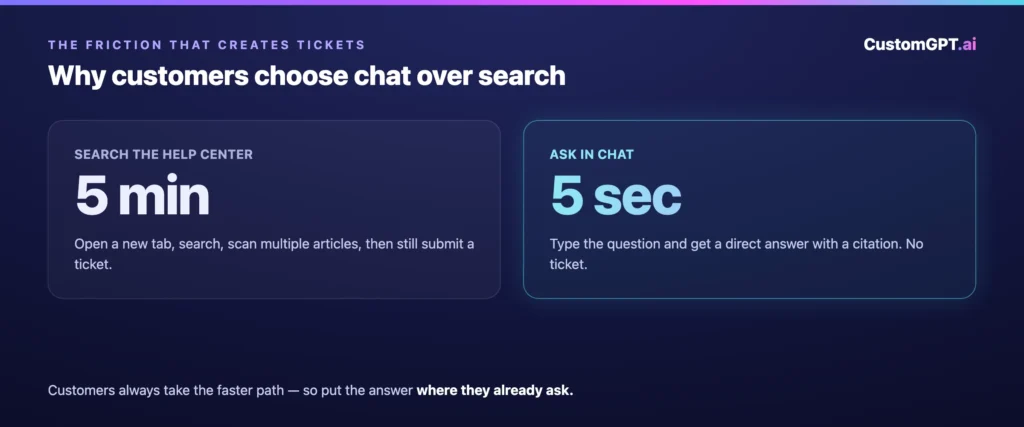
Your customers keep opening tickets because asking in chat takes 5 seconds, and searching a knowledge base takes 5 minutes. They will always choose the faster path. The only way to close that gap is to make chat produce the correct answer. The content in your help docs is not the constraint. The missing step is an AI that reads those docs and answers the question before it becomes a ticket. BQE Software resolved 86% of support questions this way, answering 180,000+ questions without tickets being created. The deflection starts when you point an AI at your knowledge base. Not when you rewrite another article.Read next:
- What 86% AI Resolution Looks Like for a SaaS Support Team
- How ticket deflection works
- AI knowledge base chatbot for SaaS support teams
- AI chatbots vs human agents: what to automate and when to escalate
Add this guide to self-serve support integrations when you want to show what teams should connect first.