How to Build an AI Clone of Yourself From Your LinkedIn Posts
What an AI Clone of Yourself Actually Is
An AI clone of yourself is an assistant that answers questions from what you have already published, in your words, and links each answer to the post it came from. You build one in CustomGPT.ai by pasting your public LinkedIn profile URL into the built-in LinkedIn source and turning on auto-sync.
Every public post becomes one page the clone can answer from, and there’s no LinkedIn developer app to set up. Auto-sync is available on every plan, Standard included, so a post you publish today reaches the clone on the next sync. With citations turned on, an answer drawn from a post links back to that post, and anyone can check that you said it. When your posts don’t cover a question, the clone replies with a custom ‘I don’t know’ message”.
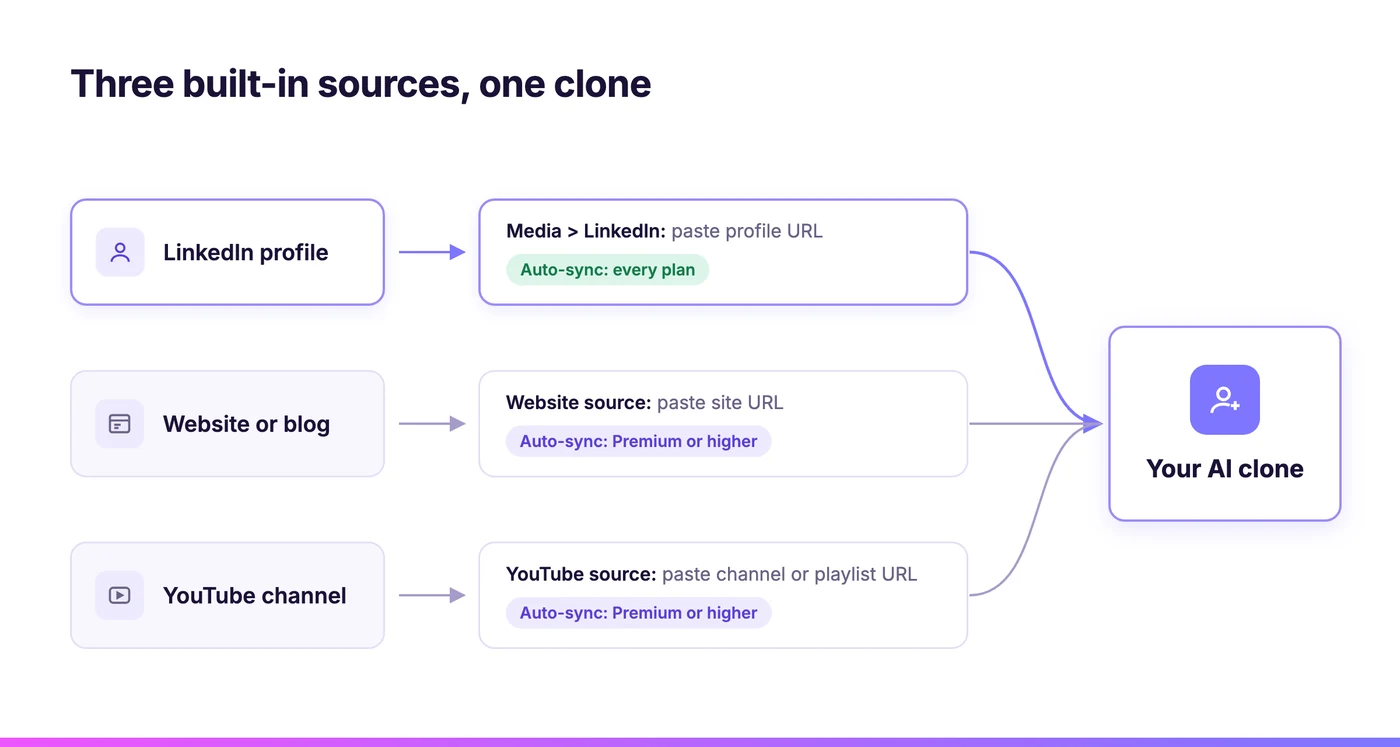
Your website and YouTube channel are built-in sources too, so the same clone can later draw on your blog articles and video transcripts.
If you’re a creator, coach, consultant or founder, you already know the questions: what you charge, how you’d handle a client’s situation, where you stand on something you posted last month. A clone answers them from your own words while you’re offline.
A Knowledge Clone, Not a Video Avatar
“AI clone” covers three different products. A video or voice avatar copies how you look and sound. A ghostwriting prompt copies your style to draft new posts. A knowledge clone copies what you know and answers from it with sources, and that is the one that saves you from repeating yourself.
Most results for “AI clone of yourself” are avatar tools such as HeyGen, and most guides to training ChatGPT on your posts have you paste five of your best into a prompt. Those help with video and style. They can’t answer a client’s question about pricing a retainer, and they can’t point to where an answer came from.
A knowledge clone does less, and you can check its work. It answers from your published record and links to the source. When the record is silent, it replies with your “I don’t know” message. That setting cuts down on gap-filling, though it can’t stop the clone from blending two posts into a view you never stated, so reading a sample of its conversations each month still matters. If you’re new to the idea, start with the basics of cloning yourself with AI.
In David Riha’s June 2026 review of digital twin tools for coaches, CustomGPT.ai is “the most accurate” of the chatbot builders he compared, yet he scored it 6.0 out of 10 as a clone and added that “It won’t carry a premium coaching subscription.” Build this clone for accurate answers from your work, and keep the paid relationship for yourself.
Your LinkedIn Posts Already Hold the Answers
Most experts have already written answers to their most common questions in their LinkedIn posts. The built-in LinkedIn source reads every public post on your profile, and Auto-sync is available on all plans. Your website and YouTube channel connect as built-in sources as well, each with its own rule for staying current.
| Source | How it gets into the clone | Stays current on its own? |
| LinkedIn profile | Built-in LinkedIn source: paste your public profile URL | Yes, once you turn on auto-sync (every plan, per the docs) |
| Your website or blog | Built-in Website source: paste your site URL | Yes, with website Auto-Sync on Premium or higher |
| YouTube channel | Built-in YouTube source: paste a channel or playlist URL, and the transcripts are added | Yes, with YouTube auto-sync on Premium or higher. See the guide to turning YouTube videos into an AI assistant |
Each LinkedIn post counts as one page toward your agent’s limit. Standard allows 5,000 pages per agent and Premium allows 20,000, and the docs note that a profile with a few hundred posts fits comfortably on any plan. Only posts come in. LinkedIn articles and newsletters are left out, and a repost counts only if you added your own commentary.
Connect Your LinkedIn Profile in Two Steps
Connect your LinkedIn profile, turn on auto-sync, and your clone is live.
Start with LinkedIn. You can open a free 7-day trial in another tab and follow along.
Connect Your Profile URL
Click New Agent, then under Media click LinkedIn. On an agent you already have, click the three dots, select Build, click Add Sources and pick LinkedIn from the dropdown. Paste your profile URL however you copied it. The https:// and www are optional, and regional or mobile addresses such as uk.linkedin.com work too. Click Create Agent, or Add Source on an existing agent, and your posts are read in the background. A profile with a few hundred posts takes longer than one with a few dozen.
Private profiles, and profiles with no public posts, can’t be added. The LinkedIn setup guide in the docs has every screen, and the full walkthrough for training an AI chatbot on your LinkedIn posts covers company pages as well as profiles.
Turn On Auto-Sync
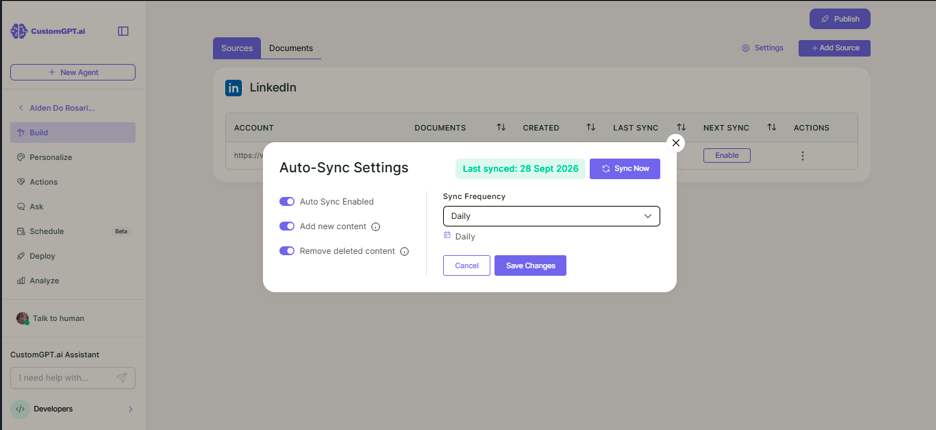
Go to Sources, find your LinkedIn source and click Enable under Next Sync. Toggle on Auto-sync enabled, Add new content and Remove deleted content. Choose Daily, Weekly, Monthly or Custom, then click Save Changes. The LinkedIn auto-sync steps show each screen.
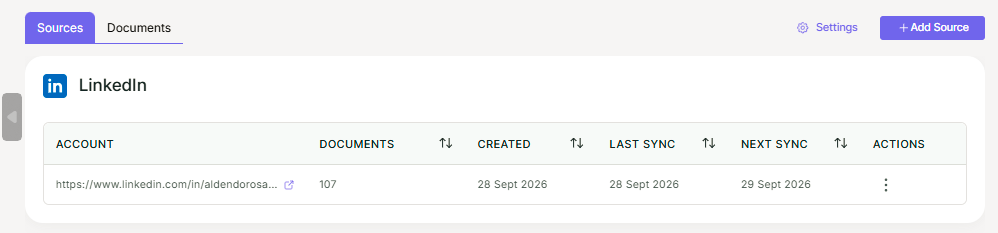
On the clone of Alden Do Rosario, CustomGPT.ai’s founder and CEO, the connected source looks like this, with auto-sync set to run daily.
Add Your Website and YouTube
Add your blog with the built-in Website source: paste your site URL and CustomGPT.ai finds the pages. Add videos with the built-in YouTube source: paste a channel or playlist URL, and CustomGPT.ai finds the videos and generates transcripts the clone can answer from. Both can keep themselves current with Auto-Sync, which is available on the Premium plan or higher.
How Your Clone Stays Current
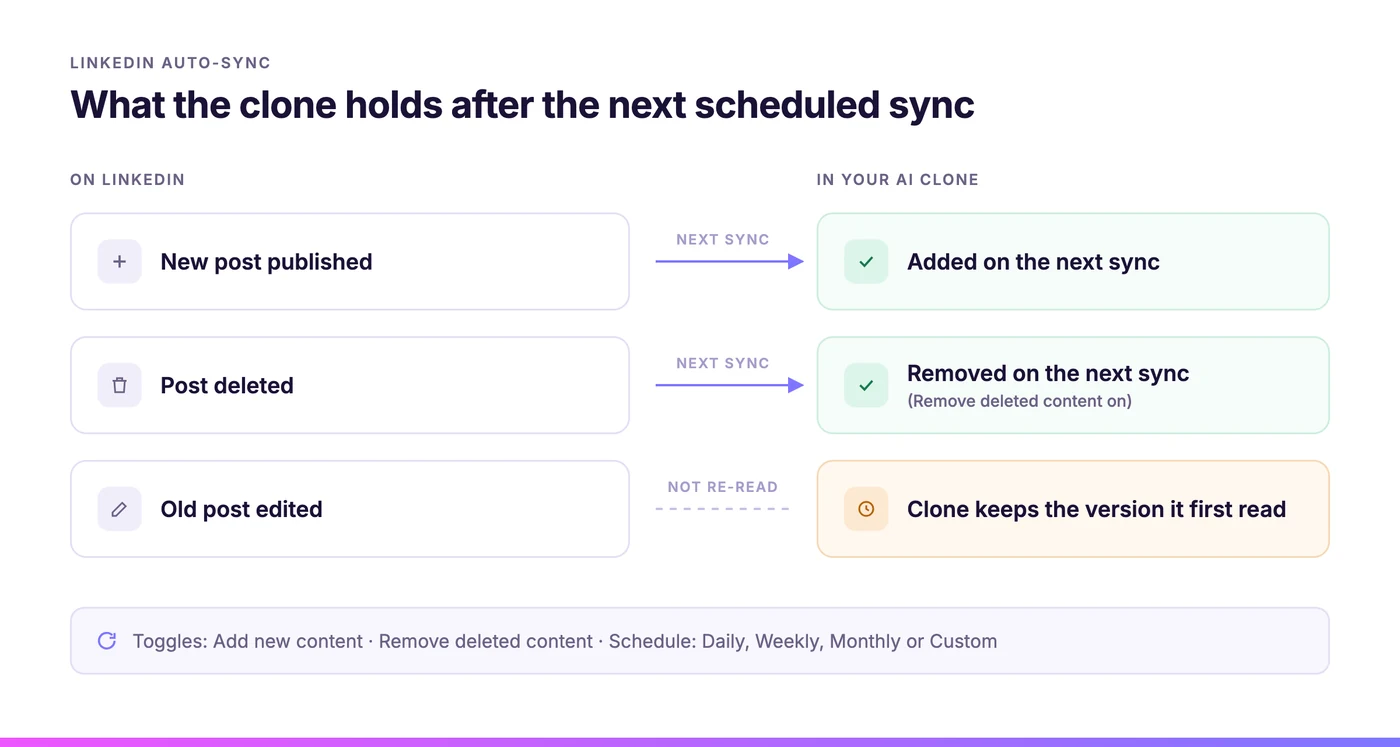
With LinkedIn auto-sync on, and both Add new content and Remove deleted content toggled on, each scheduled run adds posts published since the last sync and removes posts you deleted. A new post arrives with the next sync, so a daily schedule keeps an active profile close to current.
A prompt file or a one-time upload stays fixed on the day you make it. Building your own LinkedIn sync is out of reach for most people: LinkedIn’s API only lets approved partners read a member’s posts, and its developer documentation says the permission “is restricted and is available to approved users only.” A leading digital-clone tool keeps your website, Substack, YouTube channel, and podcast series up to date automatically, but not LinkedIn.
For someone who does their thinking in public on LinkedIn, the clone is only as current as its last sync. If your sharpest views are in last month’s posts, a daily sync keeps the clone on them. Your readers gain the same way when you make your LinkedIn posts work forever after they drop out of the feed.
Guardrails That Keep the Clone Honest
The fair worry about any clone is that it will say something you never said. Four controls tie it to your published record, and a few habits cover what settings can’t. None of them make a wrong answer impossible, so plan to check its work, especially in the first weeks after you connect your profile.
Public posts only. The LinkedIn source reads public posts. Private profiles can’t be added. Beyond your sources, the clone knows only what you choose to upload.
A citation on the answer. With citations turned on for your agent, readers see the source titles and URLs, either as numbered inline references or after the response. For LinkedIn, the citation opens the original post.
An honest “I don’t know.” When your content does not hold the answer, the agent says so in a the agent says so in a custom message you set in the agent settings. Word it the way you would: “I haven’t written about that yet. Ask me directly.”
Your data only. CustomGPT.ai’s docs list two protections that are on by default on all plans: Anti-Hallucination, and a Generate Responses From setting of “My Data Only,” under which the agent “responds solely based on the content you’ve uploaded.”
Settings leave some gaps. Keep client material out: add only what you’d be happy to see quoted to a stranger, even if the clone would be more useful with more. Tell visitors plainly, wherever you place the clone, that it is an AI answering from your public posts.
With Remove deleted content on, the next sync removes it, while an edited post stays in the clone as first written. Read a sample of real conversations each month, too. Citations make a wrong answer quick to spot, but only if someone looks. If you want the clone to sound like you as well as know what you know, give it your voice and tone with a persona.
Alden’s Clone, Built From LinkedIn Alone
Alden Do Rosario, CustomGPT.ai’s founder and CEO, has a clone built from one source: his public LinkedIn profile, connected through the built-in LinkedIn source with auto-sync on. Nothing else went in, so each answer has to come from a post he wrote, and the citation under it shows which one.
Ask Alden’s clone a question and open the post behind each answer to compare.
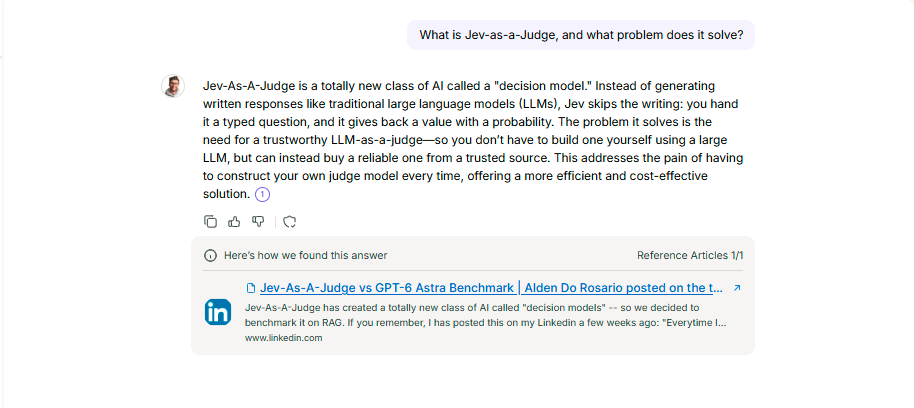
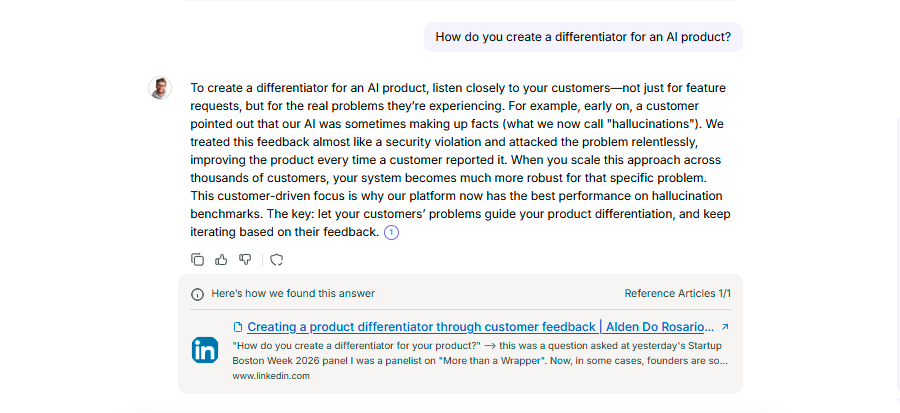
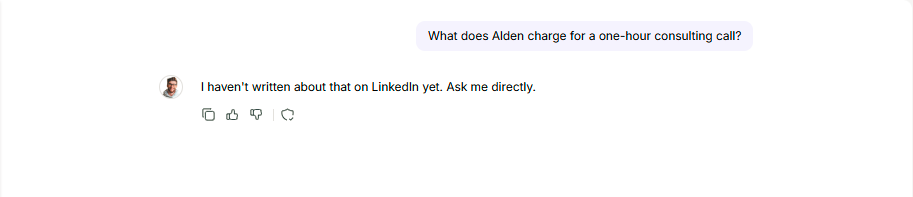
The screenshots are unedited. The third one is the answer a clone should give when your posts are silent, and it is the reply that keeps the clone from putting words in your mouth.
Experts Already Run Clones of Their Own Work
An economist and a research lab already answer questions through agents trained on their published work. Neither used LinkedIn, and neither publishes an accuracy rate. What they show is narrower: experts are willing to put their published work behind a public agent under their own name.
Economist Sébastien Laye built EcoBot through Aslan AI, “a highly specialized AI agent trained on more than three million words from his articles, books, TV, and radio appearances.” It was live within seven days. At Tufts, the Levin Lab’s LevinBot answers from the lab’s papers and talks, and Dr. Michael Levin’s reaction was “Omg finally, I can retire!”
The wider market is moving toward clones too, though often toward video avatars rather than knowledge clones. If you want the clone to earn money, see how experts turn their expertise into revenue.
Build Your Clone This Week
Start with your LinkedIn profile, because auto-sync is available on every plan. Paste your profile URL, set LinkedIn to sync daily, write your “I don’t know” message, and turn on citations. Then ask the clone the five questions you answer most often and check each citation against the original post.
Where the clone says it doesn’t know, you have found a post worth writing. Once the LinkedIn answers look right, add your website or YouTube channel. The personal AI assistant setup guide covers the no-code basics if this is your first agent.
The Standard plan is $99 a month and includes 1,000 queries a month and 5,000 pages per agent. Start a free 7-day trial and paste your LinkedIn profile URL, and your first cited answer will come from a post you have already written.
FAQ
Can you clone yourself with ChatGPT?
You can get part of the way. Most guides have you paste a handful of your best posts into a prompt so a chatbot writes in your style, which copies your tone but leaves out most of your body of work, and it stays frozen on the day you paste. A knowledge clone connects your LinkedIn profile directly, answers from every public post with a citation, and picks up new posts on a schedule.
How do I create an AI twin of myself?
Start from what you have already published. In CustomGPT.ai, create an agent, choose the LinkedIn card under Media and paste your public profile URL. Turn on auto-sync with the options to add new content and remove deleted content, then set a custom “I don’t know” message, turn on citations, and test it with the questions people ask you most. Your website and YouTube channel can be added as built-in sources later. The LinkedIn setup guide has every screen.
How do I make a text-based digital clone of myself?
Build it from text you have already written, because a text clone is only as good as its sources. LinkedIn posts work well since they already hold your opinions in your words, and blog articles from your website add depth. Keep it to public material you are happy to be quoted on, leave client work out, and let each answer cite the post it came from so readers can check the original.
What are the downsides of creating a digital clone of yourself?
The main risk is being misquoted by your own clone. Limit that by using only public content, turning on citations, and writing an honest “I don’t know” message for questions your writing does not cover. Two limits remain. A clone answers from what you wrote, so it can repeat a view you have since changed, and edits to old LinkedIn posts are not re-read. Delete outdated posts, with the remove-deleted-content option on, and review sample answers each month.
How much does my AI twin cost?
On CustomGPT.ai the Standard plan is $99 a month, with 1,000 queries a month and 5,000 pages per agent, and a free 7-day trial is available. The docs list the LinkedIn source, including its scheduled auto-sync, on every plan, and each LinkedIn post counts as one page. Automatic syncing for a website or a YouTube channel needs Premium ($499 a month) or higher. See the current plan details.
Has anyone built an AI clone of themselves?
Yes. Economist Sébastien Laye launched EcoBot, trained on more than three million words from his articles, books, TV and radio appearances, and it went live within seven days. Dr. Michael Levin’s lab runs LevinBot on its papers and talks, and his reaction was “Omg finally, I can retire!” Both were built from published work. Neither used LinkedIn.