How To Build A ChatGPT Chatbot For Site Search
Do you ever feel like your website visitors are struggling to find what they need? You’re not alone. For a practical next step, see our custom chat workflow.
Many times, I type 2-3 words into a WordPress search box—without anything close to a generative search experience—only to get the dreaded “No results found”.
Wouldn’t it be nice if ChatGPT could understand all your website content so that visitors can have conversations with it? And get exact answers without hallucinating? (aka: making up facts!)
In this blog post, I will show you how to let your visitors search your website and get ChatGPT-style responses from your content — without making up facts.
In short : Search Your Website With ChatGPT.
So without further ado, let’s get started.
Why Use ChatGPT Indexed On Your Website Content?
There are many reasons to use ChatGPT with your Website content, the biggest being: Better customer engagement.
Nobody wants customers and visitors to be frustrated with “No results found” or aimlessly browsing the site to find what they are looking for.
No More Keywords In Search Boxes
As people get used to having conversations with ChatGPT, they will ask longer and longer questions in your website search box.
Currently, the default WordPress search is designed for 1-2 keywords and usually gives the dreaded “No results found”
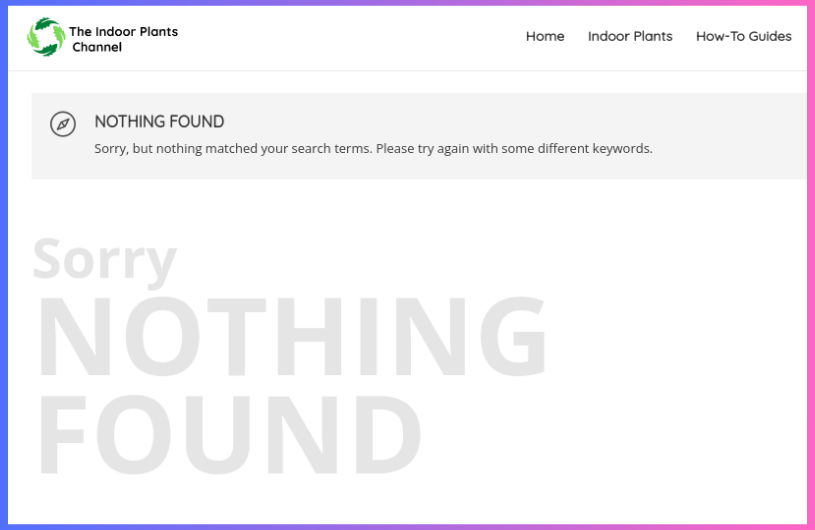
Like this simple example where I asked “are coffee grinds good for indoor plants?” on a site about indoor plants, only to get “NOTHING FOUND”
Conversational Search
Rather than a boring list of web pages, visitors are now expecting to get a conversational experience in their own words. Maybe in their own language as well.
They want to ask their questions in natural language. And are expecting responses in a conversational way. Just like they are not coming to expect in ChatGPT.
Using the same example above, this is the type of response they are expecting.
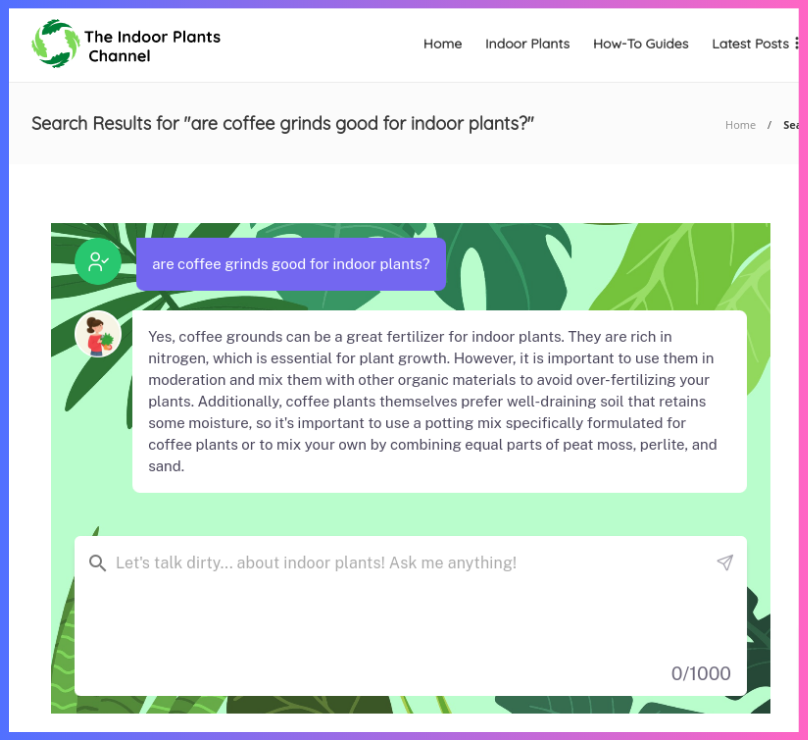
ChatGPT Responses Based On Your Website Content
The visitor expectation is that the response is based on your website’s specific content and expertise.
Not the general ChatGPT knowledge base. There are many plugins that claim to add ChatGPT to WordPress or websites or browsers. But all they are doing is querying the generic ChatGPT API.
What is needed is for ChatGPT to understand your specific content – based on the question the user is asking. And get accurate responses without Stop ChatGPT From Making guide. ChatGPT making up facts can be dangerous for your brand and business — so not making up facts is critically important.
So in essence, something that will take pieces of your content that are relevant to what the user is asking and send them to the ChatGPT API.
In this example, it’s expected that the website is an expert in Indoor plants and so the responses are conversational responses based on the content of that website.
Consider this response to a search query – the response was conversational and based on the expertise of that particular website – not a generic answer from Google or ChatGPT.
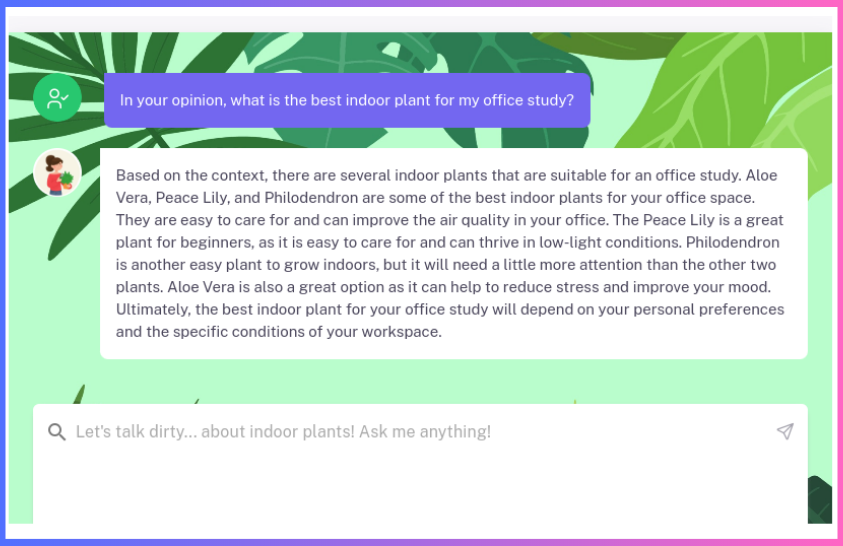
How Does It Work?
To index your website content and then send it to ChatGPT for a custom ChatGPT chatbot, we use two systems:
- CustomGPT: This system indexes your website content using the OpenAI large language models.
- ChatGPT API: This API along with the relevant data from your content responds to the user’s query.
CustomGPT
To be able to do this, CustomGPT first crawls, parses and indexes all your content in its databases and gets it ready to be searched using OpenAI language models. For the technically inclined, this process is called “embeddings”.

When the user asks a question, using the OpenAI language models, CustomGPT matches the user’s query to the correct content segments that are relevant to the query. This matching happens across languages. So even if the content is in English and the user query is in French, it will find the right content pieces.
So in the above example, if the website talks about “coffee grinds” in 5 different blog posts, it will find the correct segments from those posts.
These content segments are then packaged and sent to the ChatGPT API.
ChatGPT API
The ChatGPT API that we all know and love receives the request with the user’s query AND the relevant pieces of content from your website. This is called “context”.
And the API is asked to respond within that context. This means: ChatGPT is requested to answer the question with your website content – not making things up from things it learned from the Internet.
This part is important: Because you want the visitor to trust your expertise and website content.
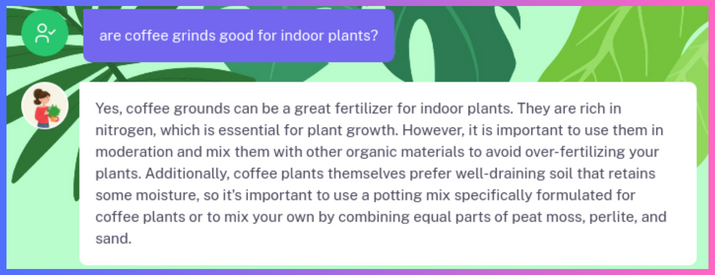
The responses returned by the ChatGPT API are then nicely packaged into a widget branded with your logo and background as seen above.
You can see this entire process live in action here: https://www.indoorplantschannel.com/?s=vine+plants
Step-By-Step Guide
So this now begs the question: How can you have this for your website?
Here is the step-by-step guide.
Step 1: Build your CustomGPT Bot
The first step is to have CustomGPT suck in all your content and index it (using OpenAI’s language models). This might take a few minutes, depending on how much content you have.


If you don’t know where this is, it’s usually at yourdomain.com/sitemap.xml or you can use this helpful sitemap finder.
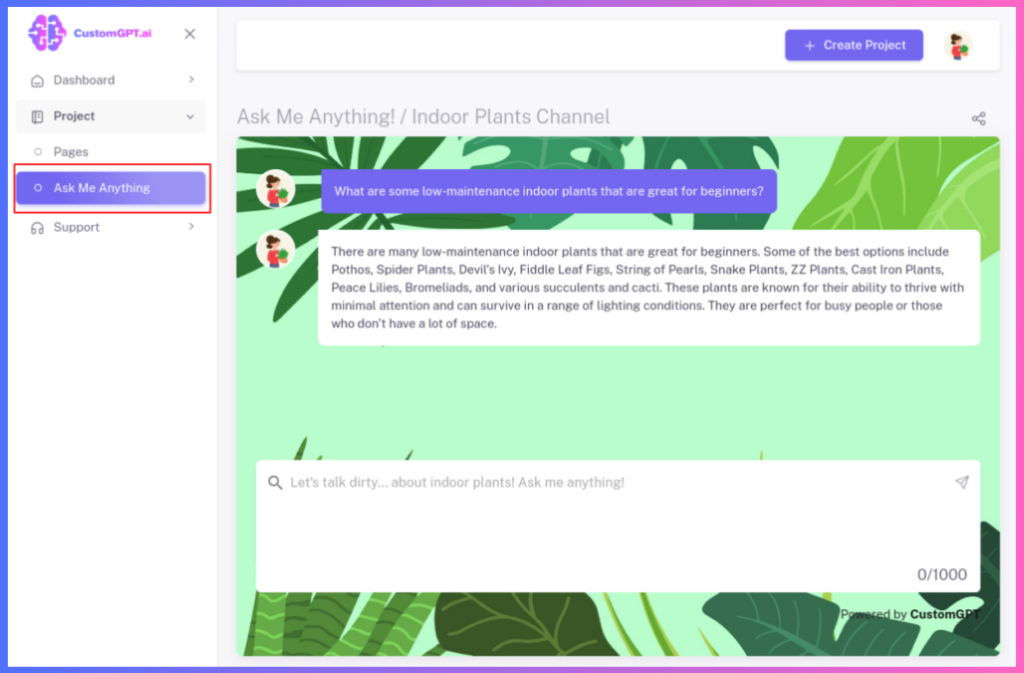
Once your bot is built, you can test it in the dashboard with some queries and see if the results are good for your website visitors.


If you are satisfied with the responses, grab the “Embed” code from the “Project Settings”.
Step 3 : Embed the Widget Into Your Website
At this stage, you have a functioning chatbot working with your content + ChatGPT and are ready to copy-paste the code into your website. If you are unfamiliar with this process, please ask your web developer.
Common places to embed the widget are:
- Search results page
- Contact Us page
- Form Submission page
Quick tip:
If you want to integrate this with your wordpress search functionality, you can do this by capturing the wordpress search like this and passing it into the widget:
prompt="<?php echo get_search_query(true); ?>"
Using this option, you can create a seamless site search experience for e-commerce sites and other site search use cases. And all this without writing a single line of code. All the complexity is handled for you under-the-hood in a secure, privacy-preserving platform that improves customer engagement and conversions by 10X.
Advanced Tips For A Tailored Experience
Here are some customizations that you might be interested in. Your web developer might also have many ideas on how to integrate the widget into your website.
Branding
What fun is a bot if it can’t be customized to your brand and personality. You want the logo to be your own. And the look-n-feel to be exciting to reflect your brand.
Logo + Background
You can customize the logo and background to your brand settings.

Make sure you use small file sizes for these. You don’t want to download large files each time your visitors use the bot.
Initial Greeting
You can customize the initial greeting. Do something catchy and fun. Or if you want, you can change the greeting to your local language.
Sample Questions
To guide your visitors, you can add some sample questions to get the conversation started.
Search
This experience is most effective when it is directly integrated into the WordPress search experience.
Your WordPress developer can do this easily by integrating it into the search results page. In the above example, here is the code that was used (please replace “AGENT_ID” and “AGENT_KEY” with your own values).
<div id="customgpt_chat"></div>
<script src="https://cdn.customgpt.ai/js/sge.js" defer="" div_id="customgpt_chat" p_id="AGENT_ID" p_key="AGENT_KEY"></script>
Livechat
And if you really want your website visitors to literally talk to your content, then you can add the Livechat widget.

This will appear in the bottom right corner (similar to common Livechat widgets) and will let your visitors chat with your content.
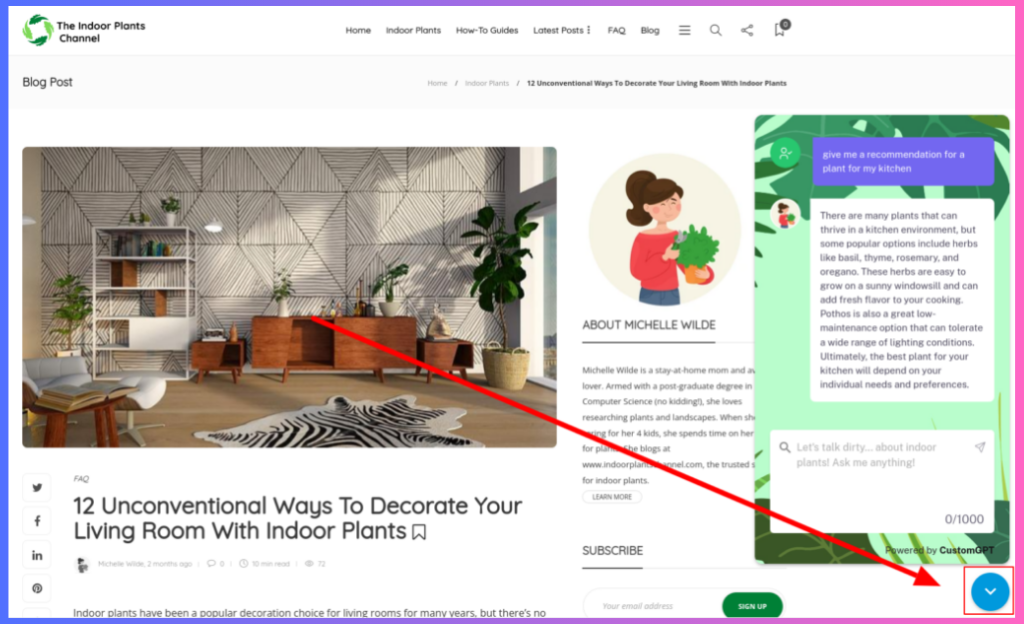
Quick hint: It also works great if you have helpful contact information and other data on your website. So it can serve as a customer service/lead generation for your website.
Does my site have to be WordPress to use this?
No. You can use any website you want. As long as you have a sitemap.
How is this different from the normal ChatGPT?
It uses your content to answer the questions. And makes sure the responses are from within your content — without Stop ChatGPT From Making guide. This process combines your content with the ChatGPT API.
Can I use this on my e-commerce site for search?
Yes – absolutely. And that is one of the primary use cases for this. You can index your entire product catalog and let users get quick answers to what they are looking for. No more typing keywords in search boxes and browsing around the site (which greatly drops conversion rates).
The best part: the chatbot even shows the link to the products/pages where the answer came from. This way, your visitors can quickly get answers and get links to the product info page.
I see many ChatGPT plugins. Can’t I just use those?
They just search the general ChatGPT. They don’t have any idea about your content.
Can I build this in my local language?
Yes. We support 92 languages llm. And ChatGPT automatically adapts to the language that the visitors use. So your content could be in English and if the visitor asks a question in Portuguese, it will respond in Portuguese.
How much does this cost?
Please see the pricing page for the best plan that meets your needs, depending on the amount of content you have and the traffic you get.
Do I need a website to build the bot?
No. You can build your bot by uploading your files using the CustomGPT.ai build walkthrough. Or use your competitor’s website. Or you can build your bot from a custom collection of web pages. You can even combine ALL your company content like website, helpdesk, product manuals, documents, Excel spreadsheets, Powerpoints, etc, and build one consolidated bot.
Do you have an API where I can query the bot?
Yes – here is the API. With this, you can integrate the bot into your applications and create custom experiences. See cookbooks for examples.
Do you have a WordPress/Drupal/Joomla/Shopify Plugin?
Not at this time. But it’s possible enterprising developers will build plugins and use our partner program to monetize them.
In conclusion, ChatGPT is a powerful tool that can revolutionize your website’s user experience. Using your content + ChatGPT, you can create a more engaging, helpful, and conversational environment for your visitors.
What will you do with this? Share your thoughts in the comments below.
Related Resources
These guides expand on key ways to use CustomGPT.ai on your website.
- Realtime Chatbot Guide — Learn how CustomGPT.ai realtime features enable faster, more natural conversations for website visitors.
- No-Code Builder Guide — See how CustomGPT.ai lets teams create and customize AI chatbots without writing code.
- Embed Website Chatbot — Explore how to add a CustomGPT.ai chatbot as a live chat feature to improve support and engagement.
Frequently Asked Questions
How is a ChatGPT chatbot better than the default WordPress search box?
Default WordPress search is built around short keyword matching, so longer natural-language questions can return weak results or “No results found.” A retrieval-based chatbot lets visitors ask full questions and get direct answers grounded in your indexed site content instead of just a list of pages. Speed also affects whether search feels useful: Bill French said, “They’ve officially cracked the sub-second barrier, a breakthrough that fundamentally changes the user experience from merely ‘interactive’ to ‘instantaneous’.”
How do I build a website search chatbot without creating a separate knowledge base?
You can usually start with your existing website: add your site URLs or sitemap, let the system crawl and index the pages, and then deploy the bot as a widget or search bar. A separate knowledge base is only necessary if you want the bot to answer from extra sources such as PDFs, docs, audio, or video in addition to the site. Evan Weber said, “I just discovered CustomGPT, and I am absolutely blown away by its capabilities and affordability! This powerful platform allows you to create custom GPT-4 chatbots using your own content, transforming customer service, engagement, and operational efficiency.”
Can a website chatbot answer only from my site content instead of generic ChatGPT answers?
Yes, if it uses retrieval-augmented generation (RAG). RAG first pulls relevant passages from your indexed pages or files, then generates the reply from that material instead of relying only on general model memory. Citation support helps you verify where the answer came from, and the provided benchmark says CustomGPT.ai outperformed OpenAI in RAG accuracy. If a page or file is not indexed, the bot cannot ground its answer in that source.
What should I index first if I want more customers to self-serve on my site?
Start with the content visitors ask for repeatedly and the pages that block a purchase or support resolution: product selection guides, shipping and return policies, account help, troubleshooting steps, and FAQs. That gives you the fastest self-service impact because it targets the questions that otherwise become tickets, chats, or abandoned sessions. Stephanie Warlick said, “Check out CustomGPT.ai where you can dump all your knowledge to automate proposals, customer inquiries and the knowledge base that exists in your head so your team can execute without you.”
Can a website search chatbot handle complex product questions?
Yes, as long as the right source material is indexed. Complex questions are best answered when the chatbot can retrieve the exact manuals, specifications, support articles, or policy documents behind the response. That matters most in specialized fields where a generic model is more likely to miss nuance. Barry Barresi described a domain-specific use case this way: “Powered by my custom-built Theory of Change AIM GPT agent on the CustomGPT.ai platform. Rapidly Develop a Credible Theory of Change with AI-Augmented Collaboration.”
Will my website content be used to train public AI models?
No. The available compliance information says customer data is not used for model training, and the service is GDPR compliant and SOC 2 Type 2 certified. For you, that means indexed URLs and uploaded files are treated as retrieval sources for answering questions rather than training material for public models.
Is a website search chatbot the same as ChatGPT web search?
No. ChatGPT web search looks across the public web for current information, while a website search chatbot is designed to answer from your own indexed pages and files. Use web search for broad research and discovery; use a site-search bot when the answer needs to match your products, policies, documentation, or support content.