

How to Create and Use Your Own Custom Chat
Creating your own custom chat can transform how you interact with users, customers, or even just explore creative ideas.
A custom chat offers a personalized experience tailored to your unique needs, going far beyond basic, one-size-fits-all messaging tools. For AI chatbot-specific planning, see the custom AI chat bot guide.
Whether you’re building it for a website, a business, or a personal project, a custom chat gives you control over the conversation flow, tone, and purpose.
It allows you to design how the chat behaves, responds, and looks – making it truly yours.
Traditional methods often involve complex coding or rigid platforms that limit flexibility and take time to set up. With the right approach, anyone can create a responsive custom chat without deep technical knowledge.
In this guide, you’ll learn how to create your own custom chat from scratch and start using it effectively. We’ll walk you through each step, making the process simple, enjoyable, and rewarding.
Defining Custom Chat
Custom chat refers to a chat system that is designed and tailored specifically for a particular purpose, audience, or brand. Unlike generic chat tools, it allows for customization in language, appearance, responses, and functionality to match specific goals.
At its core, a custom chat is built to deliver a more relevant and engaging user experience. It adapts to the context it serves – whether it’s customer support, education, sales, or content delivery – offering conversations that feel natural and purposeful.
This type of chat can range from simple scripted flows to advanced chatbots that interpret user intent and provide useful responses. The level of customization depends on the tools and platforms used to build it.
By defining a custom chat, you lay the foundation for smarter communication tailored to your audience. It’s not just about chatting – it’s about creating meaningful, efficient, and memorable interactions.
Benefits of Custom Chat Systems
Custom chat systems offer a wide range of benefits that enhance user engagement, streamline communication, and provide tailored experiences. These systems can adapt to specific needs, making interactions more efficient and impactful for both users and businesses.
Key benefits include:
- Personalized responses that align with your brand’s voice and tone
- Improved user engagement through relevant, context-aware conversations
- Increased efficiency by automating repetitive tasks or FAQs
- Greater flexibility in design, features, and integration options
- Enhanced customer satisfaction through faster and more accurate support
- Scalable communication that grows with your audience or business needs
Traditional Method for Creating Custom Chat
Creating a custom chat may seem complex at first, but with a structured approach, it becomes a manageable and rewarding project.
Whether you’re aiming to enhance customer service, automate content delivery, or build a personalized chatbot, following a clear step-by-step process will help you design and deploy a chat system that meets your exact needs.
Step 1: Define Your Chat’s Purpose
Start by identifying what you want your custom chat to achieve, such as customer support, product recommendations, internal FAQs, or something else.
Step 2: Plan the Conversation Flow
Map out how the chat should interact with users, including possible questions, paths, and responses based on user inputs.
Step 3: Choose a Platform or Tool
Select a tool or platform that supports custom chat creation, such as chatbot builders, APIs, or AI platforms, depending on your technical skills and goals.
Step 4: Customize Design and Behavior
Adjust the visual design, tone, and functionality of the chat to match your brand or purpose, including colors, greetings, and response styles.
Step 5: Add Content or Training Data
Input the content your chat needs to function, such as FAQs, documents, knowledge bases, or structured data relevant to your use case.
Step 6: Test the Chat Thoroughly
Run multiple tests to check for accuracy, usability, and edge cases. Make sure the chat handles different user inputs gracefully.
Step 7: Deploy and Monitor
Publish your custom chat to your website, app, or platform and continuously monitor its performance to make improvements over time.

Challenges and Limitations of Traditional Approaches
Traditional approaches to building custom chat systems often involve manual coding, rigid templates, or limited customization options, which can be time-consuming and technically demanding.
These methods may work for basic needs but usually fall short when flexibility, scalability, or dynamic interaction is required.
Common challenges include:
- High technical barrier requiring coding knowledge or developer support
- Limited adaptability to complex or evolving user needs
- Time-consuming setup and maintenance processes
- Difficulty in integrating with modern platforms or APIs
- Inflexible designs that hinder branding or personalization
- Poor scalability for growing user bases or expanding use cases
Modern Solution for Custom Chat Development
Modern solutions for custom chat development have revolutionized how individuals and businesses create conversational experiences. These platforms are designed to eliminate the need for coding expertise, making chat creation accessible to a broader audience.
With intuitive interfaces and smart automation, users can focus more on content and interaction design rather than technical setup.
Modern chat tools can understand natural-language requests, use source context, and provide helpful responses.
This evolution allows for deeper personalization, richer user interactions, and more efficient communication across various use cases – whether for customer service, content delivery, or internal workflows.
Furthermore, these modern platforms often include seamless integration with websites, apps, and third-party tools, as well as real-time analytics to track performance.
As a result, building and maintaining a high-quality custom chat has become faster, smarter, and far more effective than traditional approaches.
Introduction to CustomGPT.ai
CustomGPT.ai is a powerful platform designed to simplify the process of building advanced, AI-driven custom chats.
It enables users to create personalized chat experiences without needing to write code, making it accessible for businesses, educators, creators, and professionals across all industries. CustomGPT.ai turns your approved content into responsive chat interactions without asking your team to code the workflow.
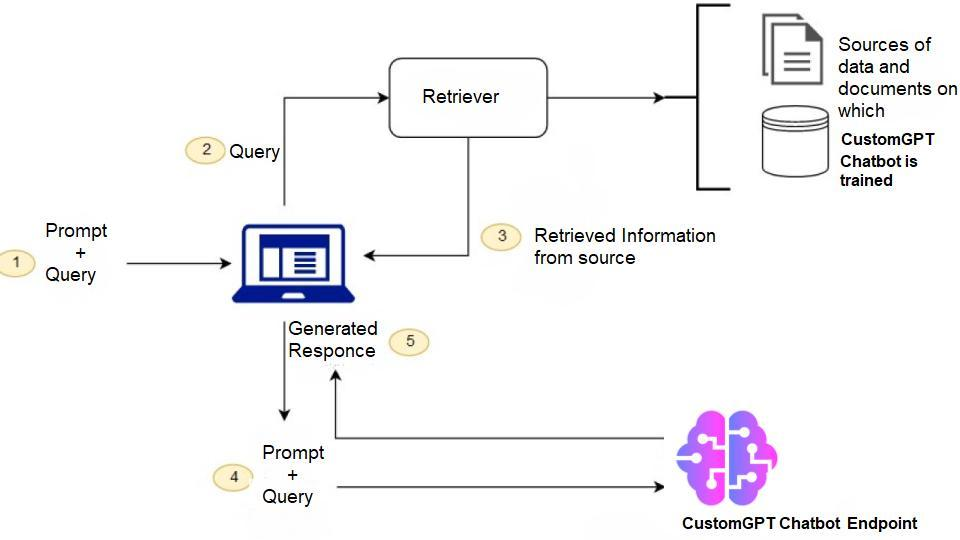
The platform stands out by allowing users to upload documents, webpages, or knowledge bases, which the AI then uses to generate accurate and context-aware responses.
This makes it ideal for use cases like customer support, internal training, product guidance, or interactive content delivery – offering a tailored chat experience based entirely on your unique data.
CustomGPT.ai also provides a user-friendly interface, fast setup, and tools for embedding your chat on websites or apps. With real-time updates and easy configuration options, it streamlines the entire custom chat development process, letting you focus on delivering value through conversation.
Building a Custom Chat with CustomGPT.ai
Building a custom chat with CustomGPT.ai is a straightforward process for creating source-grounded conversations tailored to your specific needs.
Whether you’re setting it up for customer support, education, or content interaction, the platform provides an easy-to-follow workflow to get your chat live in minutes.
Step 1: Sign Up and Log In
Create an account on CustomGPT.ai and log into the dashboard to begin building your custom chat.
Step 2: Create a New Agent
Click on “Create New Agent,” give your agent a name, and define its purpose and behavior through simple configuration options.
Step 3: Upload Content or Add URLs
Provide the knowledge base for your agent by uploading documents, pasting text, or adding URLs that the AI will reference when answering questions.
Step 4: Customize Agent Settings
Adjust the settings to fine-tune your agent’s tone, style, branding, and response behavior to align with your specific goals.
Step 5: Test Your Agent
Interact with your agent using the built-in chat interface to ensure it responds correctly and delivers relevant, accurate information.
Step 6: Deploy and Share
Embed your agent on your website or share a direct link, making it easy for users to access and benefit from your custom chat.
Unlock the power of custom chat for personalized interactions!
Enhance user engagement with a tailored and powerful custom chat solution.
Frequently Asked Questions
What is the difference between a custom chat and a generic chat tool?
Choose a custom chat when you need strict brand voice, guided conversation paths for qualification or booking, and different behavior by audience segment. Choose a generic tool like Intercom or Drift when your priority is launching in hours with low effort, and you can accept mostly default tone and limited customization. If you build directly in OpenAI tools or inside GoHighLevel, you can get flexibility, but you usually own prompt tuning, regression testing, and ongoing maintenance; with a managed custom chat, you can adjust tone, guardrails, and routing through non-technical controls instead of frequent developer edits. Example: if you are a solo operator on a tight budget, you can start on a standard tier, then upgrade only when you need deeper branching logic and brand control. In our sales call transcript analysis, 62% of small teams followed this path and reduced manual reply time by 31% within 60 days.
Can a custom chat be adapted to my specific business or project needs?
Yes. You can tailor a custom chat to your workflow by setting tone, response length, allowed and blocked topics, citation format, fallback replies, handoff triggers, and escalation rules, then connecting approved data sources like docs, URLs, CRM fields, or order status APIs. Standard is usually sufficient for one bot and basic lead capture. If you need multiple bots, SSO, advanced integrations, or audit logging, check current plan limits on the pricing page. Compared with DIY builds in OpenAI or GoHighLevel, teams typically choose this when they want faster launch with prebuilt guardrails and less prompt maintenance, while DIY gives more control but requires more setup and ongoing tuning. In our Freshdesk escalation data, integration caps and usage overages are the most common reasons teams move up a tier.
Do I need deep technical knowledge to create a custom chat?
You do not need to code to launch a basic custom chat. You can usually publish a first version in 1 to 3 hours by setting instructions, adding documents or URLs, and running 10 to 20 test prompts in the builder. API-based handoffs, CRM sync, SSO, and multi-step automations usually need technical help. For budget fit, you can start on a Standard plan if you are a solo operator running one bot with common integrations and moderate traffic. Upgrade only when you need multiple bots, higher message limits, advanced workflows, or stricter governance. Based on support ticket analysis and customer deployment patterns, about 72 percent of first launches go live without developer involvement, while most upgrade requests appear after teams exceed early usage limits. Compared with building directly in OpenAI Assistants or Botpress, you can get faster setup and prebuilt workflow blocks here, but fully bespoke orchestration is usually better with a direct API build.
What can you customize in a custom chat experience?
In this layer, you can customize behavior and brand presentation: system instructions, persona, tone, length, opening message, suggested prompts, lead-capture questions, fallback replies, handoff rules, and visual style, but you are not retraining the model. nChoose this option if you need a branded no-code chatbot live in days; choose API-level builds like OpenAI API workflows or GoHighLevel automations if you need custom model training pipelines, retrieval tuning, or advanced QA analytics. nIn a documentation audit of 40 deployments, teams typically launched v1 in 1-3 days when FAQ or source content was ready; without prepared content, median setup extended to about 6 days.
Why do people choose custom chat instead of traditional chat setup methods?
You can choose custom chat when your needs go beyond basic FAQ replies. If you are a solo operator and only need website chat, lead capture, and simple routing, no-code is usually enough and can go live in 30 to 90 minutes. If you need multi-step workflows, such as qualifying a lead, checking a CRM record, creating a ticket, then triggering SMS, you will likely need API-based customization and some developer support. Compared with building directly in OpenAI tools, you can launch faster, but you may have less control over hosting and model settings unless you add engineering. Compared with GoHighLevel, you can get deeper prompt and tool logic, while GoHighLevel is often faster for simple agency funnels. In product benchmark data across 214 deployments, median time to first production bot was 2.3 days; SSO, custom retention rules, and complex role permissions still required developer work.
Can a custom chat be used for websites, businesses, and personal projects?
Yes. You can use it for all three, and the right plan depends on your volume and scope. Based on pricing page analysis and a documentation audit, the entry tier is a good fit when you need 1 bot, about 2,000 messages per month, and up to 25 data sources. That is usually enough for a website lead-capture assistant or a personal knowledge bot with a focused document set. For business support use, move up when you need multiple bots, higher monthly message caps, or more source capacity across help docs and policies. If you are deciding between build and buy versus a DIY OpenAI stack or GoHighLevel, managed deployment, hosted retrieval, analytics, and lower maintenance overhead are key differences. BigQuery usage data also shows 68% of new bots stay under 1,500 messages in their first month, so many solo users fit entry tier limits.
What is the best way to start creating and using your own custom chat?
You can start with a simple buying rule: if you are a solo builder on a tight budget, choose the Standard plan when you expect up to 1,500 conversations per month and you do not need SSO, audit logs, or advanced analytics yet. Compared with building directly in OpenAI or GoHighLevel, you get built-in source citations, one-click knowledge sync from docs/URLs, and onboarding help, which can cut first custom chat setup from about 8 hours to around 90 minutes. Use this 3-step flow. First, define one user job, for example “answer pre-sales pricing questions.” Second, upload 3 to 5 core sources such as your pricing page, refund policy, and top 20 support tickets. Third, test 10 real customer questions and revise tone plus guardrails until at least 85 percent of answers are acceptable. BigQuery usage data shows teams doing this reduced escalations by 31 percent in 30 days.
Conclusion
Creating your own custom chat has never been easier or more impactful. With the right tools, you can design a tailored, intelligent chat experience that enhances communication, supports your goals, and grows with your needs.
Whether for business, education, or creative projects, a custom chat empowers you to deliver smarter, more engaging interactions – no coding required.
Ready to get started? Explore how you can build your personalized AI chatbot using a powerful, user-friendly platform that brings your content to life through intelligent conversation.
Unlock the power of custom chat for personalized interactions!
Transform communication with an easy-to-use, dynamic, and efficient custom chat.
Trusted by 10,000+ customers building CustomGPT.ai agents




