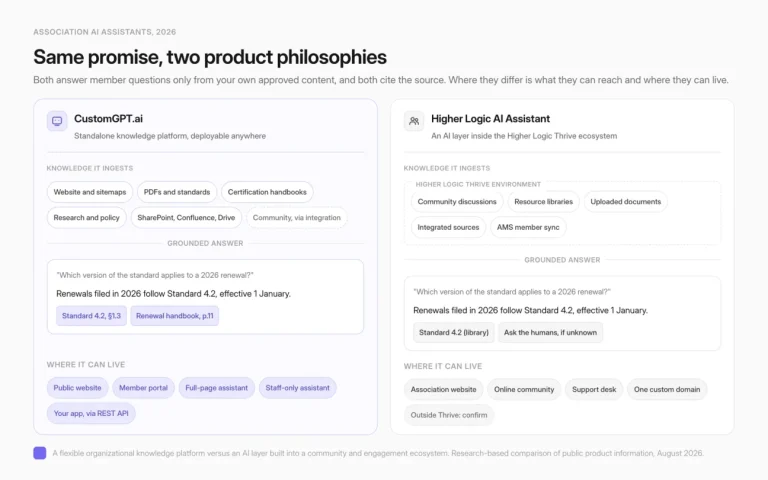
CustomGPT vs. Chatbase: A Comprehensive Custom Chatbot Showdown
If you are trying to choose a custom chatbot for your business, chances are you have already heard of Chatbase, and maybe, you are deciding to use it. But before making such an impactful decision for your business, you should research more about Chatbase alternatives that can beat every other chatbot competitor.
CustomGPT is a Generative AI-powered personalized chatbot builder that can be set-up easily, enhances employee efficiency, and provides accurate answers without making up facts for improving the user-experience and enabling productivity by deep understanding of the businesses.
Despite Chatbase’s success, there are several reasons why companies today are looking elsewhere. Improvements in AI, adaptability, and an easy setup process all rank high on that list. CustomGPT is the clear winner in this respect.
CustomGPT and Chatbase: Side by Side Comparison
Before we dive into the finer distinctions between these two, let’s start with a broad overview of their differences.
 |  |
| CustomGPT: ✔ Powered by advanced large language models (LLMs), ideal for business. ✔ All-in-one solution for chatbot personalization. ✔ Customizable and adaptable. ✔ Focuses on security and privacy. ✔ Boosts revenue, cuts costs, and improves engagement and efficiency. Built for: ✔ Designed for both large enterprises (Lessons from MIT Case, Adobe, Dropbox) and small-to-medium enterprises (SMEs). ✔ Automates tasks like customer service, sales, and scheduling. Competitive Edge: ✔ Outperforms Chatbase and similar tools. ✔ Streamlines processes and enhances efficiency. | Chatbase: ✔ Utilizes GPT-3.5 for interactive website chatbots. ✔ Easy process: Upload a document or share a link. ✔ Fast and effective chatbot creation. Built for: ✔ Primarily caters to small businesses and personal use. ✔ Vulnerable to limitations as businesses grow. Competitive Disadvantage: ✔ Occasional factual inaccuracies. ✔ Lacks a no-code plugin builder. ✔ Best suited for small businesses and personal use. ✔ Business Limitations of Chatbase |
Comparison of Key Capabilities
Ease of Set Up
CustomGPT offers a no-code hastle-free set-up in a short time, diverse data sources ranging from website data to 1400+ different types of document formats, including PDF, HTML, Microsoft Office documents, RTF, Email Archives (mbox), zips, mp3, mp4, mpeg, mpga, m4a, wav, and webm. This makes CustomGPT built chatbots more engaging, interactive, and intelligent.
Chatbase supports a few file formats (.pdf, .txt, .doc, and .docx) for data uploads. It will soon add a feature to support csv and excel files. Thus users can only upload their business data in the above formats for using Chatbase service’s for chatbot building.
Understanding
CustomGPT is powered by advanced large language models (LLMs), which means it offers better performance, understands business needs more deeply, and can handle audio, video, and podcasts. This advanced LLM technology lets CustomGPT create chatbots that excel in understanding language and generating responses.
ChatBase uses GPT-3.5, resulting in slower chatbot performance and much more limited language capabilities.
Accuracy & Trust
CustomGPT has solved the problem of inaccurate responses by ensuring that responses are exclusively coming from the data you provided. This is accomplished through CustomGPT’s robust context boundary that protects your chatbot’s responses. CustomGPT is also built using advanced prompt engineering and a proprietary pre-processing algorithm so that all the AI-generated responses are strictly within your business’ context.
Case Study: MIT selects CustomGPT for Generative AI

ChatBase provides information not only from your business data but also from other data sources. While ChatBase strives to offer accurate information, its capabilities are limited, and this can sometimes result in highly inaccurate or even fabricated responses. Such inaccuracies may lead to compliance and legal risks, provide misguided sales recommendations, and impact the effectiveness of marketing content.

Multi-Lingual Support
Both CustomGPT and ChatBase support many languages (CustomGPT supports 92 languages) so that businesses all around the world can benefit from it.
Integration Support
CustomGPT offers Introducing Multi-Source Data Integration overview with multiple platforms and software solutions. Additionally, with integration and ingestion with Zapier, businesses can integrate their API with over 5000+ systems. Additionally, CustomGPT has a full and robust API for developers to leverage when needed.
Feature Comparison
When considering the best tool, it’s essential to recognize the unique features each platform offers and how CustomGPT.ai works in practice. While both CustomGPT.ai and Chatbase come with a set of standard functionalities, their specialized features can be the deciding factor for many businesses.
CustomGPT Differentiated Features
CustomGPT stands out with its advanced capabilities, providing tools and resources that cater to the evolving needs of modern enterprises. Whether it’s the cutting-edge LLM technology, the No-Code Plugin Builder for effortless integration, or the enhanced Privacy Controls ensuring data security, CustomGPT has carved its niche in the market.
| ✔️LLMs | ✔️No-Code Plugin Builder | ✔️OpenAI API Resiliency | ✔️Anti-Hallucination |
| ✔️Zapier & API Ingestion | ✔️Privacy Controls | ✔️Enterprise Contracts | ✔️Custom Instructions |
A Comprehensive Comparison
Choosing the right AI chatbot can be tricky. So, we’ve put CustomGPT.ai and Chatbase side by side to see how they stack up. Below, you’ll find a clear breakdown of their features. This will help you decide which one fits your business best, especially if you’re also weighing enterprise search software needs.
Let’s take a look:
| Features | CustomGPT | Chatbase |
| Websites | ✔️ | ✔️ |
| PDFs | ✔️ | ✔️ |
| 1400+ Document Formats | ✔️ | ❌ |
| Youtube Videos | ✔️ | ❌ |
| Audio/Podcasts | ✔️ | ❌ |
| Sitemaps | ✔️ | ❌ |
| OCR | ✔️ | ❌ |
| Privacy Controls | ✔️ | ❌ |
| Zapier Ingestion | ✔️ | ❌ |
| API Ingestion | ✔️ | ❌ |
| Query Relevancy | ||
| Anti-Hallucination | ✔️ | ❌ |
| Citations and Sources | ✔️ | ❌ |
| Trust and Transparency | ✔️ | ❌ |
| Personas/ Persona / Custom Instructions | ✔️ | ❌ |
| Deployment Options | ||
| Embed Widgets | ✔️ | ✔️ |
| Live Chat | ✔️ | ✔️ |
| No-Code Plugin Builder | ✔️ | ❌ |
| API | ✔️ | ✔️ |
| Zapier | ✔️ | ✔️ |
| Enterprise Contracts | ✔️ | ❌ |
| On-Premise | ❌ | ❌ |
| OpenAI API Resiliency | ✔️ | ❌ |
| LLM Models | ||
| ChatGPT-3.5 | ❌ | ✔️ |
| ChatGPT-4 | ✔️ | ❌ |
Total Cost of Ownership
When it comes to selecting an AI chatbot, the overall investment matters just as much as the features, especially when comparing business chatbot options.
Chatbase – The Chatbase pricing may look pretty decent and straight-forward at the start, but when we compare it to CustomGPT and the performance and power of the chatbots it provides, the pricing becomes complex.
CustomGPT – The CustomGPT offers greater power, better performance and more productivity and money value than Chatbase.
CustomGPT’s Standard Plan provides 10 Custom Chatbots, and 60 million words content while Chatbase provides 5 chatbots and 15 million words content in Standard Plan. Both the standard plans are worth $99/month.
CustomGPT Pricing Plans
Diverse Pricing plans Of Custom GPT ensure availability for every type of businesses
Monthly Package:
| Standard $99/month | Premium $499/month | Enterprise (Contact Sales for pricing) |
| 10 CustomChatbots | 100 CustomChatbots | All Premium features |
| 5000 items/ chatbot | 20,000 items/chatbot | Scalable data, query, and seat capacity |
| 20 million words | 100 million words | Custom features |
| 1000 queries per month | 5000 queries per month | Dedicated account manager |
You can learn more about Chatbase pricing plan from their website.
Product Features by Plan
Here’s a clear breakdown of what each plan offers in terms of features:
| Basic | Standard | Premium | Enterprise | |
| Custom chatbots using Open AI technology and business data | ✔ | ✔ | ✔ | ✔ |
| Business website data, helpdesks, knowledgebases, etc | ✔ | ✔ | ✔ | ✔ |
| PDF documents | ✔ | ✔ | ✔ | ✔ |
| Office documents (Word, PowerPoint), 1400+ document formats | ✔ | ✔ | ✔ | ✔ |
| Audio, Video files for transcripts (Youtube, Vimeo, Podcasts) | ✔ | ✔ | ✔ | ✔ |
| Embed Custom Chatbots or Livechat on business websites | ✔ | ✔ | ✔ | ✔ |
| Customize chatbot logo, colors, background, etc for your brand | ✔ | ✔ | ✔ | ✔ |
| API for Custom Chatbots | ✔ | ✔ | ✔ | ✔ |
| Multi-language support (92+ languages) | ✔ | ✔ | ✔ | ✔ |
| Augmentation of search functionality on business websites | ✔ | ✔ | ✔ | ✔ |
| Custom Enterprise capabilities and contracts | – | – | – | ✔ |
| Remove “Powered by CustomGPT” Branding | – | – | ✔ | ✔ |
Leveraging CustomGPT and Some of Its Best Benefits
Now that you are ready to use CustomGPT for improving your business’ engagement and performance rates, it is time for you to get to know how to create Chatbots for your website. For this, follow the below steps:
#1: Create an account on CustomGPT by entering your Name, email and password.

#2: Create your chatbot by either providing a link to your sitemap or uploading your website’s files/documents, which is useful to note when comparing business chatbot platforms.
#3: For creating your project using sitemap, head to Dashboard>Create Project.

- Select your data source.

#4: To upload your website data, simply enter your URL and click ‘Create Agent.’

- Name your project.
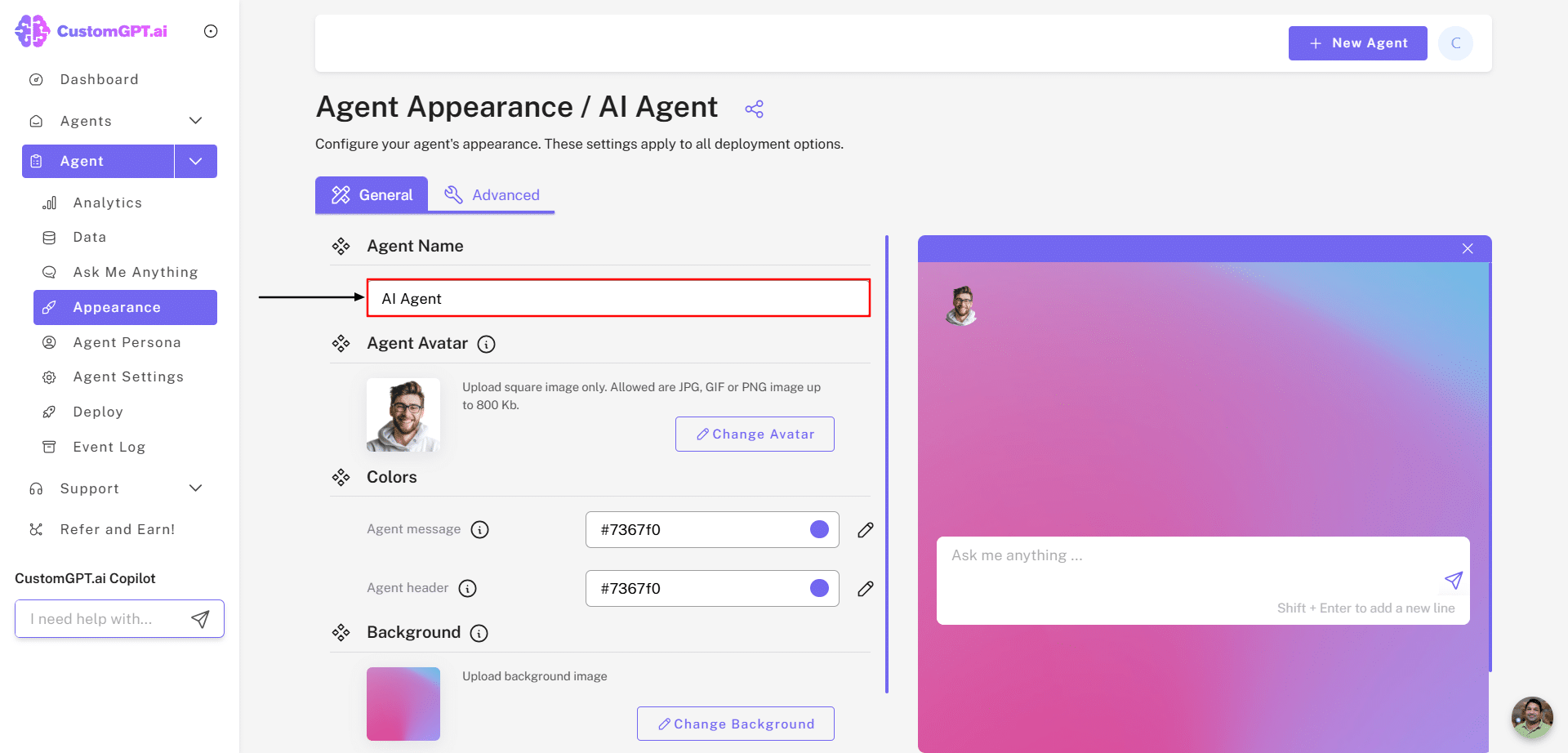
#5: You can also navigate to the ‘Data’ section to upload additional documents.
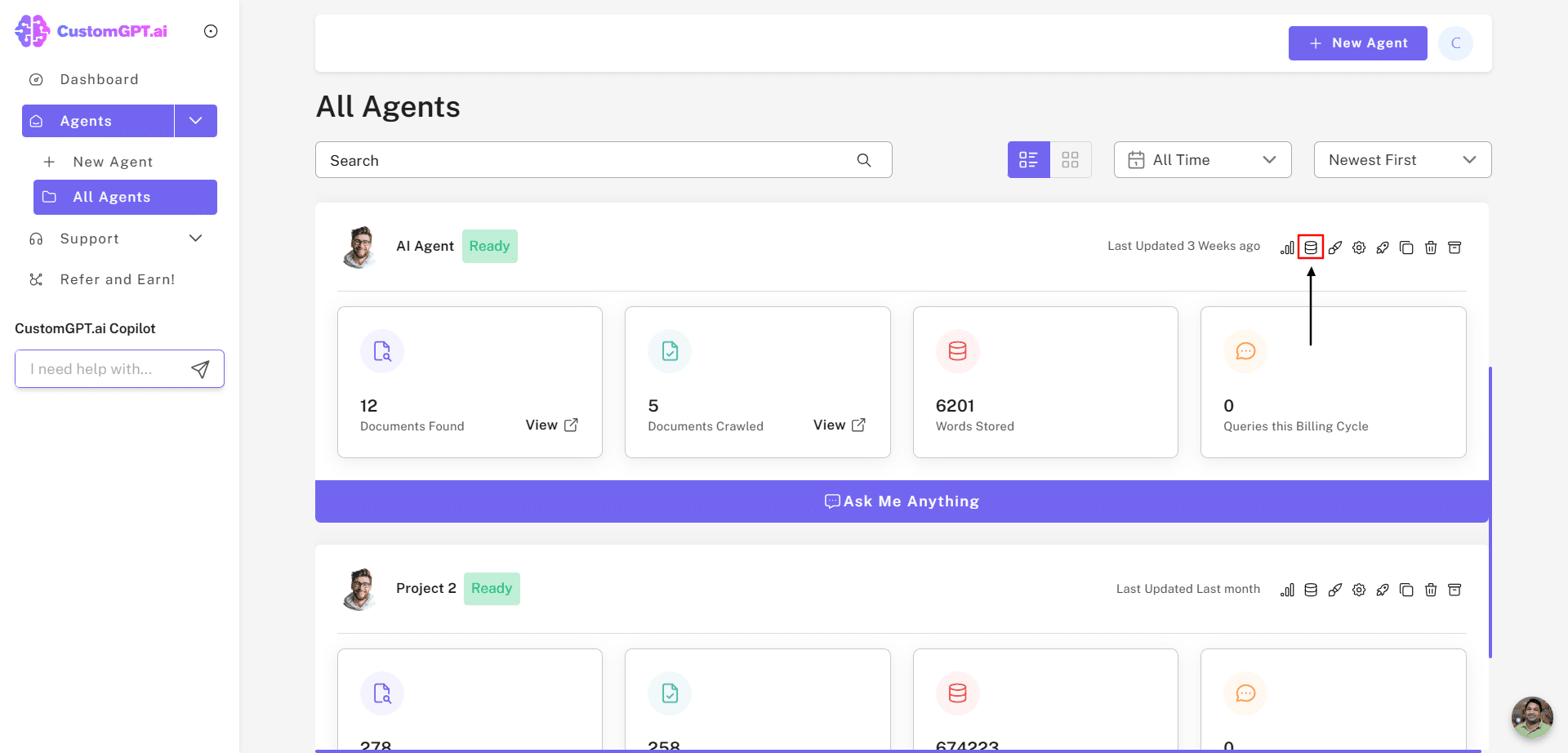
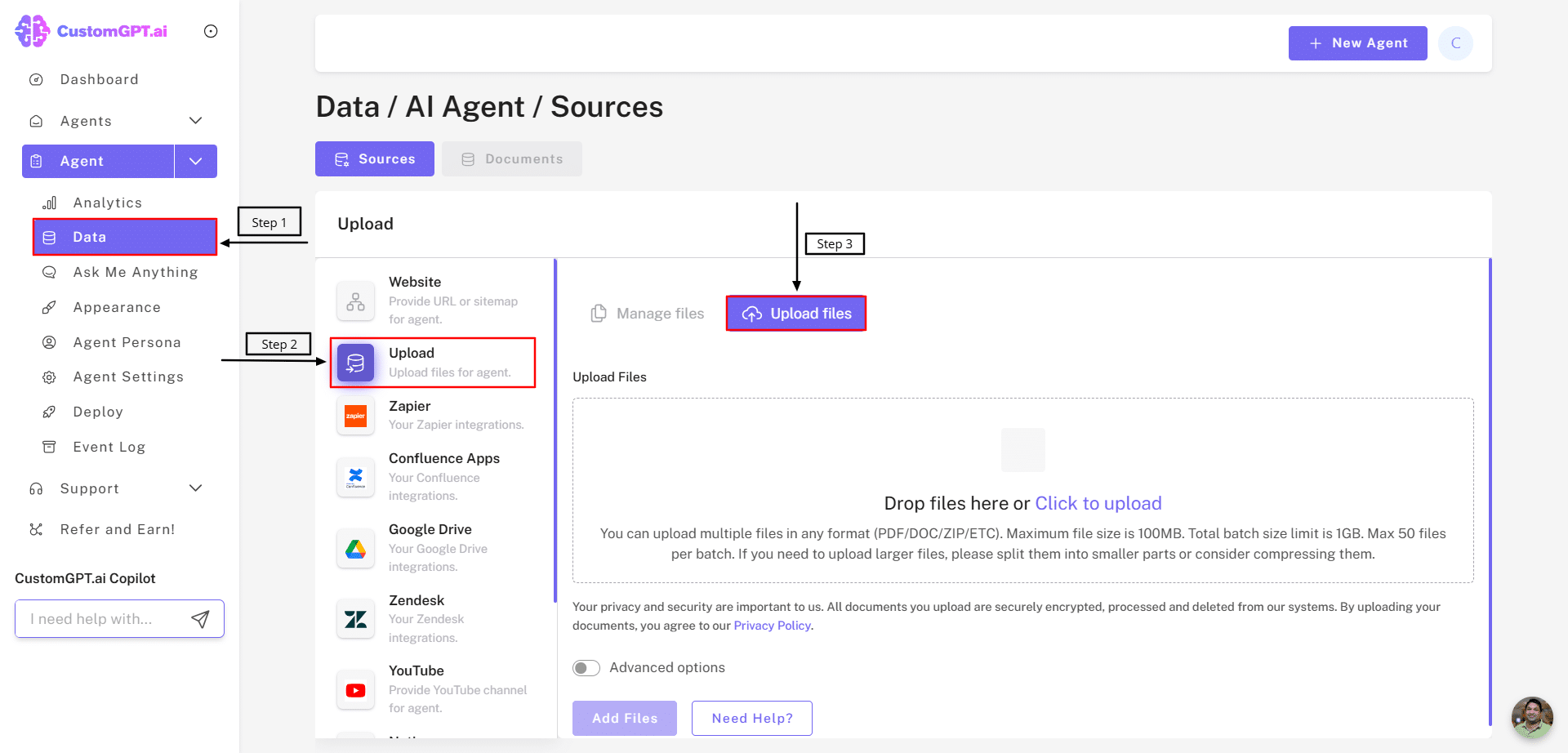
After creating the project, you can customize your chatbot.
Now let’s see the two benefits of using CustomGPT.
Customer Service
Customer service is greatly improved due to CustomGPT built chatbots.
- CustomGPT enhances customer service by promptly responding to users’ queries, by adapting your business’ unique brand voice and customizing responses according to the user’s questions. Additionally, CustomGPT built chatbots to converse in a natural human-like way.
- CustomGPT chatbots understand user behavior and engagement and provide insights to businesses for improved lead generation.
- CustomGPT provides product recommendations tailored to each individual customer ensuring personalization and e-commerce success.
Code-Free CustomGPT Plugins
CustomGPT.ai offers code-free ChatGPT plugins, so businesses or users looking for a GPTs alternative can create or enable ChatGPT plugins without requiring a programmer or a developer’s support.
- CustomGPT utilizes advanced vector databases and semantic search capabilities to ensure that the ChatGPT plugins accurately understand and respond to a query in context to the business data.
- By using CustomGPT plugins, you can focus on your business while CustomGPT handles all the technicalities, hosting and maintaining of your plugins.

CustomGPT.ai Accuracy: Chatbot Reliability with RAG and Anti-Hallucination Tech
CustomGPT.ai sets new standards for answer accuracy, thanks to its advanced RAG and anti-hallucination technology. These innovative features ensure that CustomGPT.ai provides accurate responses, earning the trust of its users and establishing itself as a reliable AI chatbot platform.
CustomGPT.ai excels in delivering accurate responses through its sophisticated anti-hallucination technology, which instills confidence in users regarding the reliability of its chatbots. This technology ensures that responses are factual and contextually appropriate, mitigating the risk of providing incorrect or misleading information. Moreover, CustomGPT.ai’s RAG technology has surpassed OpenAI’s in assessments conducted by Tonic.ai, highlighting its effectiveness and superiority in generating precise and relevant answers.
Read the complete blog detailing CustomGPT.ai’s superiority over OpenAI in the RAG benchmark.
With CustomGPT.ai’s anti-hallucination and RAG technologies, users can trust that the responses provided are accurate, dependable, and tailored to their needs. This makes CustomGPT.ai an ideal choice for businesses seeking AI solutions that prioritize accuracy and reliability, ultimately enhancing the overall user experience and satisfaction.
Watch the interview video featuring Alden Do Rosario, CEO of CustomGPT.ai, delving into the RAG benchmark on YouTube: CustomGPT.ai Overtakes OpenAI in Accuracy Benchmark.
CustomGPT Vs. Chatbase: The Final Verdict
Though CustomGPT and Chatbase both are AI-powered chatbot builders, yet they both have stark differences in terms of productivity, performance, power, revenue generated and factuality. Though Chatbase is a well-known chatbot, CustomGPT offers the most features, allowing businesses to automate their tasks and provide accurate information to their users.
To start using CustomGPT, you can first analyze its various capabilities by a Live Demo. After you are surely and clearly satisfied, you can sign up on CustomGPT and watch your business positively impacted!
Frequently Asked Questions
What does the CustomGPT vs Chatbase comparison focus on most?
The comparison centers on business chatbot priorities such as answer accuracy, ease of setup, adaptability, and overall fit for company use cases. It frames the decision around choosing the better custom chatbot platform for business outcomes.
Why does the comparison say some companies look for alternatives to Chatbase?
The content states that companies are exploring alternatives because they want stronger AI improvements, better adaptability, and an easier setup process. In this comparison, those are presented as key reasons teams may evaluate CustomGPT against Chatbase.
How is CustomGPT positioned against Chatbase on accuracy and business use?
The comparison describes CustomGPT as a generative AI-powered personalized chatbot builder that is easy to set up and designed to provide accurate answers without making up facts. It also presents CustomGPT as oriented to business productivity and employee efficiency.
What capabilities are highlighted for CustomGPT in the side-by-side section?
The side-by-side section highlights CustomGPT as an all-in-one personalization solution powered by advanced LLMs, with customization/adaptability and a focus on security and privacy. These are the primary capability categories emphasized in the comparison.
Related Resources
If you’re comparing AI chatbot platforms, this guide adds useful context to the discussion.
- CustomGPT.ai vs LiveChatAI — A side-by-side look at features, usability, and strengths to help you evaluate CustomGPT.ai against LiveChatAI.