How to Integrate CustomGPT.ai with Squarespace: Build a Dynamic Custom Q&A Bot

Squarespace lets you build a website in minutes; with CustomGPT.ai, you can add a powerful personalized Q&A bot in a similar amount of time using the CustomGPT.ai workflow. A Squarespace and custom Q&A bot delivers a double whammy of customer engagement on a website that could be live within a day!
Let’s get started. If you’re building in Squarespace already or plan to, our step-by-step for a Squarespace GPT Q&A bot setup will have a GPT-powered bot helping you convert visitors in no time.
What are the Advantages of Adding a CustomGPT.ai Bot to a Squarespace website?
Squarespace provides easy-to-edit website templates that need zero coding and full e-commerce features so you can build any website quickly. Its simple CMS makes adding your tailored version of ChatGPT a straightforward exercise.
A custom GPT bot can be populated with just the data you select. That might be information about your products, manuals, user guides, blogs from your website or social media, and even ebooks and PDFs.
Once populated, a custom GPT bot can answer every question your visitors might have, and your AI bot can also help you convert potential leads or pass troubled customers on to a human agent.
Before we take you through our guide to setting up a CustomGPT.ai bot in Squarespace, let’s look at the benefits.
Customer experience
Chatbots have been around for some time, but the older versions don’t use ChatGPT technology. Once you provide your AI-powered bot with data, set it up, and tested it, it will be ready to serve your customer needs.
A tailored GPT bot works like ChatGPT; your customers can ask questions and receive conversational responses. You can even customize your own chat GPT bot to understand when a customer might be ready to buy.
Competitive advantage
The combination of a dynamic website built with Squarespace and a personalized Q&A chatbot from CustomGPT.ai can provide customer service that will outpace your market peers and provide you with a competitive advantage that isn’t going to take an age to create.
A tailored GPT bot will interest and engage your customers, and they’ll stay on your website longer and be more likely to buy. Custom bots can efficiently answer most of your customer inquiries, leaving your human employees more time for sales and marketing or new product development.
Cost savings and increased profits
You and your team will have more time to spend on revenue-generating activities, and engaging your customers with your bot can drive more sales from your website.
A custom GPT bot can be used internally, too. Your Squarespace site can have an open bot for visitors and a gated page with a custom company bot for your staff.
You can embed into Squarespace or any website CMS a GPT Q&A bot populated with all your training and HR material to provide a detailed repository of company information for employees.
We all know that better-trained staff who can solve problems quickly are far more beneficial to a business!
Zero hallucinations
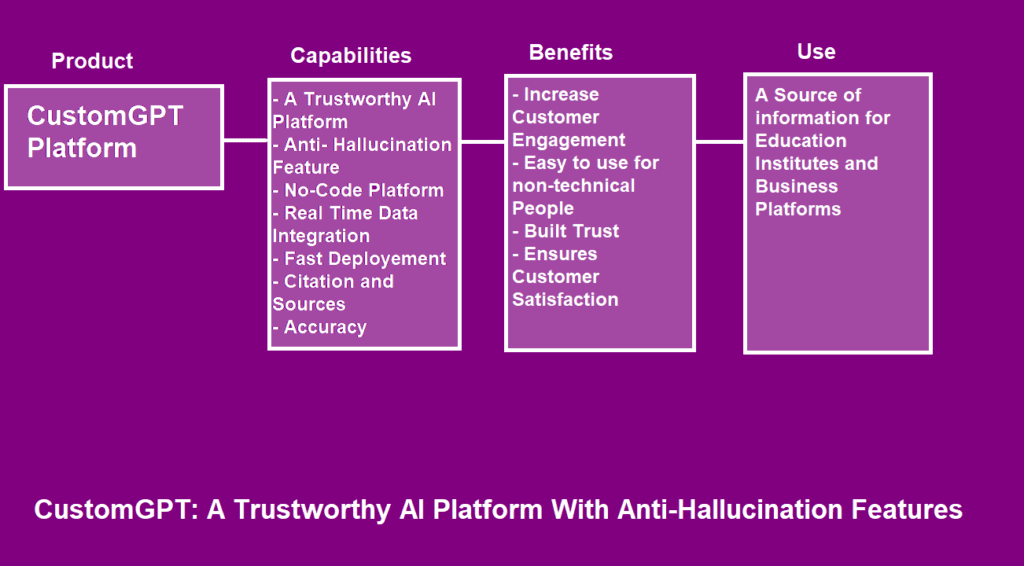
A CustomGPT.ai bot is programmed only to use information from the sources you provide to formulate its answers. What this does is remove the risk of Leveraging Anti-Hallucination Features Trustworthy explained a common problem with ChatGPT where answers are inaccurate and sometimes false.
The Benefits of CustomGPT.ai’s RAG Technology
CustomGPT.ai technology puts Lessons from MIT Case overview around ChatGPT and advanced large language models. You have the same AI, but only using your information, even in a Help Scout bot. We use Retrieval-Augmented Generation (RAG) technology to achieve this, which adds another layer to OpenAI’s ChatGPT.
Our Customize Your ChatGPT Personas feature enables further customization of your personalized Q&A bot. With persona, you can decide your tone and how your Squarespace chatbot responds in different circumstances. You can even block certain responses to ensure privacy or compliance.
CustomGPT.ai and Squarespace: Synergies and Benefits
Creating a CustomGPT.ai bot to embed into your Squarespace site is as simple as signing up with CustomGPT.ai, setting up your bot, adding your data, and then creating the code to paste into your Squarespace website.
Creating a tailored GPT bot for Squarespace with CustomGPT.ai takes just minutes to a few hours, depending on how much data you add and how you customize your bot.
Just the same as Squarespace, CustomGPT.ai is a no-code experience.
As well as the benefits we’ve covered above, can you envision turning your CustomGPT.ai chatbot into a supercharged sales agent using the “Persona” feature?
There’s more: custom chatbots serve your customers 24/7, can easily cope with peaks and troughs in demand, and can deliver anything from subtle sales messages to clear calls to action. CustomGPT.ai chatbots can also detect chatgpt customer satisfaction and effectively connect a customer with a human sales or customer service agent.
Step-by-Step: How to Set up a CustomGPT.ai Bot in Squarespace
That’s the benefits covered. Perhaps you can see the potential for more?
Now, let’s set up CustomGPT.ai to create your Squarespace Q&A bot.
Sign Up for CustomGPT.ai
- Visit customgpt.ai and “Signup” from the top left menu
- Choose “Create an Account”
- Enter your “Name” “Email” and set your password
- Click “Signup”

Collect & Upload Your Data
Now, you’ll give your bot a title and upload your data.
To get started uploading website content:
- On your dashboard, click “New Agent” at the top right.

TIP: If you don’t have the sitemap URL, try our Sitemap Finder Tool.
- Click “New Agent.”
To start uploading documents:
4. You can easily find the right data source for your agent with a quick search. Upload your files or simply enter your website URL, sitemap, or connect via an integration system.
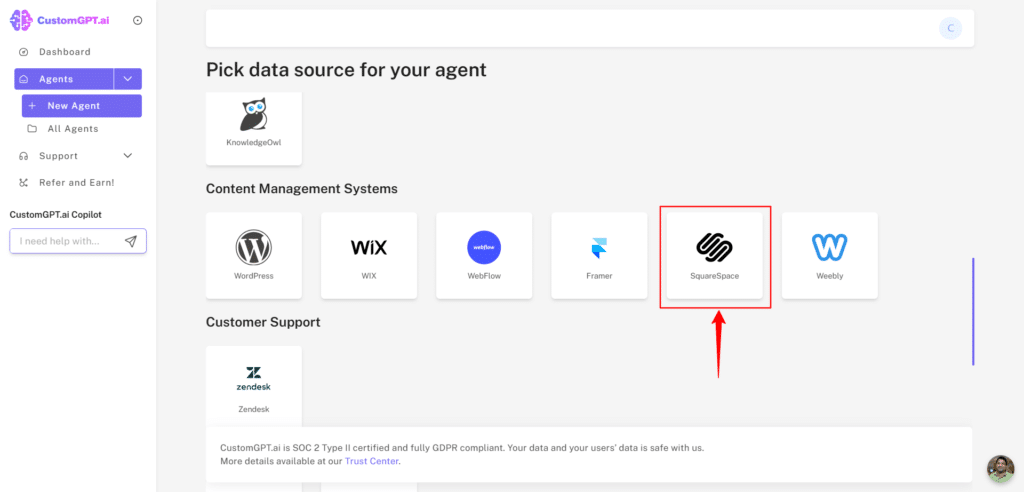

TIP: Try our full Create Chatbot guide to learn more about file formats and sizes.
5. You can also add more documents by uploading them.

6. Select your “Data retention” preference. You can choose to “keep the files for viewing in results” or “delete immediately after processing.”
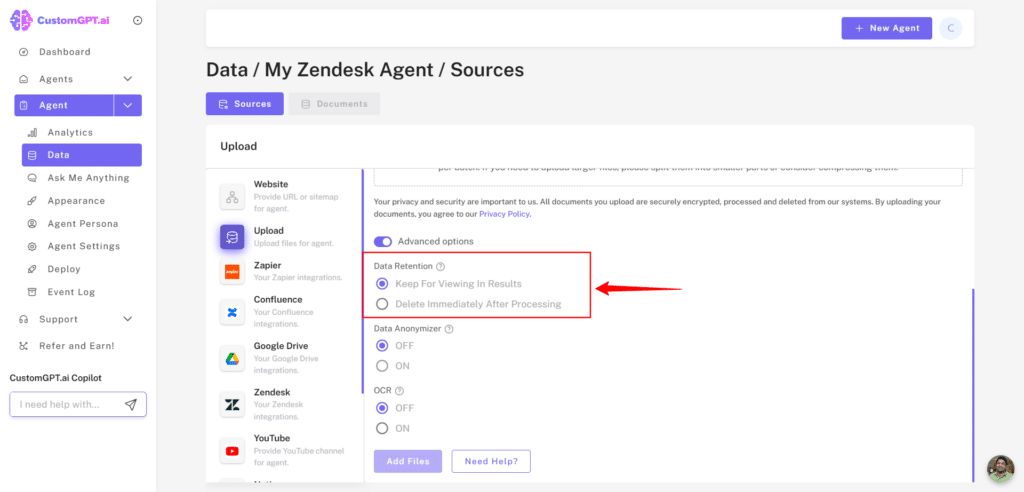
- Choose “Add files”.

You can also learn more about multi-source data integration.
Congratulations – you now have your own custom Q&A bot with ChatGPT technology!
Customize your ChatGPT bot
- Choose from 92 languages
- Add your logo, your avatar, and background design
- Create a default prompt and add sample prompting questions
- Customize your bot persona to match your brand
Visit our complete CustomGPT customization guide and learn more about developing your Customize Your ChatGPT Personas from our rag explained.
Test your Custom Bot
To test your custom chatbot, head to the “Ask Me Anything” page in your project on your dashboard.
Testing is essential to make sure your bot functions as you expect and responds to your customers in your preferred manner. While you are testing, you can refine your persona.
As well as the links we’ve included above, our Create Chatbot guide will walk you through every feature we’ve mentioned. You can also ask our demo bot your questions about CustomGPT.ai.
CustomGPT.ai Integration with Squarespace
Now, for setting up your GPT bot in Squarespace, these next steps will show you how to embed the chatbot on your website as part of the footer so it shows on every page.
- Go to your CustomGPT.ai dashboard.
- Select your CustomGPT.ai bot project, and click the “Deploy” icon.

- Make your agent “Public”.


4. Choose “Embed”

5. Now, you will see the HTML script you need to embed in your Squarespace website.

6. In your Squarespace dashboard, choose “Edit”
7. Next, go to “Edit Footer” and then “+Add Block”
8. Choose the ‘Embed” option from the menu, then “Edit” the “Embed Block”
9. Select the “Code Snippet” option
10. Copy the HTML script for your bot from the “Embed” function in CustomGPT.ai.
11. Back in Squarespace, paste the HTML script for your bot in your new block
12. Now, you can save and preview your page build and check the code is working before testing your Squarespace chatbot customization with GPT on your live website.
Learn more in our complete CustomGPT website integration guide and in the Squarespace Help Center.
Frequently Asked Questions
How do I add an AI chatbot to a Squarespace website without coding?
You can add one with a no-code setup: create the bot, load the knowledge you want it to use, customize the branding or persona, and deploy it as an embed widget or live chat on your Squarespace site. Supported knowledge sources include website content, manuals, user guides, blogs, ebooks, PDFs, and other common file types. Before publishing, test a few real visitor questions and confirm the chat experience works well on mobile.
Can a Squarespace chatbot answer questions from my own site pages and PDFs?
Yes. The bot can be grounded in your own URLs and files, including PDFs, DOCX, TXT, CSV, HTML, XML, JSON, audio, and video. Because it uses retrieval-augmented generation, it searches the knowledge you provide before answering. Doug Williams of MIT said, “For the Martin Trust Center for MIT Entrepreneurship, we needed a Generative AI platform that would provide trustworthy responses based on our own data. We chose the CustomGPT solution because of its scalable data ingestion platform which enabled us to bring together knowledge of entrepreneurship across multiple knowledge bases at MIT.”
How accurate is a Squarespace Q&A bot, and how does it reduce hallucinations?
A retrieval-grounded bot is generally more reliable than a generic chatbot because it searches approved sources before answering and supports citations. In the provided credentials, CustomGPT.ai outperformed OpenAI in a RAG accuracy benchmark. MIT’s ChatMTC also reported zero hallucinations while making entrepreneurial knowledge available in 90+ languages. If accuracy matters, use curated source material and review conversations to spot gaps in the knowledge base.
What support impact can a Squarespace chatbot have on an ecommerce site?
Fast, relevant answers can keep shoppers engaged and reduce repetitive support work. Bill French, Technology Strategist, said, “They’ve officially cracked the sub-second barrier, a breakthrough that fundamentally changes the user experience from merely ‘interactive’ to ‘instantaneous’.” On a Squarespace store, that kind of speed can help visitors get product, shipping, or policy answers quickly, while routine questions are handled automatically and your team focuses on more complex cases.
Can a Squarespace chatbot help capture leads outside business hours?
Yes. A bot can keep answering questions when your team is offline and help visitors move toward the next step instead of waiting for a reply. MIT’s ChatMTC made entrepreneurship knowledge available 24/7 in 90+ languages, showing how an always-on assistant can stay useful beyond normal business hours. On a Squarespace site, that can support lead capture by reducing drop-off when visitors need answers before they are ready to contact you.
How can I track chatbot usage and performance on a Squarespace site?
Use analytics and conversation tracking to monitor how often the bot is used, what visitors ask, and where answers may need improvement. That gives you a practical view of whether the chatbot is handling routine questions effectively and which knowledge sources should be expanded. Reviewing conversation patterns regularly is one of the simplest ways to improve answer quality after launch.
Will my Squarespace content be used to train public AI models?
No. The provided compliance credentials state that data is not used for model training, and the service is listed as GDPR compliant and SOC 2 Type 2 certified. For a Squarespace setup, you can use public website content for a visitor-facing bot while keeping internal HR or finance material in a separate private bot or gated employee area.
Conclusion
You now have a personalized GPT bot for your Squarespace website that you can use to wow your customers, sell your products or services, or help your team work more efficiently!
If you haven’t already started creating and integrating your bot – sign up and test CustomGPT.
Related Resources
If you’re exploring how CustomGPT.ai fits into your content and website strategy, this guide adds useful context.
- Share Expertise With AI — Learn how to turn your knowledge into AI-powered experiences that help visitors get answers faster and more effectively.