Driving AI Adoption with a Non-Technical Membership
Rank the rollout the way your members rank their objections, and put training last. AI Adoption Older Members Association give permission for AI at high rates. They do not arrive with the habit.
Higher Logic’s 2025 member research puts 94% of members comfortable with their association using AI for search, personalization, or support when it stays transparent and human-centered. Pew’s February 2026 survey of 5,119 US adults finds that 23% of people 65 and older say they ever use AI chatbots, which leaves 77% who do not.
The useful number sits one level down. Among adults who never use chatbots, Pew asked why. 83% say they are not interested. 79% are concerned about how their personal information will be used. 76% do not trust chatbots to give accurate information.
55% do not know how to use them. These figures cover all adult non-users, not the 65-and-older group alone, but the order is what any rollout has to answer. The skills gap ranks last of the four, which means a rollout that opens with a member training webinar is aimed at the smallest barrier on the list.
The other three are settled before any member is asked to learn anything. Decide placement first, so the member never has to choose to use “an AI.” Publish a privacy posture second.
Turn on citations and a visible refusal third. Seed the first-run scaffolding fourth. Run member education last, sized to the 55% it actually addresses. That sequence is what member AI for associations has to be designed around. One ceiling belongs in the same breath: grounding reduces fabrication and does not eliminate it.
Members give permission for AI, and they do not arrive with the habit
94% of association members say they are comfortable with their association using AI for search, personalization, or support when it stays transparent and human-centered. Among US adults 65 and older, 23% say they ever use AI chatbots, which leaves 77% who do not. Permission is high, habit is low, and those two problems have different fixes.
The permission number comes from Higher Logic’s 2025 Association Member Experience Report, fielded across 440 current members and 112 nonmembers and released in December 2025. It is an unusually clean result for a technology question, and it tells you that member resistance is not primarily ideological.
What it does not tell you is whether members will reach for the tool.
For that, Pew Research Center’s June 2026 analysis of AI use by age is the harder read. Fielded February 17 to 23, 2026 across 5,119 US adults, it finds that while 23% of people 65 and older have ever used an AI chatbot at all, only 20% have used one specifically to search for information, and just 6% describe themselves as extremely or very confident using one. Confidence, not permission, is the scarce resource.
The trend line argues against fatalism about older members. Chatbot use among adults 65 and older went from 12% in 2024 to 23% in 2026, close to a doubling. The 50 to 64 group moved from 25% to 42% over the same two years, up by roughly two-thirds.
Both cohorts climbed sharply inside two renewal cycles. A membership that looks unreachable this year is a membership in motion, and a rollout designed only for the least confident version of it will be miscalibrated by the time it launches.
The distinction worth carrying forward is simple. A permission problem is solved by disclosure, which is cheap and you should do it anyway. A habit problem is solved by placement.
The reasons members give for skipping chatbots rank training last
Among US adults who never use AI chatbots, 83% say they are not interested, 79% are concerned about how their personal information will be used, 76% do not trust them to give accurate information, and 55% do not know how to use them. Education addresses the smallest of the four barriers.

Pew asked non-users to sort those reasons by weight, and the major-reason subsets hold the same order: 60% call disinterest a major reason, 54% say the same of privacy, 45% of accuracy distrust, and 29% of not knowing how. The ranking survives the stricter test, so it is not an artifact of a soft question.
The same report puts adoption velocity in context: 67% of non-users say they are not too or not at all likely to start using chatbots in the next 12 months, against 5% who call it extremely or very likely. Waiting for the cohort to come around on its own is not a plan with a horizon.
Read the four barriers as an engineering brief instead of an attitude survey, and the rollout order writes itself:
- Not interested (83%) is a placement decision. Attach the assistant to something the member already uses, so answering their question does not require adopting a tool.
- Personal information (79%) is a governance decision. Name where member data goes, who can read it, and what the model provider never receives.
- Accuracy distrust (76%) is a configuration decision. Cite every answer and let the assistant decline when your content does not cover the question.
- Do not know how (55%) is a first-run design decision, with member education behind it.
Three of the four are decided by staff before launch. The fourth is the only one a training program touches. Most association rollout plans invert that order, spend their political capital on the 55%, and leave the 83% untouched.
Placement is the first lever because it removes the decision to use an AI
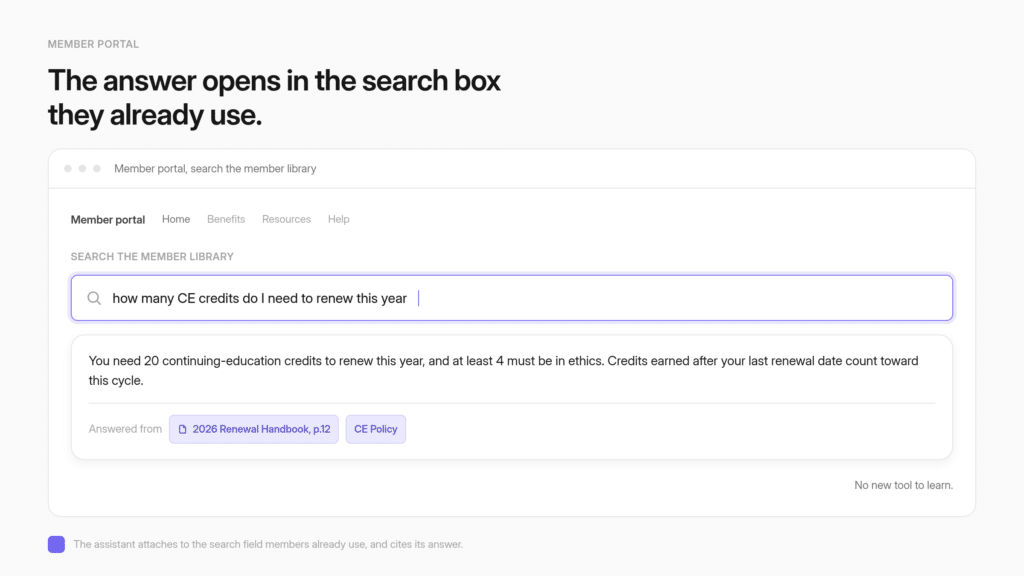
A member who is not interested in AI will not click a chat bubble. The assistant can attach instead to the search box that member already uses, so typing a question into the portal search field opens the assistant on a grounded, cited answer.
The member gets the benefit without opting into a new tool.
The mechanic is specific. Website Copilot is a large-window chat deployment, and per the docs, “Unlike Live Chat, Copilot buttons can be placed on any HTML element, giving you more control over when and where the assistant appears.”
Your web contractor marks the element with data-cgpt-ai-assistant, so the button can live on an element members already click: a “Member Resources” card, a benefits tile, a help link in the navigation.
The version that matters most for a non-technical membership goes one step further. A second attribute, data-cgpt-ai-assistant-input, attaches the copilot to a text input already on the page.
The docs describe the behavior plainly: visitors type a query, press Enter, and the copilot opens and processes their input. Your member uses the search box that has been there for years, and the answer comes back from your library. The field clears. Nothing was renamed and no new icon appeared, so the member never made a decision about artificial intelligence.
Implementation is the copilot script, a unique ID on the input, and a small event listener that dispatches new CustomEvent(‘CustomGPTSendQuery’, { detail: inputValue }), which is a task for whoever maintains your portal template, and not a development project.
Two constraints decide whether that mechanic is available to you at all, and both should be settled in week one.
- Control of the template. Attaching to an existing input needs a script on the page and an ID on the field. An association running its portal on a hosted AMS (iMIS, MemberClicks, Higher Logic Thrive) has two questions for the vendor before it plans anything around the search box: can we add a script tag to the portal template, and can we edit the markup of the search field. Where either answer is no, the surfaces still open to you are a copilot button on a page you do control, an embed on a single benefits page, and a link in the member newsletter, and that is the order to try them in.
- Existing search behavior. The marked field now sends the member’s question to the assistant, so decide what should still happen to ordinary site-search queries typed into the same box.
Placement is a menu of surfaces. The deployment surfaces run to six: share via link, embed onto a web page, live chat, website copilot, search generative experiences, and the REST API or SDK.
A shared link works for an email newsletter to members who will never visit the portal. An embed suits a single high-traffic benefits page. The copilot attributes suit the portal search box.
Choosing among them is the first real adoption decision, and staff make it rather than members. The use cases associations run it for are a separate axis: a portal copilot, onboarding, a certification study aid, an event and library concierge.
Identity is the related question, and it needs a precise reading. You can put the assistant behind the member login, where members authenticate through your identity provider and are routed to only the agents their role permits, with no separate CustomGPT.ai account created for each member.
That gates which assistant a member can reach. It does not filter an individual answer against that member’s own record, so treat access control and per-member personalization as different projects.
Gating access through your existing identity provider is an Enterprise-tier item on the pricing page, which matters to any rollout plan built on the member login.
The privacy answer has to be a posture a board can read
79% of chatbot non-users cite concern about how their personal information will be used, and 54% call it a major reason. A friendly disclosure line does not answer that.
Naming where member data goes, who can see it, and what the model provider never receives does.
This is the second-ranked barrier and it deserves the second-ranked lever. The material facts belong in a paragraph a membership director can hand to a board without translation: SOC 2 Type 2, GDPR compliance, and 256-bit AES encryption at rest, with member content held in your own agent instance.
The load-bearing sentence for a skeptical member is that your data is not used to train the underlying model. Say those things in your own words, on the page where the assistant appears, and say them once rather than repeatedly.
There is a second privacy fact most associations do not think to mention, and members find it reassuring. Staff cannot pull an individual member’s transcript.
The analytics show themes, volume, and gaps across the whole membership. They do not produce a named member’s conversation history. That is a genuine constraint on your reporting, and it is also the honest answer to the member who asks whether the executive director will see what they typed.
The operator move here is unglamorous. Write the member-facing privacy statement once, before launch, in plain language. Put it where the assistant appears, not three clicks away in a policy page.
State what is retained and for how long. An association that publishes that posture in advance is answering the second-largest objection in the Pew data with a document, which is what a board and a member both want.
Citations and a visible refusal answer the accuracy objection
76% of non-users do not trust chatbots to give accurate information, and that skepticism is well founded. An assistant grounded on your approved library returns the sources behind its answers and declines when your content does not cover the question. Grounding reduces fabrication. No honest vendor claims it eliminates it.
Citations are the mechanism that converts a skeptical professional into a user. When the assistant answers a question about a certification deadline or a dues policy, the response is referenced in the text with the source material one click away.
One setup detail is worth catching before launch: existing agents need citations activated in project settings rather than arriving with them on. A member who half believes the reply clicks through and reads the actual page. That behavior is the point.
Your most credentialed members were trained to check primary sources, and an answer they can trace is worth more to them than an answer delivered confidently.
The refusal behavior does the other half. When the library does not hold an answer, the assistant declines rather than guessing, and the wording of that refusal is a setting: the citations tab in agent settings carries a customizable “I don’t know” message, so it can route the member to staff in your own voice.
For a membership of lawyers, engineers, or compliance officers, a system that admits its edges earns more trust in one interaction than a fluent system earns in ten. Decide before launch where that refusal routes and who watches that inbox.
A refusal that hands the member a dead end costs more than the wrong answer it avoided.
State the ceiling plainly, because the alternative costs more. Grounding an assistant on your own corpus lowers fabrication and does not take it to zero.
What grounding buys you is a reduced error rate plus a citation a human can check, which is a different promise from perfection.
A cohort where 76% already distrust chatbot accuracy is lost permanently by one overclaim followed by one wrong answer. Telling members the assistant is usually right and always shows its work is both more accurate and more persuasive.
One scoping note so nobody plans the wrong thing. Verify Responses analyzes an answer claim by claim against approved source documents and produces an audit-ready record, which makes it a governance instrument for the staff who own the content.
The docs are explicit that it is a builder-only auditing tool your members never see, so budget for it as a staff review workflow, separate from the inline citation a member clicks.
First-run scaffolding does most of what the training plan was for
55% of non-users say they do not know how to use a chatbot, and an empty text box is what confirms that fear. Starter questions show example questions that begin the conversation on a click.
A placeholder prompt and a persona written in your members’ vocabulary handle most of the remaining first thirty seconds.
This is where member education actually belongs, and where it works. The agent settings are organized into tabs a director can navigate without a developer: General, Persona, Conversation, Citations, Intelligence, Advanced, and Security.
Under the conversation tab sit starter questions, the agent language, the placeholder prompt, the loading indicator, and a custom message ending.
Starter questions are the sample questions you write into the agent so the first screen a member sees is populated instead of blank. A member who does not know what to ask is handed four things worth asking.
Seed those four from what member services actually receives.
Pull the last hundred emails and calls to the membership inbox and take the most frequent, most specific questions. Staff imagination about member questions is reliably wrong, usually too abstract. “How do I claim my CE credits for a webinar I attended?” outperforms “Ask me about member benefits.”
The persona tab is where you configure how the agent communicates by describing the tone, behavior, and interaction style you expect, and a library of template personas gives you a starting point.
Write the persona in your members’ own vocabulary instead of in the terminology your staff uses internally. If members say “renewal” and staff say “membership lifecycle stage,” the assistant should say renewal.
One caveat prevents a common misread. The agent language setting is a single dropdown, and the documentation does not spell out how it interacts with a question typed in a different language.
The documented pattern for serving a multilingual membership is a separate agent per language with a switch on your site.
Any association promising members support in three languages should test that setup with real questions in each language before announcing it.
Your membership is skewing younger, and staff-side AI use is not member-side adoption
Millennials are roughly 25% of association membership, up from 21% since 2020, while Boomers have slipped to about 27% from 32% in 2023. Separately, 87.5% of associations already use AI for content. That figure measures the organization using AI internally, which is a different thing from members using it.
Two honest corrections belong in any plan built on the phrase “our members are not technical.” The first comes from Marketing General Inc.’s 2025 Membership Marketing Benchmarking Report, the source for those shifts, which also tracks Boomers stepping down through 29% in 2024 on the way to today’s number.
The non-technical-membership premise is aging out faster than most rollout timelines assume. Designing exclusively for the least confident cohort produces a system that fits your membership less well every year. Design for placement and clarity, which serve everyone. A simplified experience is one that a growing share of your members will read as patronizing.
The second correction guards against a number that gets misquoted constantly. ASAE’s first State of Associations report, released March 23, 2026, found AI use “widespread” across associations at 87.5% for content and 44.3% for data, while “readiness lags, with most organizations citing limited expertise and data privacy concerns.”
Read the scope carefully. That is associations using AI as organizations, mostly staff drafting content. It is not evidence that members are using anything.
The gap between those two numbers is the actual state of the category: most associations have staff-side AI, and member-facing deployment remains rare.
The stakes sit alongside. The same ASAE research puts retention and engagement at the top of the association challenge list, cited by nearly one-third of respondents, with nearly 39% of CEOs reporting decline against 10% reporting improvement.
An association under that pressure has a second reason to get member-facing AI right, since the same library that answers member questions can turn existing content into a non-dues revenue stream.
Adoption measurement is aggregate by design, and the reporting window depends on your plan
The analytics show themes, volume, emotion, intent, top languages, and the questions your content failed to answer. They do not show an identified member’s transcript. You can report that member questions about dues renewal doubled. You cannot report that a named member used the assistant four times.
The panels are worth knowing by name before you promise a board a metric. Under agent knowledge sit latest prompts, latest missing content, and content source.
Under user insights sit emotion, intent, and top languages. Conversations, queries, and queries per conversation carry the activity volume, alongside user feedback, popular days, query statuses, and a sent-by view that separates team members from guests.
Latest missing content is the panel that repays daily attention. Every question your library failed to answer is an editorial signal, ranked by real member demand instead of staff guess.
An association that works that list monthly is running a content strategy off member behavior, which is a better input than the committee’s agenda.
Two gating facts are constraints, not upsell, and both change what you can promise. The view and export window for analytics runs 7 days on Standard, one year on Premium, and all-time on Enterprise, so the reporting window depends on the plan and a 90-day adoption curve is not observable on Standard.
Gating agent access through your existing identity provider is listed on the Enterprise tier, so any plan that says “put it behind the member login” has a tier decision attached to it.
For a director who has to report upward, the honest metric set is query volume over time, the mix of question themes, the missing-content trend, and positive-feedback rate. Anything per-member comes from your own survey program, paired with these aggregates. Promising a per-member adoption funnel is promising something the analytics do not produce.
Associations have already run this play with real member bases
Two membership organizations have published their numbers. GEMA, a German music-rights collecting society, and VdW Bayern DigiSol, a Bavarian housing federation, have each put their own approved knowledge behind a cited assistant serving a member base. Each result is scoped to that single deployment, measured on its own content and its own members.
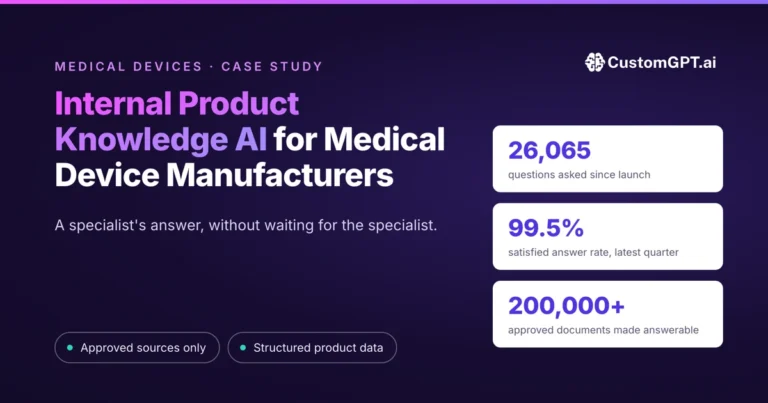
GEMA, the German music-rights collecting society, represents more than 100,000 members. Its chatbots have answered more than 248,000 inquiries, external and internal combined, at an 88% query success rate, with more than 6,000 working hours saved.
Jonas Walther, Manager Data & AI at GEMA, described the result this way: “CustomGPT.ai isn’t just a support tool. It’s become a knowledge infrastructure for our organization.” A quarter of a million answered inquiries is not a pilot, and it is not a volume an organization reaches by asking people to be patient with a new tool.
VdW Bayern DigiSol, the Bavarian housing federation, serves more than 500 member organizations on regulatory and technical material. Its WohWi AI assistant handled over 7,000 questions across 2,000 conversations in the first six months, with 84% of user interactions receiving positive feedback, after going live on 3,620 documents in under 60 days without engineering resources.
Dr. Korbinian Weisser, Managing Director of VdW Bayern DigiSol GmbH, said the assistant “enables members to make informed decisions faster and with greater confidence.”
What both deployments show, each on its own content and its own audience, is that a member base holding regulated, high-stakes material will reach for a cited assistant at volume.
Two published deployments are not an industry benchmark, and neither number forecasts yours. They do establish that the behavior an adoption plan exists to produce is achievable.
Sequence the rollout against the ranked objections, not against the training calendar
Decide placement first. Publish the privacy posture second. Turn on citations and the refusal behavior third. Seed starter questions from real member-services traffic fourth.
Run member education last, against the 55% it addresses. A rollout that opens with a training webinar has inverted the order and spent its attention on the smallest barrier.
A rollout sequence showing placement, privacy posture, citations and refusal, first-run scaffolding, and member education in ranked order.

The same sequence in operator form, with the owner and the barrier each step settles:
- Placement. Confirm what you can edit on your portal, then pick the surface: an existing search field, a copilot button on a page you control, an embed on a benefits page, or a newsletter link. Owner: whoever holds the portal or AMS relationship. Settles the 83%.
- Privacy posture. Write the member-facing paragraph naming what is retained and for how long, who can read it, and what the model provider never receives. Owner: the executive who will defend it to the board. Settles the 79%.
- Citations and refusal. Switch citations on, confirm they are on for any agent that already existed, write the “I don’t know” message in your own voice, and name the inbox it routes to. Owner: whoever owns the content. Settles the 76%.
- First-run scaffolding. Pull the last hundred emails to member services, take the four most frequent specific questions, and write them in as starter questions in your members’ vocabulary. Owner: member services. Settles most of the 55%.
- Member education. Announce it in one line where members already read, sized to whatever is left.
One check belongs on the same page as that list. Confirm the analytics window on the plan you are buying before you promise a board a 90-day adoption curve, because a 7-day window cannot produce one.
The field is not empty, and an honest evaluation says so. Higher Logic’s AI Assistant is built into Higher Logic Thrive, the stack many associations already run, which makes it the lowest-friction option if you are already a Thrive customer.
Betty AI positions itself as a knowledge platform built only for associations.
Compare all of them on the things that determine whether a non-technical membership actually uses the result: whether answers come only from your approved corpus, whether every answer carries an openable citation, whether the assistant declines when your content falls short, how many surfaces you can place it on and whether it can attach to an input you already have, and how far back the analytics reach on the plan you can afford.
Two things stay true whichever vendor you pick. Grounding reduces hallucination and does not remove it, so keep citations on and keep a human path open.
And the analytics will tell you what your membership asked, never which member asked it, which is a privacy feature and a reporting limit at the same time.
The cheapest first move costs an afternoon and settles two of the five steps.
Pull the last hundred questions your membership inbox received, and ask whoever runs your portal whether you can add a script tag and put an ID on the search field.
Those two answers tell you what your assistant should be able to answer on day one and which surface it can live on, which is most of a rollout plan before anyone has been asked to learn anything. Scope the rest against what associations are actually shipping today.
Frequently asked questions about AI adoption older members association
Our members average 55 and up and most have never used ChatGPT. Will they actually use this?
Fewer of them will arrive with the habit, and the cohort is moving faster than most rollout plans assume. Pew’s February 2026 survey of 5,119 US adults puts chatbot use among people 65 and older at 23%, up from 12% in 2024. The 50 to 64 group went from 25% to 42% over the same two years. Both roughly doubled inside two renewal cycles. Design for placement rather than for the least confident version of your roster.
Do we need to run member training before we launch?
Training addresses the smallest barrier in the data, so it belongs at the end of the plan, not the front. Among adults who never use chatbots, 55% say they do not know how, behind disinterest at 83%, privacy at 79%, and accuracy distrust at 76%. The first-run cure is cheaper than a webinar. Seed four starter questions, the sample questions that populate the assistant’s first screen, drawn from the real emails your membership inbox received last quarter. A member who does not know what to ask gets handed four things worth asking.
Where should the assistant sit so members actually find it?
Attach it to something members already use, so getting an answer does not require deciding to adopt a tool. The practical surfaces run to six: a shared link, an embed on a single high-traffic page, live chat, a website copilot button, search generative experiences, and the REST API. A shared link suits a newsletter to members who never visit the portal. An embed suits one benefits page. The copilot suits the portal itself. That choice is the first real adoption decision, and staff make it, not members.
Can it work through the search box we already have instead of a chat bubble?
Yes. Marking your existing search field with the data-cgpt-ai-assistant-input attribute attaches the assistant to a text input already on the page. A member types a question into the field that has been there for years, presses Enter, and the assistant opens on a cited answer. Nothing was renamed and no new icon appeared. It takes the deployment script, a unique ID on the input, and a short event listener, so whoever maintains your portal template can do it. Decide in advance what should still happen to ordinary site-search queries typed into that same box.
What do we tell members about the fact that it is AI?
Say it plainly, in one line, where the assistant appears. The high permission rates associations see are conditional on exactly that. Higher Logic’s 2025 member research, fielded across 440 current members and 112 nonmembers, found 94% comfortable with their association using AI for search, personalization, or support when it stays transparent and human-centered. Disclosure is cheap, it is the condition on the permission you already have, and hiding it converts a solved problem into a live one.
A member asks what happens to what they type. What is the honest answer?
A posture answers that better than a reassurance does. Name where the content lives, who can read it, what the model provider never receives, and how long conversations are retained. The material facts for that paragraph are SOC 2 Type 2, GDPR, and 256-bit AES encryption at rest, with your content held in your own agent instance and not used to train the underlying model. Publish it before launch, on the page where the assistant appears, not three clicks deep in a policy document.
Our members do not trust AI to be accurate. What changes that?
A source they can open. When an answer about a dues policy or a certification deadline carries the document behind it, a skeptical professional clicks through and checks, which is the behavior credentialed members were trained into. Pair that with a visible refusal, so the assistant declines when your library does not cover the question rather than guessing. Grounding on your own corpus lowers fabrication and does not take it to zero, and a cohort where 76% already distrust chatbot accuracy is lost permanently by one overclaim.
How do we measure whether adoption is actually happening?
Read query volume over time, the mix of question themes, the trend in questions your content failed to answer, and positive-feedback rate. Those four are honest and reportable. What the analytics will not give you is a per-member funnel, because the panels are aggregate by design. You can tell a board that member questions about renewal doubled. You cannot tell it that a named member used the assistant four times. Anything per-member has to come from your own survey program.
How long after launch can we judge whether the rollout worked?
That depends on which plan you are on, and it catches people out. The view and export window for analytics runs 7 days on Standard, one year on Premium, and all-time on Enterprise, so the reporting horizon is a plan question before it is a methodology question. A 90-day adoption curve is not observable on a 7-day window. Decide the reporting period you need to defend upward, then check it against the tier you are buying, rather than the other way around.
Has a membership organization actually got a non-AI-native base using one of these?
Yes, at volume. GEMA, the German music-rights collecting society representing more than 100,000 members, reports over 248,000 inquiries answered across its external and internal chatbots at an 88% query success rate. Separately, VdW Bayern DigiSol, a Bavarian housing federation serving more than 500 member organizations, handled over 7,000 questions across 2,000 conversations in the first six months, with 84% of interactions receiving positive feedback, after going live on 3,620 documents in under 60 days without engineering resources. Each result belongs to that one deployment and forecasts nothing about yours.
Is our membership actually as non-technical as we assume?
Probably less so every year, and the premise is worth testing before it shapes a rollout. Marketing General Inc.’s 2025 Membership Marketing Benchmarking Report puts Millennials at 25% of association memberships, up from 21% since 2020, while Boomers have declined to 27% from 29% in 2024 and 32% in 2023. A system built exclusively for the least confident cohort fits your roster worse each renewal cycle, and a growing share of members will read a simplified experience as patronizing.
Our members read in Spanish and French. Does the language setting cover that?
Only partly, and the distinction matters before you promise anything. There is an agent language setting in the conversation tab, but the documentation does not spell out how it behaves when a member types a question in a different language. The documented pattern for multilingual service is a separate agent per language with a language switch on your site. Treat multilingual support as something to test with real member questions in each language before you announce it, rather than as a checkbox you switch on in settings.
Related Resources:
- ChatGPT vs. Your Own Member AI to understand which solution best fits your association’s member support and knowledge management needs.
- How to Stop Silent Member Churn with AI: Use this guide to connect member engagement, support automation, and retention strategy without waiting for renewal season to reveal churn.
- How to add an AI Copilot to Your Member Portal: Use this guide to deploy a secure AI copilot behind member login with trusted citations and member-only knowledge.
- An AI Study Assistant for Your Certification Program: Learn how to deliver secure AI-powered exam preparation using approved study materials without exposing answer keys or inventing information.
- AI for State Bar Associations: See how bar associations apply the same trust-first approach to make CLE content findable for members.