AI for State Bar Associations: Making CLE Content Findable
Two properties of your CLE catalog decide whether an AI assistant will work, and you can audit both this week
For AI for state bar association continuing legal education, the most defensible deployment is a findability layer over content you already approved and published, and whether it works at all is settled before any vendor demo by two things you can count yourself.
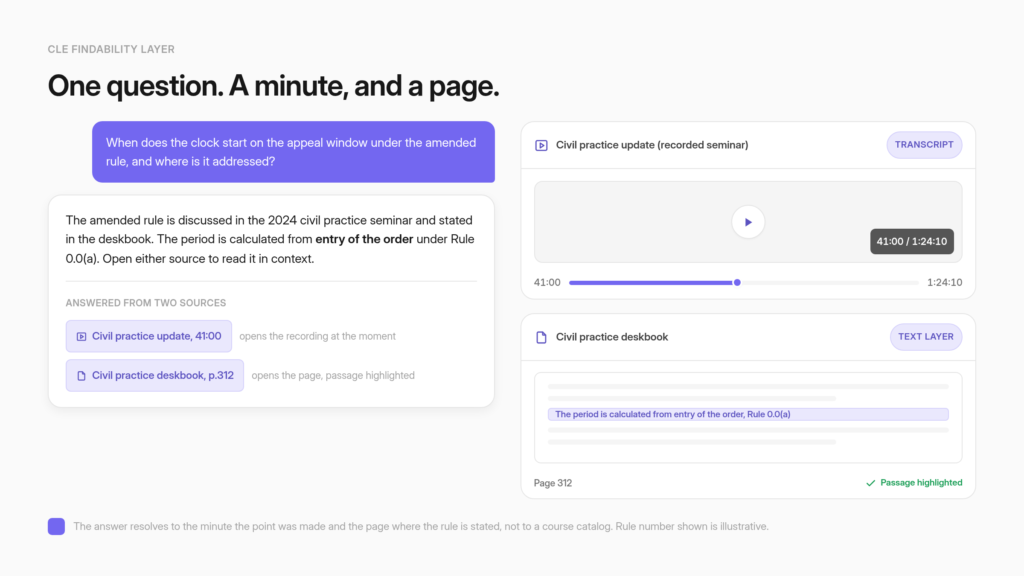
A member asks a narrow practice question in plain language, and the answer comes back citing the minute of a seminar recording where the point was made and the page of a practice manual where the rule is stated. Two boundaries hold that deployment in place. The assistant locates authority rather than giving legal advice, and a member who asks it questions is not earning accredited CLE hours.
Those two properties sit on assets the bar already owns. Does each recording carry a transcript. Does each practice manual carry a real text layer, or is it a scan. A recording with a transcript can answer questions about what was said and cite the moment it was said.
A recording without one can be listed by title and nothing more. A text-based PDF opens to the cited page with the passage highlighted. A scanned one opens to the page, highlights nothing, and consumes a metered monthly page allowance on the way in.
So the first move for a bar is a two-column inventory of its own CLE catalog, ahead of any vendor evaluation. One person can run it in a week with a spreadsheet, and the result stays useful no matter which member AI built for associations the bar eventually picks.
A state bar accredits CLE, publishes CLE, and regulates a profession under active AI scrutiny
Three roles land on the same organization. The bar approves what counts as continuing legal education, sells and hosts a large share of it, and oversees lawyers at a moment when courts are documenting AI-generated citations in filings. Anything the bar deploys under its own name gets read against all three at once.
The scrutiny is measurable. Damien Charlotin maintains a public database of court decisions involving AI-hallucinated content, and as read on 21 July 2026 it states: “While seeking to be exhaustive (1783 cases identified so far), it is a work in progress and will expand as new examples emerge.”
Filtering those tracked decisions by party gives 695 under Lawyer, alongside 1043 under Pro Se Litigant. The database defines its own scope narrowly, and the qualifier belongs alongside the number: “It does not track the (necessarily wider) universe of all fake citations or use of AI in court filings.” It records what courts found in filings, not which tool produced the text.
A member asking a bar’s own CLE catalog where a filing deadline is discussed is doing a different thing entirely. The two activities share a technology and nothing else, and a bar’s assistant should never be sold as protection against the first. What the record does establish is the audience’s disposition.
This membership has watched colleagues warned, referred, and sanctioned over fabricated citations, and it will treat an unsourced paraphrase from the bar with suspicion it would not apply to a retail chatbot.
Demand is arriving from the regulator side as well. The New Jersey Supreme Court has amended its CLE regulations so that technology-related subjects include “developments in artificial intelligence (AI), including generative AI, and other emerging technologies affecting legal practice,” with at least one of the twenty-four credit hours required across the two-year reporting cycle falling in that category, effective January 1, 2027.
The notice is dated April 1, 2026. Bars in that jurisdiction now have to accredit and supply AI-competence programming, and members have to be able to locate it inside a catalog that already holds a decade of other material.
The appetite has a clear ceiling, and it is worth knowing where members draw the line. Thomson Reuters reported on 26 February 2026 that “only 17% of legal professionals feel ethically comfortable allowing AI to give legal advice.” That single figure writes the product brief. An assistant that helps a member find the accredited program, the ethics opinion, or the manual section is inside what the profession will accept.
An assistant that opines on the member’s matter is outside it. A firm building its own internal tool faces a related but separate set of design decisions, and the bar’s job is the catalog, not the matter.
A CLE catalog is two asset types, and site search is blind to the contents of both
A bar’s continuing legal education library is mostly recorded seminar video plus long-form practice manuals in PDF. Site search typically reaches the titles and metadata of both and the contents of neither. A member with a specific procedural question types it in and gets a product catalog back.
The inventory tends to look the same whatever the size of the bar. Years of accumulated recorded programming, deskbooks and practice manuals running to several hundred pages each, section newsletters, ethics opinions, forms, and a webcast archive that grows every quarter. All of it was expensive to produce and most of it is genuinely authoritative.
The retrieval layer on top is usually a keyword search over titles, descriptions, and whatever metadata the learning platform captured at upload. The descriptive slice is the easy part: the public course pages, section newsletters, and ethics opinions already sitting on the bar’s own site. A crawl points at that site and maps its publicly accessible pages from a starting URL into the knowledge base. That slice is also the one members can already search and still come up short against, which is why the contents behind it, the recordings and the manuals, are where the rest of this audit goes.
Now take the actual question a member asks. Something narrow and procedural, phrased the way a practicing lawyer would phrase it under time pressure. Suppose the catalog has the answer, in minute forty-one of a seminar recorded two years ago and on page 312 of a deskbook. Title search cannot reach either. The member gets a list of eight courses that might be relevant, priced individually, with no way to tell which one contains the passage they need. The realistic next step is to close the tab and ask a colleague, which is the moment the library stops earning its keep.
The bar version of this problem is harder than the generic library-search version, because the two dominant asset types in a CLE catalog are the two that general knowledge base search handles worst without preparation: video and very long PDFs. The wider pattern, where members cannot reach content their dues already bought, runs across member organizations of every kind. A CLE catalog is its sharpest form, because the assets are the expensive ones. Each carries a different precondition.

A seminar recording is answerable only if a transcript exists
Video becomes searchable through its transcript. With one, an assistant can answer questions about what was said in the session. Without one, only the surface metadata is stored, so the assistant can confirm the recording exists and cannot answer from its contents.
The behavior is documented rather than inferred. On the Vimeo path, CustomGPT.ai reads transcripts that are already present on Vimeo, and the documentation states the failure case plainly: “If a video does not have a transcript available on Vimeo, only its details are saved (title, description, and tags). The agent can show that video in results but cannot answer questions about what was said in it.” A bar whose webcast archive was captured without transcripts is in that case for its entire back catalog, which is why inventorying the archive comes before the vendor conversation.
The YouTube path behaves differently, and the difference is the single most consequential thing a CLE director can know before choosing where to host. Point the integration at a channel or playlist and CustomGPT.ai “will automatically detect your videos and generate transcripts,” which removes the need for a separate transcription vendor for anything hosted there.
The integration accepts channels, playlists, or individual videos, and pulling a recorded-session channel in as a source is a one-time setup task rather than a project.
Two further constraints are documented for the Vimeo integration and worth confirming for whichever platform you use. Private or password-protected videos “cannot be accessed and will not be added,” so restricted programming needs a different ingestion route than simply pointing at the URL, which matters immediately for a members-only archive.
And there is no video count limit, though initial sync for a large collection takes significant time to complete, which belongs in any project plan that assumes a launch date.
The workaround where no transcript exists is unglamorous and effective. Produce the transcript, then upload it as a source in its own right, and upload the recording’s audio file as its own source alongside it if you have one.
Transcription is now a commodity, and a bar that transcribes its top hundred programs by revenue has converted the most valuable part of its archive into answerable content without touching the rest. The same transcript gate governs an annual meeting’s recorded sessions, so a bar that runs a large convention is really running this audit twice against two archives.
Timestamped citations send a member to the minute the point was made
Where a transcript exists, the citation is a jump link. It opens the recording at the exact moment the relevant passage occurs, so a lawyer checking a procedural point lands on the thirty seconds that matter instead of scrubbing a ninety-minute program.
The documented behavior: “When your agent answers a question, citations link to the exact moment in the video where the relevant content appears. Clicking a citation opens the Vimeo video at that timestamp.” The matching limit sits in the same document and travels with the capability: “Citations are only available for videos with transcripts.
Videos saved without a transcript do not produce timestamp citations.” So the transcript gate governs both halves of the outcome. It decides whether the assistant can answer from a recording, and it decides whether the answer can point back into it.
The storage and compliance facts matter to a bar’s procurement review, which will ask. Transcripts and video details are stored in the project, no audio or video files are downloaded or stored, and the Vimeo integration is SOC 2 compliant. A bar keeps its media where it already lives.
Why minute-level citation matters more for this audience than for most: a lawyer will not act on a paraphrase of a CLE session, and should not. The value of a grounded answer to a practicing attorney sits almost entirely in the verification path. Every answer arrives with the passage it came from, and for video that passage is a moment they can watch and judge.
An answer they can check in fifteen seconds gets used. An answer they would have to go find gets ignored, which is the same outcome as the catalog they already have.
A practice manual cites to the page only when the PDF carries a text layer, and scans meter against an allowance
For text-based PDFs, an end user opens the source document inside the chat at the exact page with the cited text highlighted. For scanned or image-based PDFs, the viewer opens to the correct page and highlighting is not available. Scanned pages also consume a metered monthly allowance on ingest.
Three constraints govern the manual side, and all three are published.
- Page-level citations are Enterprise-gated. The capability and its gating are stated together: “PDF Citations is an Enterprise-only feature that lets end-users see the source PDF for any AI citation directly inside the chat, opened to the exact page, with the cited text highlighted for text-based PDFs.” A bar whose core reference assets are deskbooks should price that in from the start rather than discover it during a pilot. The honest limit on scans sits in the same document: “For scanned or image-based PDFs, the viewer opens to the correct page, but text highlighting is not available. Scanned documents are images rather than selectable text, so the system cannot pinpoint an exact passage to highlight.”
- The viewer is invisible in preview. “The PDF viewer is only available on deployed agents – share links, embedded widgets, and full-page deployments. It does not appear in the in-app agent preview.” A CLE director evaluating the experience inside the builder will not see the feature the whole manual use case depends on. Test it on a deployed agent behind a staging login, not in preview.
- Scans meter against a monthly allowance. The published plan comparison defines “Monthly uploads (AI vision): Total number of images or pdf pages processed using AI vision,” and sets that allowance at 500 pages a month on Standard and 2,500 on Premium. One several-hundred-page scanned deskbook can therefore consume most of a Standard month by itself. A bar with a shelf of scanned manuals is looking at a phased ingest or a higher plan, and that is a budget conversation worth having before procurement rather than during it. Which is exactly why per-member pricing beats per-query billing for a body that can’t predict its own query volume in advance.
There is a fourth constraint that no plan tier fixes, and it is the one that bites hardest on a deskbook. Citation precision “depends on the quality and structure of the source content,” and if the material is “broad or loosely structured, the citation may point to a larger section.” A 900-page manual ingested as a single file will cite to a chapter.
The same manual split by chapter or by section, with headings intact, cites far more tightly. Citation precision tracks how well the source is structured, which makes chunking a content-preparation decision the bar controls rather than a vendor feature the bar shops for. Members who already ask a several-hundred-page manual a direct question notice the difference immediately.

Two columns in a spreadsheet predict the outcome of the whole project
Before evaluating a vendor, inventory the CLE catalog against two questions per asset. Does this recording carry a transcript, and is this PDF text-based or a scan. The share of the catalog answering yes to both is the share that can become answerable on day one, and one person can measure it in a week.
|
Asset |
The question to ask |
If yes |
If no |
|
Recorded seminar or webcast |
Does a transcript exist? |
Answers questions from the session and produces a timestamp citation |
Title, description and tags only; transcribe before ingest |
|
Members-only video |
Is it private or password-protected? |
Ingestible through the normal route |
Cannot be accessed and will not be added; needs a different route |
|
Practice manual or deskbook |
Text layer or scan? |
Page-level citation with the passage highlighted |
Correct page, no highlight, and AI-vision pages consumed on ingest |
|
Long manual |
Ingested whole or split by chapter? |
Citations land on a section a reader can scan |
Citations point at a large, loosely bounded block |
|
Superseded programming |
Labeled by jurisdiction and effective year? |
Scopeable at question time |
Retrievable, confident, and wrong |
|
Paid course or manual |
Where should a citation to a paid asset lead? |
A deliberate design decision made in advance |
An accidental one made by the default behavior |
|
Edited or re-recorded program |
Was it re-imported after the edit? |
Current |
Stale, since auto-sync “cannot re-index or detect changes to videos that were previously imported” |
Run the audit against the catalog sorted by revenue or by usage rather than alphabetically, because the answer that matters is what share of the content members actually reach is answerable, not what share of the file count is. Check the oldest high-value assets first.
Where the top of the revenue list is also the back of the archive, that is where transcripts are least likely to exist and scans are most likely to be sitting, and finding that out in week one is cheaper than finding it out in a pilot.
The honest framing to take into the budget meeting: most of the work in a CLE AI project is content preparation, and it is work the bar owns entirely. Transcription, text layers, chapter splits, and labels are all vendor-neutral. Every hour spent on them improves the outcome regardless of which platform gets selected, and no vendor can do that work for you in a way that survives a switch.
The preparation work lands on a small staff, and the CLE department has a reason to resist
Content preparation belongs to whoever already owns the catalog, so name that person before the budget meeting rather than after it. A second obstacle is quieter and rarely raised out loud. The department that sells on-demand courses will read a question-answering layer over those courses as a threat to its own revenue line.
Three roles carry the work, and at a bar with a small staff they are often two people wearing different hats. Inventory and labeling sit with the CLE or education director, because the judgment about which 2023 program is still safe as current guidance is theirs and nobody else’s to make. Ingestion and access land on IT or on whoever administers the AMS, since entitlement runs through identity the bar already federates.
Accuracy review has an obvious home in the sections, whose chairs the bar already convenes for this exact kind of judgment. Worth noting from the plan grid: staff logins are capped at one team member on Standard and three on Premium, so the administrative circle stays small by design even where member access is uncapped.
The revenue tension deserves a straight answer rather than a reassurance. If members can ask the catalog a question and get a cited passage back, some share of them will not buy the course that contains the passage. Where that line falls is set by the three routing positions, and it is the bar’s decision rather than the vendor’s.
The argument worth making to a CLE director who raises the objection is that a member who could not find the passage was not on a path to buying the course either, because the realistic alternative was closing the tab and asking a colleague.
That argument is testable rather than rhetorical. The aggregate question log shows what members came looking for and did not find, which is both the evidence for the claim and a commissioning brief for programming the bar does not sell yet.
Jurisdiction and currency get enforced by scoping at question time, not by hoping the model notices
A CLE archive keeps programming that was accurate when recorded and is not accurate now, because rules get amended while the recording stays in the catalog. Source labeling lets you tag knowledge base pages and control, at the moment a member asks, which labeled pages the assistant is allowed to search.
The mechanism is explicit in the documentation: “Source labeling lets you change that. You can tag your knowledge base pages with labels and then control – at the moment a user asks a question – which labeled pages the agent is allowed to search.” The consequence is stated more plainly still: “The agent only sees what you point it at. Everything else is ignored for that question.”
The documentation’s own named scenario is regional content governed by different regulations, which is the same shape as jurisdictional practice guidance with a different label on it.
The failure mode this prevents is specific, and it is worse than a missing answer. A member asks about a filing requirement. The assistant retrieves a thorough, well-organized treatment from a 2023 program, delivers it confidently with a citation, and the underlying rule was amended in 2025.
The citation makes the error checkable, which is the containment, and containment is not prevention. Recency heuristics do not solve it either, because the superseded program is frequently the most comprehensive treatment in the entire library and will keep winning retrieval on relevance.
Labels by jurisdiction, practice area, and effective year, plus a retirement policy for programming whose underlying rule has changed, is editorial governance rather than configuration. Accreditation status and substantive currency are two different things, and conflating them is easy.
A program can remain validly accredited for the cycle in which it was delivered and be unsafe as current guidance today. The bar already knows which of its programs are in that state; the labeling exercise is mostly writing that knowledge down. Tracking the questions the catalog cannot answer turns the same system into a commissioning list for next year’s programming.

The assistant is a findability layer over accredited content, not an accreditation path and not advice
Two boundaries belong in the design from the first week. A member asking the assistant questions is not earning accredited CLE hours, and a member using it to locate what a practice manual says is not receiving legal advice. Both need to be explicit in the interface rather than assumed.
Take the credit boundary first, in one named jurisdiction. Mississippi’s Rules and Regulations for Mandatory Continuing Legal Education, as amended effective September 23, 2025, require a minimum of twelve actual hours of approved CLE in each twelve-month period. Regulation 3.6 states: “No credit will be allowed for self-study, except as specifically approved under Regulation 3.3 for approved on-line programs and Regulation 4.10.”
Regulation 3.3 caps recorded material at six hours and requires that seminars offered by electronic reproduction or online delivery “must be approved by the Commission.” Those are one state’s rules, and MCLE rules vary by jurisdiction, so every bar should read its own. The underlying point survives the variation.
Querying a catalog is upstream of credit, and an assistant that routes a member to the right accredited program earns its place by pointing at the program rather than standing in for it.
The advice boundary follows from what the profession will accept. With only 17% of legal professionals ethically comfortable with AI giving legal advice, an assistant that surfaces what the bar’s own published materials say, with a citation, and leaves the judgment to the member, is aligned with its audience rather than fighting it.
The ABA’s Formal Opinion 512, “Generative Artificial Intelligence Tools,” issued July 29, 2024 by the Standing Committee on Ethics and Professional Responsibility, is the ethics reference in this area, and any deployment should be read against it by the bar’s own counsel rather than against a summary of it.
The refusal behavior is where the boundary becomes concrete. The default response setting is My Data Only, so answers come solely from content the bar uploaded, and the anti-hallucination settings are available on all plans and enabled by default.
The “I don’t know the answer” message is configurable, which means the bar writes its own refusal wording and routes the member to a reference librarian, a section chair, or the ethics hotline instead of to a guess.
State the ceiling plainly to your board, because the product language is reduce rather than eliminate: grounded answers reduce hallucination without eliminating it. Someone still owns the review loop, and at a bar that someone should be named in the project plan. For a membership of lawyers, an assistant willing to say it does not know reads as competence rather than as a limitation, which is close to the opposite of how a retail audience reads the same behavior.
Members-only CLE needs entitlement, and entitlement is what keeps the analytics aggregate
Paid and members-only content can be referenced without being exposed publicly, with access gated through the login members already use. Sessions run anonymously, which is a deliberate privacy property and also the reason reporting shows patterns across the membership rather than named individuals.
Entitlement runs on infrastructure the bar already operates. Protected data integration connects “login-protected websites and secure web portals to unlock information that sits behind authentication,” and on the access side, members “authenticate the way they always do” through Google Workspace, Microsoft Entra ID, Okta, PingOne, or any SAML 2.0 provider.
The documentation adds that there is “no limit on how many external users can access agents this way.” Stated with its gating attached: “This is an Enterprise feature that needs to be enabled on your account,” and the overview lists Enterprise SSO already configured as a prerequisite, a step the SSO setup guide walks through.
A bar already federating identity for its members has the harder half done, and the security posture procurement will ask about is documented rather than assembled on request. The single-sign-on and security questions an association’s IT reviewer works through are the same ones a bar’s will, with the difference that a bar’s reviewer is answering to a membership that reads contracts for a living.
The caveat that prevents a dangerous misread belongs in the same breath, because CLE departments plan reporting around it. Member sessions “last 24 hours and are completely anonymous,” and “No user data is stored, and no conversation history carries over between sessions.”
A bar therefore cannot see what a named individual member asked. Read that as a privacy property first, which for a membership of lawyers is close to a requirement, and as a reporting limit second. Aggregate question patterns are what you get, and aggregate question patterns are enough to commission next year’s programming.
Paid-content citation routing is the open design question, and it deserves an honest answer rather than a feature claim. Retrieval that makes the library useful can undercut the product the library sells.
Three positions are available, and the bar picks before launch: ingest only non-paywalled material and let the assistant point at purchase pages by title; ingest paid material and deploy the assistant entirely behind the member wall; or ingest metadata and abstracts broadly while reserving full text for entitled members.
Paywall-aware citation routing that automatically redirects a citation to a purchase page, and blurred-page previews for upsell, are requests that have been raised rather than shipped behaviors, so plan around the three positions above rather than around a roadmap.
Staff can audit the assistant’s answers, before rollout and after members receive them
Verify Responses extracts each factual claim from an answer, cross-references it against the source documents, reports a verified-claims ratio, and runs the response past a virtual committee of six stakeholder perspectives including Legal Compliance and Risk Compliance. It is administrator tooling and members never see it.
The components are specific. Claim Verifier “automatically extracts every factual claim from a response and cross-references it against your source documents.” The Verified Claims Score is “simple math: verified claims divided by total claims,” so ten statements with eight tracing back to the documents scores 80%.
Trust Score runs “a virtual committee of six stakeholders – End User, Security / IT, Risk Compliance, Legal Compliance, Public Relations, Executive Leadership.”
Builder mode runs automatically on every chat, so a team testing answers before rollout sees the analysis as it builds, and audit mode lets staff “run verification manually on any conversation – even old ones,” which is how a CLE department spot-checks a quarter’s worth of member questions after the fact rather than sampling live.
The analysis runs after the response is generated and never slows the member’s chat, so checking any claim against its source is builder-side work on every plan tier.
The scope boundary is documented and must not be blurred in a board presentation: “Verify Responses is a behind-the-scenes tool designed exclusively for you – the builder and administrator. Your end-users see a clean, standard chat interface.” No member-facing trust badge exists, and promising one to a CLE committee creates a gap you will have to explain later.
The governance fit here is better at a bar than at most member organizations, because the committee structure already exists. Section chairs reviewing flagged answers within their own practice area is a review model the organization runs every year for other purposes.
Assigning a quarterly audit sample to the sections that own the underlying content turns accuracy review into a standing agenda item rather than a project with an end date. Running verification against an association’s own published material is the same workflow a CLE department would apply to a chapter of a deskbook.
External benchmarking exists too, and Tonic.ai’s published RAG benchmark is a more useful thing to hand a skeptical board than a vendor’s own adjectives, with the caveat that page itself states: a benchmark runs on someone else’s dataset, and teams should still test any platform on their own content and questions. For a bar, that means a test set of real member questions against the bar’s own catalog.
The plan grid gates the things a CLE project actually depends on, and two published pages disagree
Page-level PDF citations and IdP-gated member access are Enterprise features. Verify Responses, SOC 2 Type 2, and the anti-hallucination defaults are included on every plan. Analytics history runs seven days on Standard and one year on Premium, which decides whether quarterly reporting to a CLE committee is possible at all.
Read the published grid against a bar’s actual shape. Documents per agent, capped at 5,000 on Standard and 20,000 on Premium, is the number to check a combined manual-and-video catalog against.
Ask the vendor in writing how a large video archive counts against that cap, because how ingested transcripts are tallied is the difference between a comfortable fit and an unexpected ceiling. Seat mechanics need care in both directions: the pricing page states that “adding team members has no per-seat fee; pricing scales with credit usage across your account,” and the same page caps team members at 1 on Standard and 3 on Premium. Both are true at once.
Staff logins are capped per plan, while member access through an IdP is uncapped on Enterprise and does not consume a team-member seat. That distinction is the one a board most often gets backwards.
One disclosure belongs in the prose rather than a footnote, because a bar’s counsel will find it during diligence. The published pricing page and the product documentation currently disagree on which plans include video auto-sync: the pricing table lists it as included on all tiers, while the documentation says auto-sync requires Premium or higher.
Do not plan a Standard-tier deployment around automatic video syncing. Get the current plan gating for video auto-sync and IdP access confirmed in writing before it becomes a line in a procurement document.
Name the real alternatives, because a bar is not evaluating this in a vacuum. It already runs an AMS, from the iMIS, Fonteva, or MemberClicks family, and the incumbent’s own AI plans are worth asking about before buying alongside it. It may run a CLE-specific learning platform such as Blue Sky eLearn or Freestone, and a community platform such as Higher Logic. If it does, check whether its AI Assistant covers a CLE catalog or only what already lives inside the community.
If the bar offers a legal research member benefit, note that a catalog assistant does not compete with legal research: different corpus, different job. The alternative a board most often weighs is per-seat ChatGPT Enterprise or Microsoft Copilot licensing for staff, which solves a different problem and leaves the member-facing catalog exactly as unfindable as it is today.
The association deployment path is worth comparing against all of them on the two gates rather than on feature lists.
No state bar is a nameable customer here, and the mechanism is still what transfers
No published CustomGPT.ai case study covers a state bar association. What is documented is the same mechanism running for a membership organization whose members ask regulatory-interpretation questions against a large internal document set, which is the part of the problem that transfers.
Saying that plainly is more useful than an implied logo. A bar’s procurement process involves counsel, and an unnamed reference that turns out to be a different kind of organization does more damage in month three than a missing one does in week one. Ask any vendor in this category for a named reference in your vertical, and treat “we work with several bars, confidentially” as an answer that costs nothing to give.
What can be shown is a structural analog. VdW Bayern DigiSol, a Bavarian housing federation, built a member assistant trained on roughly 25 million tokens from 3,620 internal documents. Over 7,000 questions were posed across 2,000 conversations in six months, and 84% of user interactions received positive feedback.
Its answers are described on the case study as “fully source-backed, pulling directly from source material and showing citations for each answer to enhance transparency.” The member questions quoted on that page have the shape a bar will recognize, including “What is a §34 zone in connection with urban development plans?”
Those are interpretation questions asked against a body of regulated guidance by professionals who need to know where the answer came from. Managing Director Dr. Korbinian Weisser says the solution “now enables members to make informed decisions faster and with greater confidence.”
The question in front of a bar association is smaller and more concrete than a platform decision. It is an inventory question about assets the bar already owns and already paid for. Count the recordings with transcripts. Count the manuals with text layers. That number, expressed as a share of the catalog members actually use, is the honest forecast for what any assistant over the CLE library can do on day one.
So the sequence is the audit first, the vendor second. Take the two counts, the AMS and video platform you are on, and the three routing positions with a preferred one already chosen, and a first conversation can be about your catalog rather than about a demo.
Ask any vendor you talk to for four things in writing: the plan tier that carries page-level PDF citations and IdP member access, how ingested video transcripts count against the documents-per-agent cap, the current gating on video auto-sync, and a named reference in the legal or credentialing vertical.
We can answer the first three today, and on the fourth the honest answer is the one stated above. With the two counts, the platform names, and a preferred routing position in hand, a member-facing deployment can be sized against your actual catalog on day one instead of against a demo.
Frequently asked questions about AI for state bar association continuing legal education
Can an AI assistant actually answer questions from our recorded CLE seminars?
Only where a transcript exists. Video becomes answerable through its text, so the practical question for a CLE director is whether the archive was ever transcribed and where it is hosted. On the Vimeo path, transcripts already present on the platform get read at ingest. On the YouTube path, pointing CustomGPT.ai at a channel or playlist means it “will automatically detect your videos and generate transcripts,” which removes the need for a separate transcription vendor for anything hosted there. Count your transcribed programs before you count your programs.
What happens to a seminar recording that has no transcript?
It gets stored, listed, and nothing more. The documented behavior on the Vimeo path: “If a video does not have a transcript available on Vimeo, only its details are saved (title, description, and tags). The agent can show that video in results but cannot answer questions about what was said in it.” No timestamp citation is produced either. The fix is unglamorous and it works. Transcribe the recording, then upload the transcript as a source in its own right. A bar that transcribes its hundred highest-revenue programs converts the valuable part of the archive without touching the rest.
Do citations point to the exact minute of a video, or just to the recording?
To the minute, where a transcript exists. The Vimeo integration documentation puts it this way: “When your agent answers a question, citations link to the exact moment in the video where the relevant content appears. Clicking a citation opens the Vimeo video at that timestamp.” A lawyer checking a procedural point lands on the thirty seconds that matter instead of scrubbing a ninety-minute program. The limit travels with the capability and sits in the same document: videos saved without a transcript do not produce timestamp citations. For an audience trained to verify, the jump link is most of the value.
Can a member ask our practice manual a question and get sent to the right page?
For text-based PDFs, yes. “PDF Citations is an Enterprise-only feature that lets end-users see the source PDF for any AI citation directly inside the chat, opened to the exact page, with the cited text highlighted for text-based PDFs.” Scanned deskbooks behave differently: the viewer opens to the correct page and highlighting is not available, because an image has no selectable text to pinpoint. One piloting detail catches teams out. The PDF viewer appears only on deployed agents, not in the in-app preview, so test it behind a staging login.
What does it cost us to ingest a several-hundred-page scanned deskbook?
It consumes a metered monthly allowance rather than a per-page fee. The published plan comparison defines monthly uploads by AI vision as the total number of images or PDF pages processed that way, and sets the allowance at 500 pages per month on Standard and 2,500 on Premium. A single scanned manual can therefore use most of a Standard month by itself. A bar with a shelf of scanned manuals is looking at a phased ingest or a higher plan. Worth settling before procurement rather than during a pilot.
Does asking the assistant questions earn a member CLE credit?
No, and the interface should say so. Querying a catalog sits upstream of credit. Mississippi’s Rules and Regulations for Mandatory Continuing Legal Education, as amended effective September 23, 2025, make the point in one jurisdiction: Regulation 3.6 states that “No credit will be allowed for self-study, except as specifically approved under Regulation 3.3 for approved on-line programs and Regulation 4.10.” MCLE rules vary by jurisdiction, so read your own and check with your CLE commission. An assistant that helps a member locate the right accredited program is useful precisely because it is not pretending to be the program.
Will it give our members legal advice?
It should be scoped so it does not, and the profession’s own tolerance sets that line. Thomson Reuters reported on 26 February 2026 that “only 17% of legal professionals feel ethically comfortable allowing AI to give legal advice.” An assistant that surfaces what the bar’s published materials say, with a citation, and leaves judgment to the member is aligned with that. The default response setting is My Data Only, so answers come solely from the content you uploaded, and the “I don’t know the answer” wording is yours to write. Route the refusal to a reference librarian or the ethics hotline.
How do we keep answers scoped to one jurisdiction and off a superseded course?
Source labeling handles both. You can “tag your knowledge base pages with labels and then control – at the moment a user asks a question – which labeled pages the agent is allowed to search,” and “the agent only sees what you point it at. Everything else is ignored for that question.” Label by jurisdiction, practice area, and effective year. Recency heuristics alone will not save you, because a superseded program is often the most comprehensive treatment in the library and keeps winning retrieval on relevance.
Can members sign in through the login they already use, and can we keep members-only CLE out of public answers?
Yes on both, with the access side gated to Enterprise. Members “authenticate the way they always do” through Google Workspace, Microsoft Entra ID, Okta, PingOne, or any SAML 2.0 provider, and the docs state there is “no limit on how many external users can access agents this way.” The feature needs enabling on the account, and Enterprise SSO has to be configured first. On the content side, protected data integration connects login-protected sites and secure portals so paid material can be referenced without being exposed publicly. A bar already running SSO through its AMS is most of the way there.
Can we see what an individual member asked?
No. Member sessions “last 24 hours and are completely anonymous,” with no user data stored and no conversation history carried between sessions. Read that as a privacy property first, which for a membership of lawyers is close to a requirement, and as a reporting limit second. What you get is aggregate question patterns rather than a named-member trail. Aggregate patterns are enough for the job a CLE department actually has, which is deciding what to commission next year and where the catalog is silent.
Do you have a state bar association customer we can call as a reference?
Not a named one. No published case study covers a state bar, and saying that plainly beats an implied logo that unravels in month three of a procurement review. What is documented is the mechanism at a structural analog. VdW Bayern DigiSol, a Bavarian housing federation, built a member assistant on roughly 25 million tokens from 3,620 internal documents, fielded over 7,000 questions across 2,000 conversations in six months, and recorded 84% positive feedback on user interactions. Ask every vendor in this category the same question.
How is this different from the legal research benefit we already give members?
Different corpus, different job. A legal research benefit covers case law, statutes, and secondary sources published by others, and a catalog assistant does not compete with that. What no research tool holds is the bar’s own accredited programming: your seminar recordings, your deskbooks, your ethics opinions, your section newsletters. A findability layer answers from the material members already paid dues to access, and how member organizations deploy this is worth weighing against the per-seat general assistants a board usually compares first.
Related Resources
- AI for Healthcare Credentialing Bodies: See the same grounded, credential-safe approach applied to a different regulated professional body.
- An Internal AI Knowledge Assistant for Association Staff: Learn how the bar’s own staff can deflect repeat CLE and member questions the same way.
- How to Connect Member AI to Your AMS: See how to wire this assistant into the AMS and SSO the bar association already runs.
- Member vs Staff AI Permissions: Understand how to route licensed attorneys, law students, and staff to different permitted content.
- AI for Credit Union Research Libraries: See the same gated-research-made-answerable pattern applied to a different regulated membership vertical.