Member vs Staff AI Permissions: Personas, Roles, and What Actually Enforces the Boundary
Separating member answers from staff answers runs on three controls, and only two of them enforce anything
Member vs staff AI permissions determine what content each audience can access. Mistaking an assistant’s persona for a permission is how negotiated sponsor rates end up inside an answer a member reads. Persona text shapes how the assistant talks.
It does nothing to stop the assistant from retrieving a document, and treating it as a barrier is the most expensive configuration mistake an association makes with member AI.
Three controls get called on to keep member answers and staff answers apart, and only two of them enforce anything. An Agent Persona sets how the assistant talks and behaves. Roles set what a staff account can administer.
Identity-provider attributes set which agent a person reaches when they sign in. The persona is the one that enforces nothing. Association teams tend to say “personas” for the assistant’s voice and for their own member segments, which is where the confusion starts.
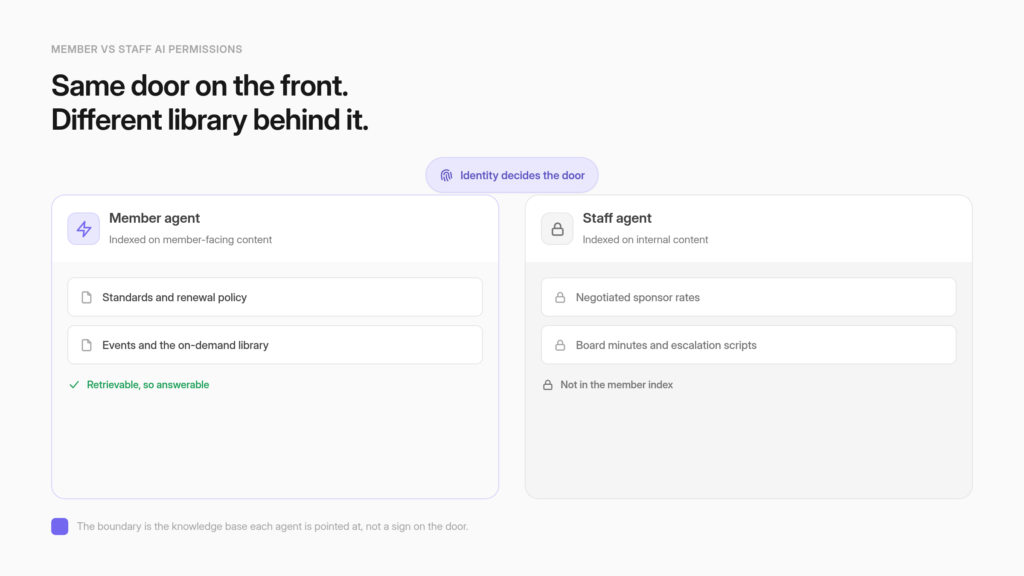
The line between member content and staff-only content is drawn by which knowledge base an agent is pointed at, so the reliable pattern is two agents: a member agent indexed on member-facing content, a staff agent indexed on everything else.
Persona text lives in the system prompt, and OWASP’s current guidance is direct about the limits of that. Privilege separation and authorization checks must not be delegated to the model.
One warning before you build. In CustomGPT.ai, “Member” is the name of a staff administration role. It does not mean an association member. Read every role name in that light, because the mismatch is the single most common way this gets misconfigured.
That distinction shapes how an answer engine built for member associations gets deployed in practice, and the mechanics start with what a persona actually does.
Persona sets voice, roles set administration, identity attributes set reach
Agent Persona shapes tone and behavior, and it is configured under Personalize. Roles decide what a staff account can administer. Identity-provider attributes decide which agent a person lands on after signing in. Persona text is instruction. Roles and identity attributes are enforcement. Building a member and staff boundary out of persona text leaves the boundary unenforced.

Agent Persona controls how the assistant sounds and behaves
The Agent Persona is the instruction set that governs voice, framing, and conversational habits. It lives at Personalize > Agent Persona in the CustomGPT.ai interface, and the documentation describes it as the feature that configures how an agent communicates “by defining its tone, behavior, and interaction style.”
For an association, this is where a certification assistant learns to answer in the register a candidate expects, where a member-portal copilot learns to name the renewal page instead of describing it vaguely, and where the assistant learns what to say when it has nothing to offer.
Getting how an agent persona shapes tone and behavior right is real work with real payoff, and none of it is access control. A persona is a request the model is asked to honor. It carries no mechanism that prevents the model from retrieving a document, only language encouraging it not to.
Roles control what a staff account can do inside the account
Roles are the account-level permission model, and they govern staff. Owner, Team Administrator, Administrator, Member, and Chat-only each carry a defined scope over agents, conversations, logs, and subscription settings.
Custom roles let an association shape a permission set that matches how its team is organized, and agent-specific roles narrow that set to chosen agents. These are enforced by the platform rather than requested of the model, so a staff member without a permission cannot use it regardless of what any agent has been told.
The practical use for an association is straightforward. An education coordinator administers the certification agent. A membership director administers the portal agent. Neither reaches the other’s data sources, and the finance lead who only needs answers gets no administrative surface at all.
Because the platform enforces these rather than the model, a role assignment survives a persona rewrite, a model change, and a staff handover without anyone re-checking it.
Identity-provider attributes control which agent a person reaches
The third control operates before a conversation starts. When a member signs in through the association’s identity provider, the provider sends an attribute describing them, and that attribute determines which agents they land on. A first-year member and a fellow can be routed to different agents.
Staff can reach an internal agent that members never see listed. This is the control that scales to a full membership roster, because it borrows the entitlement logic the association already maintains rather than duplicating it inside the AI platform.
Members authenticate as end users mapped to a role rather than as accounts the platform creates, so an association can route its whole roster through one entry point without provisioning a separate account per member, which means roster size is not bounded by a per-seat count. It also has an important property that persona text lacks.
A member whose attribute does not match a configured role does not get a politely refused answer. They do not reach the agent at all. For an association whose entitlements already live in an AMS or a directory, that keeps one system as the authority on who counts as a member and stops the AI platform from becoming a second roster to maintain.
Persona text lives in the system prompt, and the system prompt is not a security control
A persona instruction such as “never reveal staff-only pricing” is a behavior request inside the system prompt, and OWASP’s LLM07:2025 entry on system prompt leakage treats that layer as the wrong place to enforce a boundary. The reason it gives, quoted in full below, is the design instruction the rest of this section turns on.
OWASP names the failure directly
The OWASP Top 10 for Large Language Model Applications entry on system prompt leakage addresses this in its own words: “It’s important to understand that the system prompt should not be considered a secret, nor should it be used as a security control.” The same entry goes further on the specific question an association is asking. “Critical controls such as privilege separation, authorization bounds checks, and similar must not be delegated to the LLM, either through the system prompt or otherwise.”
OWASP also warns that “sensitive data such as credentials, connection strings, etc. should not be contained within the system prompt language.” Read that as a design instruction rather than a warning about a rare edge case. Any separation an association needs to hold under pressure has to be implemented somewhere the model cannot reinterpret it, and persona text is not that place.
Content the assistant can retrieve is content it can surface
The practical consequence lands on the corpus. If negotiated sponsor rates sit in the same index as the member FAQ, the persona instruction telling the assistant to keep quiet about sponsor rates is the only thing standing between a member and that number. Instructions are negotiable in a way indexes are not.
A member does not need to be adversarial for this to fail, and most of the time nobody is trying anything clever. A reasonable question phrased in an unanticipated way is enough, because the retrieval step does not consult the persona before deciding what is relevant.
The document surfaces, the model reads it, and the answer reflects what it read. Removing the document from the index removes the failure mode entirely, and it does so without depending on the model behaving as instructed.
The enforced boundary is the knowledge base each agent is pointed at
Two agents give you a boundary that holds without depending on the model’s cooperation. A member agent indexes member-facing content. A staff agent indexes internal pricing, board material, and case notes. A question the member agent cannot retrieve is a question it cannot answer, whatever its persona says. Corpus separation works on every plan.

A member agent and a staff agent are two agents with two indexes
Running two agents sounds like extra work and mostly is not, because the two audiences want different things anyway. The member agent answers questions about benefits, standards, events, renewal, and the content library dues paid for.
The staff agent answers questions about process, escalation, sponsor terms, and the internal record. Each gets a persona tuned to its audience, and each gets a corpus scoped to what that audience is entitled to see. GEMA’s member assistant runs exactly this shape at one of the world’s largest music rights collecting societies: “Melody,” described as “a 24/7 digital assistant embedded on its public website and member portal,” alongside an internal deployment integrated with knowledge repositories like Confluence “so employees can access relevant information.”
GEMA’s published figure across both is “248,000+ inquiries answered via chatbots (external and internal).” The split is visible in how the work divides too, since in GEMA’s account “AI handles high-volume, repeatable inquiries. Staff handle complex cases, escalations, and situations requiring judgment.”
GEMA operates at a scale a 25-person association will never match, so the transferable part is the shape rather than the volume. Two audiences, two corpora, one escalation path to a human.
The split follows the content, so sorting is editorial before it is technical
The hardest part of this project is deciding which side each document belongs on, and it is editorial work before it is technical work. Be realistic about the size of it. A few hundred sources is a focused afternoon. A library in the thousands is a multi-week pass that needs a named owner and a written rule, which is the honest shape for an association that has been accumulating content for a decade. Public standards, event logistics, renewal policy, and the on-demand library sit on the member side.
Negotiated sponsor rates, board minutes, staff escalation scripts, and anything with member names attached sit on the staff side. Ambiguous items are common, and the useful test is simple: would you be comfortable if a member read this verbatim in an answer. Case notes carrying member names raise a further question worth settling before ingestion rather than after, which is whether that material belongs in any index at all.
VdW Bayern’s assistant works inside a large internal corpus at the digital innovation subsidiary of VdW Bayern e.V., the Bavarian housing-industry association whose members are more than 500 public, cooperative, municipal, and church-affiliated housing organizations. It was trained on 3,620 internal documents and handled “over 7,000 questions across 2,000 conversations in the first six months,” with 84% of user interactions receiving positive feedback. Writing your sorting rule down beats deciding case by case later.
The pass is also the moment to catch documents nobody has reviewed in three years, since a stale internal policy answering member questions confidently is its own kind of exposure.
Budget for the ongoing cost as well, because two indexes turn into two copies of the same document if nobody watches. Keep member-facing material canonical on the member side and let the staff agent index internal-only sources, so a change to renewal policy is one edit instead of two that quietly drift apart. Where staff also need something member-facing, send them to the member agent rather than duplicating the file into the staff corpus.
Associations that skip this rule usually discover it a year later, when the two agents start giving different answers to the same question and nobody can say which one is current.
Grounding in an approved corpus reduces hallucination without removing the need for review
Pointing an agent at a defined corpus narrows the space it can invent in, and answers boundaried to approved content behave far more predictably than open-web generation. The accurate description is that grounding reduces hallucination rather than eliminating it. A member agent restricted to member-facing content can still summarize a policy imprecisely, or answer a question about a standard with more confidence than the source supports.
For a professional membership, where a wrong answer about a certification rule or a compliance deadline costs trust that took years to build, keep a human review path for the topics where accuracy is load-bearing. Corpus separation solves the exposure problem cleanly. It does not solve the accuracy problem, and the two deserve separate plans. A workable division of labor is to let the boundary handle what the assistant may see and let review handle what it may assert without a human checking first.
Roles govern staff administration, and the role called Member is a staff role
CustomGPT.ai roles cover Owner, Team Administrator, Administrator, Member, and Chat-only. Owner holds full control over conversations, logs, and subscription. Team Administrator can create new team roles, and Administrator cannot. Member can create agents and contribute data sources. None of these words refer to an association member.

The five built-in roles and what each one can reach
The documentation for the built-in roles defines the ladder plainly. The Owner “has the highest level of permissions within a team” with “full control over team conversations, logs, and subscription management.” Team Administrator and Administrator are both described as roles “for people who need similar access as the account owner,” and the difference between them is that Team Administrator can create new team roles while Administrator cannot.
Member sits below both: “Members can create agents, contribute data sources, and manage their own conversations. They have limited permissions compared to Administrators and Owners.” Chat-only sits at the bottom of the ladder with no administrative surface. For an association mapping its own staff, the useful shape is one Owner, a small number of Administrators, and Member-level access for the program staff who build and maintain agents.
| Role | Scope, per the documentation |
|---|---|
| Owner | Highest permissions in the team, full control over conversations, logs, and subscription management |
| Team Administrator | Similar access to the account owner, including creating new team roles |
| Administrator | Similar access to the account owner, but cannot create new team roles |
| Member | Can create agents, contribute data sources, manage own conversations; limited compared to Administrators and Owners |
| Chat-only | Interact with agents, no administrative or management features |
Every row above comes from the live pricing grid except the Chat-only row, which comes from the teams and collaboration page.
The Chat-only role restricts a user to conversation with no administrative access
The Chat-only role “allows users to interact with agents in the app while restricting their access to any administrative or management features.” That describes the staff member who needs answers and nothing else: a chapter coordinator, a part-time events lead, a board liaison who should never see a data source screen. One gating fact matters before you plan around it.
Chat-only is available only to teams on the Enterprise plan, which CustomGPT.ai confirms on its teams and collaboration page as a role “specifically available for customers on our Enterprise subscription plan.” Any older material presenting Chat-only as generally available on lower tiers is out of date, and an association on Standard or Premium should not build a rollout plan that assumes it.
The workable substitute on those plans is to give occasional staff no account at all and let them reach the member agent through the same portal embed everyone else uses.
Every role name reads as a staff permission level
The terminology trap is worth restating because it causes real misconfiguration. When an association executive sees a role called Member, the natural reading is “this is the role I give my members.” It is not. Member is a staff administration role with the ability to create agents and contribute data sources, which is close to the opposite of what an association member should hold.
An association member maps to end-user access through the identity provider, or to an embedded assistant inside the member portal. Neither path involves assigning them a role in the account, and neither turns them into a workspace user. Staff get roles. Members get routed.
Holding those two ideas apart makes the rest of the configuration straightforward, and it prevents the specific mistake of granting agent-creation rights to people the association never intended to let near a data source.
Agent-specific roles narrow permissions to chosen agents, and account-level permissions never appear in them
Agent-specific roles let you assign permissions that apply only to chosen agents, so an education coordinator can administer the certification agent without touching the member portal agent. The documentation states the hard limit directly. Account-level permissions are never available in agent-specific roles.
Permissions scoped to chosen agents match how association teams actually divide
An association with a certification program, a member portal, a conference, and an advocacy arm ends up with several agents, each owned by a different part of the staff. The documentation on permissions scoped to chosen agents describes the fit: “Agent-specific roles let you assign permissions that apply only to chosen agent(s).” That lets the education director own the certification agent’s content, sources, and settings while having no reach into the portal agent that the membership team maintains.
Setting different user permissions for different agents also lowers the cost of a mistake. Someone who mis-ingests a document or misconfigures a persona affects one agent, not the whole account. For a small staff where one person often wears three hats, that containment is worth more than the strictness of the model suggests. It also makes seasonal help safe to onboard, since a conference contractor can be given the event agent for six weeks and nothing else.
Account-level permissions stay out of agent-scoped roles
The guardrail is stated in the same documentation: “Account-level permissions are never available in agent-specific roles.” This is the sentence that keeps scoped roles genuinely scoped. Without it, an agent-level role could quietly accumulate account-wide reach through some combination of granted permissions, which is the classic path by which a narrow role becomes a broad one over a few years of staff turnover.
The documentation gives the examples: “you cannot allow users to create new agents, add team members, or view subscription details.” Because billing, subscription, team management, and account-wide settings sit outside what an agent-scoped role can hold, the ceiling is fixed by the platform rather than by an administrator’s discipline.
One deliberate exception is worth knowing before an access review, since the same note adds that “administrators can now optionally allow selected members to create their own personal agents through this role.” Check that toggle when you audit, because it is the one setting that lets an agent-scoped role reach beyond the agents named in it. Everything else about the role is fixed, which makes the answer to “who could reach the staff agent” verifiable rather than remembered.
Your plan decides which separation controls you can use
On Standard, roles are unavailable and the account carries one team member, so separation comes from running two agents. Premium adds account-level roles and three team members. Enterprise adds agent-level roles, Chat-only, and identity-provider gating of chat access. SOC 2 Type 2 and GDPR coverage apply across plans.

The separation controls, plan by plan
Checking the plan-by-plan control grid before designing an access model saves a rescope later. Standard carries one team member, so there is no second account to assign a role to. Premium carries three team members and turns on account-level roles. Enterprise adds agent-level roles and gating of chat access through your existing identity provider.
GDPR compliance, SOC 2 Type 2, SSL encryption in transit, and 256-bit AES encryption at rest are included on all three tiers, while a Data Processing Agreement is Enterprise only.
|
Control |
Standard |
Premium |
Enterprise |
|
Team members |
1 |
3 |
Custom |
|
Account-level roles |
Not included |
Included |
Included |
|
Agent-level roles |
Not included |
Not included |
Included |
|
Chat-only role |
Not included |
Not included |
Included |
|
Gate chat access using your existing IdP |
Not included |
Not included |
Included |
|
SOC 2 Type 2 and GDPR |
Included |
Included |
Included |
|
Data Processing Agreement |
Not included |
Not included |
Included |
Every row above comes from the live pricing grid except the Chat-only row, which comes from the teams and collaboration page.
Corpus separation is the control available to every association
Read that grid alongside the thesis and something useful falls out. The control that decides what the member agent can surface, running two agents on two knowledge bases, carries no plan gate at all. Standard includes two AI agents and Premium includes five, so a small association on a lower tier can build a member agent on the public library and a staff agent on the internal one, and the member agent cannot surface staff content on any tier, because that is enforced by what each agent can retrieve.
One guardrail makes the separation complete on the lower tiers, where identity-provider gating is not available: keep the staff agent off the open web. Run it as a private, login-gated deployment, or embed it only inside a staff-restricted area, so a member never reaches it directly in the first place.
What the higher tiers buy is identity-provider routing that closes that second gap automatically, not the existence of the corpus boundary. That inverts the usual assumption that serious access control requires an enterprise contract, and it is the reason a small membership team can start now rather than waiting for a budget cycle.
One consequence of the seat counts deserves saying plainly, because it is the part that bites after the boundary is built. Standard carries a single team member, so on that plan the staff agent has exactly one person who can sign in and administer it.
Premium raises that to three. Chat-only, the role designed for staff who need answers without any administrative surface, is Enterprise. A small association gets the enforced boundary on any tier and can still find that giving five program staff their own way into the staff agent is a plan decision rather than a configuration one.
Budget for the seats separately from the boundary, since they scale on different logic. Associations sizing this against a real staff count get further reading the tiers against headcount than against agent features. The sibling piece on enterprise-grade member AI without an enterprise team works through the staffing side of that.
Identity-provider attributes decide which agent a member lands on
End-user identity-provider access lets members authenticate through Google Workspace, Microsoft Entra ID, Okta, PingOne, or any SAML 2.0 provider and land on the right agents automatically. A role in Teams with a name matching the identity-provider attribute value, set to local scope with chat-only permissions and specific agents assigned, performs the routing.
Members authenticate through the directory the association already runs
The design goal is that nobody learns a new login. Members “authenticate the way they always do” through the provider the association already operates, and they land on the agents their attribute allows. In the platform’s own terms, end-user IdP access authenticates members through your identity provider and routes them to only the agents their role permits, without creating an account for anyone, and the single sign-on that carries them is configured with SAML 2.0 on the directory the association already runs. CustomGPT.ai describes the operational shape in the same announcement: “Sessions last 24 hours and no user is ever stored in CustomGPT.ai.”
For a membership team, that removes the two costs that usually sink a member-facing rollout, which are account provisioning at roster scale and password support for a non-technical base. It also settles a question that comes up in every board conversation about member data. Members are not becoming users of a third-party platform. They are authenticating against the association’s own directory and reaching an agent, and the assistant holds no roster of its own. That answer tends to end the data-residency conversation faster than any compliance document, because there is no member list to residency-check.
The attribute-to-role match is the routing mechanic
The configuration is specific enough to hand to an IT director. The documented setup for an identity-gated agent is a role in Teams whose name “must exactly match the attribute value your IdP will send,” and it “is case-sensitive (for example, if your IdP sends partner-support, the role name must be partner-support).” The same instructions say to deselect “Role is Global,” since “keeping the role local ensures access is strictly controlled and limited to the intended agents,” to set permission to Chat Only, which “prevents end-users from accessing any settings or configuration,” and then to “select which agents this role can access.” That is the whole mechanism. Your directory already knows who is a fellow, who is a student member, and who is staff, and the role name is the join key between that fact and the set of agents a person sees.
An association can therefore run one member agent for the general roster and a second for a credentialed tier without either group knowing the other exists. This capability gates chat access to agents using your existing IdP and is available to Enterprise customers with SSO already configured.
Membership status changes in your directory, and access follows
Revocation is the part worth getting right before launch, because it is the part a membership director will be asked about. When someone’s membership lapses, the change happens in the association’s system of record. Remove them from the group or change the attribute, and the next sign-in no longer matches a role, so access ends without anyone touching the AI platform.
The same path handles a staff departure, a chapter reorganization, or a tier upgrade. Identity belongs in the AMS and the identity provider rather than in persona text, which is why members land on the right agents automatically instead of being asked to identify themselves to the assistant.
The companion piece on passing identity through your AMS covers how iMIS, Fonteva, MemberClicks, and Higher Logic feed that layer.
Role separation controls what each side can ask, and reporting stays aggregate
Separation changes what each audience can reach. It does not produce a per-member activity record. Reporting covers queries, users, failures, and sessions, plus location, the team and guest split, source, and query status. That shows staff-side against guest-side volume. It does not show what an individual named member asked.
What the analytics actually report
The analytics surface reports the number of queries to your agent, users, failures, and sessions, alongside a User Location Table, a Team and Guest chart, a Source chart, and a Query Status chart. Every one of those is a count or a distribution.
The Team and Guest split is the one that matters most for a two-agent setup, since it separates staff-side volume from member-side volume and lets you see which audience is actually using what you built.
Failures and query status are the editorial signal worth watching weekly, because a rising failure rate on the member agent usually means the corpus is missing content members expect to find rather than that the assistant is performing badly. That reading turns the reporting into a content roadmap for the membership team. Reviewed monthly, the failure list is usually a shorter and more honest version of the content audit an association keeps meaning to run.
Treat it as aggregate visibility and plan governance accordingly
Do not promise a board a per-member dashboard. The reporting is aggregate by design, and the end-user identity path reinforces that, since sessions last 24 hours with no user stored. An association can see that member-side volume doubled after a portal launch and cannot see that a named member asked six questions about lapsing.
For most associations that is the correct posture rather than a limitation to work around, because a professional member asks more candid questions of a tool that is not building a file on them. Set expectations early with anyone who arrives at the project imagining individual engagement scoring. What you get is the shape of demand across the membership, which is enough to drive content strategy and not enough to profile a person.
Say that plainly in the project brief so nobody discovers it during a board presentation.
The trust layer under a staff-only corpus
Putting internal association material behind a staff agent depends on the platform controls beneath it. SOC 2 Type 2 compliance, GDPR readiness, and 256-bit AES encryption apply across plans. A data-processing agreement is Enterprise. The staff agent runs login-gated, reachable only by users signed in to the account.
SOC 2 Type 2, GDPR, and encryption apply on every plan
The compliance floor is what lets a small association defend this setup to a board without an enterprise contract. CustomGPT.ai states it is SOC 2 Type 2 compliant, with “SSL encryption during transit” and “industry-standard 256-bit AES encryption at rest,” and the plan grid above lists SOC 2 Type 2, GDPR compliance, and SSL 256-bit AES encryption as included on Standard, Premium, and Enterprise alike.
That matters for the staff corpus specifically, since board minutes and negotiated terms are the material a governance committee will ask about first. For associations whose members are lawyers, clinicians, engineers, or security professionals, expect the question to arrive with technical follow-ups, and the explainer on how SOC 2 and single sign-on fit together is a reasonable thing to forward before a procurement call.
The DPA sits on Enterprise, so an association with a GDPR obligation should raise that during evaluation rather than after. Associations with European members or European staff usually find this is the one line item that decides the plan, independent of how many agents they intend to run.
The staff agent runs login-gated, and the role model is what you review
A staff agent should not sit on the open web. Running it as a private, login-gated deployment means it is “accessible only by users logged in CustomGPT.ai system,” so nobody reaches it without first signing in to the account. That login gate is the first half of a reviewable boundary. The second half is the role model above.
At the annual access review, someone has to answer who could reach the staff agent over the past year and whether that list still matches the org chart, and staff turnover, chapter volunteers, and contractors all leave residue in permission systems.
The role model is what makes that answer tractable: check who holds Administrator or higher, check which agent-scoped roles exist and what they cover, and confirm the identity-provider groups still map to the tiers they were created for. Booking that as a recurring calendar item beats treating it as a project, because permissions drift quietly and nobody files a ticket about it.
Splitting a member agent from a staff agent, in four steps
Sorting content comes first, because every later control assumes the two corpora already exist. Build the member agent on member-facing content, build the staff agent on internal material, assign staff roles at the narrowest scope that lets people work, then route members through your identity provider if your plan supports it.
- Sort the content into member-facing and internal. Run the “would I be comfortable if a member read this verbatim” test on every source. Ambiguous items go to the staff side until someone decides otherwise.
- Build two agents on the two corpora. The member agent indexes only member-facing material. The staff agent indexes the internal record. This is the step that creates the enforced boundary, and it works on every plan.
- Assign the narrowest staff role that still lets people work. Use account-level roles on Premium and above, agent-scoped roles on Enterprise, and Chat-only for staff who need answers rather than administration.
- Route members through your identity provider, or embed inside the portal. Enterprise accounts with SSO configured can match identity attributes to roles. Associations on other plans embed the member agent inside the members-only area their portal already restricts.
Persona text still earns its place after all four steps. Tone, refusal language, escalation phrasing, and the sentence the assistant says when it has nothing useful all come from persona settings, which you set up through the Persona Builder by describing the role, tone, and behavior you want, and they are what make the member agent feel like it belongs to your association rather than to a vendor.
Pair that with citations, since an assistant that returns the source inline with the answer lets a member check the standard rather than trusting a paraphrase. Persona sits on top of the boundary, and the boundary sits underneath it.
Written in that order, the two stop competing for the same job, and the persona work gets easier because it no longer has to carry a security burden it was never built for. For associations building the first agent members ever meet, the onboarding agent new members meet first is usually the one worth shipping ahead of the staff side.
Three limits to plan around
Identity-provider gating of chat access and agent-level roles sit on Enterprise, so an association on Standard or Premium separates member and staff answers through two agents and a portal embed rather than through attribute routing.
Seat counts bind at the same place, since Standard carries one team member and Premium three, and the Chat-only role for answer-only staff is Enterprise. Reporting is aggregate rather than per member, which rules out individual engagement scoring and is the right expectation to set with a board early. Grounding an agent in an approved corpus reduces hallucination without eliminating it, so the topics where a wrong answer carries real cost still need a review path.
None of those change the core answer. The boundary between what members can ask and what staff can see is enforced by the knowledge base each agent is pointed at, and every association can build it today. Roles and identity attributes decide who reaches which agent. Persona decides how that agent sounds once someone arrives.
To scope a two-agent setup against your own content and identity stack, work through it with the member-association team, or start a free trial and build the member agent on your public library first. The sorting work is the same either way, and it is the step that makes everything after it hold.
Frequently asked questions about member vs staff AI permissions
Can members and staff use the same AI assistant with different permissions?
They can share a platform, and they should not share a knowledge base. Permissions decide who reaches which agent. What an agent can retrieve decides what it can say. If internal pricing and board material sit in the same index as the member library, the only thing keeping that content back is an instruction the model can reinterpret. Running a member agent and a staff agent on two corpora is the pattern associations deploy member AI with, and it works on every plan.
What is the difference between an agent persona and a user role?
A persona is instruction. A role is enforcement. The Agent Persona feature configures how an agent communicates by defining its tone, behavior, and interaction style, which is where refusal language and escalation phrasing get set. Roles are the account-level permission model that governs what a staff account can administer, and the platform enforces them regardless of what any agent has been told. Writing “never discuss staff-only rates” into persona text is a behavior request. Assigning a narrow role, or pointing the agent at a corpus that lacks those rates, is a control.
Do our members need an account or a role to use the member assistant?
No. Association members reach the assistant either through an embed inside the members-only area your portal already restricts, or through your identity provider on Enterprise. Neither path makes them account users, and neither involves assigning them a role. Staff accounts are the ones that get roles, and staff sign-on runs through the same single sign-on setup your IT team already knows, with SAML support for Google Workspace, Microsoft Entra, Okta, and PingOne. Keep the two ideas apart: staff get roles, members get routed.
Which plan do we need for role-based access?
On CustomGPT.ai, account-level roles start on Premium, which carries three team members. Standard carries one team member, so there is no second account to assign a role to. Agent-level roles, the Chat-only role, and gating chat access through your existing identity provider all sit on Enterprise, and the teams and collaboration page confirms Chat-only as an Enterprise-subscription role. The separation that matters most carries no plan gate. Two agents on two knowledge bases is available on every tier.
How do we stop the member assistant from answering staff-only questions?
Remove the staff content from the member agent’s index. That is the only method that holds without depending on the model cooperating. OWASP’s 2025 guidance on system prompt leakage is explicit that “critical controls such as privilege separation, authorization bounds checks, and similar must not be delegated to the LLM, either through the system prompt or otherwise.” A member does not have to be adversarial for instruction-based blocking to fail. A reasonable question phrased in an unanticipated way is enough, because retrieval does not consult the persona before deciding what is relevant.
Why is there a role called “Member” if it is not for association members?
The name collides with association vocabulary and causes real misconfiguration. In the platform, Member is a staff administration role whose holders “can create agents, contribute data sources, and manage their own conversations,” which is close to the opposite of what an association member should hold. Read every role name as a staff permission level: Owner, Team Administrator, Administrator, Member, Chat-only. An association member maps to end-user access or a portal embed, never to a role in the account.
Can a board liaison or part-time coordinator get answers without admin access?
Yes, on Enterprise. The Chat-only role “allows users to interact with agents in the app while restricting their access to any administrative or management features,” which fits a chapter coordinator, a seasonal events lead, or a board liaison who should never see a data source screen. On Standard and Premium, the workable substitute is to give occasional staff no account at all and let them reach the member agent through the same portal embed everyone else uses.
How do we map our AMS or SSO groups to the agents someone sees?
Create a role in Teams whose name exactly matches the attribute value your identity provider sends. The match is case-sensitive. Deselect “Role is Global” so the role stays local, set permission to Chat Only, and select the specific agents that role should reach. Your directory already knows who is a fellow, a student member, or staff, so the role name becomes the join key between that fact and the agents a person lands on. Passing identity through iMIS, Fonteva, MemberClicks, or Higher Logic feeds the same layer. The capability is Enterprise with single sign-on already configured.
What happens to a member’s access when their membership lapses?
Access ends at the next sign-in, and you change nothing on the AI platform. Revocation happens in your system of record. Remove the person from the group or change the attribute your identity provider sends, and their next sign-in no longer matches a role, so they no longer reach the agent. The same path handles a staff departure, a chapter reorganization, or a tier upgrade. One system stays the authority on who counts as a member, which avoids maintaining a second roster.
Can we see which individual member asked what?
No, and plan governance around that. Conversation reporting covers queries, users, failures, and sessions, plus location, a team and guest split, source, and query status. Every one of those is a count or a distribution. You can see that member-side volume doubled after a portal launch. You cannot see that a named member asked six questions about lapsing. Say so in the project brief rather than letting a board discover it during a presentation, and treat the rising failure list as your content roadmap.
Can the assistant still get a certification or compliance answer wrong?
Yes, and that risk needs its own plan. Pointing an agent at an approved corpus narrows the space it can invent in, and grounding reduces hallucination without eliminating it. A member agent restricted to member-facing content can still summarize a policy imprecisely or answer with more confidence than the source supports. Corpus separation solves exposure. It does not solve accuracy. For certification rules and compliance deadlines, keep a human review path before members rely on the answer.
Related Resources:
-
- What Member Questions Reveal: AI Conversation Analytics: See how the Team vs. Guest volume split this article covers becomes an ongoing analytics read.
- Enterprise Security and SSO for Association Member AI: See the broader security posture that role-based routing sits inside.
- AI for Manufacturing and Packaging Trade Associations: See member vs. staff persona routing applied in a real trade association deployment.
- AI for Healthcare Credentialing Bodies: See how role-based access separates candidates from credentialing staff in a regulated vertical.
- An Internal AI Knowledge Assistant for Association Staff: See the staff persona this article’s role-based routing sends internal questions to.
- AI for State Employer Associations and Their HR Libraries: See role-based access applied to a state employer association’s HR content specifically.
- AI Pricing for Associations: Per-Member, Not Per-Query: See how a two-agent, role-routed setup fits into the same per-member pricing model.
- CustomGPT.ai vs. Higher Logic AI Assistant: See how thrive security groups compare with isolated private agents — two ways to enforce the same member and staff boundary.