Enterprise-Grade Member AI Without an Enterprise Team
An association can launch a member assistant without developers, and the harder question is procurement
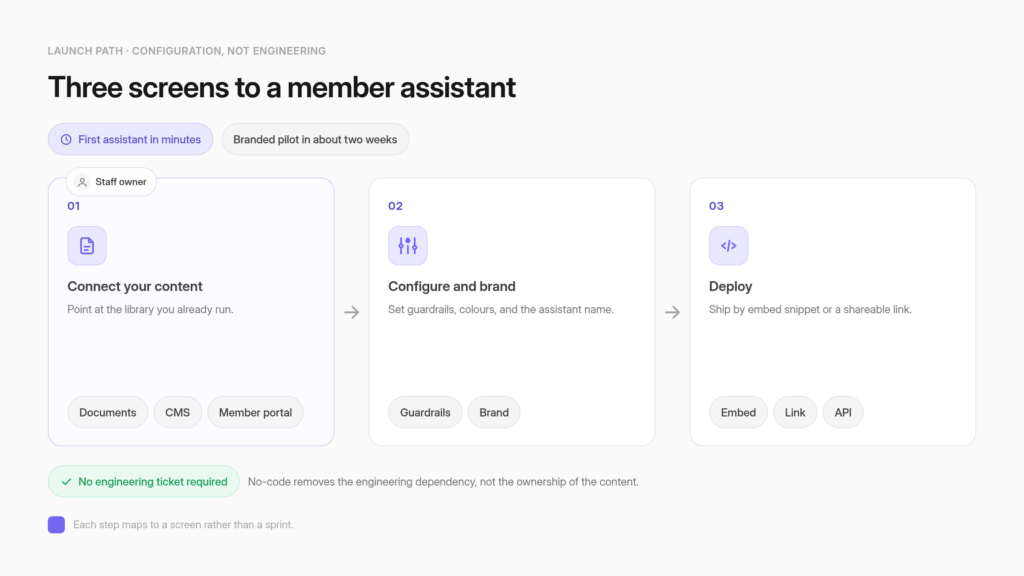
No, an association does not need developers or an IT project to launch a member AI assistant. Setup is configuration work rather than engineering: you connect content, set guardrails, brand the assistant, and deploy it by embed or link from a dashboard.
The objection that actually stalls these projects hides two different questions inside one feeling. The staffing question asks whether a three-person team can run this. The procurement question asks whether the tool will survive a board or legal review. They have different answers.
Staffing is the easier one. Most associations create a first assistant in under five minutes, a branded pilot with real content typically goes live in about two weeks, and organizations with zero internal engineers have already shipped working assistants.
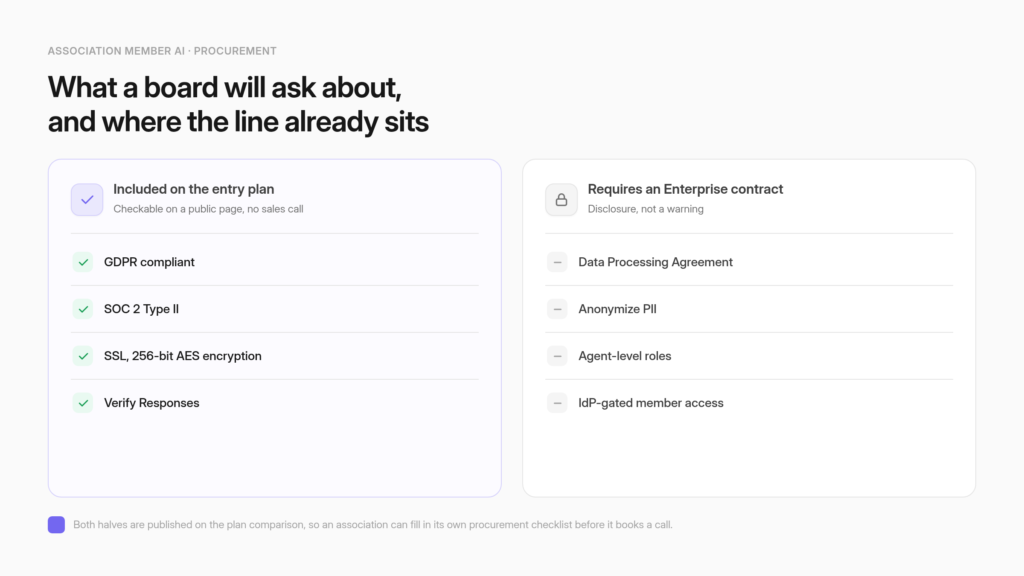
Procurement has a published answer that few vendors state plainly. On the CustomGPT.ai plan comparison, GDPR compliance, SOC 2 Type 2, SSL with 256-bit AES encryption, and Verify Responses are all marked Included on the entry tier, which runs $89 per month billed annually and $99 month to month. A Data Processing Agreement, PII anonymization, account and agent-level role controls, and identity-provider gating are not. Both halves are checkable on a public page, which is what makes member AI built for associationsdefensible to a board without a sales call.
Two caveats belong in the same breath. No-code removes the engineering dependency, not the ownership of the content. And the entry tier carries 500 messages a month, so message volume rather than security is usually what moves an association up a tier.
Associations already use AI, and what lags is readiness
ASAE’s first State of Associations report, published on March 23, 2026 and drawn from a year of ASAE pulse polls, found AI use widespread across the sector, at 87.5% for content and 44.3% for data, then stated that “readiness lags, with most organizations citing limited expertise and data privacy concerns.” Adoption is not the gap. Confidence is.
Read that finding as a membership director would. Staff are already using AI to draft newsletters and session descriptions. What they have not done is put an assistant in front of members, because that step invites questions about accuracy, privacy, and who signs off.
The same report describes the financial weather those decisions are made in. It reports “nearly 39% of CEOs reporting decline versus 10% reporting improvement,” and notes that “dues increases have more than doubled year over year.” Tight budgets and thin expertise push in the same direction: a scoped pilot on a published price beats a platform program. Under that pressure, the associations that move first tend to treat a member assistant as part of their broader case for AIrather than a side experiment.
The staffing question and the procurement question have different answers
“Can our team actually run this?” and “can we defend this to the board?” get collapsed into a single objection. They separate cleanly. Staffing is answered by the setup path and by organizations that have already done it with no engineers. Procurement is answered by a published plan comparison that names which controls are included and which are not.
ASAE’s two named barriers map onto these questions one to one. Limited expertise is the staffing question. Data privacy is the procurement question. Treating them as one problem produces the conclusion that an association needs an enterprise team, because no single answer satisfies both. Treating them separately produces two answers, and each one is short.
The sector’s own membership structure shows how normal small staffing is. ASAE runs an organizational membership tier for small-staff associationswith dues banded by headcount: “1-2 staff: $395 / 3-6 staff: $595 / 7-9 staff: $995.” An industry body that maintains a pricing band for two-person organizations is telling you that a two-person organization is a standard association, not an edge case. The tooling question for that organization is whether the work is configuration or engineering.
Launching a member assistant is configuration work rather than an engineering project
Connecting content, setting guardrails, branding the assistant, and deploying it by embed, link, or APIare dashboard tasks. Most associations create a first assistant in under five minutes. A branded pilot running on real association content typically goes live in about two weeks. No engineering ticket is required to start.
The product page for associations states the staffing requirement in one line: “No engineering resources required. Your team configures and launches everything from a no-code dashboard.” Its FAQ answers the developer question directly, saying that all essential features are fully no-code and that you upload or sync content, set guardrails, brand the assistant, and deploy via embed, link, or API.
The path itself is three steps: connect your content, configure and brand, deploy. Each maps to a screen rather than a sprint, which is what the association deployment pathdescribes.
Content is usually the step people expect to be hard, and it is where the leverage sits. The platform supports over 1,400 file formats and connects to more than 100 platforms directly, including Google Drive, CMS platforms, and member portals, with thousands more reachable through the API.
Most of an association’s library already lives in systems you already run, so the work is pointing at it rather than migrating it. The same dashboard is where you curate what enters the knowledge base, adding or removing sources so nothing stale or off-topic reaches a member’s answer, which is the ownership no-code hands you rather than takes away.
Organizations without in-house engineers have already shipped this
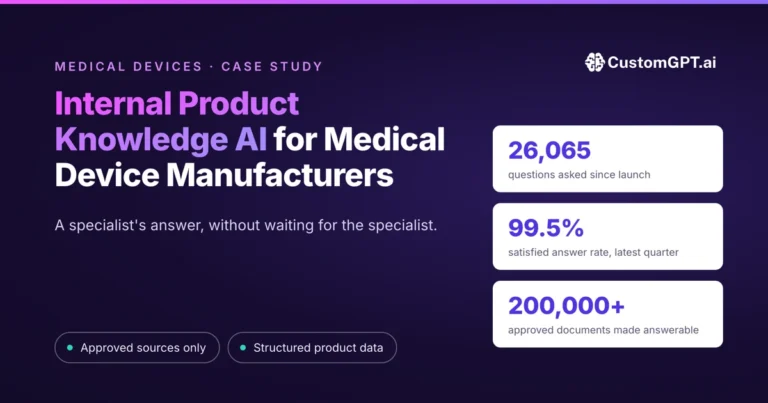
Two published customer stories name the constraint directly. GEMA, a collecting society representing over 100,000 members, records the engineering cost of its deployment as zero. VdW Bayern DigiSol, a German housing federation working under staffing shortages and regulatory complexity, deployed an embedded assistant across regulated content.
GEMA is the closest shape to an association in that set. Its case study describes an organization “representing over 100,000 members and approximately 2 million professional music consumers,” and its own before-and-after table records the engineering cost of the project as zero, achieved with a no-code deployment.
The FAQ puts the timeline at “Days, not months, with no developer required.” Those are resourcing facts, not outcome claims, and resourcing is what answers the staffing question for a member organization operating at national scale. What GEMA’s performance numbers show belongs to GEMA’s corpus and its membership, and they do not transfer to yours.
VdW Bayern DigiSol is closer to an association’s shape. Its case study describes an organization “confronted with regulatory complexity, staffing shortages, and pressure for digital transformation,” which built WohWi AI on more than 3,600 internal documents using a no-code model. The published results are a 50-60% reduction in task time, 84% positive feedback, and over 7,000 questions across 2,000 conversations in six months.
Document creation tasks that took 45 or more minutes now take 15 to 20. The full deployment, from configuration through knowledge-base ingestion, testing, and public launch, completed in under 60 days.
Managing Director Dr. Korbinian Weisser is quoted saying, “The platform made it straightforward to turn our vision for WohWi AI into reality, and the results have been significant.” That is a federation of housing organizations facing staffing shortagesshipping regulated member content without an internal AI team.
The security questions a board asks first are already answered on the entry plan
On the published plan comparison, three of the credentials a board asks about first are marked Included on the $89 per month Standard tier: GDPR compliance, SOC 2 Type 2, and SSL with 256-bit AES encryption. A fourth line an association leans on, Verify Responses, is a product feature rather than a certification, and it sits at the same tier. An association can verify all four on a public page instead of asking a salesperson and waiting for a security questionnaire to come back.
That matters because the four items are usually the first four questions a board or a general counsel asks. SOC 2 Type 2 sits on the entry tier alongside GDPR compliance and encryption, rather than behind a custom contract. The security documentation corroborates the same posture, confirming SOC 2 Type 2 compliance, industry-standard 256-bit AES encryption at rest, and self-contained agents with no data sharing between bots, even within the same account.
Verify Responses is the fourth, and it is the one an association will use most. The plan comparison describes it as a feature where “builders and admins can check answers for accuracy and compliance,” and it is available on the entry plan without an upgrade. It is a builder-side feature: the team scores an answer’s claims against its sources while testing, catching weak spots before rollout, and the member never sees the auditing panel.
One honest caveat for the entry tier: the plan comparison notes Verify Responses burns fewer credits on Premium and Enterprise, so on Standard’s 500-credit envelope heavy verification draws down the same monthly allowance that answers members (the credit arithmetic below), which argues for concentrating it in the testing phase rather than running it on every live answer. Even used that way, an accuracy review step available at the lowest tier changes what a pilot can safely cover for an association publishing standards or certification guidance.
A fifth question tends to arrive unprompted from members rather than from the board, and it concerns training data. The association product page answers it in the security FAQ, which lists “SOC2 Type 2, GDPR, SSL in transit, 256-bit encryption at rest” and states that your data never trains external models.
For an association whose library represents decades of member-funded research, standards work, or curriculum, that sentence is often the one that decides whether the project proceeds. It is worth pulling into a board memo verbatim alongside the four plan lines, because the four lines answer what the vendor is certified for and this one answers what happens to your content after you upload it.
One boundary: ISO/IEC 42001 certification is not in place today, and the published position is that the company is on track for it. Do not carry it into a board memo as a completed certification.
Four more controls genuinely require an Enterprise contract
A Data Processing Agreement, PII anonymization, account and agent-level role controls, and identity-provider gating are marked Not included on the entry plan. PII anonymization and account-level roles arrive on Premium. The DPA, agent-level roles, and IdP-gated access are Enterprise only. Knowing this before procurement asks is worth more than discovering it after.
The gating on the published comparison is specific. Anonymize PII moves from Not included on Standard to Included on Premium, and that Premium control is the platform’s data anonymizer, which removes personally identifiable information from the image files you upload. Account-level roles follow the same line.
Agent-level roles and the Data Processing Agreement are Included only on Enterprise, and the DPA is explicitly not available on Premium. The access-control row reads “IdP as access,” described as gating chat access to agents using your existing login system, and it is Enterprise only. Enterprise also carries custom security controls, Azure OpenAI and AWS Bedrock options, and the support capacity a small team cannot staff for itself: a dedicated account team, forward-deployed engineering, fully custom solutions, and product-roadmap collaboration.
For a three-person association that support layer is the part of the promise that matters most, because the Enterprise contract supplies specialist capacity the team does not employ instead of asking it to hire one.
Translated for an association, two triggers move you off the entry tier regardless of team size. If member-only content has to be gated so that answers respect who is asking, you need member access gated through your existing identity provider, which is an Enterprise line item. Mechanically, members sign in with the login they already have, get mapped to a role, and reach only the agents that role permits, without any of them creating a separate account.
If legal requires a signed Data Processing Agreement before member data touches a vendor, the entry tier will not clear that review either. Both are worth knowing before you build a business case, and both belong on the checklist procurement will hand yourather than in a surprise at contract stage. Everything else an Enterprise contract addsis a scale decision.
The whole line, in the form a board paper needs it:
| Control | Standard ($89/mo) | Premium ($449/mo) | Enterprise |
|---|---|---|---|
| GDPR compliance | Included | Included | Included |
| SOC 2 Type 2 | Included | Included | Included |
| SSL, 256-bit AES encryption | Included | Included | Included |
| Verify Responses | Included | Included | Included |
| Anonymize PII | Not included | Included | Included |
| Account-level roles | Not included | Included | Included |
| Agent-level roles | Not included | Not included | Included |
| Data Processing Agreement | Not included | Not included | Included |
| IdP as access (identity-gated chat) | Not included | Not included | Included |
Prices are the annual-billing rate. Every row is readable on the public plan comparison, which is the point: an association can fill in its own procurement checklist before it books a call.
Seats are not billed per user, and the entry plan’s real ceiling is message volume
The plan comparison states that adding team members carries no per-seat fee and that pricing scales with credit usage across the account. Each plan still caps how many staff logins exist: one on Standard, three on Premium, custom on Enterprise. A five-person membership team needs Premium or above. The tighter limit is message volume, not seats.
The exact wording is “adding team members has no per-seat fee; pricing scales with credit usage across your account.” Read alone, that sentence invites a conclusion the plan table contradicts. Standard includes one team member. Premium includes three. Enterprise is custom. So the honest reading is that seats are not billed incrementally and the number of seats is still fixed by plan.
The rest of the entry-tier envelope matters for the same reason. Standard carries 500 credits per month, 2 AI agents, 5,000 documents per agent, and a 7-day analytics window. Premium carries 2,500 credits, 5 agents, 20,000 documents per agent, and a 1-year window. Enterprise is custom. The published plan comparison draws that linein a table anyone can read before a call.
Credits are the line item to model first, and the pricing page defines them plainly: “Credits are spent on messages and actions. Sending 1 message costs 1 credit,” with actions costing additional credits. Standard’s 500 credits a month is therefore about 500 member messages, which is fewer than 500 conversations, since a member who asks a follow-up spends a second credit. At the ceiling, “the system pauses message responses.” Additional capacity is purchasable at $375 per month billed annually for 2,500 extra query credits.
Do that arithmetic before the security review, because it usually decides the tier on its own. Five hundred members each asking a single question exhausts the month’s credits in one exchange apiece. An association with a few thousand members running a genuinely useful assistant will pass the entry allowance during the first busy week of a renewal cycle. The entry tier is priced as a pilot envelope, and nothing about the security posture changes when you outgrow it.
The 7-day analytics window is the next constraint associations underestimate. If you intend to report member-question trends to a board quarterly, a seven-day lookback will not support it, and that alone can be the reason to sit on Premium rather than the security features.
Most vendors do not publish this line at all
The generic no-code chatbot builders an association finds first do not publish a plan-by-plan compliance breakdown. On Chatbase’s pricing page as observed in July 2026, the plan-level items nearest to compliance appear in the Enterprise tier description, listing SSO, audit logs, custom roles and permissions, and HIPAA eligibility. The comparison table itself carries no compliance row.
Be fair about what that does and does not mean. Chatbase displays SOC 2 and GDPR badges in its page footer, which is an organization-level attestation. Absence from a pricing table is not absence from the company. The narrow, checkable claim is that the published table does not tell an association which controls it is buying at which tier, so answering a board question requires a sales conversation.
Name the real alternatives too. Higher Logic is the incumbent association community platform, and its AI Search Assistant answers from community discussions, uploaded documents, and official organizational content on community subscriptions. We put CustomGPT.ai and Higher Logic AI Assistant side by sideon ingestion, permissions, deployment, and pricing.. Member Lounge ships a member-facing assistant inside its engagement platform.
See seven association AI platforms comparedon citations, gated content, and published pricing.
AMS vendors such as GrowthZone compete from a different angle, since they already hold member records and identity, which is a genuine advantage whatever their current AI surface looks like. Generic builders like Chatbase, Dante AI and Jotform compete on speed and price. An association evaluating all of them will find strategy guidance in abundance and plan-level compliance detail almost nowhere.
The same opacity tends to obscure the costs that surface after launch rather than before. Architecture belongs on the same checklist, since retrieval keeps your data out of a training runin a way fine-tuning does not.
No-code removes the engineering dependency, not the governance one
Someone on staff still owns the corpus, the guardrails, and the review loop. ASAE’s own guidance says associations must define acceptable use, establish approval workflows, and maintain audit trails, and that staff still need to build operational capability alongside the tools. The assistant augments a team rather than replacing one.

ASAE’s February 2026 guidance on adopting AI safelyis blunt about the governance half. It states that “policies must clearly define what constitutes acceptable AI use, establish approval workflows, and provide audit trails to track methods and data sharing and usage,” and that “staff still need to develop operational and analytical capabilities alongside AI tools.” It also names the feeling directly, noting that “associations, particularly small-staff organizations, may feel overwhelmed by AI adoption,” and recommends starting small with a single high-priority challenge.
The product side agrees on scope: the association product page answers the replacement question by saying the assistant “augments your existing portal and staff by handling repetitive ‘where do I find…?’ questions so your team can focus on higher-value work.” That framing, an assistant that augments the staff you have, is the accurate one.
Two ceilings deserve naming before a board asks. Grounding an assistant on your own approved content sharply reduces fabrication, and no responsible vendor claims it reaches zero, which is why grounded answers reduce hallucination without eliminating itis the honest phrasing. What contains the residual risk is that answers arrive with the source attached, so a wrong or stale answer is visible and fixable rather than buried in confident prose. That is also why someone still owns the review loopafter launch.
The second ceiling is visibility. Conversation analytics show aggregate patterns in what members ask, not a per-member guarantee, and the entry tier keeps only seven days of that history. The weekly time cost of owning an assistant is real and it is the association’s to measure. Budget for a named owner who reviews flagged answers, retires outdated documents, and adds the content members asked for and did not find.
A small staff can commit to a scoped pilot rather than a platform program
The realistic first commitment is one assistant, one content set, one named owner, and a branded pilot of about two weeks on a plan whose compliance line is already published. Enterprise controls become a later decision driven by identity gating and legal paperwork, not by the size of the team.
Scoping the pilot is mostly a content decision. Pick the narrow band of questions that already consume staff time, which for most associations means membership benefits and renewal mechanics, certification and continuing-education requirements, or the standards and guidance documents members call about.
One of those bands, loaded as one content set, gives a pilot enough surface to be useful and a small enough boundary that a single owner can review what the assistant says. Resist the instinct to load the whole library at once. A narrow corpus makes the first round of wrong or missing answers legible, and legible errors are what turn a pilot into a decision instead of an impression.
The decision rule is short enough to hold in one meeting:
- Start on Standard ($89/mo, $1,068/yr)if 500 messages a month covers the pilot, a single admin login is workable, a seven-day analytics window is enough, and no signed DPA is required to put association content in front of members.
- Move to Premium ($449/mo, $5,388/yr)for message volume above that, three logins, PII anonymization, account-level roles, and a one-year analytics window.
- Move to Enterprisewhen member access must be gated through your identity provider, when legal requires a DPA, or when agent-level role separation between staff groups is a real requirement.
Month to month the same plans run $99 and $499. The annual figures, $1,068 and $5,388, are what a budget line needs and what the plan table does not add up for you.
Across membership association customers, the platform reports up to 93% deflection of repetitive questions, 95% or better member satisfaction with cited answers, two weeks to launch, and assistant usage often rising two to six times after launch. Those are aggregate platform figures rather than any single organization’s results, and your own numbers will depend on the corpus you load and the owner you assign.
The first move is small on purpose. Pick the content members ask about most, load it, brand the assistant, and give one person the review loop. A 7-day free trial with cancel-anytime terms is enough to load one content set and watch what your members actually ask, and the credit meter during that week will tell you more about the tier you need than any feature comparison will. Start a free trial if you want the answer before the meeting, or book a 15-min discovery call about a member-facing assistant on your own content if procurement wants a conversation first.
Frequently asked questions about Enterprise association AI no developers
Can a two-person membership team actually run a member AI assistant on its own?
Yes. Setup is configuration work done from a dashboard: connect content, set guardrails, brand the assistant, deploy it by embed or link. Most associations create a first assistant in under five minutes, and a branded pilot on real content typically goes live in about two weeks. ASAE maintains an organizational membership band for associations of one to two staff, so a two-person shop is a standard association rather than an edge case.
Do we need developers, an RFP, or an IT project to launch a member assistant?
No developers and no engineering ticket. The essential features are no-code: you upload or sync content, set guardrails, brand the assistant, and deploy via embed, link, or API. Whether you need an RFP depends on your own procurement threshold rather than the tool. Published entry pricing runs $89 per month billed annually, which comes to $1,068 a year, or $99 month to month, with a 7-day free trial and cancel-anytime terms.
Which security controls come with the entry plan, and which need an Enterprise contract?
Four controls a board usually asks about first are marked Included on the $89 per month entry tier: GDPR compliance, SOC 2 Type 2, SSL with 256-bit AES encryption, and Verify Responses. Four others are not. PII anonymization and account-level roles arrive on Premium. A Data Processing Agreement, agent-level roles, and identity-provider gating are Enterprise only. Both halves are printed on a public plan comparison, so you can check them before a sales call.
Can we get a signed Data Processing Agreement without an Enterprise contract?
No. The Data Processing Agreement is Enterprise only, and the published comparison shows it as not available on Premium either. If your general counsel requires a signed DPA before member data touches a vendor, the entry and mid tiers will not clear that review, and no amount of configuration changes it. Find out where your legal team stands on this before you build the business case, because it is the single line item most likely to push you to the tier where a DPA is available.
How many member questions does a plan actually cover before we hit a limit?
Standard includes 500 credits a month and Premium includes 2,500. The pricing page defines the unit directly: “Credits are spent on messages and actions. Sending 1 message costs 1 credit,” and actions cost additional credits. So 500 credits is roughly 500 member messages and fewer than 500 conversations, because a follow-up question spends another credit. If you reach the limit, “the system pauses message responses.” Extra capacity is purchasable at $375 per month billed annually for 2,500 additional query credits. Model this against your own member base before you pick a tier, and use the free trial to measure the real consumption rate rather than estimating it.
How many staff logins does each plan include?
The plan comparison says adding team members carries no per-seat fee and that pricing scales with credit usage across the account. Read alone that invites a wrong conclusion, because each plan still caps how many staff logins exist: one on Standard, three on Premium, custom on Enterprise. Seats are not billed incrementally and the number of seats is fixed by tier. A five-person membership team needs Premium or above whatever the per-seat wording suggests.
How do we gate member-only content so answers respect who is asking?
That requires an Enterprise contract. The access-control line reads “IdP as access,” which gates chat access to agents using your existing login system, and it is not available on the entry or mid tiers. For a pilot on content that is already public or already open to anyone who reaches your portal, gating is not needed. The moment members-only research or certification material enters the corpus, gating access through your existing identity providerbecomes the requirement that sets your tier.
Who on staff owns the assistant after launch?
One named person. That owner reviews flagged answers, retires documents that went out of date, and adds the content members asked for and did not find. Removing the engineering dependency does not remove the editorial one. ASAE’s own guidance says associations must define acceptable use, establish approval workflows, and maintain audit trails, and that staff still need to build operational capability alongside the tools. The weekly time cost is real and it is yours to measure during the pilot.
Does no-code mean the assistant maintains itself?
No. The corpus drifts, dues structures change, certification requirements get revised, and an assistant grounded on last year’s PDF will answer from last year’s PDF. Grounding on your approved content sharply reduces fabrication and no responsible vendor claims it reaches zero, which is why answers that arrive with their source attachedmatter: a wrong answer stays visible and fixable. Budget for a standing review loop rather than a launch date.
How do we answer the board when they ask who vetted the vendor's security?
Point them at documentation they can read without a sales call. SOC 2 Type 2 attestationcovers the organization, and the published security postureconfirms 256-bit AES encryption at rest and self-contained agents with no data sharing between bots, even inside the same account. One honesty note for the memo: ISO/IEC 42001 is described as on track rather than certified, so do not carry it in as a completed certification.
What happens to our association's content after we upload it?
It stays yours and it does not train an external model. For an association whose library represents decades of member-funded research, standards work, or curriculum, that is usually the sentence that decides whether the project proceeds, and it is worth quoting verbatim into a board memo alongside the certification lines. Retrieval architecture is the reason: the assistant looks up your documents at answer time rather than absorbing them into model weights, which is how retrieval differs from fine-tuning.
Has an organization without an in-house AI team actually shipped one of these?
Yes. GEMA, a collecting society representing over 100,000 members, records the engineering cost of its no-code deployment as zero, delivered in days rather than months with no developer required. Separately, VdW Bayern DigiSol, a German housing federation working under staffing shortages, built on more than 3,600 internal documents and reported a 50-60% reduction in task time with 84% positive feedback. Each figure belongs to that one deployment.
Can we start on a small plan and move up as member usage grows?
Yes, and for most associations the trigger is message volume rather than a feature. Start on the entry tier if 500 messages a month covers the pilot, a single admin login works, a seven-day analytics window is enough, and no signed DPA is required. Move to Premium for higher volume, three logins, PII anonymization, account-level roles, and a one-year analytics window. Move to Enterprise for identity-gated member access, a DPA, or role separation between staff groups.
Related Resources:
- AI Pricing for Associations: Per-Member, Not Per-Query: See the pricing logic that keeps a small-staff deployment budget-predictable long after launch.
- How to Connect Member AI to Your AMS: See how a small team wires this into the AMS and SSO they already run, with no engineering hire.
- Member vs Staff AI Permissions: See how a small staff manages member vs. staff access without a developer maintaining custom logic.
- AI for Manufacturing and Packaging Trade Associations: See this exact no-code, small-team pattern deployed at a real trade association.
- Enterprise Security and SSO for Association Member AI: See the security posture a small staff can point to without hiring a security team.
- ChatGPT vs. Your Own Member AI: See why a small staff still needs a grounded, cited assistant rather than pointing members at ChatGPT directly.
- AI for State Bar Associations: See this same no-code, no-engineering-team deployment pattern in a real bar association’s rollout.
- An Internal AI Knowledge Assistant for Association Staff: See the staff-side deflection case that makes the ROI argument to a board with limited headcount.
- Verify AI Answers for Associations: See how a small team confirms answer accuracy without hiring anyone to audit it manually.
- What Member Questions Reveal: AI Conversation Analytics: See how a lean staff uses aggregate analytics as a content roadmap instead of adding a research function.
- AI for State Employer Associations and Their HR Libraries: See this same small-staff, no-code pattern applied to an HR-focused member library.
- How a Credit Union Research Library Went Searchable: See how a research institute decides what belongs in a member-facing agent versus a staff-only one.
- CustomGPT.ai vs Onyx Point AI: Compare a self-serve platform with a vendor-led service that takes a typical 8 to 12 weeks to launch.