AI Knowledge Assistant for Association Staff: Seats, Sources, and Deflection
The internal staff assistant is the association AI deployment that can ship first
An internal AI knowledge base for association staff is a retrieval agent pointed at your handbooks, dues policy, event procedures, and chapter governance material, which staff query instead of interrupting the one colleague who happens to know the answer.
Among the staff knowledge assistant and the five other member-organization deployments, it is the one that can realistically ship first, because its entire corpus is already internal and already owned. It needs no member-privacy review, no public brand exposure, and no sign-off on member data, because none of that is in scope.
It also stalls more often than it should, for a licensing reason that turns out to be a misreading. An executive sees a seat count on the pricing page, multiplies it by a 40-person staff, and closes the tab before the project reaches a budget conversation.
Pricing that scales per member rather than per query is what actually gets that conversation past the seat-count misread, see how the math works.
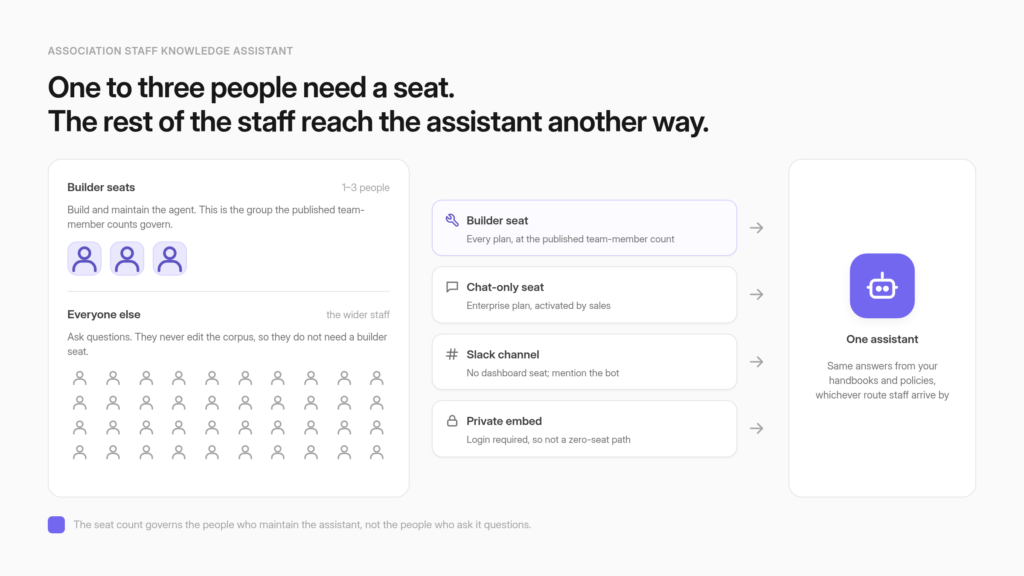
The people who need a seat are the ones who maintain the assistant, not the ones who ask it questions. Builder seats, chat-only seats, and Slack are three access paths with three different costs, and only one of them scales with headcount.
Set one expectation early. The analytics report patterns across conversations rather than a named employee’s question history, so a staff assistant is not a monitoring tool and should not be pitched internally as one.
Associations absorbed their capacity problem into the staff they already have
Association staffing has been broadly stable. More than three-quarters of associations maintained or increased headcount over the past year, and where reductions did happen, the work was redistributed internally or supplemented with outside help rather than dropped.
ASAE’s insight update published in January 2026 puts the mechanism plainly: “When reductions occurred, organizations most often redistributed work internally or supplemented capacity through consultants, freelancers, and generative AI tools.” The same release reports that “More than three-quarters of associations surveyed reported maintaining or increasing staffing levels over the past year,” and that “Nearly two-thirds of respondents anticipate no staffing changes over the next six to nine months.”
Read those two findings together and the picture is not a sector shedding people. It is a sector holding headcount flat while the work grows, which means the growth lands on the member-services and operations teams already in the building.
Those teams spend a substantial part of the week answering questions that already have written answers somewhere in the shared drive. Dues proration for a mid-year joiner. Whether a chapter can run its own sponsorship. What the refund window is on a cancelled registration.
The answers exist. Finding them is the cost, and reducing that repeat-question load is the mechanism an internal assistant actually provides.
Association AI adoption concentrated on content, with other functions well behind
Sector AI adoption concentrated on the output side of the operation. ASAE reports AI use at 87.5% for content and 44.3% for data, a spread wide enough to show that adoption is running unevenly across functions. No published ASAE figure covers internal question-answering on its own, so treat the size of that particular gap as an inference rather than a measurement.
Those figures come from the first State of Associations report, published March 2026, which also notes that readiness lags adoption, with organizations citing limited expertise and data privacy concerns. The same release describes a constrained financial picture, “with nearly 39% of CEOs reporting decline versus 10% reporting improvement.”
This is why an internal deployment is the politically easy one to approve. It requires no new headcount, it touches no member-facing surface, and it does not need a marketing budget line. The tooling went to the end of the operation that produces newsletters and session descriptions. The pressure is at the end that answers the phone.
The staff assistant is the lowest-risk of the six association deployments because its corpus is already yours
Six member-organization deployments appear on the CustomGPT.ai industry page: member portal copilot, certification study assistant, new member onboarding, non-member acquisition tool, staff knowledge assistant, and event and library concierge. Only one of them runs entirely on documents the association already owns…
The tile describes the job in one line: “Reduce repetitive internal inquiries. Keep your team moving faster with instant answers from handbooks, policies, and procedures.” Everything in that sentence is already yours.
Compare that against the other five. A member portal copilot puts generated text in front of dues-paying members. A non-member acquisition tool exposes part of your library to the public. A certification study assistant touches the credential your organization’s reputation rests on. Each of those deserves review by someone who was not in the room when the project started, and that review takes weeks.
The internal assistant skips the member side of that review. There is no member-privacy question, because no member data goes in, and no brand exposure, because no member sees the output. What remains is an internal document review rather than a member-facing one.
Staff handbooks carry HR policy, so a staff assistant still opens a works-council conversation in Europe or an HR and counsel conversation in the US, a point the rollout section returns to. The member-data sign-off that gates the member-facing deployments is the specific piece that does not apply here.
The sequencing argument follows. The member portal copilot is what leadership asks for first, and it is the member-facing twin of this deployment and the one with the visible payoff.
The staff assistant is what can be running this quarter, and running it produces something the member-facing project needs: a staff that has spent three months learning where the assistant is strong, where it is thin, and which documents were never as clear as everyone assumed. That fluency is cheap to buy internally and expensive to buy in public.
Where the member and staff boundary is actually enforced is a separate design question, settled by roles, personas, and corpus separation rather than by the assistant itself.
Consider what associations put in front of their own teams before deciding what to put in front of members.
The people who need a seat are the ones who maintain the assistant, not the ones who ask it questions
The Team members row on the pricing page reads 1 on Standard, 3 on Premium, and Custom on Enterprise. Read as one seat per employee, a 40-person association prices itself out in about four seconds. Those counts govern full-access team members. Staff who only ask questions reach the assistant on different terms.

That misread is the single most common reason this project dies quietly, and it is an easy one to make. A seat count on a pricing page reads as a user count, and every other tool the association buys is licensed that way. The AMS charges per staff login. The email platform charges per sender. Assuming the AI platform does the same is a reasonable inference from experience, and it happens to be wrong.
The distinction is drawn in the documentation for two-tier team roles, which separates two kinds of person. Builders are documented as “Full-access team members who can create, edit, and manage agents, configure settings, view analytics, and access all workspace features.
” Chat-only users are “Limited-access team members who can interact with agents but cannot edit, configure, or manage any workspace settings.” The chat-only role documentation adds the operational detail: chat-only users can see available agents and chat with them in the app, they see only their own conversation history, and “They cannot view or manage agent settings, sources, or team members.”
For a typical association, the builder count is one to three people. The membership director or education coordinator who owns the corpus, possibly an IT contact who wired up the connector, and a backup so the project does not stop when one person takes leave. Everyone else asks questions.
Now the gating, stated in the same breath as the good news, because it decides whether this shape is available to you at all. The documentation is explicit: “The Two-tier team roles are specialized roles available only for teams on the Enterprise plan.”
Chat-only access is not something you switch on yourself either. The docs say “If you are interested in activating it, please contact our sales team.” They also state that the role is “Eligible for discounted pricing when your workspace uses the new two-tier team roles system, making it a cost-effective option for large groups who only need conversational access.”
No figure is published for that discount, and none should be assumed. Enterprise pricing is listed as Custom, with a plan-level range of roughly $2,000 to $6,000 per month, and that range describes the plan rather than any per-seat arithmetic.
If the shape of your rollout is a handful of builders and a large group of question-askers, how team roles are structured is the conversation to have with sales rather than a number to model from the public page.
Three access paths reach the assistant, and they cost differently
Staff reach an internal assistant three ways. Builder seats on any plan at the published team-member counts. Chat-only seats on Enterprise, activated by sales. Or Slack, where staff mention the bot in a channel and need no dashboard seat at all. Only the middle path scales with headcount.
|
Access path |
Who it is for |
Plan availability |
How you turn it on |
|
Builder seat |
The 1-3 people who own and maintain the agent |
Every plan, at the published team-member counts (1 Standard, 3 Premium, Custom Enterprise) |
Self-serve |
|
Chat-only seat |
The rest of the staff, who ask but cannot change anything |
Enterprise only, per the two-tier team roles documentation |
Contact sales to activate; discounted pricing stated, no figure published |
|
Slack channel |
Staff who would rather not learn a second tool |
No plan tier stated in the documentation, so confirm against your own plan |
Connect your CustomGPT.ai account to Slack, then configure access at setup |
- Builder seats are available on every plan at the published team-member counts, and they suit the small group who own the agent. These are the people who add documents, notice when an answer is wrong, and retire the policy that got superseded in March. Nobody else needs this level of access, and giving it away broadly creates a corpus that four people edit and no one owns.
- Chat-only seats are the shape most associations picture when they imagine rolling this out to the whole staff: everyone can ask, almost nobody can change anything. The gating is Enterprise plus a sales conversation.
- Slack is the path that avoids a dashboard seat entirely. Staff mention @CustomGPT in the message field and select an agent, and the assistant answers in the channel. During setup an administrator chooses who can communicate with the agent, whether the agent responds to other bots in the channel, and whether it replies only when mentioned or every time someone sends a message. The prerequisite is straightforward: make sure you have connected your CustomGPT.ai account to Slack first. The documentation states no plan tier for this, so treat it as unstated rather than unlimited, and confirm it for your plan before building a rollout plan on top of it. The practical appeal is placement. Staff already live in those channels, and running the assistant inside the channels staff already use removes the step where somebody has to remember a second tool exists.
One correction before it costs you a planning cycle. Private agent deployment sounds like the zero-seat internal answer and is not one. The documentation describes it as a way to “embed your agent on external sites, while ensuring only logged-in users with appropriate permissions can access and interact with the agent,” and it is direct about what that requires: “End users must log in to their CustomGPT.ai account before they can access or interact with the embedded agent.” It is also gated, being “available only for accounts with the CustomGPT.ai Teams functionality enabled.” That makes it a strong access-control path and a poor way to avoid seats, since a login exists for every user who touches it. It remains the right choice when the requirement is keeping an internal assistant internal on a page you control, and it depends on the Teams functionality underneath it.
Where your handbooks live decides which plan you need
Most association handbooks and policy libraries live in SharePoint or Google Drive. SharePoint integration is available on Premium and Enterprise plans only, so the location of your source documents, more than the size of your staff, is often what sets your plan floor.
The SharePoint connector documentation states the gate directly: “SharePoint integration is available on Premium and Enterprise plans only.” Connecting it requires three delegated permissions in your Microsoft tenant, Files.Read.All, Sites.Read.All, and offline_access. That is a half-hour handoff to whoever administers your Microsoft environment, and it is worth raising with them in the first week, because in a small association that person is frequently an outside IT contractor with a queue.
Identity is the adjacent question, and it has a cleaner answer. SSO setup covers Google Workspace, Okta, and PingOne, with Microsoft Azure and Entra ID guides alongside them.
Administrators can allow login only using SSO, or allow login via SSO and email and password, and SCIM can be enabled to sync user creation and removal from the identity provider automatically. That last option matters more than it sounds for an association with seasonal or contract staff, since it means departures are handled by the system that already handles departures.
The SSO documentation states no plan gating, so do not assume a tier either way without confirming against the plan grid.
On compliance, SOC 2 Type 2 and GDPR are marked as included on all plans, which removes one common procurement objection early. What each plan includes on compliance and connectors is worth reading before scoping the corpus, since discovering the SharePoint gate after the project has been socialised is an avoidable conversation.
The repeat-question list your member-services team already keeps is the corpus specification
The fastest way to scope a staff assistant is to take the questions your member-services team answers most often and load only the documents that answer them. Dues and lapsing policy. Event and registration procedures. Chapter and committee governance. The AMS how-to knowledge that currently lives in two people’s heads.

Start with the written answers to the top repeat questions, then add the operations documents new staff ask about in week one, then the procedures that currently bottleneck on a single long-tenured employee. That third category is where the return concentrates, because those questions carry an interruption cost for someone senior, and because the day that person retires is the day the association discovers what was never written down.
The same corpus does double duty for the new-staff ramp case, where a new hire asks the assistant twenty questions in week one that they would otherwise queue up for a manager.
What stays out is a shorter list and a firmer one. Anything containing member PII. Board-confidential material. Drafts that were never approved.
Superseded documents deserve their own line, because they cause the most common quality failure in an internal rollout. A grounded assistant will faithfully cite an obsolete policy with exactly the same confidence it cites the current one, since nothing in the document announces that it was replaced eighteen months ago.
If your shared drive contains three versions of the dues schedule, the assistant will find whichever one retrieval ranks highest. Deleting or excluding the old versions before ingestion costs an afternoon, and managing and removing sources from the knowledge base is the control that does it.
Discovering the problem through a member who was quoted the wrong rate costs considerably more. Planning the scope and the rollout sequence in more depth is covered in scoping and rollout for an internal search deployment.
GEMA’s staff-side outcome, in its own numbers
GEMA, the German music rights collecting society, publishes staff-side figures for its deployment: 6,000+ working hours saved annually, 248,000+ inquiries answered, an 88% success rate, and between €182K and €211K in annual cost avoidance.
The staff-side detail carries the argument. In GEMA’s published account, employees report “significantly faster access to information,” and approximately 3 FTEs were redirected “from repetitive query handling to higher-value work.”
On the headcount question every association board asks first, the case study summarises the outcome as a team that “became more effective, not smaller.” Attribute that line accurately when you repeat it internally. It is the write-up’s characterisation rather than a statement from anyone at GEMA, and a board member who checks the source will notice the difference. The figures around it are GEMA’s own and carry the weight.
Jonas Walther, Manager Data & AI at GEMA, describes the result this way: “CustomGPT.ai isn’t just a support tool. It’s become a knowledge infrastructure for our organization. It allows us to serve members, customers, and employees better, faster, and smarter.”
A second deployment sits in a different regulatory environment. VdW Bayern DigiSol, the digital innovation arm of the Bavarian housing federation whose members are more than 500 public, cooperative, municipal, and church-affiliated housing organizations, trained its assistant on 3,620 internal documents and handled over 7,000 questions across 2,000 conversations in the first six months, with 84% of user interactions receiving positive feedback.
Both organizations are larger than the typical association, so treat the shape as the transferable part and the volume as theirs. A defined internal corpus, a high-volume repeat-question load, and a staff redirected toward the work that needs judgment.
The deflection number a board understands is gated by a retention window nobody mentions
Under Agent Knowledge, CustomGPT.ai surfaces Latest Prompts, Latest Missing Content, and Content Source, viewed from the Agent Analytics dashboard. The pricing page lists a View and export window of 7 days on Standard, 1 year on Premium, and All time on Enterprise. A seven-day window cannot produce a quarterly board report.
The query and conversation monitoring documentation names those three surfaces without defining their mechanics, so take them as what they are called rather than as a specification of how they rank or deduplicate anything.
The constraint is the part that matters for planning. This entire product category promises a deflection number for the board, and whether you can actually produce one depends on a pricing row almost nobody discusses during evaluation.
On a plan with a seven-day view and export window, the quarterly report requires either a weekly export discipline that someone owns and never forgets, or a plan that retains the history for you. Decide which before the first board meeting where the question gets asked, not during it.
The accumulated question log rewards being read as a demand signal rather than as a scoreboard, since the questions that recur are telling you which documents your own operation is missing.
One disclosure belongs here, because its absence would be misleading. There is no CustomGPT.ai aggregate datapoint linking an association staff assistant to call-volume reduction to dollars saved. GEMA’s figures are GEMA’s, published by GEMA, and they describe GEMA’s scale and content.
The deployment pattern is proven. The deflection number for your association is yours to measure, which is why the pre-launch baseline matters more than it appears to.
The documented analytics report question patterns rather than named employees, and that is the correct design
Staff assistant analytics report patterns across conversations. Chat-only users see only their own conversation history and do not have visibility into team-wide conversations, and nothing in the documentation exposes a named employee’s question history to an administrator. Reading “staff analytics” as per-employee monitoring is a misread.
The member-facing version of that same aggregate-reporting discipline is covered in a companion piece on conversation analytics.
That design is worth wanting on its own merits. An employee who asks the assistant how parental leave accrues, how to file a harassment complaint, or what the severance policy says must not be creating a queryable record attached to their name.
In a European association that is a works-council conversation, and it will happen before rollout whether you plan for it or not. In a US one it is an HR and counsel conversation with the same outcome. An assistant that cannot produce a per-employee transcript is an assistant that clears that review quickly.
The practical consequence for whoever runs the project is a discipline: audit patterns, not people. The useful signal is which questions recur and which documents are missing, and that signal is complete without any name attached.
Approaching it as auditing question patterns without monitoring individuals also protects adoption, because staff who suspect the tool reports on them will use it exactly once. Never promise a colleague a per-employee drill-down that is not documented, and if you are giving a works council or an HR reviewer an assurance they will hold you to, get the behaviour confirmed in writing by the vendor rather than inferred from a docs page.
Grounding reduces hallucination and does not eliminate it
The default setting is My Data Only, which the documentation on grounding defenses describes as ensuring “that your agent responds solely based on the content you’ve uploaded.” With the defaults in place, “agents are protected against over 95% of known prompt injection methods and hallucination risks.” Over 95% is not 100%.
The staff-specific version of that risk has one distinguishing feature. An internal assistant’s errors do not stay internal. A trusting employee reads a wrong answer about a refund window, repeats it to a member in an email, and the mistake arrives with the association’s authority behind it. The laundering step is what makes internal accuracy a member-facing concern.
Two configuration choices contain that risk. Configure the “I don’t know the answer” response deliberately rather than accepting whatever is there, since the wording is editable and a refusal is far cheaper than a confident error.
And keep answers restricted to your own corpus rather than allowing general model knowledge to fill gaps in policy questions. Before you widen the rollout, the person who owns the corpus can audit the assistant’s answers against their cited sources during testing, a builder-side scoring pass that surfaces the weak spots your staff would otherwise find in production.
That check runs for the builder, not the staff member asking the question, so it belongs in the pilot month rather than in the live experience. For a member base of lawyers, clinicians, or engineers, a refusal is the feature rather than the shortfall.
The honest alternatives, named
Betty Bot is the association-native vendor that names an internal staff assistant explicitly, positioning Member, Public, and Internal Staff assistants as the three use cases associations should plan for. Higher Logic sells an AI Assistant inside Thrive, aimed at helping members find what they want, leaves the internal staff case unaddressed; how the two products handle a separate staff-only assistant is the clearest split between them.
The member-facing half of that findability problem is covered in its own companion piece; this one is about the staff side. Microsoft Copilot and Glean are the horizontal options, and outsourced association call centers remain the human-labor alternative.
Each of those is a reasonable choice under different conditions. The horizontal tools are strong when the corpus is genuinely Microsoft 365 or a general enterprise wiki, and weaker when the association-specific knowledge sits in an AMS or in a document library that was organised by a committee in 2019. The association-native tools understand the vocabulary. Outsourcing the call center solves the volume problem with people, which works and costs what people cost.
The useful move is to ask every vendor, including this one, the same four questions:
- Where does my corpus live, and is that connector available on the plan I can afford? The answer sets your plan floor before headcount does.
- Who needs a paid seat, and does that number scale with my headcount? A vendor whose seat model tracks staff size prices differently at 40 people than at 4.
- What is the analytics retention window, and can I produce a quarterly report from it? A window shorter than your reporting cadence turns into an export chore somebody has to own.
- Can leadership see individual employees, and is that answer the one my works council or HR counsel will accept? Get this one in writing rather than inferred from a documentation page.
Those four answers separate vendors more reliably than a feature comparison, and three of them are usually absent from the pricing page.
A staged rollout starts with a baseline, not a launch
Before turning anything on, log two weeks of the questions member-services staff actually field. That list is both the corpus specification and the only credible before-measurement for the deflection number you will eventually report. Launching first makes the result unprovable.
The sequence from there is short:
- Log two weeks of repeat questions by topic and volume, before anything is switched on. This is both your corpus specification and your only credible before-measurement.
- Name the one person who owns the corpus. Not a committee. The failure mode of an internal assistant is a document library four people edit and nobody is accountable for.
- Load only the documents that answer the logged questions, and delete or exclude superseded versions in the same pass.
- Run it with the member-services team alone for a month. They will find the wrong answers fastest and they have the standing to say so.
- Put it where staff already work instead of behind a new login.
- Widen one team at a time, retiring superseded documents as you go, and check the export window against your reporting cadence before the first board meeting.
On the question every executive director asks next, the honest answer is that no staff-hours figure for building or maintaining an association assistant is published, so treat anyone quoting you one as estimating. What the documentation does establish is the shape of the commitment: a builder group of roughly one to three people, and a corpus-retirement discipline that is ongoing rather than a one-time load.
Scope the pilot so that a single owner can carry it alongside their existing role, and measure the real cost during the month with member services before you widen.
Set the reporting cadence against your export window instead of the calendar. If the window is seven days, your export discipline is weekly, and one missed week is a hole in the quarterly number. If it is a year, the pressure comes off entirely. Understanding what deflection is worth before you calculate it is what turns the baseline from an administrative chore into the number the board actually asked for.
Association staff absorbed the sector’s capacity problem while the sector’s AI budget went somewhere else. An AI knowledge base for association staff closes that gap, runs on documents you already own, needs seats for the handful of people who maintain it, and produces a number you can defend only if you measured the before.
The internal-facing half of an association deployment is the one you can start this quarter.
The lowest-risk way to start is a single document. Point a CustomGPT.ai trial at one handbook this week, run the member-services team’s most-asked questions through it, and log which interruptions it removes.
If those documents live in SharePoint, or the rollout needs chat-only access for the whole staff, both of those are plan gates rather than build problems, so take the Enterprise two-tier roles conversation to sales before you scope the plan rather than after.
Frequently asked questions about AI knowledge base for association staff
Does every staff member need a paid seat to use the assistant?
No. The seat counts on the pricing page govern full-access team members, the people who create agents, load documents, and change settings. A 40-person association typically needs one to three of those. Staff who only ask questions reach the assistant through a different path: a chat-only seat, or a deployment surface such as a Slack channel where no dashboard seat is involved. Multiplying your headcount by the team-member count is the arithmetic that kills this project in budget meetings, and it describes a licensing model the product does not use.
What is the difference between a builder seat and a chat-only seat, and which plan has which?
Builders are documented as “Full-access team members who can create, edit, and manage agents, configure settings, view analytics, and access all workspace features.” Chat-only users are “Limited-access team members who can interact with agents but cannot edit, configure, or manage any workspace settings.” Builder seats exist on every plan at the published team-member counts, which read 1 on Standard, 3 on Premium, and Custom on Enterprise. Chat-only is narrower in availability: two-tier team roles are documented as available only for teams on the Enterprise plan, and the role has to be activated by contacting sales rather than switched on yourself. The documentation says chat-only qualifies for discounted pricing and publishes no figure, so treat the number as a sales conversation rather than something to model from the public page.
Can staff use the assistant in Slack instead of logging into a dashboard?
Yes, and for most associations that is the path of least resistance. Staff mention the bot in a channel and select an agent, and the answer comes back in the channel. During setup an administrator chooses who can talk to the agent, whether it responds to other bots, and whether it replies only when mentioned or to every message. The account has to be connected to Slack first. The documentation states no plan tier for this, so treat that as unstated rather than as confirmed availability and check it against your own plan before you build a rollout on it. The real argument for Slack is placement: staff already live in those channels, so nobody has to remember that a second tool exists.
Should the staff assistant and the member assistant be the same agent?
Keep them separate. The corpora differ, the tolerance for a wrong answer differs, and the internal one contains operational material that was never written with a member reader in mind. Running one agent against both audiences means every internal document has to be re-reviewed as if a member might see it, which removes the main reason the staff deployment ships quickly. Separate agents also let you launch the internal one now and take the member-facing one through review on its own schedule. How the boundary gets enforced in practice, through roles, personas, and corpus separation, is a design question worth settling before either goes live.
Which documents should go into a staff assistant first?
Start with the written answers to the questions your member-services team fields most often. Dues and lapsing policy, event and registration procedures, chapter and committee governance, and the association management system how-to knowledge that currently lives in two people’s heads. Add the operations documents new hires ask about in their first week, which is the same corpus that carries the new-staff ramp case. Then the procedures that bottleneck on one long-tenured employee, where the return concentrates because those interruptions cost senior time and because that knowledge leaves when the person does. Member PII, board-confidential material, and unapproved drafts stay out.
How do we stop it from answering out of a policy we replaced two years ago?
Remove the old versions before you load anything, and keep retirement part of the routine afterward. A grounded assistant will cite an obsolete dues schedule with exactly the confidence it cites the current one, because nothing inside the document announces that it was superseded. If three versions sit in the shared drive, whichever one retrieval ranks highest is the one staff will read. Grounding to your own corpus reduces fabrication without eliminating it, so the corpus itself becomes the quality control. Configuring a deliberate “I don’t know” response helps for the same reason: a refusal costs far less than a confident wrong answer that a staff member forwards to a member.
Can leadership see which individual staff member asked what?
Not in the documented analytics, and that is the design you want. They report patterns across conversations instead of a named employee’s question history, and chat-only users see only their own conversations. An employee asking how parental leave accrues or what the severance policy says should not be creating a queryable record attached to their name. In a European association that question reaches the works council before rollout, and in a US one it reaches HR and counsel, with the same answer either way. The discipline for whoever runs the project is to audit question patterns rather than people, which loses nothing useful, since the signal is which questions recur and which documents are missing. Never promise a colleague a per-employee drill-down that is not documented, and where you are giving a works council or HR reviewer an assurance they will hold you to, get the behaviour confirmed in writing rather than inferred from a docs page.
How long is staff conversation data kept, and is that enough for a quarterly board report?
That depends on your plan, and it is the row most likely to be discovered too late. The published view and export window runs 7 days on Standard, 1 year on Premium, and all time on Enterprise. Seven days cannot produce a quarterly report on its own. It can support one if somebody owns a weekly export and never misses a week, and one missed week is a hole in the number you present. Decide which of those two you are running before the board meeting where the question gets asked, because the accumulated question log is only as long as the window you paid for.
What deflection number should we report to the board, and how do we calculate it?
Measure the before, or the number is not defensible. Log two weeks of the questions member-services staff actually field, by topic and volume, prior to turning anything on. After launch, compare that baseline against the same intake, and report the change in repeat questions reaching staff rather than a raw count of assistant conversations, which counts curiosity alongside genuine deflection. Be direct with the board about what the figure is: your own before-and-after measurement, not a vendor benchmark. There is no published aggregate datapoint linking an association staff assistant to call-volume reduction to dollars saved, which is exactly why the baseline carries the weight here.
Does a staff assistant reduce member-services headcount?
It has not worked out that way in the deployment with published numbers. GEMA, the German music rights collecting society, reports 6,000+ working hours saved annually and approximately 3 FTEs redirected from repetitive query handling to higher-value work, with employees reporting significantly faster access to information. The write-up summarises the outcome as a team that “became more effective, not smaller,” which is the publisher’s characterisation rather than a statement from GEMA, so repeat it with that attribution attached. The published account is worth handing to a board or a nervous staff meeting directly rather than paraphrasing. Your own result depends on whether leadership treats recovered hours as capacity or as savings, which is a decision about the association rather than about the software.
How is this different from Microsoft Copilot or Glean for an association?
The honest split is about where your knowledge actually lives. Horizontal tools are strong when the corpus is genuinely Microsoft 365 or a general enterprise wiki, and weaker when the association-specific material sits in an AMS or in a document library a committee organised years ago. Association-native vendors such as Betty Bot understand the vocabulary and name an internal staff assistant explicitly. Outsourced association call centers solve the same volume problem with people, and cost what people cost. Ask every vendor the same four questions: where my corpus lives and whether that connector is on a plan I can afford, who needs a paid seat and whether that scales with headcount, what the analytics retention window is, and whether leadership can see individual employees. Those answers separate internal search deployments more reliably than a feature grid, and three of them are usually missing from the pricing page.
Related Resources:
- How to Make Your Association’s Content Searchable with AI: See the member-facing half of this same findability problem.
- What Member Questions Reveal: AI Conversation Analytics: See the member-side counterpart, where the same kind of usage data drives content strategy instead of deflection.
- Member vs Staff AI Permissions: See how the same instance routes members and staff to different permitted content.
- How to Connect Member AI to Your AMS: See how identity ties the staff-side and member-side deployments to the same system of record.
- Enterprise-Grade Member AI Without an Enterprise Team: See the staffing/ROI argument that makes a small association’s case for both the staff and member instances.
- Enterprise Security and SSO for Association Member AI: See the access-control questions that apply just as much to an internal staff assistant.