How to Add an AI Copilot to Your Member Portal
Adding AI to a member portal means placing a copilot behind the portal’s existing sign-in, grounded in member-only content; CustomGPT.ai checks each member through SAML-based single sign-on, cites every answer, on a platform audited to SOC 2 Type 2.
It opens only the member-only library and answers in plain language.
When a question falls outside the approved content, it says it does not know rather than guessing.
It reads the content members already pay for, including the research library, journals, standards, and policy updates, and routes each signed-in member to only the agents their role permits.
Two limits stay in view from the start. Grounding reduces hallucination but does not eliminate it, so high-stakes topics still warrant human review. And the analytics are aggregate and anonymous by design, so they show which topics members ask about, not what any individual member did.
That combination, an identity-gated copilot grounded in your library, is what makes it a member-only answer engine rather than a public chatbot bolted onto a portal page.
A member portal copilot turns your paid library into natural-language answers behind the member login
A member portal copilot is a chat assistant that lives inside the member login and answers questions from the association’s own approved content.
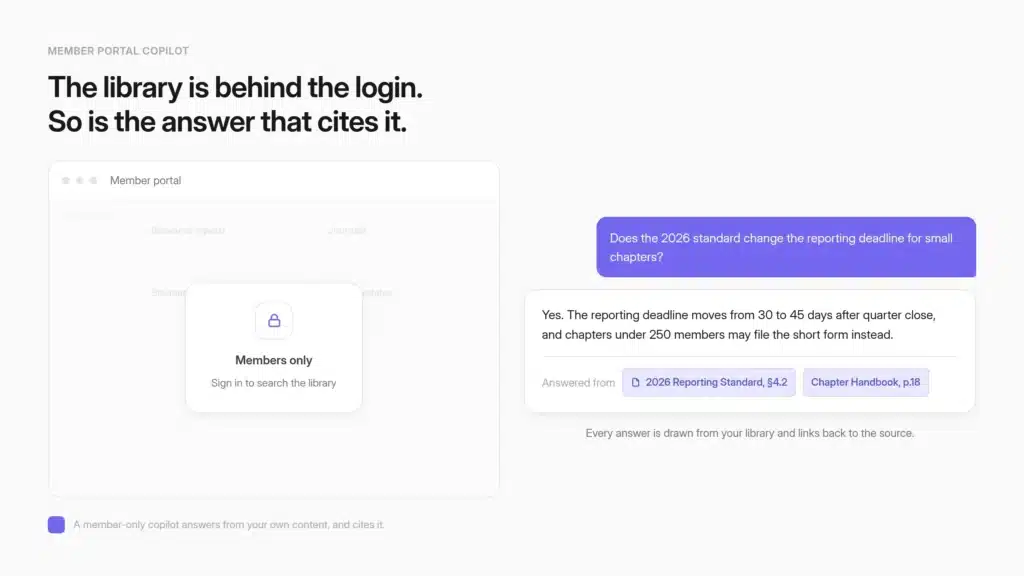
Instead of a search box that returns a list of links, a member asks a question in plain language and gets a written answer drawn from the association’s own library, with the source cited.
Members judge the membership by whether they can find what dues paid for
Members bring consumer-grade expectations to the portal. As ASAE frames it, “members increasingly expect the same personalized digital experiences they enjoy with consumer brands from associations”, and a portal that cannot answer a plain question falls short of that bar.
The stakes show up in renewals. The leading reason members do not renew is lack of engagement with the organization, named by 52% of associations in i4a’s read of Marketing General’s benchmarking data, and the median membership renewal rate held at 82% in the 2026 Membership Marketing Benchmarking Report, so the typical association loses roughly one member in six each cycle.
A portal copilot works on exactly this seam. It makes the benefit a member already bought legible at the moment they reach for it, which is often what keeps a paid-for library from going unused.
The mechanics of that findability problem, and how to fix it beyond just a portal copilot, are covered in a companion piece on why members can’t find content they already paid for.
Natural-language retrieval reaches the whole member library in one question
The value of a portal copilot is that one plain-language question reaches across formats that normally sit in separate silos. A member does not need to know whether the answer lives in a 90-page standard, a back issue of the journal, a recorded webinar, or last quarter’s policy update.
They ask, and the copilot retrieves from whichever approved source holds the answer, then writes it in readable prose with the citation attached.
That is the tile the association’s member-experience page frames as the member portal copilot: natural-language search across research reports, journals, standards, and policy updates.
The retrieval cost of the library drops from minutes of hunting through PDFs to seconds of asking.
A benefit that used to require a member to already know where to look becomes a benefit any member can use on their first try, which is what turns a paid-for archive into value members actually experience.
A portal copilot answers the question where a search box only points at it
The generic options are worth naming honestly. A workplace assistant like Microsoft 365 Copilot assumes a licensed internal workforce inside your own tenant, not an association’s outside membership arriving through a member login, so it is a reasonable staff tool but not built to open a member-only library to a signed-in member.
The generic chatbot builders, the Intercoms and Jotforms of the world, drop a widget on a page but do not inherit a member’s identity or ground each answer in your approved standards.
The gap a member feels with a plain portal search box is the same gap those tools leave open: all of them can point a member toward a document, but none write the answer from the association’s own content with the source attached.
A portal copilot closes that gap by answering in prose, from the library the member’s dues fund, gated to members and cited on every response.
Identity gating is what makes a portal copilot a member-only benefit
Identity gating is the difference between a member benefit and a public widget.
Members authenticate through the association’s own identity provider, receive chat-only access, and are routed to only the agents their role permits, all through one Portal Login URL or an identity-gated embed. No end-user accounts get created, and members stay anonymous in analytics by design.

Members sign in through your existing identity provider
The copilot inherits the identity your association already manages rather than asking members to create yet another account. CustomGPT.ai’s End User IdP access authenticates members through your identity provider and routes them to only the agents their role permits, without you managing separate accounts.
The single sign-on spine is configured with SAML 2.0 through a configuration import, and common setups cover Microsoft Azure and Google Workspace.
Because members authenticate as end users mapped to a role rather than as licensed accounts, an association can serve its entire membership without creating a separate account for each member, with no cap on how many members authenticate.
Identity, not a per-user setup step, is what admits a member. After a member authenticates, the platform grants a fixed 24-hour session, and each new authentication starts a fresh conversation rather than preserving history between sessions.
The operating model is deliberately simple: one Portal Login URL for the whole membership, with routing decided after login.
That keeps identity owned by your IT or security team while the membership team focuses on the content and the experience, and it means the copilot is reachable only to people who can already sign in as members.
Role-based routing sends each member only to the agents their role permits
Signing in proves who a member is. It does not decide what they should see, and that second step is where a member-only experience is actually enforced.
The platform maps an attribute your identity provider sends to a role you create, so a member sees only the agent or agents tied to their role.
A student affiliate, a full voting member, and a chapter officer can enter through the same URL and each land in a different, permitted assistant. If the attribute is missing or does not match a role, access fails closed rather than defaulting to open.
This is role-scoped SAML access through your identity provider, and it is what lets an association run one entry point across many member tiers without exposing a specialist assistant to members who should not reach it.
The routing happens after authentication, so entitlement stays a property of your login system, not a setting a member could stumble past.
Current limits of identity gating stay on the table
Naming the constraints up front is part of earning an IT team’s sign-off, so three limits are worth stating plainly. The Portal Login URL cannot be customized or white-labelled at this time, so members reach the copilot through a CustomGPT.ai-hosted address rather than a fully branded domain.
The analytics cannot break usage down by role or show which attribute a member authenticated with, so reporting stays at the aggregate level.
And detailed access-audit logs are not available yet, so an association that requires per-user access trails for compliance should confirm the current client-portal deployment model meets its policy before rollout.
None of these blocks a member-only deployment, and platform-level agent analytics and conversation views still let staff monitor usage and answer quality.
They are the honest edges of the model, and surfacing them early tends to shorten a security review rather than lengthen it.
Grounded, cited answers are what make a member trust the copilot
Trust is what decides whether members keep using the copilot after the first week.
Every answer is grounded in the association’s approved content, returns the exact source inline so a member can open it, and refuses to guess when the content does not hold the answer.
Grounding reduces hallucination but does not eliminate it, so human review still belongs on high-stakes topics.

Every answer cites the exact source a member can open
A member reading an answer about a certification deadline or a compliance clause should not have to take it on faith.
Every response returns the exact sources the assistant used, shown inline as clickable citations, so a member can click straight through to the standard, the journal article, or the policy document the answer came from.
Citations are a setting you turn on per agent, not a feature you have to build. For an association, that citation trail does two jobs at once.
It lets the member verify the answer against the primary source, and it keeps the copilot’s authority tied to the organization’s own vetted material rather than to whatever a general model absorbed from the open web.
A cited answer is also a more defensible answer. When a member forwards it to a colleague or acts on it professionally, the source travels with the claim, which matters most in the member bases where a wrong answer carries real consequences.
The copilot says it does not know rather than inventing a standard or policy
The behavior that protects trust is the copilot’s willingness to stop. When the approved content does not contain a grounded answer, it says it does not know rather than fabricating one, staying boundaried to the association’s own material, and the wording of that “I don’t know” response is itself configurable so it reads in the association’s own voice.
For a member base of lawyers, engineers, accountants, or pilots, an invented standard is worse than no answer, so a copilot that declines off-corpus is the safer instrument. The grounding also holds up under measurement.
In a benchmark of 945 questions across nine data sets, CustomGPT.ai posted a 10% lower hallucination rate, a 13% higher accuracy rate, and 34% faster average response time than OpenAI’s Assistant API V2.
Builders can also audit an answer’s claims against its sources during testing, a builder-side scoring tool for finding weak spots before rollout rather than a filter the member sees.
None of this makes hallucination impossible, which is why high-stakes topics still warrant a human in the loop, but it means the copilot declines rather than invents when the answer is not in your content.
GEMA runs this exact pattern on a 100,000-member portal
GEMA, one of the world’s largest music rights societies, runs this pattern in production. Its AI persona Melody serves the public website, the member portal, and an internal knowledge base from the same grounded approach, which shows the identity-gated portal copilot works at the scale of a very large membership rather than only in a demo.
GEMA represents 100,000+ members and serves roughly two million music consumers.
Its CustomGPT.ai-powered assistant resolved 248,000+ inquiries at an 88% success rate and saved more than 6,000 working hours a year, the equivalent of roughly three full-time roles, without the organization adding headcount.
GEMA puts the annual cost avoidance at 182,000 to 211,000 euros, and the deployment went live in days rather than months. Jonas Walther, Manager Data and AI at GEMA, put it this way: “CustomGPT.ai isn’t just a support tool. It’s become a knowledge infrastructure for our organization. It allows us to serve members, customers, and employees better, faster, and smarter.”
For another association, what matters is less the exact figure than the fact that a member base at six-figure scale used a grounded, portal-deployed copilot at volume, a level of use a portal search box rarely earns.
VdW Bayern shows the same pattern on regulated housing content
The pattern holds on tightly regulated content too, where a wrong answer carries legal weight. VdW Bayern DigiSol’s WohWi assistant serves 500+ member organizations across the housing-federation’s regulatory and technical material.
In under six months it handled 7,000+ queries and drew 84% positive feedback, while cutting the time to produce a compliant document from more than 45 minutes to 15 to 20. Dr. Korbinian Weisser, Managing Director of VdW Bayern DigiSol GmbH, said the assistant “enables members to make informed decisions faster and with greater confidence.”
For an association weighing whether members will trust a copilot with standards and compliance content, VdW Bayern’s regulated-content deployment is a closer analog than a general support bot.
It shows members reaching for the copilot precisely on the high-stakes material where they most need a citation, and giving it positive marks, alongside GEMA’s 100,000-member deployment as the scale proof.
See it on your own library. Start a free trial and point a copilot at one folder of member-only content, or book a member pilot to run it behind your login.
A portal copilot deploys in days without an engineering team
Standing up a portal copilot is a no-code exercise, not an engineering project. You embed it in the portal, share the login URL, or connect through the API, and you point it at the systems you already run.
The membership team owns the content while IT owns identity, and the typical path from content to live copilot runs in days to a couple of weeks.
Point it at the content members already pay for
The copilot learns from the content the association already owns, with no migration required. It connects to the content sources and systems an association already runs, ingesting across 1,400+ file formats through 100+ integrations, so the corpus can come from the association management system, the learning platform, a document vault, and the public site at once.
You curate what enters the knowledge base, managing and removing sources so nothing stale or off-topic reaches a member’s answer, which is the first line of defense against a copilot that confidently repeats bad input.
That means the research library, the journal archive, the standards, and the policy updates a member’s dues already fund become the copilot’s knowledge base directly.
On the platform’s own member-experience benchmarks, an association can automate up to 93% of repetitive member questions, maintain 95% or higher satisfaction with cited answers, and see member usage rise 2 to 6 times once the library is answerable on demand.
Those are aggregate platform figures rather than any single association’s result, and they describe the ceiling this approach reaches when the content is well organized going in.
Enterprise security keeps member-only knowledge member-only
Putting proprietary, member-only content behind a copilot only works if the security posture holds. CustomGPT.ai is SOC 2 Type 2 certified and GDPR-ready, authenticates through SAML-based single sign-on, keeps member data out of external model training, and isolates each association’s content within its own bot instance.
Those controls are what let an association expose standards, member research, and policy guidance to a copilot without worrying the material will leak into a general model or across tenants.
The data a member’s dues paid for stays the association’s data.
For a membership team, this is the layer that turns a good demo into something the board and the IT reviewers will actually approve, because it answers the first question any security review asks: where does the content go, and who else can see it.
The answer is that it stays inside the association’s own instance, gated to members.
How to add an AI copilot to your member portal, step by step
Adding a portal copilot is a short, ordered sequence rather than a build. Five steps take an association from a scattered library to a member-only copilot that members trust and use.
- Ingest the member-only content. Point the copilot at the standards, journals, event recordings, and policy updates that hold the answers, using no-code connectors so the corpus can come from the association management system, the learning platform, a document vault, and the website without a migration.
- Gate it to members through your identity provider. Configure SAML 2.0 single sign-on so members authenticate through the identity provider they already use, and no separate end-user accounts get created.
- Set role-based routing. Map an identity-provider attribute to chat-only roles so each member is routed to only the agents their tier or role permits, with access failing closed when no valid role matches.
- Ground it and turn on citations. Keep the copilot boundaried to approved content with the “I don’t know” fallback on and citations shown inline, and add a human review path for high-stakes topics, because grounding reduces but does not eliminate hallucination.
- Watch aggregate engagement. Track queries per conversation and topic patterns to see what members ask and where the content has gaps, remembering the analytics are aggregate and anonymous, so they inform your editorial roadmap rather than profiling any individual member.
The first three steps stand the copilot up in days to about two weeks. The last two are the ongoing editorial discipline that keeps it accurate and useful as the library changes.
A portal copilot is only as good as the library behind it
A copilot does not manufacture value the association does not already have. It surfaces the value the association already bought and paid to produce, gated to the members entitled to it and cited so they can trust it.
The mechanism that makes it a member benefit rather than a public gadget is identity gating plus grounded, cited answers, and the named results prove members will actually use that mechanism at scale.
GEMA and VdW Bayern are engagement, volume, and satisfaction figures, not a formula that guarantees your renewal rate will move. The library, the content discipline, and the rollout are yours, and the copilot is the layer that makes all of it answerable.
Start a free trial and build your first member assistant on your own library in minutes, and you will see what members actually ask in week one. Or run it behind your login on CustomGPT.ai’s platform for member associations.
Frequently asked questions about add AI to member portal
How can we add an AI assistant to our member portal?
You can add an AI assistant to your member portal by following a straightforward, no-code process that doesn’t require a developer. Here’s how it works with CustomGPT.ai:
Gate the AI assistant behind your existing member login. The assistant sits inside your member portal and is only accessible to signed-in members, ensuring that your content remains protected and exclusive.
Will the assistant be visible to the whole internet, or only to our members?
Only to signed-in members, when you gate it. A member portal copilot sits behind your identity provider, so a person has to authenticate as a member before the assistant will open the member-only library. There are no separate end-user accounts to manage, and non-members never reach it. The identity gating routes each authenticated member to only the agents their role permits, which is what makes it a member benefit rather than a public widget.
Can students, full members, and chapter officers each see different content?
Yes. Signing in proves who a member is, and role-based routing decides what they see next. Your identity provider sends an attribute that maps to a role you define, so each tier can enter through the same URL and land in a different permitted assistant. If no valid role matches, access fails closed rather than defaulting to open. That keeps entitlement a property of your login system, not a setting a member could stumble past, and it lets one entry point serve many member tiers without exposing a specialist assistant to the wrong people.
What keeps the AI from inventing an answer about our standards or by laws?
Grounding, plus a willingness to stop. The copilot answers only from the association’s approved content, and when the library does not hold a grounded answer it says it does not know instead of fabricating one. For a member base of lawyers, engineers, or accountants, a declined question is safer than an invented standard. Grounding reduces hallucination but does not eliminate it, so keep a human review path on high-stakes topics. A boundaried assistant stays inside your own material rather than reaching for whatever a general model absorbed from the open web.
How does a member know an answer is actually correct?
Every answer carries its source. The copilot returns the exact document it drew from as a clickable citation, so a member can open the standard, the journal article, or the policy page and check the claim against the primary source. That citation trail keeps the assistant’s authority tied to the organization’s vetted material, and it travels with the answer when a member forwards it to a colleague or acts on it professionally. Inline citations show the exact source on each response, which matters most in the member bases where a wrong answer carries real consequences.
Can it use the single sign-on we already have?
Yes. Members authenticate through your existing identity provider over SAML 2.0, configured by importing your SSO settings, with common setups covering Microsoft Azure and Google Workspace. After a member signs in, the session runs for a fixed 24 hours, and each new sign-in starts a fresh conversation rather than carrying history between sessions. Identity stays owned by your IT or security team, which is usually what a security review wants to hear first: the copilot is reachable only to people who can already sign in as members.
Will our older or less tech-savvy members even trust an AI assistant?
The permission is broader than many boards assume. In Higher Logic’s 2025 Association Member Experience Report, 94% of members said they are comfortable with associations using AI, as long as it is transparent and human-centered. Trust in daily use comes from two design choices: the assistant cites its source on every answer so a member can verify it, and it declines rather than guesses when the content does not hold an answer. Placement matters too. Members adopt a copilot faster when it lives where they already look for help, inside the portal, than when it hides behind a chat bubble that reads as customer service.
Is our member-only content safe, and will it train someone else's AI model?
No, it stays yours. Member data is kept out of external model training, each association’s content is isolated within its own instance, and access runs through SAML-based single sign-on. CustomGPT.ai is SOC 2 Type 2 certified and GDPR-ready, which answers the question a security review asks first: where does the content go, and who else can see it. The answer is that it stays inside the association’s own instance, gated to members, so exposing standards and member research to a copilot does not leak them into a general model or across tenants.
Has an association our size actually run this in production?
Yes. GEMA, one of the world’s largest music-rights societies, represents more than 100,000 members and runs a grounded assistant across its public site, its member portal, and an internal knowledge base. That assistant has resolved more than 248,000 inquiries at an 88% success rate. The point for another association is not the exact figure but the proof that a six-figure membership will actually reach for a grounded, portal-deployed copilot at volume, which is the behavior a plain search box rarely earns. The GEMA case study documents the full deployment.
Will we be able to see what individual members are asking?
No, and that limit is deliberate. The analytics are aggregate and anonymous by design, so they show which topics the membership asks about, not what any single member did. That still gives you a live editorial roadmap, because every unanswered question is a content gap worth filling, while keeping the tool from becoming member surveillance. Reporting also does not yet break usage down by role or by the attribute a member signed in with, so plan your measurement around topic patterns rather than per-person trails.
How is this different from adding a chatbot like Intercom to our portal?
A generic chatbot builder drops a widget on a page, but it does not inherit a member’s identity or ground each answer in your approved standards. A workplace assistant such as Microsoft 365 Copilot assumes a licensed internal workforce inside your own tenant, not an outside membership arriving through a member login. Both can point a member toward a document. Neither writes the answer from the association’s own content, gated to members and cited on every response, which is the specific job a portal copilot exists to do.
What are the current limitations we should weigh before rolling out?
Three are worth naming up front. The portal login address cannot be white-labelled yet, so members reach the copilot through a hosted URL rather than a fully branded domain. The analytics cannot break usage down by role or show which attribute a member authenticated with. And detailed access-audit logs are not available yet, so an association that needs per-user access trails for compliance should confirm the current deployment model meets its policy before rollout. None of these blocks a member-only deployment, and surfacing them early tends to shorten a security review rather than lengthen it.
How can volunteers or members outside our organization use an AI assistant trained on our policies?
They sign in through the organization’s own identity provider, and the assistant answers only from the policies their role allows. With CustomGPT.ai, the assistant connects to that provider over SAML or OIDC, such as Microsoft Azure, Google Workspace, Okta or the AMS, so outside volunteers need no separate account and internal-only content stays out of reach.
Related Resources:
- Compare ChatGPT vs Member AI to understand which solution best fits your association’s member support and knowledge management needs.
- Silent Member Churn: Learn how associations can spot quiet disengagement earlier and keep member value visible between renewals.
- Driving AI Adoption with a Non-Technical Membership: Use this guide to help members embrace AI by addressing trust, privacy, citations, and training in the right order.
- An AI Study Assistant for Your Certification Program: Discover how to give candidates instant study support while protecting certification standards and keeping answer keys secure.
- AI for State Bar Associations: See how a bar association makes buried CLE recordings and practice manuals answerable for members with a citation on every response.